बहु-चरणीय कार्यप्रवाह
Potato में consent, pre-screening, निर्देश, training और post-study survey वाले बहु-चरणीय annotation workflows बनाएँ, साथ में सशर्त survey प्रश्न भी।
Potato annotation task को एक लंबे workflow के एक phase के रूप में चलाता है, इसलिए consent, screening प्रश्न, निर्देश, training और exit survey अलग survey tool के बिना उसके आसपास रखे जा सकते हैं।
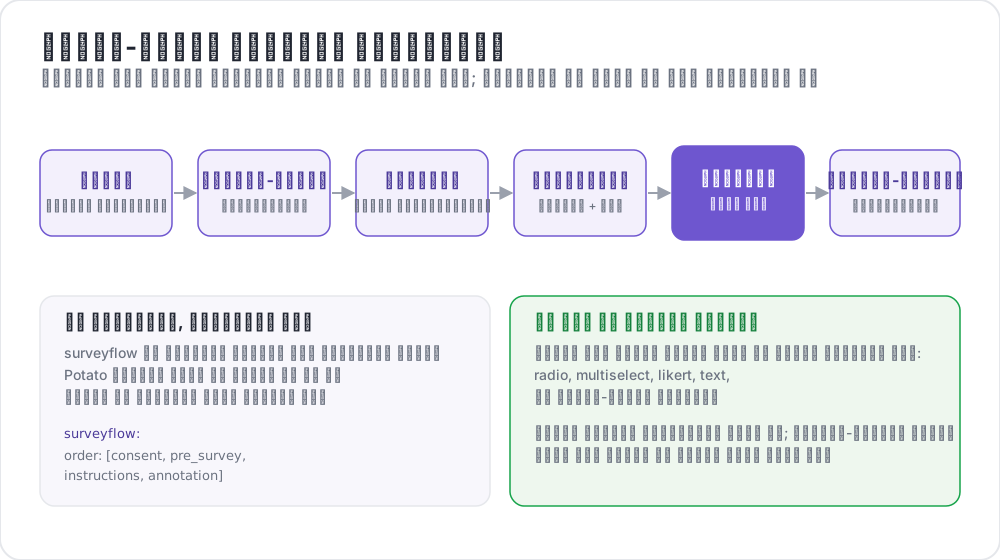 सर्वे-फ़्लो एनोटेशन वर्कफ़्लो
उपलब्ध Phases
| Phase | उद्देश्य | आवश्यक |
|---|---|---|
consent | Informed consent एकत्र करना | वैकल्पिक |
prestudy | Pre-screening प्रश्न और demographics | वैकल्पिक |
instructions | Task के निर्देश और दिशानिर्देश | वैकल्पिक |
training | Feedback के साथ qualification | वैकल्पिक |
annotation | मुख्य annotation task | आवश्यक |
poststudy | Post-study survey और feedback | वैकल्पिक |
Annotators सक्रिय phases से उसी क्रम में गुज़रते हैं जो आप घोषित करते हैं।
बुनियादी कॉन्फ़िगरेशन
phases block क्रम तय करता है और हर phase को उसकी file से जोड़ता है:
phases:
  order: [consent, prestudy, instructions, annotation, poststudy]

  consent:
    type: consent
    file: surveyflow/consent.json

  prestudy:
    type: prestudy
    file: surveyflow/prescreening.json

  instructions:
    type: instructions
    file: surveyflow/instructions.html

  poststudy:
    type: poststudy
    file: surveyflow/demographics.json
annotation phase को file की ज़रूरत नहीं होती, क्योंकि वह project के top-level annotation_schemes का उपयोग करता है।
Phase के प्रकार
हर file-आधारित phase एक type घोषित करता है, जो बताता है कि वह workflow का कौन-सा चरण है। मान्य मान consent, prestudy, instructions, training, annotation और poststudy हैं।
type स्पष्ट रूप से सेट करें। Potato इसका अनुमान तभी लगाता है जब phase का नाम स्वयं इनमें से कोई शब्द हो, इसलिए custom नाम वाले phase को इसे घोषित करना ही होगा:
phases:
  order: [intro, consent, instructions, annotation, feedback]

  intro:
    type: prestudy          # custom name, so type is required
    file: surveyflow/intro.json

  consent:
    type: consent
    file: surveyflow/consent.json

  feedback:
    type: poststudy         # custom name, so type is required
    file: surveyflow/feedback.json
पीछे जाना
जब कोई पिछला पेज नहीं होता, तब Back बटन छिपा रहता है, और इसमें पहला annotation instance भी शामिल है। Annotators को phase की सीमाओं के पार पीछे जाने देने के लिए:
allow_phase_back_navigation: trueयह विकल्प बंद होने पर भी annotators किसी phase के भीतर पीछे जा सकते हैं, जैसे annotation instances के बीच।
Survey प्रश्नों का format
Survey phases एक JSON array पढ़ते हैं। हर प्रश्न में एक id, annotator को दिखाया जाने वाला text, widget का नाम बताने वाला schema और उसके choices होते हैं:
[
  {
    "id": "consent_1",
    "text": "I certify that I am at least 18 years of age.",
    "schema": "radio",
    "choices": ["I agree", "I disagree"],
    "label_requirement": {"right_label": ["I agree"]}
  },
  {
    "id": "consent_2",
    "text": "I have read and understood the information above.",
    "schema": "radio",
    "choices": ["Yes", "No"],
    "label_requirement": {"right_label": ["Yes"]}
  }
]
समर्थित Schema प्रकार
एक विकल्प के लिए radio, कई विकल्पों के लिए checkbox या multiselect, मुक्त text के लिए text, संख्यात्मक input के लिए number, rating scale के लिए likert और dropdown के लिए select।
उत्तर की शर्तें
label_requirement तय करता है कि कौन-से उत्तर annotator को आगे बढ़ने देते हैं:
{
  "id": "age_check",
  "text": "Are you at least 18 years old?",
  "schema": "radio",
  "choices": ["Yes", "No"],
  "label_requirement": {
    "right_label": ["Yes"],
    "required": true
  }
}
right_label स्वीकार्य उत्तरों की सूची देता है और required बताता है कि प्रश्न का उत्तर देना ज़रूरी है या नहीं। जिस consent प्रश्न में कोई विफल नहीं हो सकता, वह कुछ भी दर्ज नहीं करता, इसलिए शब्दों के भरोसे रहने के बजाय स्वीकार्य उत्तर right_label में रखें।
Pre-Screening प्रश्न
Pre-screening मुख्य task से पहले चलता है, और योग्यता तथा पृष्ठभूमि से जुड़े प्रश्न यहीं रखे जाते हैं:
phases:
  order: [prestudy, annotation]
  prestudy:
    type: prestudy
file: surveyflow/prescreening.json[
{
"id": "1",
"text": "What is your native language?",
"schema": "select",
"use_predefined_labels": "language",
"label_requirement": {"required": true}
},
{
"id": "2",
"text": "How familiar are you with this topic?",
"schema": "likert",
"choices": ["Not at all", "Slightly", "Moderately", "Very", "Extremely"],
"label_requirement": {"required": true}
}
]Post-Study Surveys
phases:
  order: [annotation, poststudy]
  poststudy:
    type: poststudy
file: surveyflow/demographics.json[
{
"id": "gender",
"text": "What gender do you most closely identify with?",
"schema": "radio",
"choices": ["Male", "Female", "Non-binary", "Prefer not to say"],
"label_requirement": {"required": true}
},
{
"id": "feedback",
"text": "Please share any feedback about this study (optional)",
"schema": "text"
}
]अंतर्निहित Label Sets
Potato उन प्रश्नों के लिए label sets साथ देता है जो अधिकांश अध्ययनों में दोहराए जाते हैं, ताकि देशों की सूची config में paste न करनी पड़े:
{"id": "country", "text": "Select your country", "schema": "select", "use_predefined_labels": "country"}उपलब्ध sets country, language, ethnicity और religion हैं।
मुक्त उत्तर वाले Fields
has_free_response से किसी भी प्रश्न में एक वैकल्पिक text box जोड़ें। "अन्य" विकल्प तभी देने लायक बनता है:
{
  "id": "gender",
  "text": "What is your gender?",
  "schema": "radio",
  "choices": ["Woman", "Man", "Non-binary", "Prefer not to disclose", "Prefer to self-describe"],
  "has_free_response": {"instruction": "Please specify:"},
  "label_requirement": {"required": true}
}
पेज Headers
Survey पेज का header प्रश्न file में नहीं, phase पर सेट किया जाता है:
phases:
  prestudy:
    type: prestudy
    file: surveyflow/consent.json
    header: "Please answer all consent questions"
सशर्त प्रश्न
Survey प्रश्न पिछले उत्तरों के आधार पर दिख सकते हैं, ताकि follow-up प्रश्न केवल तब पूछा जाए जब वह लागू हो। Survey प्रश्न उसी pipeline से गुज़रते हैं जिससे annotation schemes, इसलिए कोई शर्त किसी दूसरे प्रश्न को उसके name से संदर्भित करती है:
[
  {
    "name": "prior_experience",
    "annotation_type": "radio",
    "description": "Have you previously worked on a text-annotation task?",
    "labels": ["Yes", "No"],
    "label_requirement": {"required": true}
  },
  {
    "name": "experience_details",
    "annotation_type": "text",
    "description": "Please briefly describe your previous annotation experience.",
    "label_requirement": {"required": true},
    "display_logic": {
      "show_when": [
        {"schema": "prior_experience", "operator": "equals", "value": "Yes"}
      ]
    }
  }
]
छिपा हुआ प्रश्न required-field validation से बाहर रहता है, इसलिए जब तक वह दिख नहीं रहा, वह Continue बटन को कभी नहीं रोकता।
तीन व्यवहार जानने लायक हैं। कोई शर्त किसी भी phase के प्रश्न को संदर्भित कर सकती है, इसलिए post-study प्रश्न किसी pre-study उत्तर पर निर्भर हो सकता है। अमान्य display_logic, जैसे कोई अज्ञात operator या ऐसे प्रश्न का संदर्भ जो कहीं मौजूद नहीं, runtime पर नहीं बल्कि server startup पर ही विफल होता है। और जो instructions phase किसी raw .html file की ओर इशारा करता है, वह schema pipeline को bypass कर देता है, इसलिए वहाँ शर्तें लागू नहीं होतीं।
export_include_phase_data: true होने पर Potato हर प्रतिभागी के उत्तरों का server-side पुनर्मूल्यांकन करता है और उन प्रश्नों के उत्तर छोड़ देता है जो प्रतिभागी ने कभी देखे ही नहीं। Operators का पूरा संदर्भ Conditional Logic में देखें।
पूर्ण उदाहरण
annotation_task_name: "Sentiment Analysis Study"
task_dir: "."
port: 8000

data_files:
  - "data/reviews.json"

item_properties:
  id_key: id
  text_key: text

annotation_schemes:
  - annotation_type: radio
    name: sentiment
    description: "What is the sentiment of this review?"
    labels:
      - Positive
      - Negative
      - Neutral
    sequential_key_binding: true

phases:
  order: [consent, prestudy, instructions, training, annotation, poststudy]

  consent:
    type: consent
    file: phases/consent.json

  prestudy:
    type: prestudy
    file: phases/demographics.json

  instructions:
    type: instructions
    file: phases/instructions.html

  training:
    type: training
    file: phases/training_questions.json

  poststudy:
    type: poststudy
    file: phases/exit_survey.json

training:
  enabled: true
  data_file: phases/training_questions.json
  passing_criteria:
    min_correct: 3
  allow_retry: true

allow_phase_back_navigation: false

output_annotation_dir: "output/"
export_annotation_format: "jsonl"

user_config:
  allow_all_users: true
Training phase अपनी settings top-level training block से लेता है, जबकि phases की entry उसे केवल क्रम में रखती है। Passing criteria और data format के लिए प्रशिक्षण चरण देखें।
Legacy कॉन्फ़िगरेशन
पुराना surveyflow block अब भी काम करता है, और survey पेजों को .jsonl files की सूचियों के रूप में पढ़ता है:
surveyflow:
  on: true
  order:
    - pre_annotation
    - post_annotation
  pre_annotation:
    - surveyflow/consent.jsonl
    - surveyflow/demographics.jsonl
  post_annotation:
    - surveyflow/exit_survey.jsonl
Migration
| Legacy | आधुनिक |
|---|---|
surveyflow.on: true | एक phases block |
surveyflow.pre_annotation | phases.consent या phases.prestudy |
surveyflow.post_annotation | phases.poststudy |
surveyflow.testing | training.data_file |
.jsonl files | Array वाली .json files |
सर्वोत्तम अभ्यास
Surveys छोटे रखें
हर अतिरिक्त प्रश्न completion rate घटाता है, और जिन demographic प्रश्नों का विश्लेषण में कोई उपयोग नहीं, वे इसे बिना किसी लाभ के घटाते हैं।
पूरे Flow का परीक्षण करें
Link कहीं भेजने से पहले, बिना session वाले browser में, पूरा workflow स्वयं पूरा करें। Consent और login वे दो जगहें हैं जहाँ टूटा हुआ workflow सबसे पहले और सबसे चुपचाप विफल होता है।
Required Fields सोच-समझकर चुनें
जो प्रश्न वैकल्पिक हो सकते थे, उन्हें required बनाने से ऐसे उत्तर मिलते हैं जो लोग पेज पार करने के लिए गढ़ लेते हैं।
Crowdsourcing
Completion codes post-study phase पर नहीं, बल्कि top-level completion_code key से configure किए जाते हैं:
completion_code: "POTATO2024"
auto_redirect_on_completion: true
auto_redirect_delay: 5000
Platform setup के लिए Crowdsourcing देखें।
आगे पढ़ें
- प्रशिक्षण चरण: feedback के साथ qualification
- Crowdsourcing: Prolific, SONA और अन्य panels
- उपयोगकर्ता प्रबंधन: access lists और roles
- प्रयोग प्रवाह - कंडीशन, स्क्रीन-आउट और काउंटरबैलेंस किए गए पेज
- सर्वे इंपोर्ट - Qualtrics, REDCap, XLSForm और अन्य टूल से प्रश्नावलियाँ
Implementation के विवरण के लिए source documentation देखें।