एक्सट्रैक्टिव QA
span-आधारित उत्तर निष्कर्षण, पठन बोध कामों और अनुच्छेद हाइलाइटिंग एनोटेशन के लिए Potato में SQuAD-शैली के प्रश्नोत्तर इंटरफ़ेस बनाएँ।
एक्सट्रैक्टिव QA एनोटेशन स्कीमा एक प्रश्नोत्तर इंटरफ़ेस देता है, जिसमें एनोटेटर उत्तर के span सीधे पाठ अनुच्छेद में हाइलाइट करते हैं। यह स्कीमा पठन बोध डेटासेट बनाने, SQuAD-शैली के QA एनोटेशन, तथ्य सत्यापन, और ऐसे किसी भी काम के लिए उपयुक्त है जहाँ उत्तर स्रोत पाठ से हूबहू निकाले जाते हैं।
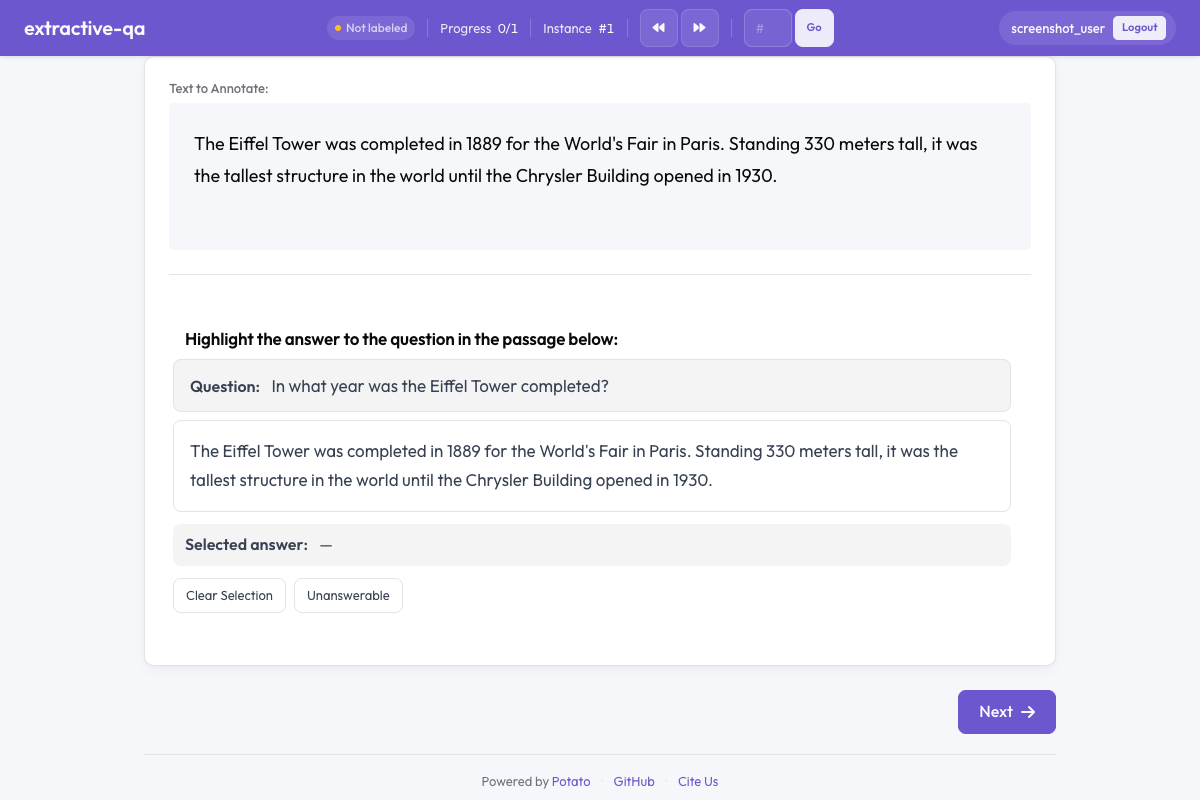 Potato में एक्सट्रैक्टिव QA
अवलोकन
एक्सट्रैक्टिव QA स्कीमा यह दिखाता है:
- एक प्रश्न, जो अनुच्छेद के ऊपर उभरकर दिखता है
- एक पाठ अनुच्छेद, जिसमें एनोटेटर हाइलाइट करके उत्तर के span चुनते हैं
- रंग-कोडित हाइलाइट, जो चुने गए उत्तर पाठ को चिह्नित करते हैं
- एक अनुत्तरणीय विकल्प, उन प्रश्नों के लिए जिनका उत्तर अनुच्छेद से नहीं मिल सकता
झटपट शुरुआत
yaml
annotation_schemes:
  - annotation_type: extractive_qa
    name: answer_span
    description: Highlight the answer to the question in the passage below.
    question_field: question
    passage_field: passage
    allow_unanswerable: true
कॉन्फ़िगरेशन विकल्प
| फ़ील्ड | टाइप | डिफ़ॉल्ट | विवरण |
|---|---|---|---|
annotation_type | string | आवश्यक | "extractive_qa" होना चाहिए |
name | string | आवश्यक | इस स्कीमा के लिए विशिष्ट पहचानकर्ता |
description | string | आवश्यक | एनोटेटरों को दिखाए जाने वाले निर्देश |
question_field | string | "question" | डेटा JSON में वह फ़ील्ड जिसमें प्रश्न पाठ है |
passage_field | string | "" | डेटा JSON में वह फ़ील्ड जिसमें अनुच्छेद पाठ है (ख़ाली स्ट्रिंग देने पर डिफ़ॉल्ट टेक्स्ट फ़ील्ड इस्तेमाल होती है) |
allow_unanswerable | boolean | true | प्रश्नों को अनुत्तरणीय चिह्नित करने के लिए चेकबॉक्स दिखाएँ |
highlight_color | string | "#FFEB3B" | उत्तर हाइलाइट के लिए CSS रंग |
उदाहरण
SQuAD-शैली QA
yaml
annotation_schemes:
  - annotation_type: extractive_qa
    name: squad_answer
    description: >
      Select the shortest span in the passage that answers the question.
      If the question cannot be answered from the passage, mark it as unanswerable.
    question_field: question
    passage_field: context
    allow_unanswerable: true
    highlight_color: "#FFEB3B"
नमूना डेटा के साथ:
json
{
  "id": "q001",
  "question": "When was the university founded?",
  "context": "The University of Michigan was founded in 1817 in Detroit and moved to Ann Arbor in 1837. It is one of the oldest public universities in the United States."
}
तथ्य सत्यापन
yaml
annotation_schemes:
  - annotation_type: extractive_qa
    name: evidence_span
    description: >
      Highlight the evidence in the passage that supports or refutes the claim.
      Mark as unanswerable if the passage contains no relevant evidence.
    question_field: claim
    passage_field: document
    allow_unanswerable: true
    highlight_color: "#81C784"
अनुत्तरणीय विकल्प के बिना उत्तर निष्कर्षण
yaml
annotation_schemes:
  - annotation_type: extractive_qa
    name: definition_extraction
    description: >
      Highlight the definition of the term in the passage.
      Every passage contains a definition — select the most precise span.
    question_field: term
    passage_field: text
    allow_unanswerable: false
    highlight_color: "#64B5F6"
आउटपुट फ़ॉर्मैट
json
{
  "answer_span": {
    "labels": {
      "answer_start": 45,
      "answer_end": 49,
      "answer_text": "1817",
      "unanswerable": false
    }
  }
}
जब एनोटेटर किसी प्रश्न को अनुत्तरणीय चिह्नित करता है:
json
{
  "answer_span": {
    "labels": {
      "unanswerable": true
    }
  }
}
बेहतर तरीक़े
- एनोटेटरों को कम से कम span चुनने का निर्देश दें - सबसे छोटा पाठ जो प्रश्न का पूरा उत्तर देता हो, उससे साफ़-सुथरा प्रशिक्षण डेटा बनता है
- असल जैसे कामों में allow_unanswerable इस्तेमाल करें - व्यवहार में QA में अक्सर अनुत्तरणीय प्रश्न होते हैं; इस विकल्प को बंद करने पर एनोटेटर अंदाज़ा लगाने पर मजबूर हो जाते हैं
- पढ़ने लायक़ हाइलाइट रंग चुनें - ध्यान रखें कि हाइलाइट रंग और पाठ के बीच इतना अंतर हो कि पढ़ना आसान रहे
- अनुच्छेद की लंबाई ठीक-ठाक रखें - प्रति अनुच्छेद 100-500 शब्द ठीक रहते हैं; बहुत लंबे अनुच्छेद में span चुनना उबाऊ हो जाता है
- प्रश्न साफ़ ढंग से लिखें - प्रश्न सुगठित और असंदिग्ध हों, ताकि एनोटेटर उलझें नहीं
आगे पढ़ें
- Span एनोटेशन - सामान्य span लेबलिंग
- टेक्स्ट और नंबर इनपुट - मुक्त-पाठ में उत्तर भरना
- AI समर्थन - AI की मदद से एनोटेशन संकेत
कार्यान्वयन के विवरण के लिए स्रोत दस्तावेज़ देखें।