टेक्स्ट और संख्या इनपुट
एनोटेशन के लिए फ्री-फॉर्म टेक्स्ट और संख्यात्मक इनपुट।
Text और number input एनोटेटर्स को फ्री-फॉर्म प्रतिक्रियाएँ देने की अनुमति देते हैं, जो सुधार, स्पष्टीकरण, गणना, और मापन के लिए उपयोगी हैं।
Text Input
बुनियादी Text फ़ील्ड
एकल-पंक्ति text input:
annotation_schemes:
  - annotation_type: text
    name: correction
    description: "Provide a corrected version of the text"
Textarea (बहु-पंक्ति)
लंबी प्रतिक्रियाओं के लिए:
- annotation_type: text
  name: explanation
  description: "Explain your reasoning"
  multiline: true
  rows: 4
  cols: 60
  allow_paste: false
Placeholder टेक्स्ट
उदाहरण इनपुट के साथ एनोटेटर्स को मार्गदर्शन करें:
- annotation_type: text
  name: summary
  description: "Write a one-sentence summary"
  placeholder: "Enter your summary here..."
Character सीमाएँ
प्रतिक्रिया लंबाई सीमित करें:
- annotation_type: text
  name: title
  description: "Suggest a title"
  min_chars: 15
  show_char_count: true
आवश्यक टेक्स्ट
फ़ील्ड अनिवार्य बनाएँ:
- annotation_type: text
  name: justification
  description: "Why did you choose this label?"
  label_requirement:
    required: true
Number Input
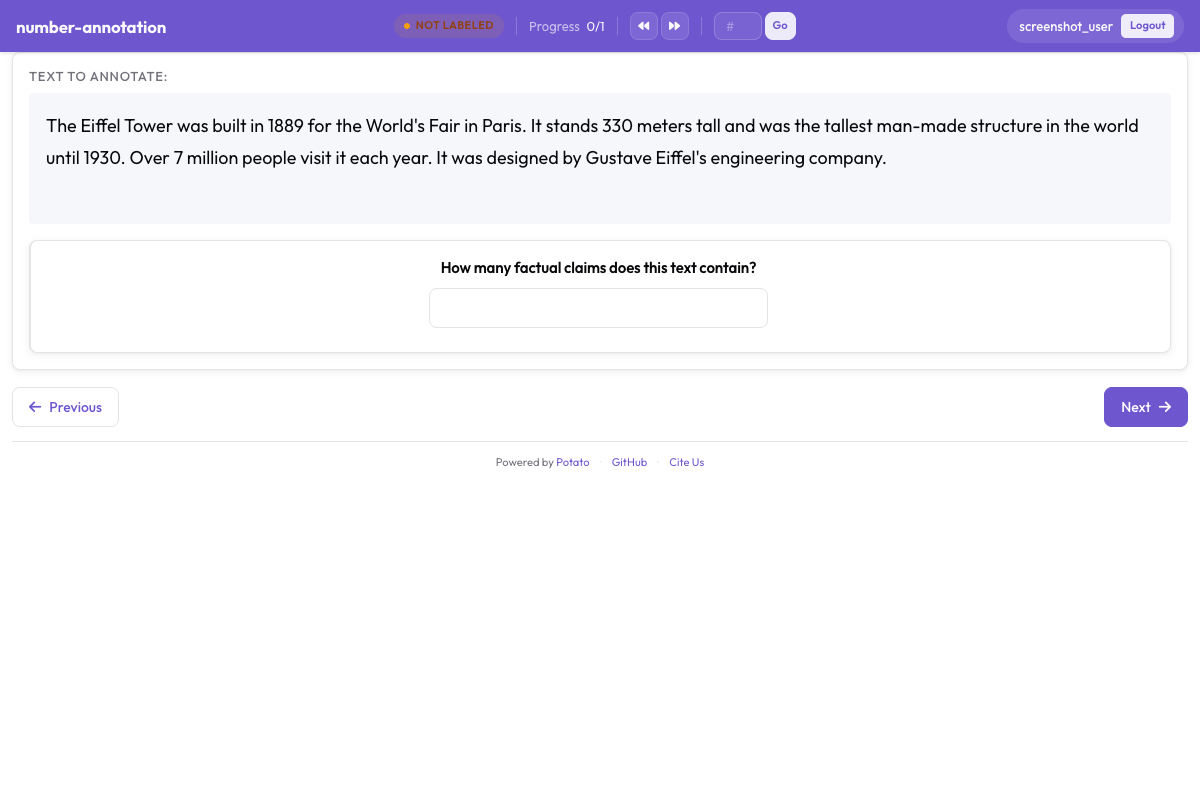 न्यूनतम और अधिकतम सीमा वाला संख्यात्मक इनपुट फ़ील्ड
बुनियादी Number फ़ील्ड
annotation_schemes:
  - annotation_type: number
    name: count
    description: "How many entities are mentioned?"
रेंज बाधाएँ
न्यूनतम और अधिकतम मान निर्धारित करें:
- annotation_type: number
  name: rating
  description: "Rate from 1 to 10"
  min: 1
  max: 10
Step आकार
वृद्धि सटीकता नियंत्रित करें:
- annotation_type: number
  name: percentage
  description: "What percentage is relevant?"
  min: 0
  max: 100
  step: 5  # Increments of 5
दशमलव संख्याएँ
Floating-point मान की अनुमति दें:
- annotation_type: number
  name: score
  description: "Confidence score"
  min: 0.0
  max: 1.0
  step: 0.1
डिफ़ॉल्ट मान
डिफ़ॉल्ट के साथ पूर्व-भरें:
- annotation_type: number
  name: count
  description: "Number of errors"
  min: 0
  tooltip: "Count each distinct error once, even where it repeats."
Slider Input
Number input का दृश्य विकल्प:
- annotation_type: slider
  name: confidence
  description: "How confident are you?"
  min_value: 0
  max_value: 100
  starting_value: 50
  step: 1
Slider के सिरों के कैप्शन
Track के दोनों सिरों पर min_value और max_value दिखते हैं, और show_labels: false उन्हें छिपा देता है। Slider कोई labels सूची नहीं लेता। सूची जोड़ने पर प्रश्न radio लेआउट में बदल जाता है और slider गायब हो जाता है, इसलिए सिरों के लिए शब्द description में लिखें:
- annotation_type: slider
  name: agreement
  description: "How much do you agree? (0 = strongly disagree, 100 = strongly agree)"
  min_value: 0
  max_value: 100
  starting_value: 50
  show_labels: true
Slider प्रदर्शन विकल्प
वर्तमान मान दिखाएँ:
- annotation_type: slider
  name: rating
  description: "Rate the overall quality"
  min_value: 0
  max_value: 100
  starting_value: 50
  step: 5
  maxTick: 10
सामान्य उपयोग के मामले
Text सुधार कार्य
annotation_schemes:
  - annotation_type: radio
    name: has_error
    description: "Does this text contain errors?"
    labels:
      - "Yes"
      - "No"

  - annotation_type: text
    name: corrected_text
    description: "Provide the corrected version"
    rows: 4
अनुवाद गुणवत्ता
annotation_schemes:
  - annotation_type: slider
    name: adequacy
    description: "How much meaning is preserved?"
    min_value: 0
    max_value: 100
    starting_value: 50

  - annotation_type: slider
    name: fluency
    description: "How natural does it sound?"
    min_value: 0
    max_value: 100
    starting_value: 50

  - annotation_type: text
    name: improved_translation
    description: "Suggest a better translation (optional)"
    rows: 4
    label_requirement:
      required: false
Entity गणना
annotation_schemes:
  - annotation_type: number
    name: person_count
    description: "How many people are mentioned?"
    min: 0
    max: 50

  - annotation_type: number
    name: org_count
    description: "How many organizations are mentioned?"
    min: 0
    max: 50

  - annotation_type: number
    name: location_count
    description: "How many locations are mentioned?"
    min: 0
    max: 50
प्रतिक्रिया संग्रह
annotation_schemes:
  - annotation_type: likert
    name: difficulty
    description: "How difficult was this task?"
    size: 5
    min_label: "Very Easy"
    max_label: "Very Hard"

  - annotation_type: text
    name: feedback
    description: "Any additional feedback?"
    rows: 4
    label_requirement:
      required: false
    placeholder: "Share your thoughts..."
औचित्य के साथ गुणवत्ता मूल्यांकन
annotation_schemes:
  - annotation_type: radio
    name: quality
    description: "Rate the quality"
    labels:
      - Excellent
      - Good
      - Fair
      - Poor

  - annotation_type: text
    name: justification
    description: "Explain your rating"
    rows: 4
    label_requirement:
      required: true
सत्यापन
Text सत्यापन
- annotation_type: text
  name: email
  description: "Enter contact email"
Number सत्यापन
Numbers min/max के विरुद्ध स्वचालित रूप से सत्यापित होती हैं:
- annotation_type: number
  name: year
  description: "Enter the year"
  min: 1900
  max: 2024
कीबोर्ड नेविगेशन
Text और number फ़ील्ड मानक कीबोर्ड नेविगेशन का समर्थन करते हैं:
- फ़ील्ड के बीच जाने के लिए
Tab - सबमिट करने के लिए
Enter(एकल-पंक्ति text के लिए) - Number वृद्धि/कमी के लिए Arrow keys
आउटपुट फॉर्मेट
Text और number एनोटेशन सीधे सहेजे जाते हैं:
{
  "id": "doc1",
  "correction": "The corrected text goes here.",
  "count": 5,
  "confidence": 85
}
पूर्ण उदाहरण: दस्तावेज़ समीक्षा
annotation_task_name: "Document Review"

annotation_schemes:
  # Quality rating
  - annotation_type: likert
    name: quality
    description: "Overall document quality"
    size: 5
    min_label: "Poor"
    max_label: "Excellent"

  # Error count
  - annotation_type: number
    name: error_count
    description: "Number of errors found"
    min: 0
    max: 100

  # Confidence slider
  - annotation_type: slider
    name: confidence
    description: "How confident are you in this assessment?"
    min_value: 0
    max_value: 100
    starting_value: 50

  # Detailed feedback
  - annotation_type: text
    name: errors_found
    description: "List the errors you found"
    rows: 4
    placeholder: "Describe each error..."

  # Summary
  - annotation_type: text
    name: summary
    description: "Brief summary of the document"
    placeholder: "Summarize in one sentence..."
सर्वोत्तम प्रथाएँ
- उचित इनपुट प्रकारों का उपयोग करें - निरंतर मान के लिए slider, सटीक गणना के लिए number
- उचित बाधाएँ निर्धारित करें - min/max मान अमान्य डेटा को रोकते हैं
- Placeholder प्रदान करें - एनोटेटर्स को अपेक्षित फॉर्मेट पर मार्गदर्शन करें
- वैकल्पिक फ़ील्ड स्पष्ट करें -
required: falseका उपयोग करें और विवरण में बताएँ - सशर्त प्रदर्शन का उपयोग करें - जब आवश्यक हो तभी text फ़ील्ड दिखाएँ
- सत्यापन पर विचार करें - ईमेल या ID जैसे संरचित इनपुट के लिए pattern का उपयोग करें