AI Agents का मूल्यांकन: Agent Traces की Human Annotation
Potato में AI agent output का human evaluation कैसे सेट करें, trace import से लेकर trace-level और per-step schema design होते हुए export किए गए results के विश्लेषण तक।
Agent traces को python -m potato.trace_converter से convert करें, उन्हें agent_trace display field के ज़रिए render करें, और trace-level verdict के साथ-साथ per-step trajectory_eval judgment इकट्ठा करें। Per-step judgment ही वह हिस्सा है जो बताता है कि run किस step पर गलत हुआ।
Success rate बताता है कि agent कितनी बार task पूरा करता है, पर यह नहीं बताता कि विफलताएँ क्यों हुईं। एक ही 62% success rate वाले दो agents बिल्कुल अलग कारणों से विफल हो सकते हैं, एक गलत tool चुनता है और दूसरा खराब retrieval पर सही reasoning करता है, और दोनों में fix अलग है। Step level पर human evaluation इन्हें अलग करती है, क्योंकि annotator चिह्नित करता है कि कौन सा step टूटा और टूटन किस तरह की थी।
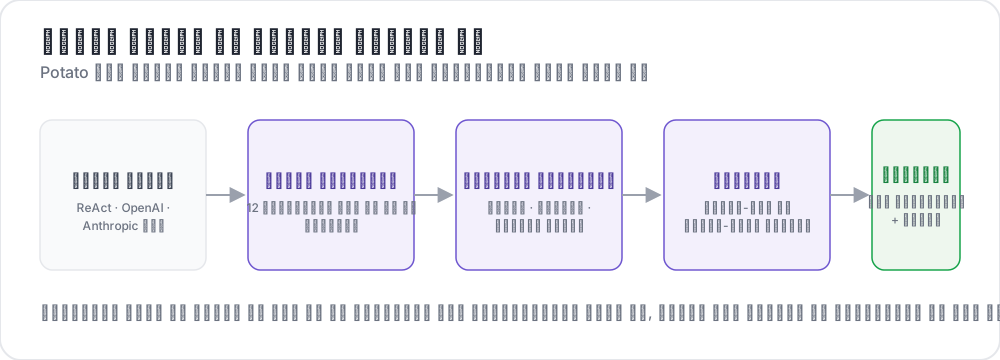 Raw traces से structured judgments तक
यह गाइड एक ReAct-style agent के लिए pipeline बनाती है जो web खोजकर प्रश्नों के उत्तर देता है। Configs को Potato 2.9.1 के विरुद्ध जाँचा गया है:
pip install --upgrade potato-annotationचरण 1: traces को convert करें
Potato 15 trace converters register करता है, और CLI उन्हें उनके विवरण के साथ सूचीबद्ध करता है:
python -m potato.trace_converter --list-formatsसूची में react, openai, anthropic, langchain, langfuse, multi_agent, mcp, otel, atif, webarena, web_agent, swebench, swe_agent_trajectory, claude_code, और aider शामिल हैं। LangSmith run exports langchain से होकर जाते हैं, और CrewAI, AutoGen और LangGraph के logs multi_agent से होकर जाते हैं।
react converter ऐसा trace पढ़ता है जिसके steps में thought, action, और observation keys होती हैं:
{
  "id": "trace_001",
  "task": "What is the capital of Australia and what is its population?",
  "steps": [
    {"thought": "I need the capital of Australia and then its population.",
     "action": "search('capital of Australia')",
     "observation": "Canberra is the capital city of Australia."},
    {"thought": "Now I need Canberra's population.",
     "action": "search('Canberra population 2025')",
     "observation": "Canberra has a population of approximately 467,000 as of 2025."},
    {"thought": "I have both pieces of information.",
     "action": "finish('Canberra, approximately 467,000')"}
  ],
  "metadata": {"agent": "GPT-4", "tokens": 2340}
}
एक command फ़ाइल को convert कर देता है:
python -m potato.trace_converter \
  --input raw_traces.json \
  --input-format react \
  --output data/traces.jsonl
जब आपको पक्का न हो कि कौन सा converter सही बैठता है, तो --input-format की जगह --auto-detect दें, और registry field signatures के आधार पर एक चुन लेती है। Format पता चलते ही उसे स्पष्ट रूप से नाम दें, क्योंकि detection पहला मेल खाने वाला converter ले लेता है और कई formats के fields आपस में overlap करते हैं।
हर converter एक ही canonical shape लिखता है, और इसी वजह से एक config अलग-अलग frameworks पर काम करता है। हर line में id, task_description, और conversation होते हैं, जहाँ conversation turns की एक सूची है और हर turn में speaker और text होते हैं। जिस converter के पास agent_name, metadata_table, और screenshots उपलब्ध हों, वह इन्हें भी लिखता है:
{
  "id": "trace_001",
  "task_description": "What is the capital of Australia and what is its population?",
  "agent_name": "GPT-4",
  "metadata_table": [{"Property": "Steps", "Value": "3"},
                     {"Property": "tokens", "Value": "2340"}],
  "conversation": [
    {"speaker": "Agent (Thought)", "text": "I need the capital of Australia and then its population."},
    {"speaker": "Agent (Action)", "text": "search('capital of Australia')"},
    {"speaker": "Environment", "text": "Canberra is the capital city of Australia."}
  ]
}
चरण 2: trace को render करें
agent_trace display हर turn को एक card के रूप में render करता है, step type के अनुसार color-coded, ताकि annotator JSON blob की जगह run को पढ़े:
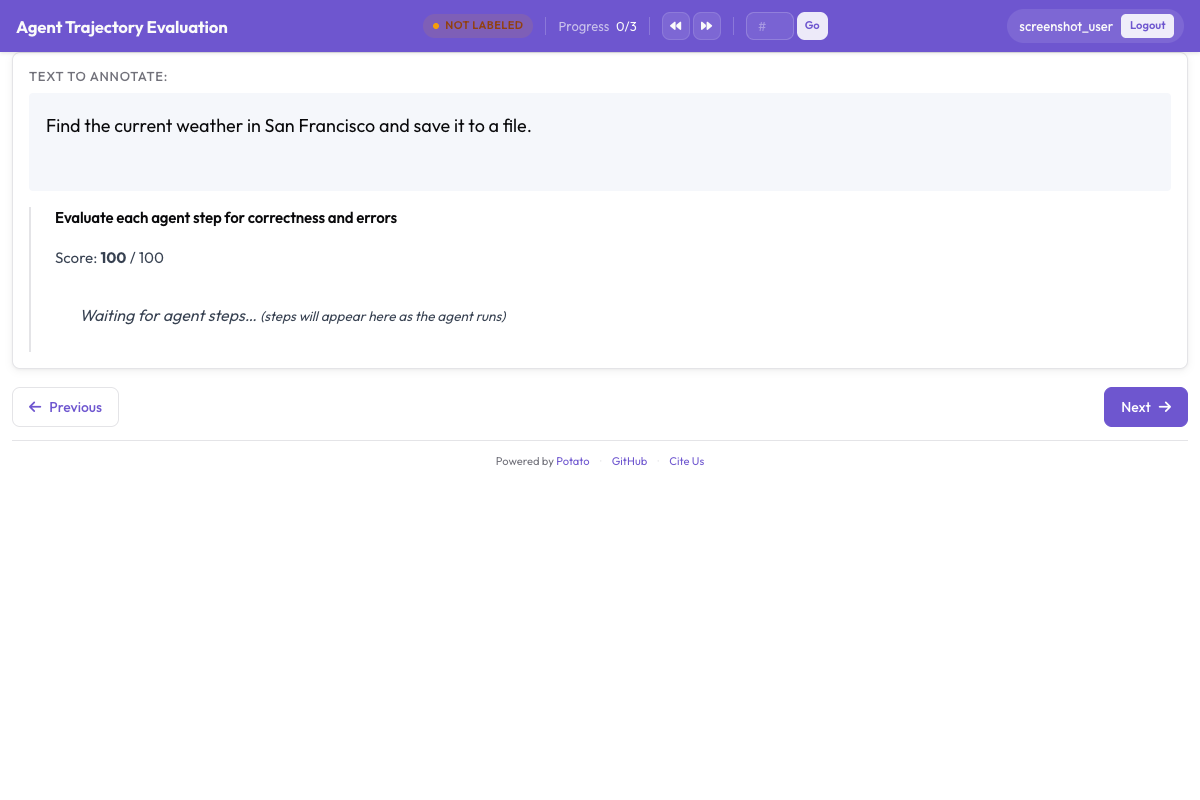
instance_display तय करता है कि page पर क्या जाएगा और किस क्रम में। Task description सबसे ऊपर रहता है क्योंकि किसी भी step का अर्थ समझने से पहले annotator को पता होना चाहिए कि agent से क्या माँगा गया था, और metadata table उसके नीचे एक compact spreadsheet field में रहती है:
instance_display:
  layout:
    direction: vertical
    gap: 16px

  fields:
    - key: task_description
      type: text
      label: "Task"

    - key: metadata_table
      type: spreadsheet
      label: "Trace Info"
      display_options:
        compact: true
        max_height: 120

    - key: conversation
      type: agent_trace
      label: "Agent Trace"
      span_target: true
      display_options:
        show_step_numbers: true
        show_summary: true
        collapse_observations: true
        step_type_colors:
          thought: "#e8f4fd"
          action: "#fff3e0"
          observation: "#e8f5e9"
Observations को collapse करने से लंबे search results बाकी trace को screen से बाहर नहीं धकेलते, क्योंकि दर्जन भर पूरे search results वाला trace ज़्यादातर scrolling बन जाता है और annotator भूल जाता है कि वह run में कहाँ है। उसी field पर span_target: true सेट करने से एक span schema किसी turn के अंदर hallucinated claim के सटीक शब्दों को चिह्नित कर सकता है, जो पूरे step को गलत चिह्नित करने से ज़्यादा बारीक record है।
चरण 3: trace-level judgment
तीन प्रश्न पूरे trace को cover करते हैं। Task success मुख्य संख्या है, answer correctness बुरे तरीके से पहुँचे सही उत्तर को गलत उत्तर से अलग करती है, और efficiency उन दो agents में फ़र्क करती है जो दोनों सफल होते हैं:
annotation_schemes:
  - annotation_type: radio
    name: task_success
    description: "Did the agent complete the task?"
    labels:
      - name: "Success"
        tooltip: "Fully completed correctly"
      - name: "Partial success"
        tooltip: "Completed with errors or omissions"
      - name: "Failure"
        tooltip: "Not completed"
    label_requirement:
      required: true
    sequential_key_binding: true

  - annotation_type: radio
    name: answer_correctness
    description: "Is the agent's final answer factually correct?"
    labels:
      - name: "Correct"
      - name: "Partially correct"
      - name: "Incorrect"
      - name: "Cannot determine"
    label_requirement:
      required: true

  - annotation_type: likert
    name: efficiency
    description: "Did the agent reach the answer without wasted steps?"
    size: 5
    min_label: "Many unnecessary steps"
    max_label: "No wasted steps"

  - annotation_type: text
    name: evaluator_notes
    description: "Anything the ratings above do not capture"
    multiline: true
    rows: 3
"Cannot determine" का होना ज़रूरी है। इसके बिना, जिस annotator के पास उत्तर जाँचने का कोई तरीका नहीं है, वह या तो अनुमान लगाता है या उसे incorrect चिह्नित कर देता है, और दोनों ही विकल्प उस संख्या में noise डालते हैं जिसकी आपको सबसे ज़्यादा परवाह है।
चरण 4: per-step judgment
trajectory_eval हर step को उसके अपने controls के साथ एक card के रूप में render करता है, और correctness label, error taxonomy, और severity को तीन की जगह एक ही schema में रखता है। steps_key को उस field पर point करें जिसमें steps हैं, जो converted trace के लिए conversation है, और step_text_key को हर step के अंदर उस key पर जिसे दिखाया जाना चाहिए:
annotation_schemes:
  - annotation_type: trajectory_eval
    name: step_evaluation
    description: "Mark each step and classify anything that went wrong"
    steps_key: conversation
    step_text_key: text
    correctness_options:
      - correct
      - partially_correct
      - incorrect
      - unnecessary
    error_types:
      - name: reasoning
        subtypes:
          - logical_error
          - factual_error
          - planning_error
      - name: execution
        subtypes:
          - wrong_tool
          - wrong_args
          - api_error
      - name: termination
        subtypes:
          - premature_stop
          - redundant_step
    severities:
      - name: minor
        weight: -1
      - name: major
        weight: -5
      - name: critical
        weight: -10
    show_score: true
    max_score: 100
Severity weights चिह्नित steps की सूची को हर trace के लिए एक तुलनीय संख्या में बदल देते हैं, और defaults को जैसे का तैसा स्वीकार करने की बजाय बदलना चाहिए। Weight बताता है कि आपके task के लिए एक critical error एक minor error से कितनी बदतर है, और safety evaluation में यह अनुपात search task की तुलना में कहीं ज़्यादा तीखा होता है।
unnecessary को incorrect से अलग रखना दूसरा फ़ैसला है जिसे सोच-समझकर लेना चाहिए। एक व्यर्थ step error लाए बिना tokens और समय खर्च करता है, और दोनों को मिला देने से भटकने वाले agent और गलत agent के बीच का फ़र्क छिप जाता है।
चरण 5: पूरा configuration
ऊपर का सब कुछ, एक फ़ाइल में:
annotation_task_name: "ReAct Agent Evaluation"
task_dir: "."
output_annotation_dir: "output/"

data_files:
  - "data/traces.jsonl"

item_properties:
  id_key: id
  text_key: task_description

instance_display:
  layout:
    direction: vertical
    gap: 16px
  fields:
    - key: task_description
      type: text
      label: "Task"
    - key: metadata_table
      type: spreadsheet
      label: "Trace Info"
      display_options:
        compact: true
        max_height: 120
    - key: conversation
      type: agent_trace
      label: "Agent Trace"
      span_target: true
      display_options:
        show_step_numbers: true
        show_summary: true
        collapse_observations: true

annotation_schemes:
  - annotation_type: radio
    name: task_success
    description: "Did the agent complete the task?"
    labels:
      - name: "Success"
      - name: "Partial success"
      - name: "Failure"
    label_requirement:
      required: true
    sequential_key_binding: true

  - annotation_type: radio
    name: answer_correctness
    description: "Is the agent's final answer factually correct?"
    labels:
      - name: "Correct"
      - name: "Partially correct"
      - name: "Incorrect"
      - name: "Cannot determine"
    label_requirement:
      required: true

  - annotation_type: likert
    name: efficiency
    description: "Did the agent reach the answer without wasted steps?"
    size: 5
    min_label: "Many unnecessary steps"
    max_label: "No wasted steps"

  - annotation_type: text
    name: evaluator_notes
    description: "Anything the ratings above do not capture"
    multiline: true
    rows: 3

  - annotation_type: trajectory_eval
    name: step_evaluation
    description: "Mark each step and classify anything that went wrong"
    steps_key: conversation
    step_text_key: text
    correctness_options: [correct, partially_correct, incorrect, unnecessary]
    error_types:
      - name: reasoning
        subtypes: [logical_error, factual_error, planning_error]
      - name: execution
        subtypes: [wrong_tool, wrong_args, api_error]
      - name: termination
        subtypes: [premature_stop, redundant_step]
    severities:
      - name: minor
        weight: -1
      - name: major
        weight: -5
      - name: critical
        weight: -10
    show_score: true
    max_score: 100

export_annotation_format: jsonl
Server शुरू करें और http://localhost:8000 खोलें:
potato start config.yaml -p 8000Annotation session कैसा दिखता है
Page पर task, trace info table, और step cards दिखते हैं, हर card के साथ per-step controls जुड़े होते हैं और trace-level schemas trace के नीचे होते हैं। Annotators किस क्रम में काम करते हैं, यह जितना लगता है उससे ज़्यादा मायने रखता है। पहले steps को rate करना और फिर trace को, समग्र verdict को इस पर टिकाए रखता है कि run ने वास्तव में क्या किया, जबकि पहले success को rate करने से उसके बाद आने वाले हर step judgment पर उसका रंग चढ़ जाता है।
तीन आदतें annotator instructions में लिखने लायक हैं। Summary line पर भरोसा करने की बजाय collapsed observations को expand करें, क्योंकि search result को गलत पढ़ना ऐसे गलत उत्तर का सबसे आम स्रोत है जो तर्कसंगत दिखता है। Task success rate करने से पहले अंतिम उत्तर को ground truth से मिलाएँ, जब dataset में वह मौजूद हो। जब कोई बाद का step यह दिखा दे कि पहले वाला step पहले से ही गलत था, तो उस step पर वापस जाने के लिए step timeline का उपयोग करें।
चरण 6: export और विश्लेषण
JSONL exporter annotations.jsonl लिखता है, जिसमें हर instance और annotator के लिए एक record होता है:
python -m potato.export --config config.yaml --format jsonl --output ./export/हर record में instance_id, user_id, labels, spans, और links होते हैं, और schema के उत्तर labels के अंतर्गत schema name से keyed रहते हैं:
import json
import pandas as pd

records = [json.loads(line) for line in open("export/annotations.jsonl")]

df = pd.DataFrame([
    {"trace": r["instance_id"], "annotator": r["user_id"], **r["labels"]}
    for r in records
])

print(df["task_success"].value_counts())
कुछ सौ traces से बड़े किसी भी काम के लिए, इसकी बजाय Parquet में export करें और उसे वहीं query करें। Parquet export annotations.parquet लिखता है जिसमें instance_id, user_id, और हर annotation schema के लिए एक column होता है, इसलिए schema name एक value नहीं बल्कि column होता है:
python -m potato.export --config config.yaml --format parquet --output ./export/import duckdb
print(duckdb.sql("""
SELECT task_success, COUNT(*) AS n
FROM 'export/annotations.parquet'
GROUP BY task_success
ORDER BY n DESC
"""))Step-level judgments ही पहले पढ़ने लायक हैं। Traces में error subtypes गिनने से पता चलता है कि agent में एक systematic विफलता है या असंबंधित विफलताओं की लंबी पूँछ, और इनमें से सिर्फ़ पहली ही targeted fix के लायक है।
चरण 7: ज़्यादा annotators, और एक qualification phase
Agent evaluation इतनी subjective है कि हर trace पर एक rating बिना error bar वाला measurement है। हर trace पर तीन annotators आपको एक agreement आँकड़ा देते हैं, और random assignment overlap को उन traces पर केंद्रित होने से रोकता है जो संयोग से फ़ाइल की शुरुआत में हैं:
num_annotators_per_item: 3
assignment_strategy: random
Qualification phase उन annotators को पकड़ लेता है जिन्होंने error taxonomy नहीं समझी, इससे पहले कि वे पूरा दिन उसे असंगत ढंग से लागू करने में लगा दें। Training block उन्हें known-answer traces पर तब तक रखता है जब तक वे pass नहीं हो जाते:
training:
  enabled: true
  data_file: "data/training_traces.jsonl"
  passing_criteria:
    min_correct: 4
  allow_retry: true
  failure_action: "repeat_training"
अन्य agent frameworks
Display और schemas सभी frameworks में वही रहते हैं, सिर्फ़ converter बदलता है। OpenAI Chat Completions traces और tool_use blocks वाले Anthropic messages के अपने-अपने converter हैं, और CrewAI, AutoGen और LangGraph के multi-agent logs एक ही converter साझा करते हैं:
python -m potato.trace_converter --input runs.json --input-format openai --output data/traces.jsonl
python -m potato.trace_converter --input runs.json --input-format anthropic --output data/traces.jsonl
python -m potato.trace_converter --input runs.json --input-format multi_agent --output data/traces.jsonl
Coding agents को अलग display चाहिए, क्योंकि JSON string के रूप में पढ़े गए diff की review नहीं की जा सकती। coding_trace display file tree के साथ unified diffs render करता है और लंबे terminal output को collapse करता है:
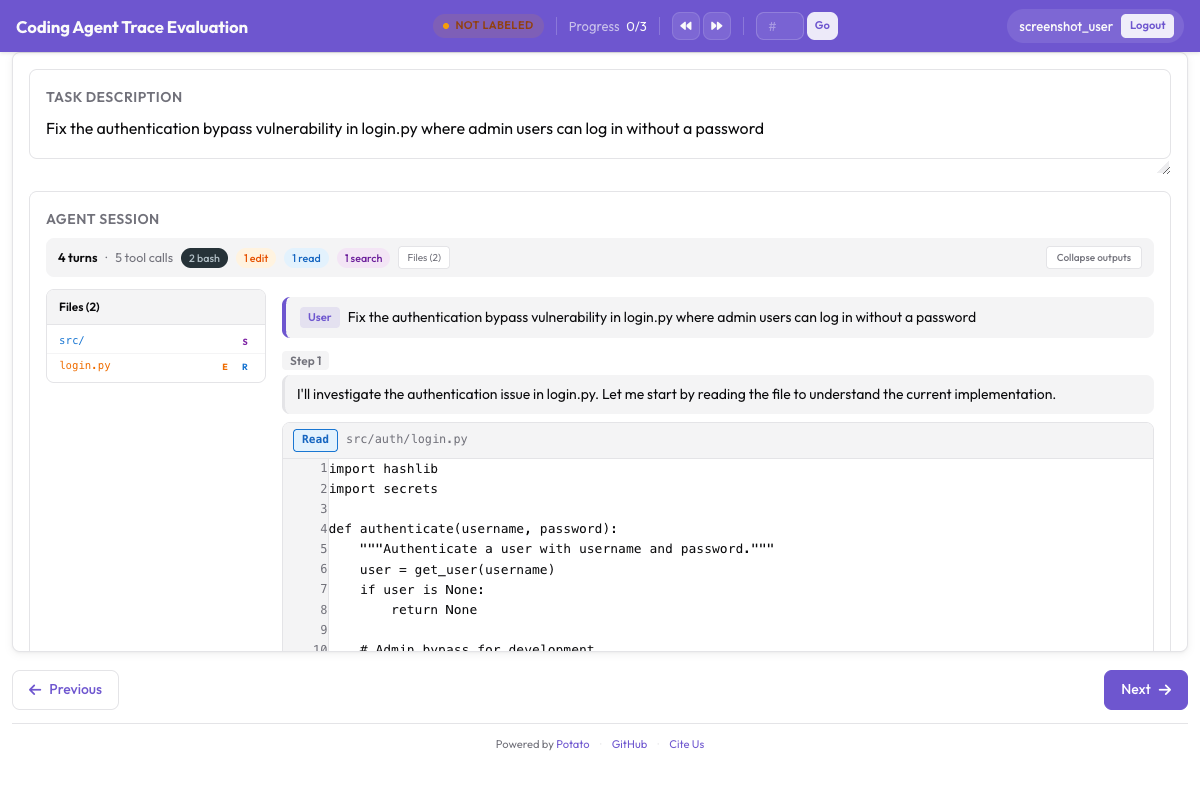
instance_display:
  fields:
    - key: structured_turns
      type: coding_trace
      label: "Agent Session"
      display_options:
        show_file_tree: true
        diff_view: unified
        collapse_long_outputs: true
        max_output_lines: 50
Web browsing agents को screenshots, action overlays, और उनके बीच आगे-पीछे जाने के लिए एक filmstrip चाहिए:
instance_display:
  fields:
    - key: steps
      type: web_agent_trace
      label: "Agent Browsing Trace"
      display_options:
        show_overlays: true
        show_filmstrip: true
        show_thought: true
        screenshot_max_width: 900
Web Browsing Agents को Annotate करना overlay format और उस creation mode को cover करता है जो नए traces record करता है।
इन सबके पीछे के implementation details के लिए, agent evaluation guide और agent traces documentation देखें। अगर आप अपना पहला evaluation सेट कर रहे हैं, तो दस traces convert करें, ऊपर वाला config चलाएँ, और guidelines लिखने से पहले उन्हें ख़ुद annotate करें, क्योंकि जिस error taxonomy की आपको ज़रूरत होती है वह आमतौर पर वह नहीं होती जो आपने पहले से लिखी होती।
आगे पढ़ें
- Agentic Annotation Documentation
- Web Browsing Agents को Annotate करना
- Solo Mode, agentic annotation को human और LLM के सहयोगी evaluation के साथ जोड़ने के लिए
- Best-Worst Scaling, agent outputs को तुलनात्मक रूप से rank करने के लिए
- Parquet Export, बड़े पैमाने पर विश्लेषण के लिए