شريط تمرير المدى
اضبط توسيم شريط تمرير المدى بمقبضين في Potato لاختيار مدى عددي بحدود قابلة للتخصيص ومقدار خطوة وتسميات للطرفين.
يوفر مخطط توسيم شريط تمرير المدى شريطاً بمقبضين يتيح للموسِّمين اختيار مدى من القيم بدل قيمة واحدة. وهذا مفيد في المهام التي تكون إجابتها فترة أو مجالاً، مثل تقدير الفئات العمرية أو النوافذ الزمنية أو فترات الثقة.
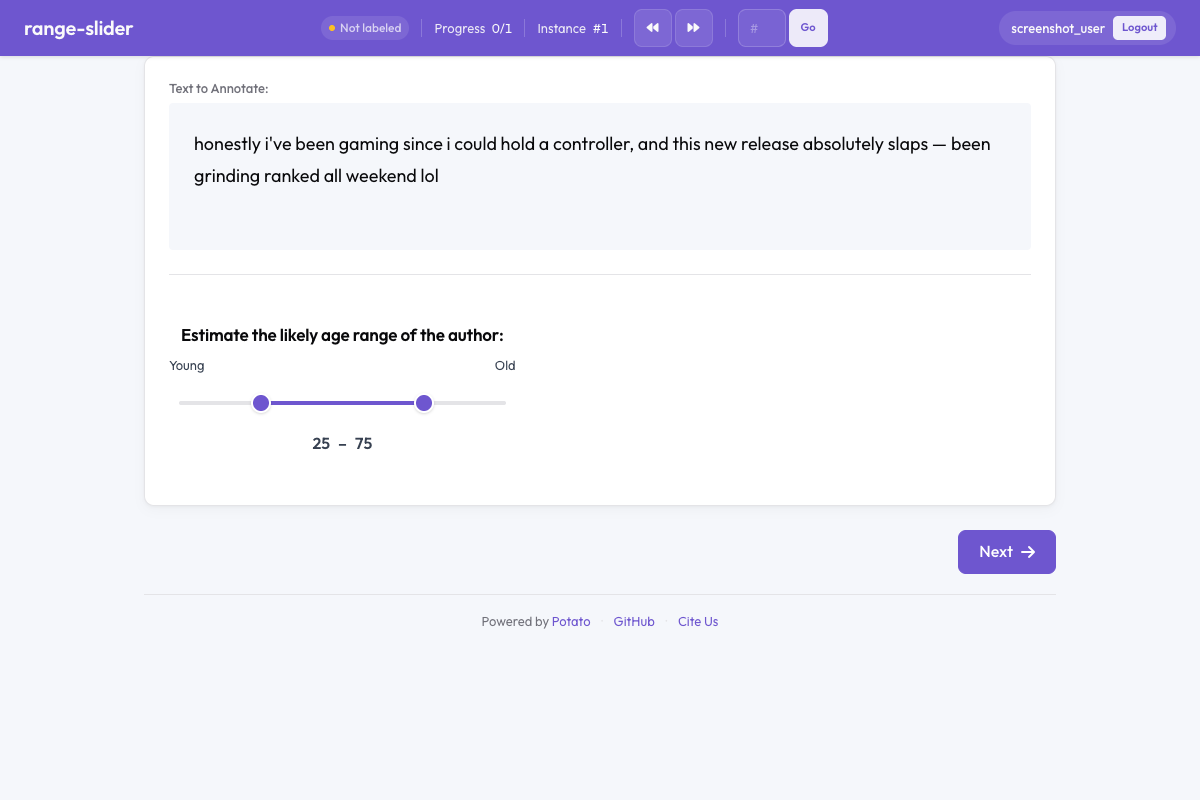 شريط تمرير المدى في Potato
نظرة عامة
خلافاً لشريط التمرير القياسي الذي يلتقط قيمة واحدة، لشريط تمرير المدى مقبضان قابلان للسحب يمثلان الطرف الأدنى والأعلى للمدى. يسحب الموسِّمون أياً من المقبضين لتحديد الفترة، وتُعرض القيم الحالية بجانب الشريط لضبط الدقة.
البدء السريع
yaml
annotation_schemes:
  - annotation_type: range_slider
    name: age_range
    description: Estimate the age range of the author.
    min_value: 0
    max_value: 100
    step: 1
    left_label: "Young"
    right_label: "Old"
خيارات الإعدادات
| الحقل | النوع | الافتراضي | الوصف |
|---|---|---|---|
annotation_type | string | مطلوب | يجب أن يكون "range_slider" |
name | string | مطلوب | معرّف فريد لهذا المخطط |
description | string | مطلوب | التعليمات المعروضة للموسِّمين |
min_value | number | 0 | القيمة الدنيا لمقياس الشريط |
max_value | number | 100 | القيمة العليا لمقياس الشريط |
step | number | 1 | مقدار الزيادة بين القيم القابلة للاختيار |
left_label | string | — | التسمية المعروضة عند الطرف الأيسر (الأدنى) للشريط |
right_label | string | — | التسمية المعروضة عند الطرف الأيمن (الأعلى) للشريط |
show_values | boolean | true | عرض القيمتين الدنيا والعليا المختارتين حالياً |
default_low | number | — | الموضع الافتراضي للمقبض الأدنى |
default_high | number | — | الموضع الافتراضي للمقبض الأعلى |
label_requirement.required | boolean | false | هل يجب إتمام التوسيم قبل الانتقال |
أمثلة
تقدير الفئة العمرية
yaml
annotation_schemes:
  - annotation_type: range_slider
    name: age_estimate
    description: What age range do you think the author falls in?
    min_value: 13
    max_value: 90
    step: 1
    left_label: "Younger"
    right_label: "Older"
فترة الثقة
yaml
annotation_schemes:
  - annotation_type: range_slider
    name: confidence_interval
    description: Select the range within which you believe the true value falls.
    min_value: 0
    max_value: 100
    step: 5
    left_label: "0%"
    right_label: "100%"
    show_values: true
نافذة زمنية
yaml
annotation_schemes:
  - annotation_type: range_slider
    name: time_window
    description: When during the day is this activity most likely? (hours)
    min_value: 0
    max_value: 24
    step: 0.5
    left_label: "Midnight"
    right_label: "Midnight"
مدى الراحة الحرارية
yaml
annotation_schemes:
  - annotation_type: range_slider
    name: comfort_range
    description: What temperature range (°F) do you find comfortable?
    min_value: 40
    max_value: 110
    step: 1
    left_label: "Cold"
    right_label: "Hot"
    show_values: true
صيغة المخرجات
json
{
  "age_estimate": {
    "labels": {
      "low": 28,
      "high": 42
    }
  }
}
تتضمن المخرجات دائماً قيمتَي low وhigh ضمن المدى المهيّأ بين min_value وmax_value.
أفضل الممارسات
- اضبط قيماً افتراضية ذات معنى - استخدم
default_lowوdefault_highلتفادي تثبيت كل الموسِّمين عند الطرفين - اختر مقدار خطوة مناسباً - خطوات دقيقة (0.1) للمهام الدقيقة، وخطوات أوسع (5 أو 10) للتقديرات التقريبية
- أضف تسميات للطرفين - يوفر
left_labelوright_labelسياقاً دلالياً يتجاوز الأرقام المجردة - أبقِ show_values مفعّلة - القراءات الرقمية تساعد الموسِّمين على الاختيار بدقة
- استخدمه لمهام المدى الحقيقية - إن كنت تحتاج قيمة واحدة فقط، فاستخدم شريط التمرير القياسي بدلاً منه
قراءة إضافية
- شريط التمرير - توسيم متصل بقيمة واحدة
- مقاييس ليكرت - مقاييس تقدير ترتيبية
- التصنيف المرن - توزيع احتمالي
للاطلاع على تفاصيل التنفيذ، راجع الوثائق المصدرية.