سير العمل متعدد المراحل
أنشئ في Potato سير عمل تعليق من عدة مراحل يضم الموافقة والفرز المسبق والتعليمات والتدريب واستبيان ما بعد الدراسة، مع أسئلة استبيان شرطية.
يشغّل Potato مهمة التعليق التوضيحي بوصفها مرحلة واحدة ضمن سير عمل أطول، فيمكن أن تحيط بها الموافقة وأسئلة الفرز والتعليمات والتدريب واستبيان الخروج دون أداة استبيان منفصلة.
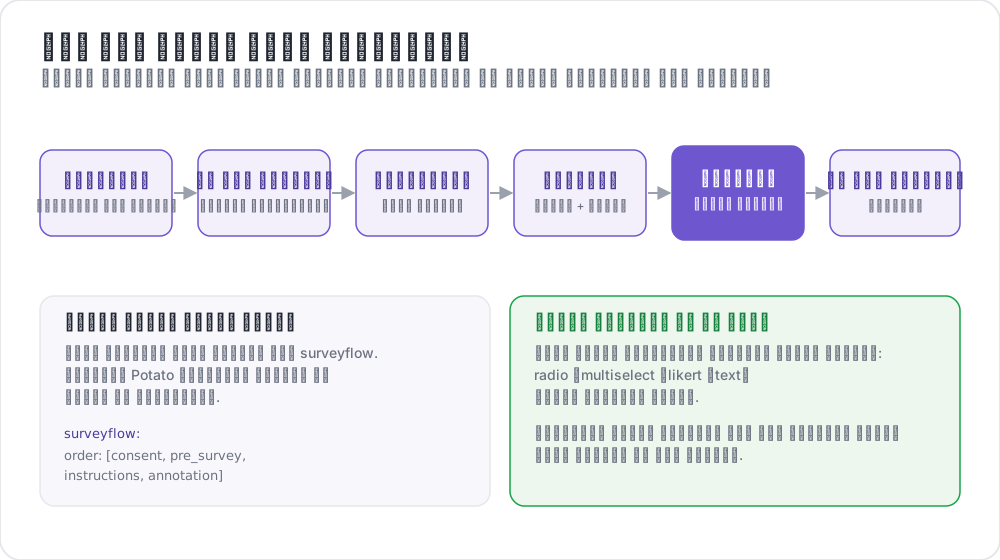 سير عمل تعليق بنمط الاستبيان
المراحل المتاحة
| المرحلة | الغرض | الإلزام |
|---|---|---|
consent | جمع الموافقة المستنيرة | اختيارية |
prestudy | أسئلة الفرز المسبق والبيانات الديموغرافية | اختيارية |
instructions | تعليمات المهمة وإرشاداتها | اختيارية |
training | التأهيل مع تغذية راجعة | اختيارية |
annotation | مهمة التعليق التوضيحي الرئيسية | مطلوبة |
poststudy | استبيان ما بعد الدراسة والتغذية الراجعة | اختيارية |
يمرّ المعلّقون بالمراحل المفعّلة بالترتيب الذي تعلنه.
التهيئة الأساسية
تحدد كتلة phases الترتيب وتربط كل مرحلة بملفها:
phases:
  order: [consent, prestudy, instructions, annotation, poststudy]

  consent:
    type: consent
    file: surveyflow/consent.json

  prestudy:
    type: prestudy
    file: surveyflow/prescreening.json

  instructions:
    type: instructions
    file: surveyflow/instructions.html

  poststudy:
    type: poststudy
    file: surveyflow/demographics.json
لا تحتاج مرحلة annotation إلى file، لأنها تستخدم annotation_schemes في المستوى الأعلى من المشروع.
أنواع المراحل
تعلن كل مرحلة قائمة على ملف type يبيّن أي مرحلة من سير العمل هي. القيم الصالحة هي consent وprestudy وinstructions وtraining وannotation وpoststudy.
حدد type صراحةً. لا يستنتجه Potato إلا إذا كان اسم المرحلة نفسه إحدى هذه الكلمات، لذا يجب أن تعلن المرحلة ذات الاسم المخصص نوعًا:
phases:
  order: [intro, consent, instructions, annotation, feedback]

  intro:
    type: prestudy          # custom name, so type is required
    file: surveyflow/intro.json

  consent:
    type: consent
    file: surveyflow/consent.json

  feedback:
    type: poststudy         # custom name, so type is required
    file: surveyflow/feedback.json
الرجوع إلى الخلف
يُخفى زر Back حين لا توجد صفحة سابقة، ويشمل ذلك أول عنصر تعليق. للسماح للمعلّقين بالرجوع عبر الحدود بين المراحل:
allow_phase_back_navigation: trueعند إيقاف هذا الخيار يظل بوسع المعلّقين الرجوع داخل المرحلة الواحدة، كالتنقل بين عناصر التعليق.
صيغة أسئلة الاستبيان
تقرأ مراحل الاستبيان مصفوفة JSON. يحمل كل سؤال id، وtext الذي يُعرض على المعلّق، وschema يسمّي عنصر الواجهة، وchoices الخاصة به:
[
  {
    "id": "consent_1",
    "text": "I certify that I am at least 18 years of age.",
    "schema": "radio",
    "choices": ["I agree", "I disagree"],
    "label_requirement": {"right_label": ["I agree"]}
  },
  {
    "id": "consent_2",
    "text": "I have read and understood the information above.",
    "schema": "radio",
    "choices": ["Yes", "No"],
    "label_requirement": {"right_label": ["Yes"]}
  }
]
أنواع المخططات المدعومة
radio لاختيار واحد، وcheckbox أو multiselect لعدة اختيارات، وtext للنص الحر، وnumber للإدخال الرقمي، وlikert لمقياس تقييم، وselect لقائمة منسدلة.
متطلبات الإجابة
يحدد label_requirement الإجابات التي تسمح للمعلّق بالمتابعة:
{
  "id": "age_check",
  "text": "Are you at least 18 years old?",
  "schema": "radio",
  "choices": ["Yes", "No"],
  "label_requirement": {
    "right_label": ["Yes"],
    "required": true
  }
}
يسرد right_label الإجابات المقبولة، ويبيّن required ما إذا كان يجب الإجابة عن السؤال أصلًا. سؤال الموافقة الذي لا يمكن لأحد أن يخفق فيه لا يسجّل شيئًا، لذا ضع الإجابة المقبولة في right_label بدل الاعتماد على الصياغة.
أسئلة الفرز المسبق
يجري الفرز المسبق قبل المهمة الرئيسية، وفيه تُطرح أسئلة الأهلية والخلفية:
phases:
  order: [prestudy, annotation]
  prestudy:
    type: prestudy
file: surveyflow/prescreening.json[
{
"id": "1",
"text": "What is your native language?",
"schema": "select",
"use_predefined_labels": "language",
"label_requirement": {"required": true}
},
{
"id": "2",
"text": "How familiar are you with this topic?",
"schema": "likert",
"choices": ["Not at all", "Slightly", "Moderately", "Very", "Extremely"],
"label_requirement": {"required": true}
}
]استبيانات ما بعد الدراسة
phases:
  order: [annotation, poststudy]
  poststudy:
    type: poststudy
file: surveyflow/demographics.json[
{
"id": "gender",
"text": "What gender do you most closely identify with?",
"schema": "radio",
"choices": ["Male", "Female", "Non-binary", "Prefer not to say"],
"label_requirement": {"required": true}
},
{
"id": "feedback",
"text": "Please share any feedback about this study (optional)",
"schema": "text"
}
]مجموعات التسميات المدمجة
يأتي Potato بمجموعات تسميات للأسئلة التي تتكرر في معظم الدراسات، فلا حاجة إلى لصق قائمة دول في ملف التهيئة:
{"id": "country", "text": "Select your country", "schema": "select", "use_predefined_labels": "country"}المجموعات المتاحة هي country وlanguage وethnicity وreligion.
حقول الإجابة الحرة
أضف مربع نص اختياريًا إلى أي سؤال باستخدام has_free_response، وهو ما يجعل خيار "أخرى" جديرًا بأن يُعرض:
{
  "id": "gender",
  "text": "What is your gender?",
  "schema": "radio",
  "choices": ["Woman", "Man", "Non-binary", "Prefer not to disclose", "Prefer to self-describe"],
  "has_free_response": {"instruction": "Please specify:"},
  "label_requirement": {"required": true}
}
ترويسات الصفحات
تُضبط ترويسة صفحة الاستبيان على المرحلة لا في ملف الأسئلة:
phases:
  prestudy:
    type: prestudy
    file: surveyflow/consent.json
    header: "Please answer all consent questions"
الأسئلة الشرطية
يمكن أن تظهر أسئلة الاستبيان بناءً على إجابات سابقة، فلا يُطرح سؤال المتابعة إلا حين ينطبق. ولأن أسئلة الاستبيان تمر عبر المسار نفسه الذي تمر به مخططات التعليق، يشير الشرط إلى سؤال آخر عبر قيمة name الخاصة به:
[
  {
    "name": "prior_experience",
    "annotation_type": "radio",
    "description": "Have you previously worked on a text-annotation task?",
    "labels": ["Yes", "No"],
    "label_requirement": {"required": true}
  },
  {
    "name": "experience_details",
    "annotation_type": "text",
    "description": "Please briefly describe your previous annotation experience.",
    "label_requirement": {"required": true},
    "display_logic": {
      "show_when": [
        {"schema": "prior_experience", "operator": "equals", "value": "Yes"}
      ]
    }
  }
]
يُستثنى السؤال المخفي من التحقق من الحقول المطلوبة، فلا يعطّل زر Continue أبدًا ما دام غير ظاهر.
ثلاثة سلوكيات تستحق المعرفة. يمكن أن يشير الشرط إلى سؤال في أي مرحلة، فيمكن لسؤال ما بعد الدراسة أن يعتمد على إجابة من مرحلة ما قبل الدراسة. وdisplay_logic غير الصالح، كعامل غير معروف أو إشارة إلى سؤال غير موجود في أي مكان، يفشل عند بدء تشغيل الخادم لا أثناء التشغيل. ومرحلة instructions التي تشير إلى ملف .html خام تتجاوز مسار المخططات، فلا تنطبق الشروط هناك.
مع export_include_phase_data: true يعيد Potato تقييم إجابات كل مشارك على الخادم ويستبعد الإجابات عن الأسئلة التي لم يرها قط. راجع المنطق الشرطي للاطلاع على المرجع الكامل للعوامل.
مثال كامل
annotation_task_name: "Sentiment Analysis Study"
task_dir: "."
port: 8000

data_files:
  - "data/reviews.json"

item_properties:
  id_key: id
  text_key: text

annotation_schemes:
  - annotation_type: radio
    name: sentiment
    description: "What is the sentiment of this review?"
    labels:
      - Positive
      - Negative
      - Neutral
    sequential_key_binding: true

phases:
  order: [consent, prestudy, instructions, training, annotation, poststudy]

  consent:
    type: consent
    file: phases/consent.json

  prestudy:
    type: prestudy
    file: phases/demographics.json

  instructions:
    type: instructions
    file: phases/instructions.html

  training:
    type: training
    file: phases/training_questions.json

  poststudy:
    type: poststudy
    file: phases/exit_survey.json

training:
  enabled: true
  data_file: phases/training_questions.json
  passing_criteria:
    min_correct: 3
  allow_retry: true

allow_phase_back_navigation: false

output_annotation_dir: "output/"
export_annotation_format: "jsonl"

user_config:
  allow_all_users: true
تأخذ مرحلة التدريب إعداداتها من كتلة training في المستوى الأعلى، بينما يقتصر دور مدخلها في phases على وضعها في الترتيب. راجع مرحلة التدريب لمعايير النجاح وصيغة البيانات.
التهيئة القديمة
لا تزال كتلة surveyflow القديمة تعمل، وتقرأ صفحات الاستبيان على شكل قوائم من ملفات .jsonl:
surveyflow:
  on: true
  order:
    - pre_annotation
    - post_annotation
  pre_annotation:
    - surveyflow/consent.jsonl
    - surveyflow/demographics.jsonl
  post_annotation:
    - surveyflow/exit_survey.jsonl
الترحيل
| القديم | الحديث |
|---|---|
surveyflow.on: true | كتلة phases |
surveyflow.pre_annotation | phases.consent أو phases.prestudy |
surveyflow.post_annotation | phases.poststudy |
surveyflow.testing | training.data_file |
ملفات .jsonl | ملفات .json تحتوي على مصفوفة |
أفضل الممارسات
اجعل الاستبيانات قصيرة
كل سؤال إضافي يخفض معدل الإتمام، والأسئلة الديموغرافية التي لا يستخدمها التحليل تخفضه دون أي مقابل.
اختبر سير العمل كاملًا
أكمل سير العمل بنفسك، في متصفح بلا جلسة، قبل إرسال الرابط إلى أي أحد. الموافقة وتسجيل الدخول هما الموضعان اللذان يفشل فيهما سير العمل المعطوب أولًا وبأقل قدر من الظهور.
حدد الحقول المطلوبة بعناية
الأسئلة المطلوبة التي كان يمكن أن تكون اختيارية تنتج إجابات يختلقها الناس لتجاوز الصفحة.
التعهيد الجماعي
تُضبط رموز الإتمام بالمفتاح completion_code في المستوى الأعلى، لا على مرحلة ما بعد الدراسة:
completion_code: "POTATO2024"
auto_redirect_on_completion: true
auto_redirect_delay: 5000
راجع التعهيد الجماعي لإعداد المنصات.
قراءات إضافية
- مرحلة التدريب: التأهيل مع تغذية راجعة
- التعهيد الجماعي: Prolific وSONA ولوحات مشاركين أخرى
- إدارة المستخدمين: قوائم الوصول والأدوار
- تدفق التجربة - الشروط والاستبعاد والصفحات المتوازنة الترتيب
- استيراد الاستبيانات - استبيانات من Qualtrics وREDCap وXLSForm وأدوات أخرى
لتفاصيل التنفيذ، راجع الوثائق المصدرية.