أساسيات الإعدادات
تعلّم أساسيات ملفات إعدادات Potato.
يستخدم Potato ملفات إعدادات YAML لتعريف مهام التوسيم. يغطي هذا الدليل خيارات الإعدادات الأساسية.
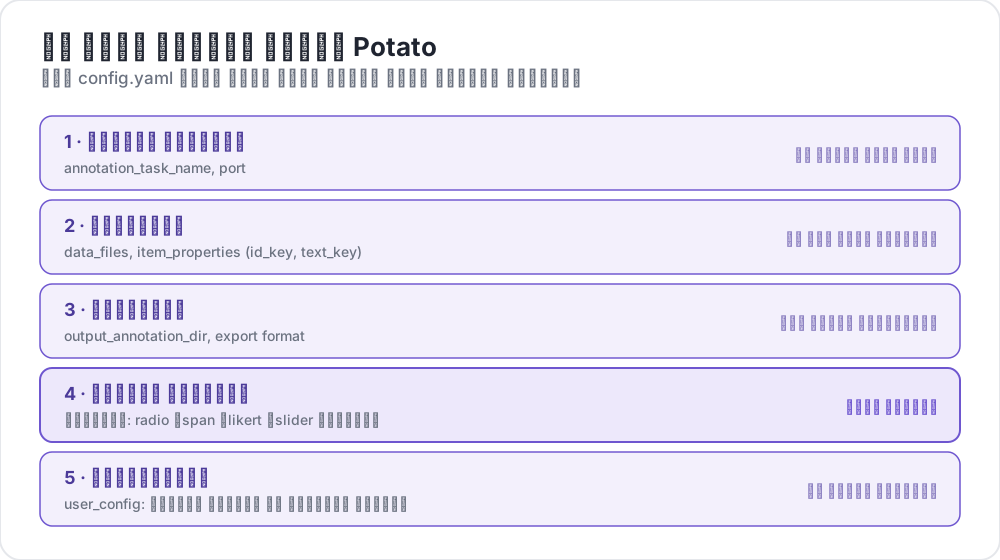 ما الذي يحتويه إعداد Potato
هيكل ملف الإعدادات
يتكون إعداد Potato الأساسي من هذه الأقسام الرئيسية:
yaml
# Task settings
annotation_task_name: "My Annotation Task"
port: 8000

# Data configuration
data_files:
  - data.json

item_properties:
  id_key: id
  text_key: text

# Output settings
output_annotation_dir: "annotation_output/"
export_annotation_format: "jsonl"

# Annotation schemes
annotation_schemes:
  - annotation_type: radio
    name: my_annotation
    description: "Pick the label that fits this item"
    labels:
      - Label 1
      - Label 2

# User settings
user_config:
  allow_all_users: true
الإعدادات الأساسية
إعدادات المهمة والخادم
yaml
annotation_task_name: "My Task"  # Display name for your task
port: 8000                       # Port to run the server on
إعدادات البيانات
yaml
data_files:
  - data.json           # Path to your data file(s)
  - more_data.json      # You can specify multiple files

item_properties:
  id_key: id            # Field containing unique ID
  text_key: text        # Field containing text to annotate
صيغ البيانات المدعومة:
- JSON (
.json) - JSON Lines (
.jsonl) - CSV (
.csv) - TSV (
.tsv)
إعدادات المخرجات
yaml
output_annotation_dir: "annotation_output/"   # Directory for annotation files
export_annotation_format: "jsonl"             # Formats: jsonl, csv, tsv, parquet, and the other registered exporters
مخططات التوسيم
حدد مخططًا واحدًا أو أكثر للتوسيم:
yaml
annotation_schemes:
  - annotation_type: radio      # Type of annotation
    name: sentiment             # Internal name
    description: "Select the sentiment"  # Instructions
    labels:                     # Options for annotators
      - Positive
      - Negative
      - Neutral
أنواع التوسيم المتاحة
| النوع | الوصف |
|---|---|
radio | اختيار واحد |
multiselect | اختيار متعدد |
likert | تقييم على مقياس |
text | إدخال نص حر |
number | إدخال رقمي |
span | تمييز نطاقات النص |
slider | اختيار نطاق مستمر |
multirate | تقييم عناصر متعددة |
إعدادات المستخدمين
السماح لجميع المستخدمين
yaml
user_config:
  allow_all_users: true
تقييد الوصول لمستخدمين محددين
yaml
user_config:
  allow_all_users: false
  users:
    - user1@example.com
    - user2@example.com
مجلد المهمة
يحدد إعداد task_dir المجلد الجذر للمسارات النسبية:
yaml
task_dir: ./my-task/
data_files:
  - data/input.json    # Resolves to ./my-task/data/input.json
مثال كامل
إليك إعدادًا كاملاً لمهمة تحليل المشاعر:
yaml
# config.yaml
annotation_task_name: "Sentiment Analysis"
port: 8000
task_dir: ./

# Data
data_files:
  - data/tweets.json

item_properties:
  id_key: id
  text_key: text

# Output
output_annotation_dir: "annotation_output/"
export_annotation_format: "jsonl"

# Annotation
annotation_schemes:
  - annotation_type: radio
    name: sentiment
    description: "What is the sentiment expressed in this tweet?"
    labels:
      - name: Positive
        key_value: "1"
      - name: Negative
        key_value: "2"
      - name: Neutral
        key_value: "3"
    sequential_key_binding: true

# Users
user_config:
  allow_all_users: true

# Assignment
per_annotator_quota:
  default: 100
num_annotators_per_item: 2
الخطوات التالية
- استكشف صيغ البيانات بالتفصيل
- تعرّف على مخططات التوسيم
- خصّص الواجهة مع إعدادات واجهة المستخدم
- استخدم أداة المعاينة عبر سطر الأوامر للتحقق من صحة إعداداتك