البدء السريع
ابدأ العمل مع Potato في أقل من 5 دقائق.
ابدأ تشغيل Potato في خطوات قليلة فقط. سيساعدك هذا الدليل على بدء التوسيم في أقل من 5 دقائق.
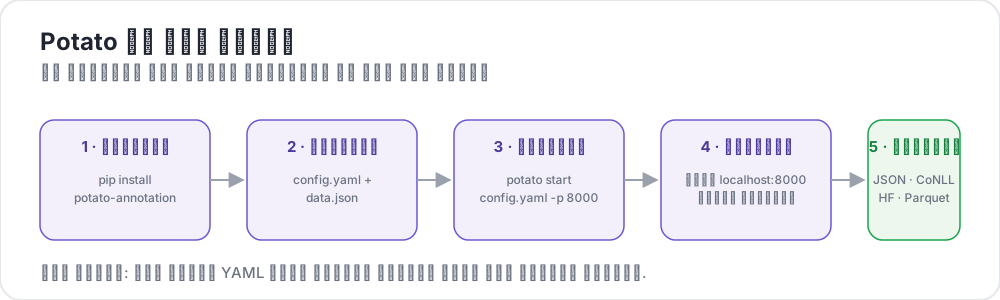 Potato in five steps
المتطلبات الأساسية
- Python 3.7 أو أعلى
- مدير الحزم pip
التثبيت
قم بتثبيت Potato باستخدام pip:
bash
pip install potato-annotationإنشاء مشروعك الأول
1. إنشاء مجلد المشروع
bash
mkdir my-annotation-task
cd my-annotation-task
2. إنشاء ملف البيانات
أنشئ مجلد data وأضف ملفًا باسم data.json يحتوي على البيانات المراد توسيمها:
bash
mkdir datajson
[
  {"id": "1", "text": "I love this product! It's amazing."},
  {"id": "2", "text": "This is the worst experience ever."},
  {"id": "3", "text": "It's okay, nothing special."}
]
3. إنشاء ملف الإعدادات
أنشئ ملفًا باسم config.yaml في مجلد مشروعك:
مهم: يجب أن يكون ملف الإعدادات موجودًا داخل مجلد المشروع. هذا متطلب أمني في Potato 2.0.
yaml
annotation_task_name: "Sentiment Analysis"

# Task directory (current directory)
task_dir: "."

# Data configuration
data_files:
  - "data/data.json"

item_properties:
  id_key: id
  text_key: text

# Output configuration
output_annotation_dir: "annotation_output/"
export_annotation_format: "json"

# Annotation scheme
annotation_schemes:
  - annotation_type: radio
    name: sentiment
    description: "What is the sentiment of this text?"
    labels:
      - Positive
      - Negative
      - Neutral

# Skip password authentication (anyone can log in with just a username)
require_password: false
4. بدء تشغيل الخادم
bash
python -m potato start config.yaml -p 8000أو باستخدام الاختصار:
bash
potato start config.yaml5. افتح المتصفح
انتقل إلى http://localhost:8000 وابدأ التوسيم!
هيكل المشروع
يجب أن يبدو مشروعك كالتالي:
text
my-annotation-task/
├── config.yaml
├── data/
│   └── data.json
└── annotation_output/     # created automatically
    └── alice/              # one subfolder per username
        └── user_state.json
ما التالي؟
- تعرّف على أساسيات الإعدادات لمزيد من الخيارات
- استكشف أنواع التوسيم المختلفة
- قم بإعداد إدارة المستخدمين لفريقك
- اكتشف الجديد في الإصدار الثاني بما في ذلك دعم الذكاء الاصطناعي والتعلم النشط
الأدوات والمرافق
بعد أن تتقن الأساسيات، تحقق من هذه الأدوات المفيدة:
- أداة المعاينة عبر سطر الأوامر - التحقق من صحة الإعدادات دون تشغيل الخادم
- دليل تصحيح الأخطاء - أعلام التصحيح ونصائح استكشاف الأخطاء
- محاكي المستخدم - الاختبار باستخدام موسِّمين محاكاة