فرز البطاقات
أنشئ واجهات فرز بطاقات بالسحب والإفلات في Potato لمهام التجميع والتصنيف وهندسة المعلومات، بوضعَي الفرز المغلق والمفتوح.
يوفر مخطط توسيم فرز البطاقات واجهة سحب وإفلات لتجميع العناصر في فئات. وهذا المخطط مثالي لأبحاث هندسة المعلومات، وتصنيف المحتوى، وأي مهمة يحتاج فيها الموسِّمون إلى تنظيم العناصر في مجموعات ذات معنى.
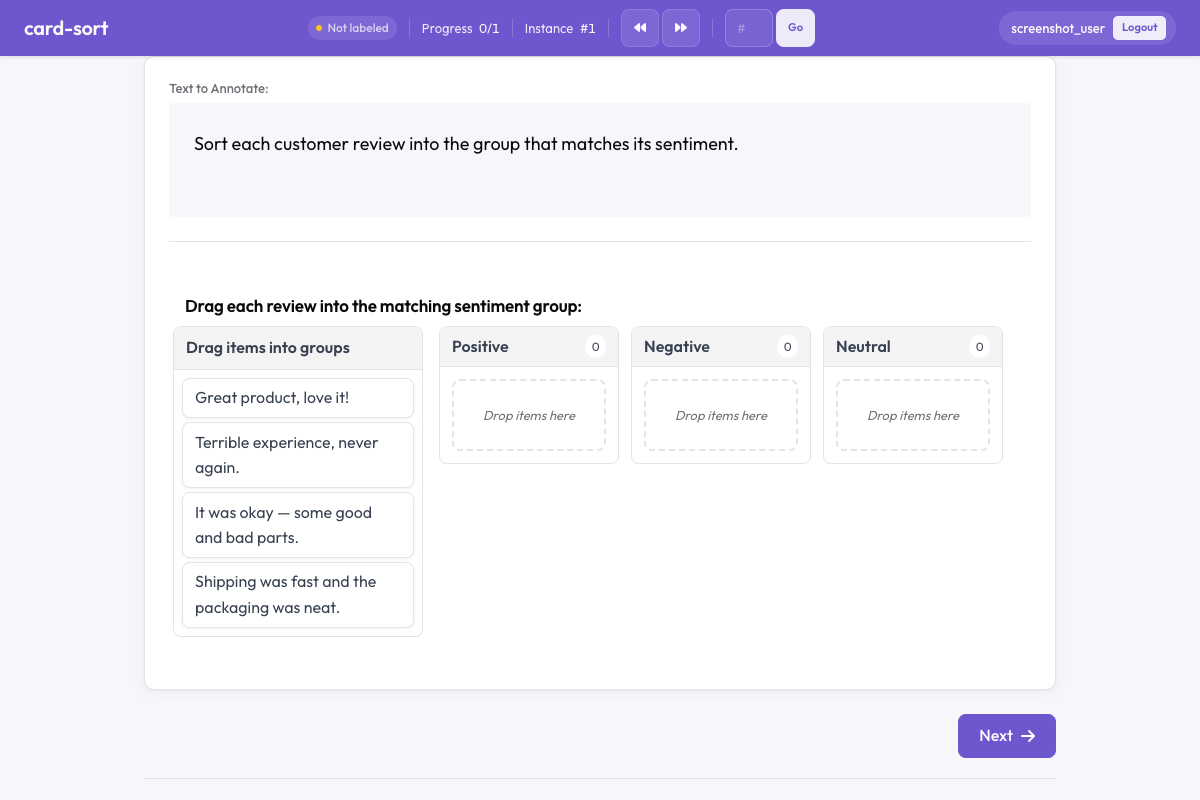 Card sort in Potato
نظرة عامة
يدعم مخطط فرز البطاقات وضعين:
- الفرز المغلق - يسحب الموسِّمون البطاقات إلى مجموعات محددة مسبقاً
- الفرز المفتوح - ينشئ الموسِّمون مجموعاتهم الخاصة ويسمّونها
البطاقات عناصر قابلة للسحب يرتّبها الموسِّمون بإفلاتها داخل حاويات المجموعات.
البدء السريع
yaml
annotation_schemes:
  - annotation_type: card_sort
    name: content_grouping
    description: Drag each card into the most appropriate group.
    mode: closed
    groups:
      - Positive
      - Negative
      - Neutral
خيارات الإعدادات
| الحقل | النوع | الافتراضي | الوصف |
|---|---|---|---|
annotation_type | string | مطلوب | يجب أن يكون "card_sort" |
name | string | مطلوب | معرّف فريد لهذا المخطط |
description | string | مطلوب | التعليمات المعروضة للموسِّمين |
mode | string | مطلوب | "closed" (مجموعات محددة مسبقاً) أو "open" (مجموعات ينشئها الموسِّم) |
groups | array | مطلوب (المغلق) | قائمة بأسماء المجموعات في وضع الفرز المغلق |
items_field | string | "items" | الحقل في بيانات JSON الذي يحتوي على قائمة عناصر البطاقات |
allow_empty_groups | boolean | true | هل يجوز أن تبقى المجموعات فارغة عند الإرسال |
allow_multiple | boolean | false | هل يمكن وضع البطاقة الواحدة في أكثر من مجموعة |
أمثلة
فرز المشاعر (مغلق)
yaml
annotation_schemes:
  - annotation_type: card_sort
    name: sentiment_sort
    description: Sort each comment into the appropriate sentiment category.
    mode: closed
    groups:
      - Positive
      - Negative
      - Mixed
      - Off-topic
    allow_empty_groups: true
مع بيانات نموذجية:
json
{
  "id": "batch_001",
  "items": [
    "Great product, love it!",
    "Terrible experience, never again.",
    "It was okay, some good and bad parts.",
    "Anyone know the weather today?"
  ]
}
فرز بطاقات مفتوح لهندسة المعلومات
yaml
annotation_schemes:
  - annotation_type: card_sort
    name: ia_sort
    description: >
      Group these menu items into categories that make sense to you.
      Name each group with a descriptive label.
    mode: open
    items_field: "menu_items"
    allow_empty_groups: false
التجميع متعدد التسميات
yaml
annotation_schemes:
  - annotation_type: card_sort
    name: theme_sort
    description: >
      Sort each statement into relevant themes.
      A statement can belong to multiple themes.
    mode: closed
    groups:
      - Economy
      - Healthcare
      - Education
      - Environment
      - Security
    allow_multiple: true
صيغة المخرجات
json
{
  "content_grouping": {
    "groups": {
      "Positive": ["Great product, love it!"],
      "Negative": ["Terrible experience, never again."],
      "Mixed": ["It was okay, some good and bad parts."],
      "Off-topic": ["Anyone know the weather today?"]
    }
  }
}
في الفرز المفتوح، تكون أسماء المجموعات نصوصاً يعرّفها الموسِّم.
أفضل الممارسات
- استخدم الفرز المغلق للحصول على نتائج متسقة - المجموعات المحددة مسبقاً تضمن توسيمات قابلة للمقارنة بين الموسِّمين
- استخدم الفرز المفتوح للبحث الاستكشافي - حين تريد اكتشاف كيف يجمّع الناس العناصر تلقائياً
- أبقِ نص البطاقة قصيراً - النصوص الطويلة على البطاقات تجعل السحب متعباً؛ استخدم تسميات موجزة أو مقتطفات
- حدّ من عدد البطاقات - من 15 إلى 30 بطاقة لكل مهمة عدد مثالي؛ وما تجاوز 40 يصبح مُملّاً
- قدّم تسميات مجموعات واضحة - في الفرز المغلق، استخدم أسماء مجموعات غير ملتبسة لتقليل الحيرة
قراءة إضافية
- الاختيار الأحادي والمتعدد - اختيار التسميات القياسي
- مقياس الأفضل والأسوأ - التوسيم المقارن
- ميزات الإنتاجية - اختصارات لوحة المفاتيح والكفاءة
للاطلاع على تفاصيل التنفيذ، راجع الوثائق المصدرية.