مخططات التوسيم
عرّف مخططات التوسيم بصيغة YAML باستخدام radio وmultiselect وspan وlikert وslider وtext و55 نوعًا آخر. اضبط التسميات والأسئلة والحقول المطلوبة.
تحدد مخططات التوسيم مهام التوسيم التي يؤديها الموسِّمون. يدعم Potato 76 نوعًا من التوسيم يمكن دمجها لبناء مهام توسيم معقدة.
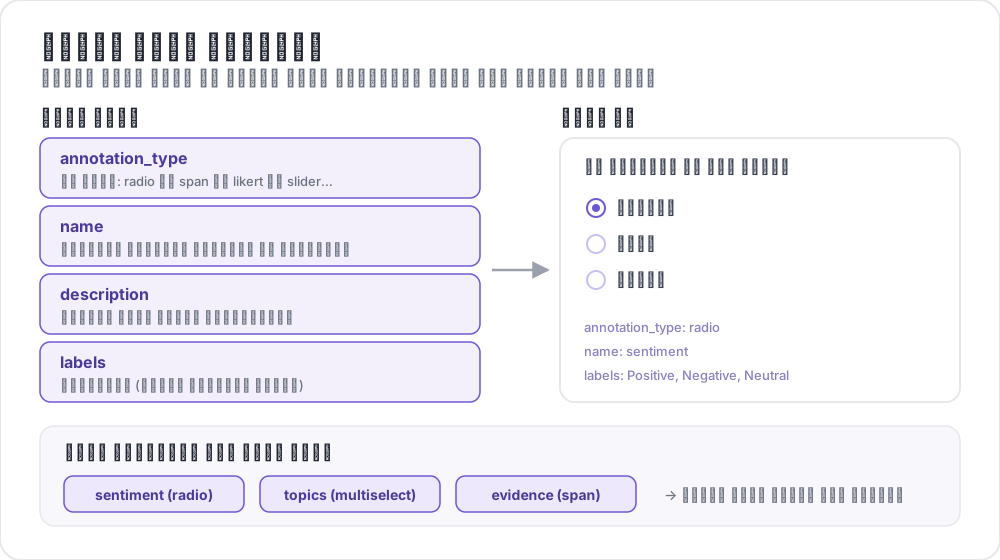 تشريح مخطط التوسيم
الهيكل الأساسي
يُعرَّف كل مخطط داخل المصفوفة annotation_schemes:
annotation_schemes:
  - annotation_type: radio
    name: sentiment
    description: "What is the sentiment?"
    labels:
      - Positive
      - Negative
      - Neutral
الحقول المطلوبة
يحمل كل مخطط هذه الحقول الثلاثة. وتضيف الأنواع المختلفة حقولها المطلوبة الخاصة، وهي مذكورة مع كل نوع أدناه.
| الحقل | الوصف |
|---|---|
annotation_type | نوع التوسيم (radio، multiselect، likert، span، text، number، slider، multirate، select، pairwise، bws، soft_label، confidence، constant_sum، range_slider، semantic_differential، hierarchical_multiselect، card_sort، rubric_eval، extractive_qa، error_span، triage، coreference، span_link، وغيرها) |
name | معرّف داخلي (بلا مسافات، ويُستخدم في المخرجات) |
description | التعليمات التي تظهر للموسِّمين |
أنواع التوسيم المدعومة
1. اختيار واحد (Radio)
اختر خيارًا واحدًا بالضبط من قائمة:
- annotation_type: radio
  name: sentiment
  description: "What is the sentiment of this text?"
  labels:
    - Positive
    - Negative
    - Neutral

  # Assigns keys 1, 2, 3... in the order the labels are listed
  sequential_key_binding: true

  # Horizontal layout instead of vertical
  horizontal: true
تربط الاختصارات التسلسلية الأرقام 1-9 بالتسميات التسع الأولى، لذا فإن إعادة ترتيب قائمة التسميات تعيد توزيع المفاتيح أيضًا. للحصول على ربط يبقى ثابتًا بعد إعادة الترتيب، امنح كل تسمية مفتاحًا خاصًا بها (انظر اختصارات لوحة المفاتيح).
2. مقياس ليكرت
مقاييس تقييم ذات طرفين موسومين:
- annotation_type: likert
  name: agreement
  description: "How much do you agree with this statement?"
  size: 5  # Number of scale points
  min_label: "Strongly Disagree"
  max_label: "Strongly Agree"

  # Show the numeric value of the selected point
  displaying_score: true
الحقل size مطلوب مع تسميتي الطرفين كلتيهما. تمنح خمس نقاط الموسِّمين نقطة وسطى محايدة، أما العدد الزوجي فيفرض عليهم اختيار اتجاه.
3. اختيار متعدد (Multiselect)
اختر عدة خيارات من قائمة:
- annotation_type: multiselect
  name: topics
  description: "Select all relevant topics"
  labels:
    - Politics
    - Technology
    - Sports
    - Entertainment
    - Science

  # Require at least one box before the annotator can move on
  label_requirement:
    required: true

  # Allow free text response
  has_free_response: true
يضيف has_free_response مربع نص "أخرى". ويستحق تفعيله ما دامت مجموعة التسميات قيد المراجعة، لأن المدخلات التي يجمعها تسمّي الفئات الناقصة.
4. توسيم النطاقات
ظلّل مقاطع النص ووسّمها:
- annotation_type: span
  name: entities
  description: "Highlight named entities in the text"
  labels:
    - PERSON
    - ORGANIZATION
    - LOCATION
    - DATE

  # Show the label name on each highlighted span
  show_span_labels: true

  # Ctrl/Cmd+click to add non-contiguous ranges to one annotation
  allow_discontinuous: false

  # Keyboard shortcuts for labels
  sequential_key_binding: true
يغطي allow_discontinuous النطاقات المكوّنة من أجزاء منفصلة، مثل السوابق المنقسمة، ولا يغطي النطاقات المتداخلة فيما بينها. اتركه معطّلًا ما لم تكن الظاهرة التي توسّمها تنقطع فعلًا عبر فجوة، لأن إيماءة Ctrl/Cmd مع النقر سهلة التفعيل عن طريق الخطأ.
5. شريط التمرير
نطاق رقمي متصل:
- annotation_type: slider
  name: confidence
  description: "How confident are you in your answer? (0 = not at all, 100 = completely)"
  min_value: 0
  max_value: 100
  starting_value: 50
  step: 1

  # Shows min_value and max_value at the ends of the track
  show_labels: true
الحقول الثلاثة min_value وmax_value وstarting_value كلها مطلوبة. لا يقبل شريط التمرير قائمة labels. وإضافة قائمة كهذه تحوّل السؤال إلى تخطيط أزرار اختيار (radio) ويختفي شريط التمرير، لذا ضع أي صياغة لطرفي المقياس في description. القيمة الابتدائية هي الموضع الذي يقف فيه مقبض كل موسِّم قبل أن يلمسه، لذا فإن اختيار نقطة المنتصف يتجنب دفع الموسِّمين نحو أحد الطرفين.
6. إدخال النص
إجابات نصية حرة:
- annotation_type: text
  name: explanation
  description: "Explain your reasoning"

  # Multi-line input
  rows: 4

  # Require a minimum length and show a running count
  min_chars: 20
  show_char_count: true

  # Placeholder text
  placeholder: "Enter your explanation here..."

  # Disable paste (for transcription tasks)
  allow_paste: false
للإعداد allow_paste: false أهمية في مهام النسخ والاسترجاع الحر، حيث تكون الإجابة الملصقة منسوخة من المصدر لا من إنتاج الموسِّم.
7. إدخال رقمي
إدخال رقمي مع قيود:
- annotation_type: number
  name: count
  description: "How many entities are mentioned?"
  min: 0
  max: 100
  step: 1
8. تقييم متعدد (تقييم مصفوفي)
قيّم عدة عناصر على المقياس نفسه:
- annotation_type: multirate
  name: quality_aspects
  description: "Rate each aspect of the response"

  # Rows: the items being rated
  options:
    - Accuracy
    - Fluency
    - Relevance

  # Columns: the shared rating scale
  labels:
    - Poor
    - Fair
    - Good
    - Very Good
    - Excellent

  # Randomize row order per annotator
  option_randomization: true

  # Layout options
  arrangement: "vertical"
  display_config:
    num_columns: 2
الحقلان options وlabels مطلوبان كلاهما، لأن المصفوفة تحتاج إلى صفوف وأعمدة. ويوزّع الترتيب العشوائي للصفوف أي أثر للترتيب على جميع العناصر، بدلًا من تركيزه على الجانب الذي يصادف أن يأتي أولًا في القائمة.
الخيارات المشتركة
اختصارات لوحة المفاتيح
سرّع التوسيم باختصارات لوحة المفاتيح:
# Automatic sequential binding: digits 1, 2, 3... in label order
sequential_key_binding: true
للحصول على ربط لا يتغير عند تعديل قائمة التسميات، مرّر التسميات بوصفها كائنات وامنح كل واحدة منها key_value:
labels:
  - name: Positive
    key_value: "1"
  - name: Negative
    key_value: "2"
  - name: Neutral
    key_value: "3"
تلميحات الأدوات
قدّم تلميحات تظهر عند التمرير فوق كل تسمية. ترتبط التلميحات بالتسمية لا بالمخطط، ولذلك تُضبط داخل labels:
labels:
  - name: Positive
    tooltip: "Expresses happiness, approval, or satisfaction"
  - name: Negative
    tooltip: "Expresses sadness, anger, or disappointment"
  - name: Neutral
    tooltip: "No clear emotional content"
للإرشادات المنسقة، وجّه tooltip_file إلى ملف HTML بدلًا من ذلك:
labels:
  - name: Economic
    tooltip_file: "config/tooltips/economic.html"
ألوان التسميات
ألوان مخصصة للتمييز البصري، تُعرَّف مرة واحدة للمشروع كله تحت ui:
ui:
  label_colors:
    entities:
      PERSON: "#3b82f6"
      LOCATION: "#10b981"
      ORGANIZATION: "#f59e0b"
تُفهرس الألوان باسم المخطط ثم باسم التسمية. ويمكن أيضًا ضبط لون على تسمية منفردة إلى جانب تلميحها:
labels:
  - name: positive
    color: "#22C55E"
    tooltip: "Positive sentiment"
الحقول المطلوبة
اجعل المخطط مطلوبًا قبل الإرسال:
- annotation_type: radio
  name: sentiment
  description: "What is the sentiment?"
  label_requirement:
    required: true
  labels:
    - Positive
    - Negative
لاشتراط خيار بعينه بدلًا من أي إجابة، سمّه باستخدام required_label، الذي يقبل تسمية واحدة أو قائمة.
مخططات متعددة
ادمج عدة أنواع من التوسيم في كل مثيل:
annotation_schemes:
  # Primary classification
  - annotation_type: radio
    name: sentiment
    description: "Overall sentiment"
    labels:
      - Positive
      - Negative
      - Neutral
    label_requirement:
      required: true
    sequential_key_binding: true

  # Confidence rating
  - annotation_type: likert
    name: confidence
    description: "How confident are you?"
    size: 5
    min_label: "Guessing"
    max_label: "Certain"

  # Topic tags
  - annotation_type: multiselect
    name: topics
    description: "Select all relevant topics"
    labels:
      - Politics
      - Technology
      - Sports
      - Entertainment
    has_free_response: true

  # Notes
  - annotation_type: text
    name: notes
    description: "Any additional observations"
    rows: 4
    label_requirement:
      required: false
تسمية المشاعر وحدها مطلوبة هنا. وترك تقييم الثقة والملاحظات اختياريين يقصر المجموعة المطلوبة على الحقل الوحيد الذي تعتمد عليه الدراسة، فلا يتعطل الموسِّمون بسبب مربع لا وزن له في التحليل.
الميزات المتقدمة
المقارنة الزوجية
قارن بين عنصرين. يأتي العنصران من المثيل نفسه، ويحددهما items_key:
- annotation_type: pairwise
  name: preference
  description: "Which response is better?"
  mode: binary
  items_key: "responses"   # Field holding a list of 2+ items

  # Labels for the two sides
  show_labels: true
  labels:
    - "Response A"
    - "Response B"

  # Tie option (opt-in)
  allow_tie: true
  tie_label: "No preference"
يوفّر ملف البيانات الزوج، لذا يحمل كل سطر قائمة من عنصرين على الأقل:
{"id": "1", "responses": ["First response text", "Second response text"]}يستحق زر التعادل الإضافة حين تكثر الأزواج المتكافئة فعلًا، لأن الموسِّمين في غيابه يحسمون التعادل عشوائيًا، ويظهر هذا التشويش في صورة اختلاف بينهم.
مقياس الأفضل-الأسوأ
رتّب العناصر باختيار الأفضل والأسوأ من كل مجموعة. تُبنى المجموعات بواسطة كتلة bws_config في المستوى الأعلى لا من المخطط، ومخطط bws بدون هذه الكتلة يعرض سؤالًا فوق قائمة عناصر فارغة:
bws_config:
  tuple_size: 4              # Items per tuple
  min_item_appearances: 8    # Minimum appearances per item across tuples
  seed: 42
  scoring:
    method: counting         # counting | bradley_terry | plackett_luce

annotation_schemes:
  - annotation_type: bws
    name: ranking
    description: "Sentiment Intensity"
    best_description: "Which sentence expresses the MOST positive sentiment?"
    worst_description: "Which sentence expresses the LEAST positive sentiment?"
    tuple_size: 4
    sequential_key_binding: true
كل صف في ملف البيانات عنصر واحد، ويسحب Potato المجموعات من هذا المخزون. ورفع قيمة min_item_appearances يجعل درجة كل عنصر أدق، على حساب عدد أكبر من المقارنات.
القائمة المنسدلة
اختيار واحد يوفّر المساحة:
- annotation_type: select
  name: category
  description: "Select a category"
  labels:
    - Category A
    - Category B
    - Category C
    - Category D
    - Category E

  # Vary the option order between annotators
  randomize_order: true
تخفي القائمة المنسدلة الخيارات حتى تُفتح، لذا تناسب مجموعات التسميات الطويلة التي تدفع فيها أزرار الاختيار النص خارج الشاشة. أما في المجموعات القصيرة فأزرار الاختيار أسرع، لأنها تتطلب نقرة واحدة بدلًا من نقرتين.
مرجع صيغ البيانات
المدخلات
تعمل مخططات التوسيم مع صيغة بياناتك:
{
  "id": "doc_1",
  "text": "This is the text to annotate."
}
المخرجات
تُحفظ التوسيمات بأسماء المخططات مفاتيحَ لها:
{
  "id": "doc_1",
  "annotations": {
    "sentiment": "Positive",
    "confidence": 4,
    "topics": ["Technology", "Science"],
    "entities": [
      {"start": 0, "end": 4, "label": "ORGANIZATION", "text": "This"}
    ],
    "notes": "Clear positive sentiment about technology."
  }
}
أفضل الممارسات
1. تسميات واضحة
استخدم تسميات واضحة ومتمايزة:
تسمّي هذه التسميات نقاطًا متمايزة على بُعد واحد:
labels:
  - Strongly Positive
  - Somewhat Positive
  - Neutral
  - Somewhat Negative
  - Strongly Negative
أما هذه فلا. لن يرسم موسِّمان الحد نفسه بين "OK" و"Fine" و"Acceptable"، والاختلاف الناتج يتعلق بمجموعة التسميات لا بالبيانات:
labels:
  - Good
  - OK
  - Fine
  - Acceptable
2. تلميحات مفيدة
أضف تلميحات للتسميات الدقيقة:
labels:
  - name: Sarcasm
    tooltip: "The text says the opposite of what it means"
  - name: Irony
    tooltip: "A mismatch between expectation and reality"
3. اختصارات لوحة المفاتيح
فعّل الاختصارات في المهام ذات الحجم الكبير:
sequential_key_binding: true4. ترتيب منطقي
رتّب التسميات بطريقة متسقة:
- الأكثر شيوعًا أولًا
- أبجديًا
- حسب الشدة (من الأدنى إلى الأعلى)
5. تقليل الخيارات
كثرة الخيارات تبطئ التوسيم:
- Radio: من 2 إلى 7 خيارات
- Multiselect: من 5 إلى 15 خيارًا
- Likert: من 5 إلى 7 نقاط
6. اختبر أولاً
وسّم عدة أمثلة بنفسك قبل النشر لاكتشاف:
- التسميات الملتبسة
- الفئات الناقصة
- التعليمات غير الواضحة