عرض العناصر
افصل عرض المحتوى عن التوسيم باستخدام كتلة إعدادات instance_display.
جديد في الإصدار 2.1.0
يفصل عرض العناصر بين المحتوى المعروض للموسِّمين والتوسيمات المطلوب جمعها. يتيح لك ذلك عرض أي مجموعة من أنواع المحتوى (صور، فيديوهات، صوت، نص) بجانب أي مخططات توسيم (أزرار راديو، مربعات اختيار، نطاقات، إلخ).
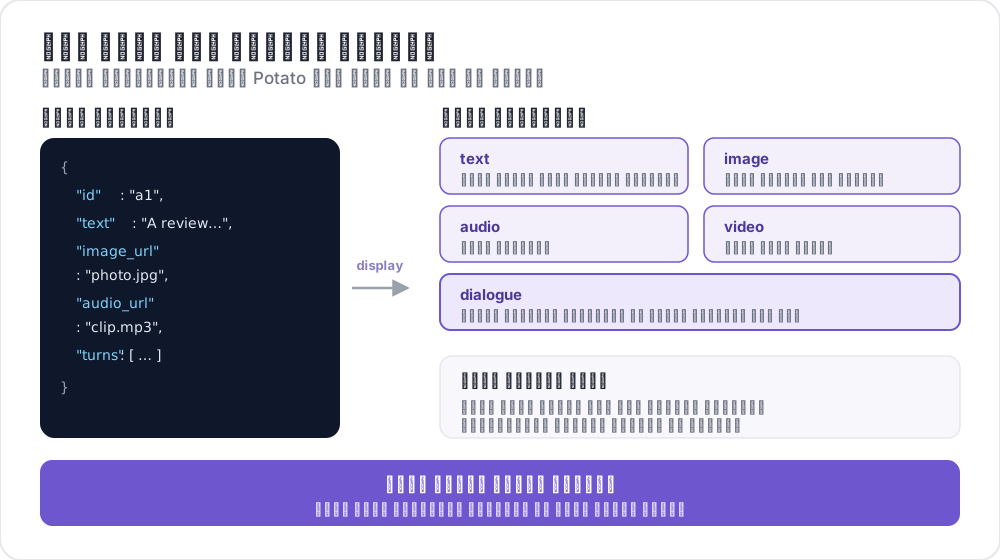 كيف يربط عرض العنصر الحقول
لماذا تستخدم عرض العناصر؟
سابقًا، إذا أردت عرض صورة مع أزرار راديو للتصنيف، كان عليك إضافة مخطط image_annotation مع min_annotations: 0 فقط لعرض الصورة. كان هذا مربكًا وغير صحيح دلاليًا.
مع instance_display، تقوم بتعيين المحتوى المعروض صراحة:
# OLD (deprecated workaround)
annotation_schemes:
  - annotation_type: image_annotation
    name: image_display
    min_annotations: 0  # Just to show the image
    tools: [bbox]
    labels: [unused]
  - annotation_type: radio
    name: category
    labels: [A, B, C]

# NEW (recommended)
instance_display:
  fields:
    - key: image_url
      type: image

annotation_schemes:
  - annotation_type: radio
    name: category
    labels: [A, B, C]
الإعداد الأساسي
أضف قسم instance_display إلى إعدادات YAML:
instance_display:
  fields:
    - key: "image_url"           # Field name in your data JSON
      type: "image"              # Content type
      label: "Image to classify" # Optional header
      display_options:
        max_width: 600
        zoomable: true

  layout:
    direction: "vertical"        # vertical or horizontal
    gap: "20px"
أنواع العرض المدعومة
| النوع | الوصف | هدف النطاق |
|---|---|---|
text | محتوى نصي عادي | نعم |
html | محتوى HTML معقم | لا |
image | عرض صورة مع تكبير | لا |
video | مشغل فيديو | لا |
audio | مشغل صوت | لا |
dialogue | أدوار محادثة | نعم |
pairwise | مقارنة جنبًا إلى جنب | لا |
code | كود مصدري مميز بناءً | نعم |
spreadsheet | بيانات جدولية (Excel/CSV) | نعم (صف/خلية) |
document | مستندات غنية (Word، Markdown، HTML) | نعم |
pdf | مستندات PDF مع عناصر تحكم الصفحات | نعم |
خيارات أنواع العرض
عرض النص
- key: "text"
  type: "text"
  label: "Document"
  display_options:
    collapsible: false        # Make content collapsible
    max_height: 400           # Max height in pixels before scrolling
    preserve_whitespace: true # Preserve line breaks and spacing
عرض الصور
- key: "image_url"
  type: "image"
  label: "Image"
  display_options:
    max_width: 800            # Max width (number or CSS string)
    max_height: 600           # Max height
    zoomable: true            # Enable zoom controls
    alt_text: "Description"   # Alt text for accessibility
    object_fit: "contain"     # CSS object-fit property
عرض الفيديو
- key: "video_url"
  type: "video"
  label: "Video"
  display_options:
    max_width: 800
    max_height: 450
    controls: true            # Show video controls
    autoplay: false           # Auto-play on load
    loop: false               # Loop playback
    muted: false              # Start muted
عرض الصوت
- key: "audio_url"
  type: "audio"
  label: "Audio"
  display_options:
    controls: true            # Show audio controls
    autoplay: false
    loop: false
    show_waveform: false      # Show waveform visualization
عرض الحوار
- key: "conversation"
  type: "dialogue"
  label: "Conversation"
  display_options:
    alternating_shading: true    # Alternate background colors
    speaker_extraction: true     # Extract "Speaker:" from text
    show_turn_numbers: false     # Show turn numbers
صيغة البيانات للحوار (كل سطر في ملف JSONL):
{"id": "conv_001", "conversation": ["Speaker A: Hello there!", "Speaker B: Hi, how are you?"]}أو مع بيانات منظمة:
{"id": "conv_001", "conversation": [{"speaker": "Alice", "text": "Hello there!"}, {"speaker": "Bob", "text": "Hi, how are you?"}]}العرض الزوجي
- key: "comparison"
  type: "pairwise"
  label: "Compare Options"
  display_options:
    cell_width: "50%"           # Width of each cell
    show_labels: true           # Show A/B labels
    labels: ["Option A", "Option B"]
    vertical_on_mobile: true    # Stack vertically on mobile
خيارات التخطيط
تحكم في ترتيب الحقول المتعددة:
instance_display:
  layout:
    direction: horizontal  # horizontal or vertical
    gap: 24px              # Space between fields
دعم توسيم النطاقات
يمكن أن تكون أنواع العرض النصية (text، dialogue) أهدافًا لتوسيم النطاقات:
instance_display:
  fields:
    - key: "document"
      type: "text"
      span_target: true  # Enable span annotation on this field

annotation_schemes:
  - annotation_type: span
    name: entities
    labels: [PERSON, LOCATION, ORG]
أهداف نطاقات متعددة
يمكنك وجود حقول نصية متعددة تدعم توسيم النطاقات:
instance_display:
  fields:
    - key: "source_text"
      type: "text"
      label: "Source Document"
      span_target: true

    - key: "summary"
      type: "text"
      label: "Summary"
      span_target: true

annotation_schemes:
  - annotation_type: span
    name: factual_errors
    labels: [contradiction, unsupported, fabrication]
عند استخدام أهداف نطاقات متعددة، يتم تخزين التوسيمات مع ارتباط الحقل:
{
  "factual_errors": {
    "source_text": [],
    "summary": [
      {"start": 45, "end": 67, "label": "unsupported"}
    ]
  }
}
ربط مخططات التوسيم بحقول العرض
لمخططات توسيم الوسائط (image_annotation، video_annotation، audio_annotation)، اربطها بحقول العرض باستخدام source_field:
instance_display:
  fields:
    - key: "image_url"
      type: "image"

annotation_schemes:
  - annotation_type: image_annotation
    source_field: "image_url"  # Links to display field
    tools: [bbox]
    labels: [person, car]
تقييمات أدوار الحوار الفردية
أضف أدوات تقييم مضمنة لأدوار الحوار الفردية:
instance_display:
  fields:
    - key: conversation
      type: dialogue
      label: "Conversation"
      display_options:
        show_turn_numbers: true
        per_turn_ratings:
          speakers: ["Agent"]          # Only show ratings for these speakers
          schema_name: "turn_quality"  # Name for the stored annotation data
          scheme:
            type: likert
            size: 5
            labels: ["Poor", "Excellent"]
تظهر دوائر التقييم مضمنة أسفل دور كل متحدث مطابق. تمتلئ التقييمات حتى القيمة المحددة، ويتم تخزين جميع تقييمات الأدوار ككائن JSON واحد:
{
  "turn_quality": "{\"0\": 4, \"2\": 5, \"4\": 3}"
}
مثال: تصنيف الصور
annotation_task_name: "Image Classification"

data_files:
  - data/images.json

item_properties:
  id_key: id
  text_key: image_url

task_dir: .
output_annotation_dir: annotation_output

instance_display:
  fields:
    - key: image_url
      type: image
      label: "Image to Classify"
      display_options:
        max_width: 600
        zoomable: true

    - key: context
      type: text
      label: "Additional Context"
      display_options:
        collapsible: true

annotation_schemes:
  - annotation_type: radio
    name: category
    description: "What category best describes this image?"
    labels:
      - nature
      - urban
      - people
      - objects

user_config:
  allow_all_users: true
ملف بيانات نموذجي (data/images.json) بصيغة JSONL:
{"id": "img_001", "image_url": "https://example.com/image1.jpg", "context": "Taken in summer 2023"}
{"id": "img_002", "image_url": "https://example.com/image2.jpg", "context": "Winter landscape"}
مثال: توسيم متعدد الوسائط
فيديو بجانب نسخة نصية مع توسيم نطاقات:
annotation_task_name: "Video Analysis"

instance_display:
  layout:
    direction: horizontal
    gap: 24px

  fields:
    - key: video_url
      type: video
      label: "Video"
      display_options:
        max_width: "45%"

    - key: transcript
      type: text
      label: "Transcript"
      span_target: true

annotation_schemes:
  - annotation_type: radio
    name: sentiment
    labels: [positive, neutral, negative]

  - annotation_type: span
    name: highlights
    labels:
      - key_point
      - question
      - supporting_evidence
التوافق مع الإصدارات السابقة
- الإعدادات الحالية بدون
instance_displayتستمر في العمل دون تغيير - لا يزال
text_keyمنitem_propertiesيُستخدم كبديل احتياطي - كشف الوسائط القديم عبر مخططات التوسيم لا يزال يعمل
- يظهر تحذير إهمال في السجلات عند استخدام النمط القديم للعرض فقط
الترحيل من أنماط العرض فقط
إذا كنت تستخدم مخططات التوسيم فقط لعرض المحتوى:
قبل (مهمل):
annotation_schemes:
  - annotation_type: image_annotation
    name: image_display
    min_annotations: 0
    tools: [bbox]
    labels: [unused]
بعد (موصى به):
instance_display:
  fields:
    - key: image_url
      type: image
قراءة إضافية
- صيغ البيانات - صيغ بيانات الإدخال المدعومة
- إعدادات واجهة المستخدم - تخصيص الواجهة
- تخصيص التخطيط - قوالب HTML مخصصة
- توسيم الصور - أدوات توسيم الصور
لمزيد من التفاصيل التقنية، راجع الوثائق المصدرية.