الإجابة الاستخراجية عن الأسئلة
ابنِ واجهات إجابة عن الأسئلة على طراز SQuAD في Potato لاستخراج الإجابات على هيئة مقاطع، ومهام فهم المقروء، وتعليق إبراز المقاطع في النصوص.
يوفر مخطط تعليق الإجابة الاستخراجية عن الأسئلة واجهةً للإجابة عن الأسئلة يبرز فيها المعلّقون مقاطع الإجابة مباشرةً داخل نص المقطع. وهذا المخطط مناسب لبناء مجموعات بيانات فهم المقروء، وللتعليق على طراز SQuAD، وللتحقق من الوقائع، ولأي مهمة تُستخرج فيها الإجابات حرفياً من النص المصدر.
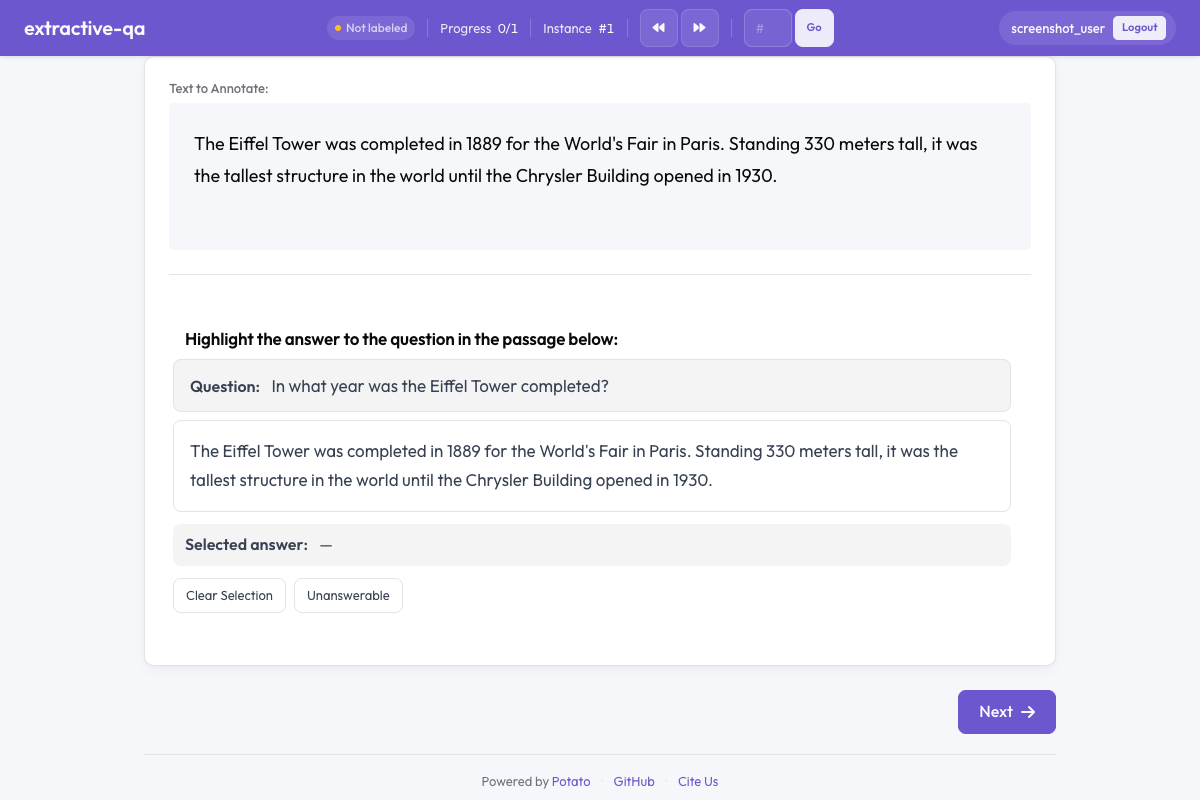 الإجابة الاستخراجية عن الأسئلة في Potato
نظرة عامة
يعرض مخطط الإجابة الاستخراجية:
- سؤالاً يظهر بوضوح فوق النص
- نصاً يختار المعلّقون فيه مقاطع الإجابة بالإبراز
- إبرازات ملوّنة تعلّم نص الإجابة المختار
- خياراً لتعذّر الإجابة للأسئلة التي لا يمكن الإجابة عنها من النص
بداية سريعة
yaml
annotation_schemes:
  - annotation_type: extractive_qa
    name: answer_span
    description: Highlight the answer to the question in the passage below.
    question_field: question
    passage_field: passage
    allow_unanswerable: true
خيارات التهيئة
| الحقل | النوع | الافتراضي | الوصف |
|---|---|---|---|
annotation_type | نص | مطلوب | يجب أن يكون "extractive_qa" |
name | نص | مطلوب | معرّف فريد لهذا المخطط |
description | نص | مطلوب | التعليمات المعروضة للمعلّقين |
question_field | نص | "question" | الحقل في بيانات JSON الذي يحتوي نص السؤال |
passage_field | نص | "" | الحقل في بيانات JSON الذي يحتوي نص المقطع (السلسلة الفارغة تستخدم حقل النص الافتراضي) |
allow_unanswerable | منطقي | true | إظهار مربع اختيار لوسم الأسئلة بأنه يتعذر الإجابة عنها |
highlight_color | نص | "#FFEB3B" | لون CSS لإبراز الإجابة |
أمثلة
إجابة عن الأسئلة على طراز SQuAD
yaml
annotation_schemes:
  - annotation_type: extractive_qa
    name: squad_answer
    description: >
      Select the shortest span in the passage that answers the question.
      If the question cannot be answered from the passage, mark it as unanswerable.
    question_field: question
    passage_field: context
    allow_unanswerable: true
    highlight_color: "#FFEB3B"
مع بيانات عيّنة:
json
{
  "id": "q001",
  "question": "When was the university founded?",
  "context": "The University of Michigan was founded in 1817 in Detroit and moved to Ann Arbor in 1837. It is one of the oldest public universities in the United States."
}
التحقق من الوقائع
yaml
annotation_schemes:
  - annotation_type: extractive_qa
    name: evidence_span
    description: >
      Highlight the evidence in the passage that supports or refutes the claim.
      Mark as unanswerable if the passage contains no relevant evidence.
    question_field: claim
    passage_field: document
    allow_unanswerable: true
    highlight_color: "#81C784"
استخراج الإجابة من دون خيار تعذّر الإجابة
yaml
annotation_schemes:
  - annotation_type: extractive_qa
    name: definition_extraction
    description: >
      Highlight the definition of the term in the passage.
      Every passage contains a definition — select the most precise span.
    question_field: term
    passage_field: text
    allow_unanswerable: false
    highlight_color: "#64B5F6"
صيغة المخرجات
json
{
  "answer_span": {
    "labels": {
      "answer_start": 45,
      "answer_end": 49,
      "answer_text": "1817",
      "unanswerable": false
    }
  }
}
وحين يسم المعلّق سؤالاً بأنه يتعذر الإجابة عنه:
json
{
  "answer_span": {
    "labels": {
      "unanswerable": true
    }
  }
}
ممارسات جيدة
- وجّه المعلّقين إلى اختيار أقصر المقاطع - فأقصر نص يجيب عن السؤال إجابة كاملة ينتج بيانات تدريب أنظف
- استخدم allow_unanswerable في المهام الواقعية - كثيراً ما تتضمن الإجابة عن الأسئلة في الواقع أسئلة يتعذر الإجابة عنها؛ وتعطيل هذا الخيار يدفع المعلّقين إلى التخمين
- اختر ألوان إبراز مقروءة - تأكد أن لون الإبراز يعطي تبايناً كافياً مع النص ليسهل القراءة
- أبقِ النصوص بطول معقول - من 100 إلى 500 كلمة لكل نص يعمل جيداً؛ أما النصوص الطويلة جداً فتجعل اختيار المقاطع مرهقاً
- صُغ الأسئلة بوضوح - تأكد أن الأسئلة جيدة الصياغة وغير ملتبسة لتقليل حيرة المعلّقين
قراءات إضافية
- تعليق المقاطع - وسم المقاطع بوجه عام
- إدخال النص والأرقام - إدخال إجابات نصية حرة
- دعم الذكاء الاصطناعي - تلميحات تعليق بمساعدة الذكاء الاصطناعي
للاطلاع على تفاصيل التنفيذ، انظر الوثائق المصدرية.