多模態智慧體評估
評估在文本之外採取行動的智慧體:computer-use 與 GUI 智慧體、語音助手、影片與文件智慧體。Potato 為帶點選定位的 GUI 軌跡、全雙工語音時間線、帶即時 IoU 的影片時間定位、語音轉錄錯誤標記、交錯式多模態推理以及表格網格結構提供專門構建的 schema。
智慧體越來越多地在文本之外的模態中行動:它們驅動 GUI、觀看影片、進行語音對話。每種模態都需要一個純文本控制元件無法提供的審查介面,比如一張帶智慧體點選位置的截圖、一條雙軌語音時間線、一個帶黃金區間的影片拖動條。 Potato 為這些軌跡提供專門構建的標註 schema,與它現有的影像、音訊和影片檢視並列。
每個 schema 在渲染時都從軌跡中推匯出其步驟、回合或片段,並且每個都在 examples/agent-traces/ 下附帶一個可執行的示例。
GUI/computer-use 軌跡(gui_trajectory)
逐步評估一個 computer-use、GUI 或 OS 智慧體(OSWorld,NeurIPS 2024;ScreenSpot-Pro;AndroidWorld)。每一步展示智慧體所看到的截圖和它所採取的動作;標註者對動作做出裁定(正確/錯誤元素/錯誤動作/幻覺)。當某一步帶有點選座標時,截圖上的一個定位標記會顯示該點選是否落在了正確的元素上。
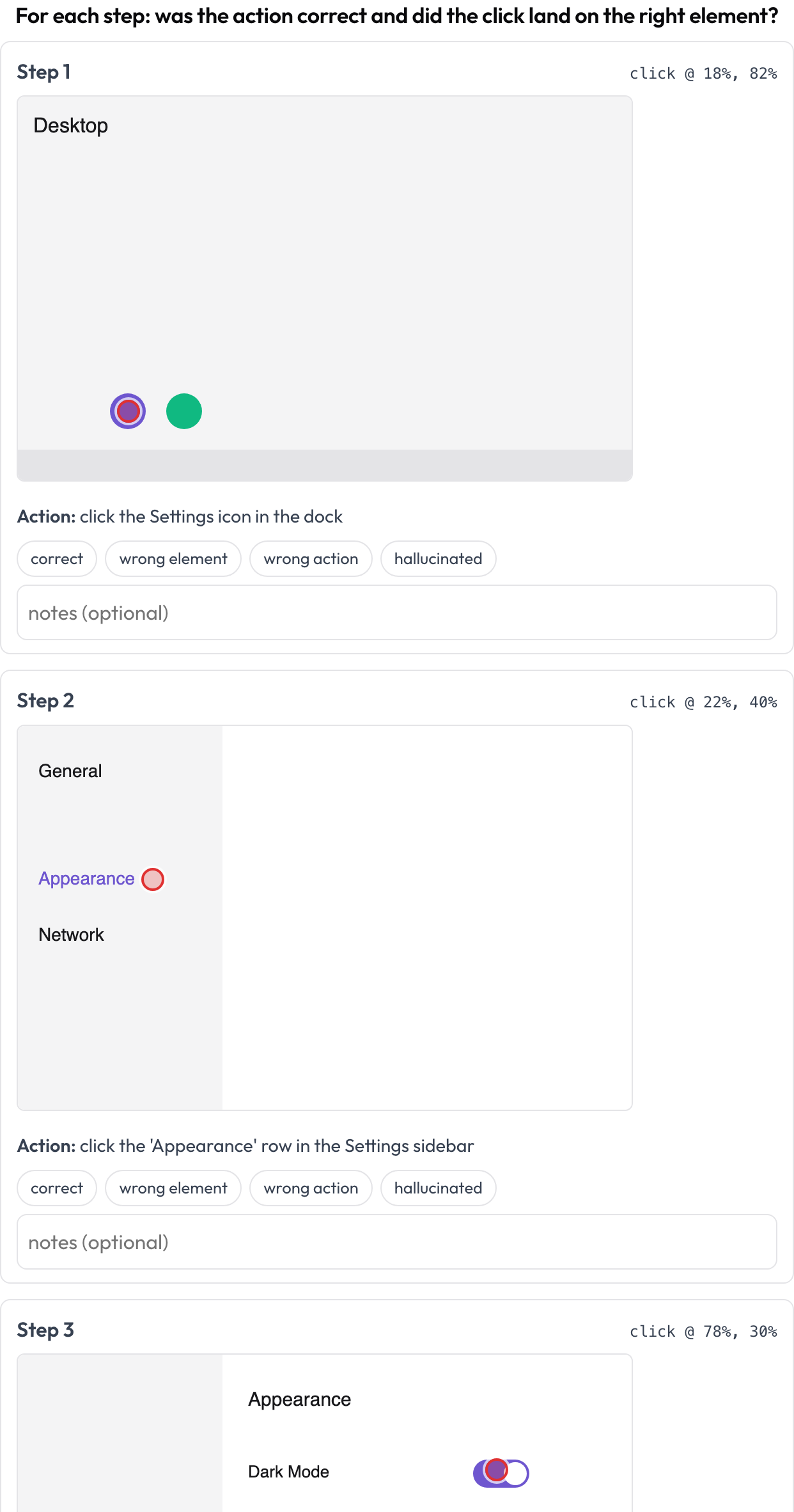 Review each computer-use step: action correctness plus click-grounding on the screenshot
annotation_schemes:
  - annotation_type: gui_trajectory
    name: gui_review
    description: "For each step: was the action correct and did the click land right?"
    steps_key: steps
    screenshot_key: screenshot   # field on each step holding an image URL / data-URI
    action_key: action           # field holding the action text
    coord_space: normalized      # normalized (0..1) | pixels — for the x/y grounding marker
    verdict_options: [correct, wrong_element, wrong_action, hallucinated]
每一步可提供 screenshot、action,以及可選的 x/y(或巢狀的 click: {x, y})。儲存為一個 {index, step, verdict, notes} 列表。
語音/全雙工互動(voice_interaction)
對一段語音的人↔智慧體對話標註其輪流發言和打斷(barge-in)處理(Full-Duplex-Bench,2025)。一條雙軌時間線(使用者泳道加智慧體泳道)按起止時間放置每個回合,並高亮重疊區域,即兩位說話者同時說話之處。標註者對每個重疊進行分類(智慧體應當回應/應當繼續/附和/不確定)並對整體輪流發言進行評分;提供時,源音訊會內聯播放。
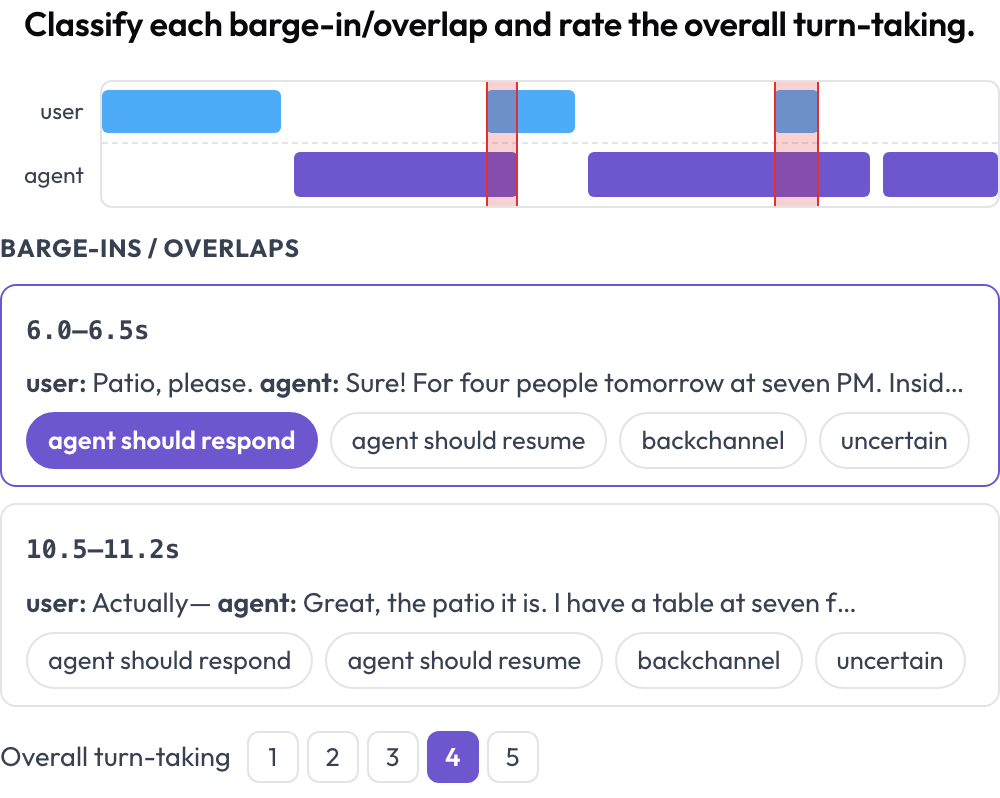 A dual-track voice timeline with barge-in detection and turn-taking scoring
annotation_schemes:
  - annotation_type: voice_interaction
    name: turn_taking
    description: "Classify each barge-in/overlap and rate the overall turn-taking."
    turns_key: turns           # list of {speaker, start, end, text} (seconds)
    speaker_key: speaker
    user_speakers: [user, human, caller]   # everything else is treated as the agent
    overlap_labels: [agent_should_respond, agent_should_resume, backchannel, uncertain]
    rating_scale: 5
    # audio_key: audio         # optional per-instance audio URL to enable the player
不同說話者回合之間的重疊在渲染時計算得出。儲存為 {"overlaps": {idx: label}, "rating": int}。
影片時間定位(temporal_grounding)
在影片中標出事件時間區間以進行時間定位評估(TimeScope,2025;ET-Bench)。對於每個事件提示,標註者設定黃金 [start, end],方式是捕獲播放頭位置或輸入秒數。當資料帶有模型預測的區間時,一個即時 IoU 和一條兩條棒的迷你時間線(預測 vs. 黃金)會隨你調整而更新。這是為"預測 vs. 黃金"的定位評分專門構建的,區別於通用的片段標註。
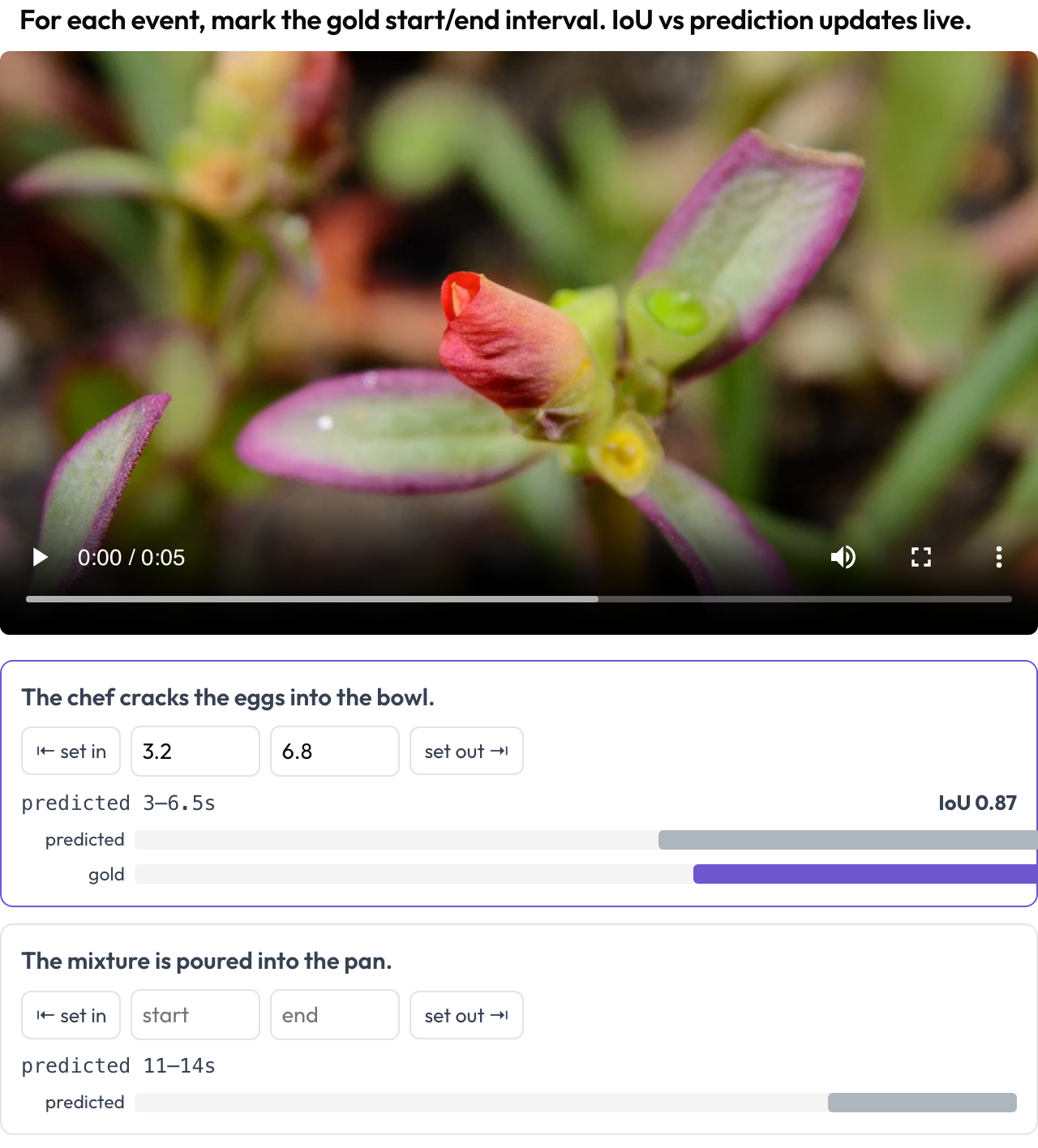 Mark gold event intervals on video with a live IoU vs. the model's prediction
annotation_schemes:
  - annotation_type: temporal_grounding
    name: grounding
    description: "Mark the gold start/end interval for each event. IoU vs prediction updates live."
    video_key: video           # per-instance video URL
    events_key: events         # list of {prompt, predicted: {start, end}} (predicted optional)
    # duration: 120            # optional fixed timeline scale (else inferred from the video)
儲存為 {"events": {idx: {start, end}}}。
對齊轉錄的語音錯誤(speech_transcript)
對一段時間對齊的語音轉錄逐片段標註 ASR/TTS 與語音品質錯誤(Speak & Improve,2025)。每個片段 {start, end, text, speaker?} 是一張顯示其時間戳和文本的卡片;標註者標記錯誤(ASR 錯誤/TTS 瑕疵/發音錯誤/不流暢)並可輸入修正後的轉錄。這是對 voice_interaction 中輪流發言檢視的片段級補充。
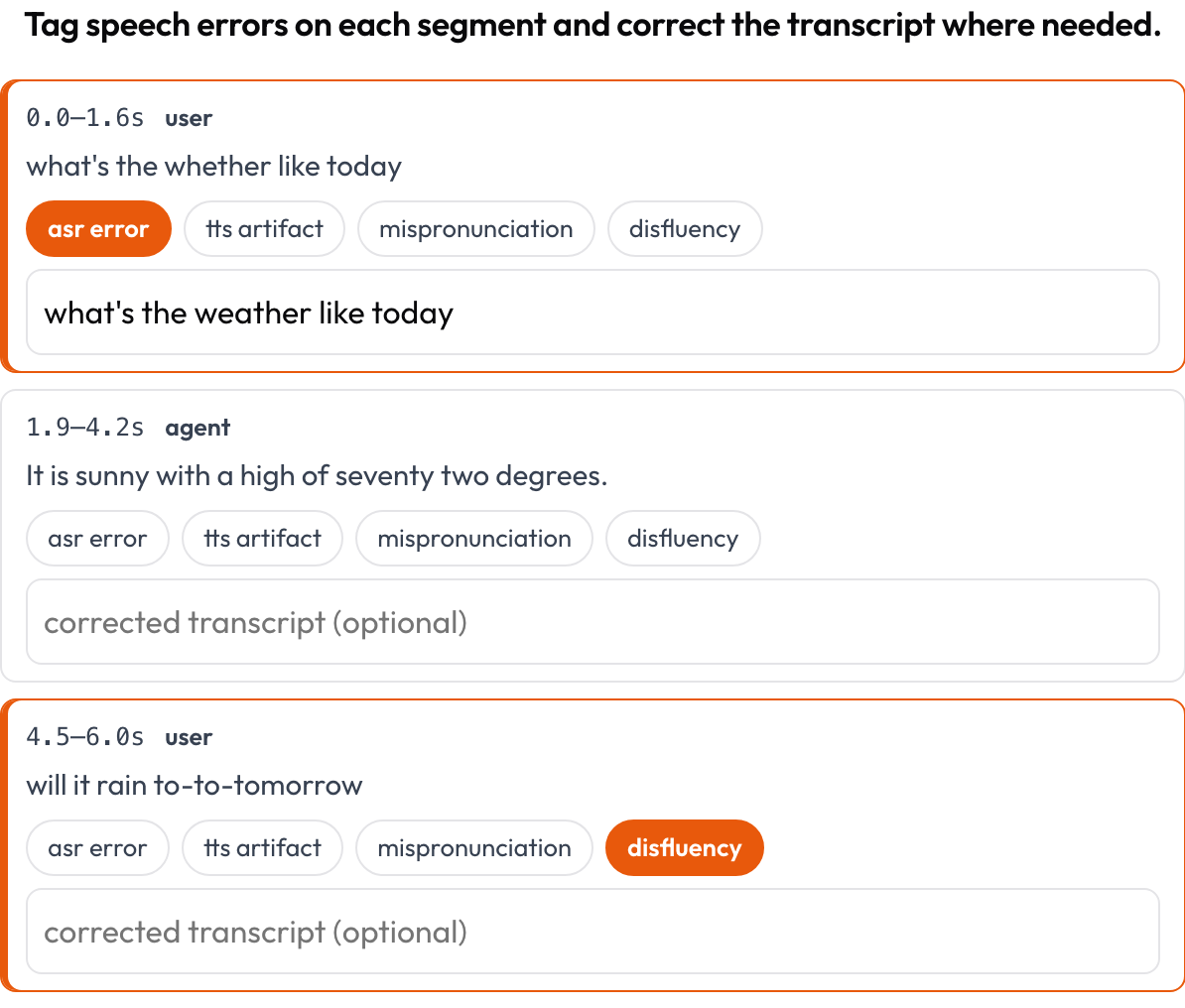 Tag ASR/TTS/pronunciation errors per segment and correct the transcript inline
annotation_schemes:
  - annotation_type: speech_transcript
    name: speech_errors
    description: "Tag speech errors on each segment and correct the transcript where needed."
    segments_key: segments       # list of {start, end, text, speaker?}
    error_types: [asr_error, tts_artifact, mispronunciation, disfluency]
    allow_correction: true
    # audio_key: audio           # optional per-item audio URL to enable the player
儲存為一個 {index, start, end, errors, correction} 列表。
交錯式多模態推理(multimodal_reasoning)
逐步對一段交錯的文本 ↔ 影像 ↔ 工具 ↔ 動作推理軌跡進行評分(Multimodal RewardBench 2,2025;Zebra-CoT)。每一步是一個有類型的塊,按其類型內聯渲染;標註者評判每一步的連貫性,即推理是否從影像和先前步驟中推導而來,還是視覺內容是幻覺?
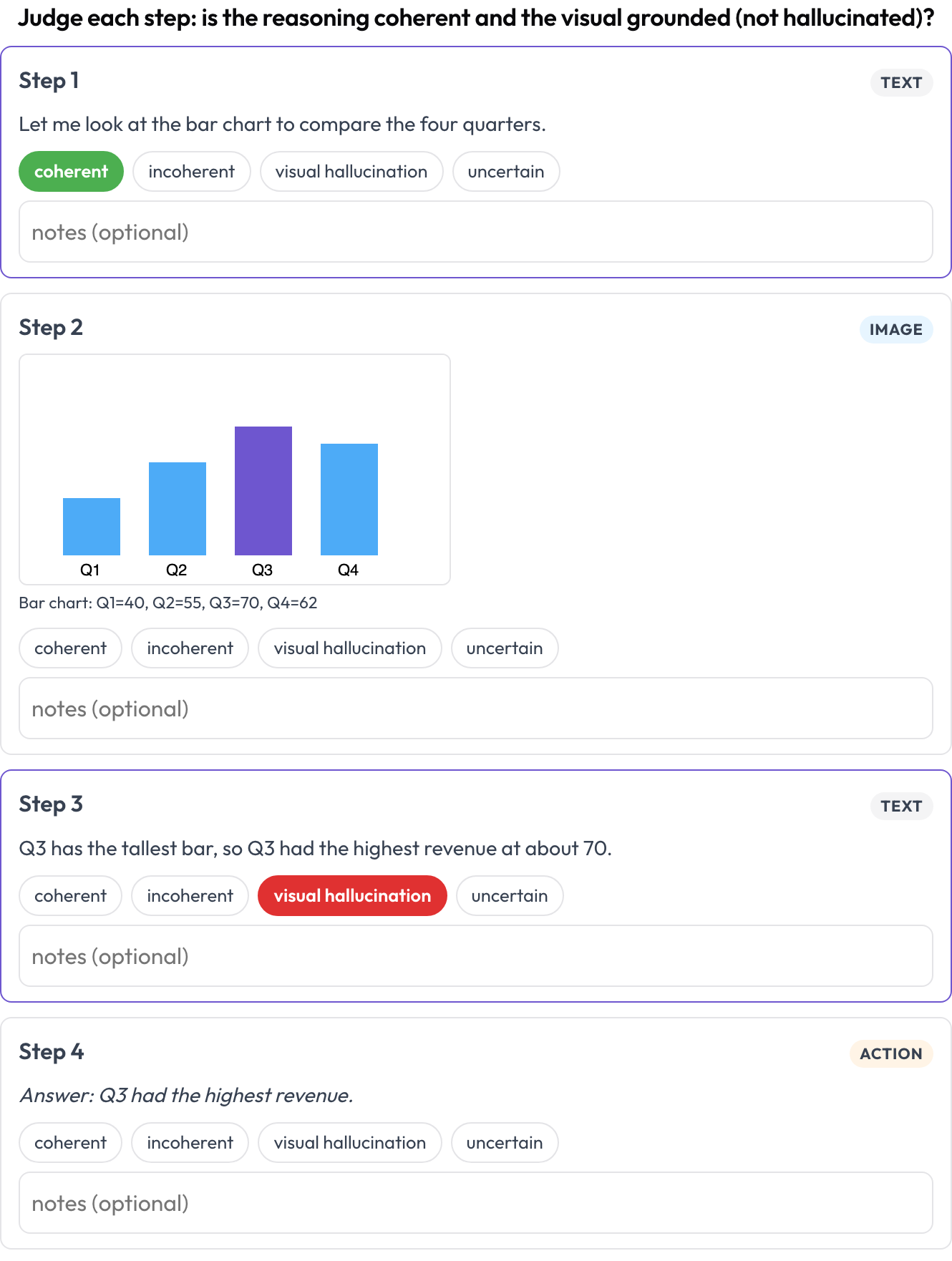 Rate each step of a text-image-tool reasoning trace for coherence and visual hallucination
annotation_schemes:
  - annotation_type: multimodal_reasoning
    name: reasoning_review
    description: "Judge each step: coherent reasoning and grounded visuals?"
    steps_key: steps
    type_key: type     # each step's 'type': text | image | tool | action (inferred if absent)
    verdict_options: [coherent, incoherent, visual_hallucination, uncertain]
每一步可攜帶 text/content、image/image_url(+caption),或 tool/args。儲存為一個 {index, step, type, verdict, notes} 列表。
表格網格結構(table_grid)
標註一張表格影像的單元格結構,這是普通邊界框無法捕捉的文件專屬部分(OmniDocBench,CVPR 2025;RealHiTBench)。標註者設定網格尺寸並點選單元格以標記其角色(資料/列表頭/行表頭/空)。逐頁的區域框已由對每一頁執行影像標註所覆蓋,因此該 schema 聚焦於那些框無法表達的結構。
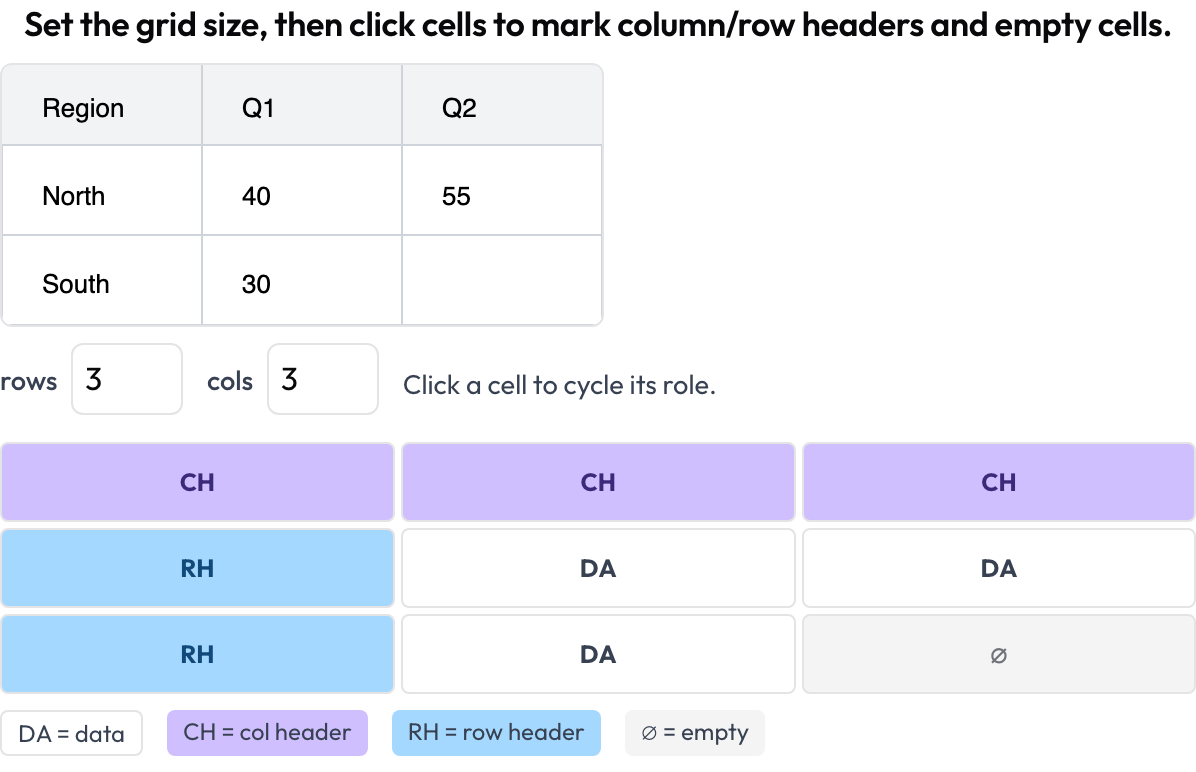 Annotate document-table cell structure: column and row headers, data, and empty cells
annotation_schemes:
  - annotation_type: table_grid
    name: structure
    description: "Set the grid size, then click cells to mark headers and empty cells."
    image_key: image           # per-instance table image URL / data-URI
    rows_key: rows             # optional initial dims from the data
    cols_key: cols
    roles: [data, col_header, row_header, empty]   # click cycles through these
儲存為 {rows, cols, cells: {"r,c": role}},只保留非 data 的單元格。
相關內容
- 多智慧體團隊評估 — 互動圖、交接與團隊評分卡
- 網頁智慧體評估 — 截圖與動作型網頁智慧體
- 如何評估 AI 智慧體 — 智慧體評估的各個層級
- 智慧體標註 — 軌跡檢視配置與資料接入
如需實現細節,請參閱源文件。