眾包標註的品質控制
把注意力檢查、金標準、標註者重疊和計時資料疊起來用,攔住低品質標註,並給出每一項對應的 Potato 配置鍵和它們各自報告什麼。
**沒有哪一種檢查能抓住所有類型的壞標註,所以把四種疊起來用:注意力檢查針對不讀題的標註者,金標準針對讀了題仍然答錯的標註者,重疊針對本身有歧義的項目,計時針對快到不可能真做過的提交。**每一項都有自己的 Potato 配置鍵,而且各自單獨報告到管理面板。
品質控制在收集之前做最便宜,在收集之後做最貴。一個在標註者第五次失敗時就把他攔下的注意力檢查,配置起來不花什麼成本,還省下了他本會填掉的那些項目;同樣的問題靠事後指令碼發現,代價就是重新收集一遍。下面的控制手段按它們起作用的時間排序。
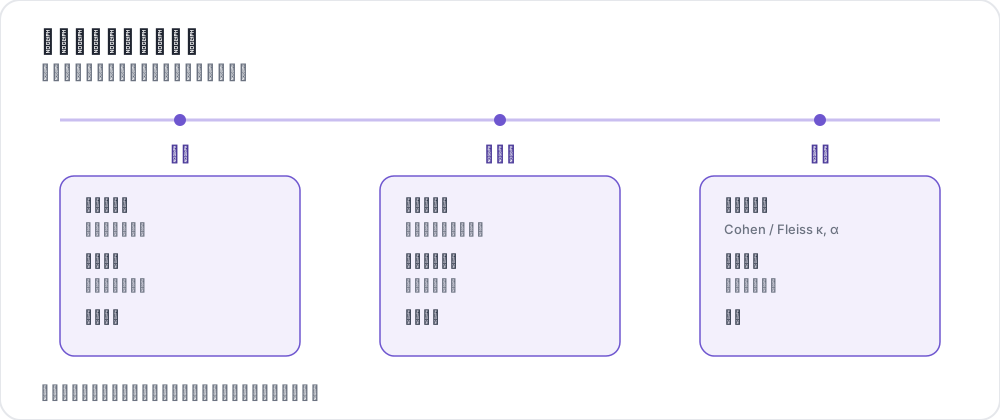 貫穿項目週期的品質控制
每種控制各能抓住什麼
四種控制失效的方向不同,這正是要同時跑不止一種的理由。
| 控制手段 | 能抓住 | 抓不住 |
|---|---|---|
| 注意力檢查 | 不讀題就作答的標註者 | 認真卻誤解了指南的標註者 |
| 金標準 | 讀了題但答錯的標註者 | 沒有唯一正確答案的項目 |
| 重疊與一致性 | 有歧義的項目和標籤 | 因為共用同一來源而一致的標註者 |
| 計時與遙測 | 快到不可能真做過的提交 | 在確實容易的語料上做得快 |
一致性尤其不是萬能的。當標註者複核模型預標註時,不讀就接受建議會抬高而不是壓低一致性,於是在這個指標上,蓋章式的標註者看起來是最好的那一個。一致性抓不住蓋章式標註講了應該改為記錄什麼。
注意力檢查
注意力檢查是一些答案已知的項目,按一定節奏注入標註流,用來核實標註者是讀了之後才作答的。Potato 負責注入、評分、警告標註者,並在你設定的閾值上把他攔下,所以整個環路跑在伺服器上,而不是跑在事後腳本里。
頻率要按你的項目花多長時間來定。每 10 個項目一次檢查,足以在一個工作時段之內抓到走神的標註者,又不會把太多預算花在非資料上。min_response_time 這個下限抓的是點而不讀,比它更快的作答無論內容是什麼都算不通過:
attention_checks:
  enabled: true
  items_file: "data/attention_checks.json"
  frequency: 10              # one check every 10 items
  min_response_time: 3.0     # seconds; faster than this fails the check

  failure_handling:
    warn_threshold: 2
    warn_message: "Please read items carefully before answering."
    block_threshold: 5
    block_message: "You have been blocked due to too many incorrect responses."
項目檔案給每個檢查一個 id、標註者看到的文本,以及按方案給出的預期答案:
[
  {
    "id": "attn_001",
    "text": "Please select 'Positive' for this item to verify you are reading carefully.",
    "expected_answer": {
      "sentiment": "positive"
    }
  }
]
結果在重啟後仍然保留。Potato 一邊記錄一邊把它們寫進輸出目錄裡的 quality_control_results.json,並在啟動時讀回來,所以一次部署不會清掉某個標註者的失敗歷史,也不會把已經被攔下的人放出來。
金標準
金標準是混進標註流的專家標註項目,用來測量準確率而不是注意力。它們預設是靜默的,結果進到管理面板,標註者看不到任何反饋,這樣在測量品質的同時不會改變你正在測量的那個行為。當你是在做訓練而不是在篩人時,再把反饋開啟。
金標項目每隔 frequency 個項目注入一次,所以這個設定是在測量精度和"多少預算花在你已經有標籤的項目上"之間做權衡。二十分之一,大約能在一個 500 個項目的工作班次裡給出 25 個被評分的項目:
gold_standards:
  enabled: true
  items_file: "data/gold_standards.json"
  mode: mixed                # mixed injects into the stream; this is the implemented mode
  frequency: 20

  accuracy:
    min_threshold: 0.7       # annotators below this are named in the dashboard
    evaluation_count: 10     # evaluate once an annotator has seen 10 gold items

  feedback:
    show_correct_answer: false
    show_explanation: false
項目檔案帶有按方案給出的正確標註,以及一個可選的解釋,供需要反饋的場合使用:
[
  {
    "id": "gold_001",
    "text": "The service was absolutely terrible and I will never return.",
    "gold_label": {
      "sentiment": "negative"
    },
    "explanation": "Strong negative language indicates negative sentiment.",
    "difficulty": "easy"
  }
]
要選在專家看來沒有歧義的金標項目。一個你自己團隊都會爭論的項目,測量的是指南而不是標註者,而且它會把稱職的標註者壓到閾值以下。Potato 也可以在標註者對某個項目一致同意之後,通過 gold_standards.auto_promote 把它提升為金標項目,這樣不必增加專家標註就能把金標池做大。
按標註者的準確率出現在 /admin/api/quality_control,它在給出總數的同時報告 configured_correct 和 configured_total。比較標註者時要引用 configured 這組數字,因為配置好的金標池對每個人都一樣,而自動提升的那部分取決於每名標註者是什麼時候來的。
重疊與一致性
每個項目多名標註者,是那個用來找出有歧義項目、而不是找出壞標註者的控制手段。每個項目三名是常見的預設值,因為三名既能給出用於聚合的多數結果,也能給出足夠算係數的重疊。設定目標並開啟報告:
num_annotators_per_item: 3

agreement_metrics:
  enabled: true
  min_overlap: 2
  refresh_interval: 60
隨著標註進來,Krippendorff's alpha 會按方案出現在管理面板上。衡量標註者間一致性講了該報告哪個係數,以及那些閾值意味著什麼。
計時與遙測
Potato 記錄的不只是答了什麼,還有每個項目花了多長時間。每個實例都帶一個 behavioral_data 物件,其中的 total_time_ms 是在那個項目上花的時間,旁邊還有互動事件、標註修改歷史和 AI 建議的生命週期。正是這個欄位讓你能把"因為語料容易而快"的標註者和"因為沒在看而快"的標註者分開:
def flag_fast_annotations(export, min_seconds=2.0):
    """Instances submitted faster than a floor, from an exported annotation file."""
    flagged = []
    for instance in export:
        bd = instance.get("behavioral_data") or {}
        seconds = bd.get("total_time_ms", 0) / 1000
        if seconds < min_seconds:
            flagged.append((instance["id"], seconds))
return flagged把計時當作你自己項目內部的一個分佈來讀,而不是拿它去對一個固定的秒數,因為同一個閾值在難語料上抓到的是蓋章式標註,在易語料上抓到的是稱職。對於繪製類標註,annotation_telemetry 以更細的粒度記錄同樣的想法。它最強的訊號是 AI 建議出現到標註者接受它之間的延遲。行為追蹤和繪製遙測介紹了這些欄位,以及它們支撐起來的那些標記。
四種控制齊備的一份配置
這四個鍵相互獨立,所以一個項目可以一次採用一個。合起來是這個樣子:
annotation_task_name: "Sentiment Annotation with Quality Control"
task_description: "Classify the sentiment of short texts."

data_files:
  - data/items.json

item_properties:
  id_key: id
  text_key: text

annotation_schemes:
  - annotation_type: radio
    name: sentiment
    description: "What is the sentiment of this text?"
    labels:
      - Positive
      - Negative
      - Neutral

num_annotators_per_item: 3

attention_checks:
  enabled: true
  items_file: data/attention_checks.json
  frequency: 15
  min_response_time: 3.0
  failure_handling:
    warn_threshold: 2
    block_threshold: 5

gold_standards:
  enabled: true
  items_file: data/gold_standards.json
  mode: mixed
  frequency: 25
  accuracy:
    min_threshold: 0.7
    evaluation_count: 10

agreement_metrics:
  enabled: true
  min_overlap: 2
  refresh_interval: 60

output_annotation_dir: annotation_output
閾值一開始要放寬。攔截閾值設成 5、準確率下限設成 0.7,能讓你在決定什麼算不合格之前先看到標註者群體的真實分佈,而之後再收緊不花什麼成本。第一天就把它們設死,等於憑一份還沒試跑過的指南把標註者趕走。
平臺層面的控制
眾包平臺在任何人到達你的任務之前就先篩一遍人,這和上面那些檢查是兩件不同的事,值得在做那些檢查之外也做一做。
- 預篩選。 Prolific 能按通過率和以往完成的工作量篩選,也能按人口統計和語言篩選。
- 資格測試。 在 Potato 的培訓階段放一個簡短的測試,就能在任何平臺上限制誰能進入主任務。
- 付款前複核。 工作沒問題時儘快通過,因為標註者抱怨最多的就是稽核慢;駁回要省著用,因為它會損害一名工作者在平臺上的信譽。
平臺預篩選和 Potato 自己的檢查是互補的。預篩選決定誰能到達任務,注意力檢查和金標準測量的是他們到了之後做了什麼。
開始收集之前
有兩個決定在收集開始之後很難反悔,所以先把它們定下來。決定你在匯出裡需要哪些欄位,因為事後才想做的計時分析,要求 behavioral_data 在執行過程中就已經被記錄下來。再用幾十個項目、開著完整的控制棧跑一次試點,因為試點正是你發現注意力檢查有歧義、或者金標項目有爭議的地方,代價是一個下午,而不是一整個資料集。