標註方案
用 YAML 定義標註方案,涵蓋單選、多選、片段、李克特、滑塊、文本等 76 種類型。配置標籤、問題和必填項。
標註方案定義標註者要完成的標註任務。Potato 支援 76 種標註類型,可以組合出複雜的標註任務。
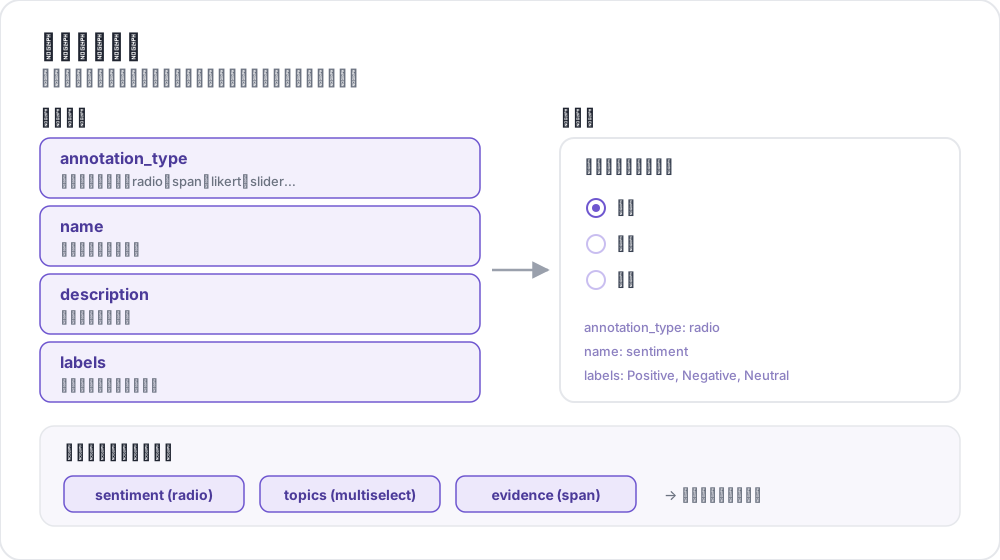 標註方案剖析
基本結構
每個方案都定義在 annotation_schemes 數組裡:
annotation_schemes:
  - annotation_type: radio
    name: sentiment
    description: "What is the sentiment?"
    labels:
      - Positive
      - Negative
      - Neutral
必填欄位
每個方案都帶這三個欄位。各個類型還會在此之上追加自己的必填欄位,下文介紹每種類型時會一併列出。
| 欄位 | 說明 |
|---|---|
annotation_type | 標註類型(radio、multiselect、likert、span、text、number、slider、multirate、select、pairwise、bws、soft_label、confidence、constant_sum、range_slider、semantic_differential、hierarchical_multiselect、card_sort、rubric_eval、extractive_qa、error_span、triage、coreference、span_link 等) |
name | 內部識別符號(不含空格,用於輸出) |
description | 展示給標註者的說明 |
支援的標註類型
1. 單選(Radio)
從列表中恰好選一項:
- annotation_type: radio
  name: sentiment
  description: "What is the sentiment of this text?"
  labels:
    - Positive
    - Negative
    - Neutral

  # Assigns keys 1, 2, 3... in the order the labels are listed
  sequential_key_binding: true

  # Horizontal layout instead of vertical
  horizontal: true
順序繫結把數字 1-9 對映到前九個標籤,所以重排標籤列表會重新分配按鍵。若想要一種不隨重排變動的繫結,請給每個標籤各自指定按鍵(見鍵盤快捷鍵)。
2. 李克特量表(Likert)
帶端點標籤的評分量表:
- annotation_type: likert
  name: agreement
  description: "How much do you agree with this statement?"
  size: 5  # Number of scale points
  min_label: "Strongly Disagree"
  max_label: "Strongly Agree"

  # Show the numeric value of the selected point
  displaying_score: true
size 和兩端的端點標籤都是必填。五個刻度給標註者一箇中立的中點;偶數刻度則強迫他們選邊。
3. 多選(Multiselect)
從列表中選多項:
- annotation_type: multiselect
  name: topics
  description: "Select all relevant topics"
  labels:
    - Politics
    - Technology
    - Sports
    - Entertainment
    - Science

  # Require at least one box before the annotator can move on
  label_requirement:
    required: true

  # Allow free text response
  has_free_response: true
has_free_response 會加上一個"其他"文本框;在標籤集還在修訂期間值得開啟,因為它收上來的條目正好點出你漏掉了哪些類別。
4. 片段標註(Span)
高亮並標記文本片段:
- annotation_type: span
  name: entities
  description: "Highlight named entities in the text"
  labels:
    - PERSON
    - ORGANIZATION
    - LOCATION
    - DATE

  # Show the label name on each highlighted span
  show_span_labels: true

  # Ctrl/Cmd+click to add non-contiguous ranges to one annotation
  allow_discontinuous: false

  # Keyboard shortcuts for labels
  sequential_key_binding: true
allow_discontinuous 管的是由分散區間組成的片段,比如分裂先行詞,而不是彼此重疊的片段。除非你要標的現象確實跨越間隔,否則別開啟它,因為 Ctrl/Cmd 點選這個動作很容易誤觸發。
5. 滑塊(Slider)
連續數值區間:
- annotation_type: slider
  name: confidence
  description: "How confident are you in your answer? (0 = not at all, 100 = completely)"
  min_value: 0
  max_value: 100
  starting_value: 50
  step: 1

  # Shows min_value and max_value at the ends of the track
show_labels: truemin_value、max_value 和 starting_value 三個都是必填。起始值是每位標註者動手之前滑塊所在的位置,取中點可以避免把他們錨定到任何一端。滑塊不接受 labels 列表。一旦新增,題目會切換為單選(radio)佈局,滑塊也隨之消失,因此量表兩端的說明文字請寫在 description 中。
6. 文本輸入(Text)
自由文本作答:
- annotation_type: text
  name: explanation
  description: "Explain your reasoning"

  # Multi-line input
  rows: 4

  # Require a minimum length and show a running count
  min_chars: 20
  show_char_count: true

  # Placeholder text
  placeholder: "Enter your explanation here..."

  # Disable paste (for transcription tasks)
  allow_paste: false
allow_paste: false 對轉寫和自由回憶類任務很要緊,因為在這類任務裡貼上來的答案是從原文抄的,不是標註者產出的。
7. 數字輸入(Number)
帶約束的數值輸入:
- annotation_type: number
  name: count
  description: "How many entities are mentioned?"
  min: 0
  max: 100
  step: 1
8. 矩陣評分(Multirate)
用同一套量表給多個條目評分:
- annotation_type: multirate
  name: quality_aspects
  description: "Rate each aspect of the response"

  # Rows: the items being rated
  options:
    - Accuracy
    - Fluency
    - Relevance

  # Columns: the shared rating scale
  labels:
    - Poor
    - Fair
    - Good
    - Very Good
    - Excellent

  # Randomize row order per annotator
  option_randomization: true

  # Layout options
  arrangement: "vertical"
  display_config:
    num_columns: 2
options 和 labels 都是必填,因為矩陣需要行和列。把行的順序隨機化,可以把順序效應攤到各個條目上,而不是全壓在恰好排在最前面的那一項上。
通用選項
鍵盤快捷鍵
用鍵盤繫結加快標註:
# Automatic sequential binding: digits 1, 2, 3... in label order
sequential_key_binding: true
若想要一種在標籤列表變動時不會跟著移動的繫結,就把標籤寫成物件,各自給一個 key_value:
labels:
  - name: Positive
    key_value: "1"
  - name: Negative
    key_value: "2"
  - name: Neutral
    key_value: "3"
工具提示
給單個標籤提供懸停提示。工具提示附著在標籤上,不在方案上,因此配置在 labels 裡面:
labels:
  - name: Positive
    tooltip: "Expresses happiness, approval, or satisfaction"
  - name: Negative
    tooltip: "Expresses sadness, anger, or disappointment"
  - name: Neutral
    tooltip: "No clear emotional content"
若說明需要排版,就把 tooltip_file 指向一個 HTML 檔案:
labels:
  - name: Economic
    tooltip_file: "config/tooltips/economic.html"
標籤顏色
用於視覺區分的自定義顏色,在 ui 下為整個項目統一定義:
ui:
  label_colors:
    entities:
      PERSON: "#3b82f6"
      LOCATION: "#10b981"
      ORGANIZATION: "#f59e0b"
顏色先按方案名作鍵,再按標籤名。顏色也可以連同工具提示一起寫在單個標籤上:
labels:
  - name: positive
    color: "#22C55E"
    tooltip: "Positive sentiment"
必填項
把某個方案設為提交前必填:
- annotation_type: radio
  name: sentiment
  description: "What is the sentiment?"
  label_requirement:
    required: true
  labels:
    - Positive
    - Negative
若要求的是某個特定選項而不是隨便作答,就用 required_label 點名,它接受單個標籤或一組標籤。
多個方案
在一個條目上組合多種標註類型:
annotation_schemes:
  # Primary classification
  - annotation_type: radio
    name: sentiment
    description: "Overall sentiment"
    labels:
      - Positive
      - Negative
      - Neutral
    label_requirement:
      required: true
    sequential_key_binding: true

  # Confidence rating
  - annotation_type: likert
    name: confidence
    description: "How confident are you?"
    size: 5
    min_label: "Guessing"
    max_label: "Certain"

  # Topic tags
  - annotation_type: multiselect
    name: topics
    description: "Select all relevant topics"
    labels:
      - Politics
      - Technology
      - Sports
      - Entertainment
    has_free_response: true

  # Notes
  - annotation_type: text
    name: notes
    description: "Any additional observations"
    rows: 4
    label_requirement:
      required: false
這裡只有情感標籤是必填的。把置信度評分和備註設為可選,能把必填集合收縮到研究真正依賴的那一個欄位上,標註者就不會被一個不承擔分析重量的框卡住。
高階功能
成對比較(Pairwise)
比較兩個條目。兩個條目來自實例本身,由 items_key 指定:
- annotation_type: pairwise
  name: preference
  description: "Which response is better?"
  mode: binary
  items_key: "responses"   # Field holding a list of 2+ items

  # Labels for the two sides
  show_labels: true
  labels:
    - "Response A"
    - "Response B"

  # Tie option (opt-in)
  allow_tie: true
  tie_label: "No preference"
這一對由資料檔案提供,所以每一行都帶一個至少兩項的列表:
{"id": "1", "responses": ["First response text", "Second response text"]}當確實等價的配對很常見時,加一個平局按鈕是值得的,因為沒有它標註者只能隨意斷定高下,而這些噪聲會以分歧的形式冒出來。
最優最差量表(Best-Worst Scaling)
從一個元組中挑出最優和最差來給條目排序。元組由頂層的 bws_config 塊構造,而不是由方案構造;沒有它的 bws 方案會在一個空條目列表上渲染出一道問題:
bws_config:
  tuple_size: 4              # Items per tuple
  min_item_appearances: 8    # Minimum appearances per item across tuples
  seed: 42
  scoring:
    method: counting         # counting | bradley_terry | plackett_luce

annotation_schemes:
  - annotation_type: bws
    name: ranking
    description: "Sentiment Intensity"
    best_description: "Which sentence expresses the MOST positive sentiment?"
    worst_description: "Which sentence expresses the LEAST positive sentiment?"
    tuple_size: 4
    sequential_key_binding: true
資料檔案的每一行就是一個條目,Potato 從這個池子裡抽取元組。調高 min_item_appearances 會讓每個條目的分數更穩,代價是比較次數更多。
下拉選擇(Select)
省空間的單項選擇:
- annotation_type: select
  name: category
  description: "Select a category"
  labels:
    - Category A
    - Category B
    - Category C
    - Category D
    - Category E

  # Vary the option order between annotators
  randomize_order: true
下拉框在展開之前會藏起選項,因此適合標籤集很長、用單選按鈕會把正文擠出螢幕的情形。對於短標籤集,單選按鈕更快,因為它只要一次點選而不是兩次。
資料格式參考
輸入
標註方案配合你自己的資料格式工作:
{
  "id": "doc_1",
  "text": "This is the text to annotate."
}
輸出
標註以方案名作鍵儲存:
{
  "id": "doc_1",
  "annotations": {
    "sentiment": "Positive",
    "confidence": 4,
    "topics": ["Technology", "Science"],
    "entities": [
      {"start": 0, "end": 4, "label": "ORGANIZATION", "text": "This"}
    ],
    "notes": "Clear positive sentiment about technology."
  }
}
最佳實踐
1. 清晰的標籤
使用無歧義、互相區分的標籤:
下面這些標籤在同一個維度上標出了不同的點:
labels:
  - Strongly Positive
  - Somewhat Positive
  - Neutral
  - Somewhat Negative
  - Strongly Negative
下面這些則不然。兩個標註者不會在 "OK"、"Fine" 和 "Acceptable" 之間劃出同一條線,隨之而來的分歧說的是標籤集本身,而不是資料:
labels:
  - Good
  - OK
  - Fine
  - Acceptable
2. 有用的工具提示
為含義微妙的標籤加上工具提示:
labels:
  - name: Sarcasm
    tooltip: "The text says the opposite of what it means"
  - name: Irony
    tooltip: "A mismatch between expectation and reality"
3. 鍵盤快捷鍵
為高吞吐量的任務啟用快捷鍵:
sequential_key_binding: true4. 合理的順序
讓標籤順序保持一致:
- 最常見的排在前面
- 按字母順序
- 按強度(由低到高)
5. 限制選項數量
選項太多會拖慢標註:
- 單選:2-7 個選項
- 多選:5-15 個選項
- 李克特:5-7 個刻度
6. 先自己試標
部署給標註者之前先自己標幾個例子,用來發現:
- 有歧義的標籤
- 缺失的類別
- 說不清楚的說明