Affichage des instances
Séparez l'affichage du contenu de l'annotation avec le bloc de configuration instance_display.
Nouveau dans la v2.1.0
L'affichage des instances sépare le contenu à montrer aux annotateurs des annotations à collecter. Cela vous permet d'afficher toute combinaison de types de contenu (images, vidéos, audio, texte) aux côtés de tout schéma d'annotation (boutons radio, cases à cocher, segments, etc.).
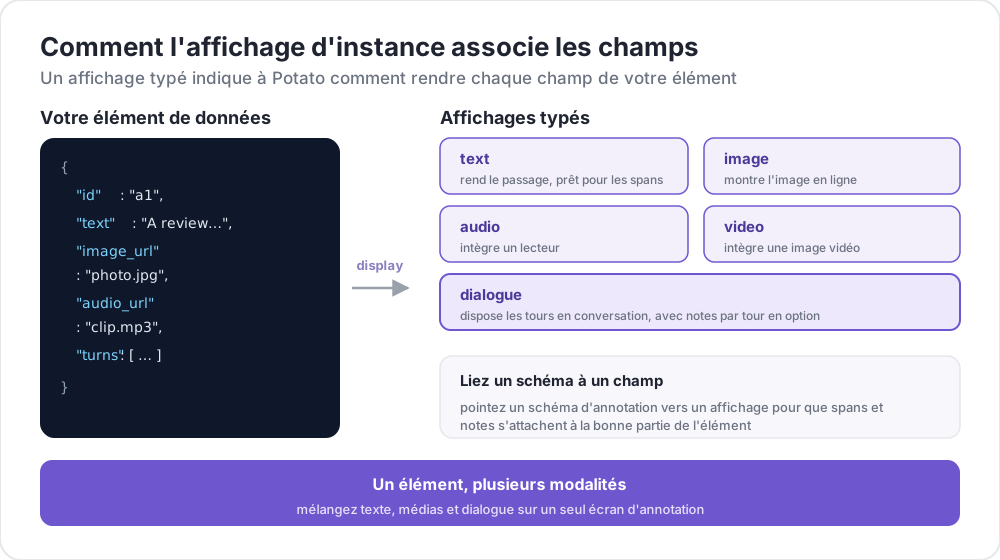 Comment l'affichage d'instance associe les champs
Pourquoi utiliser l'affichage des instances ?
Auparavant, si vous vouliez afficher une image avec des boutons radio pour la classification, vous deviez ajouter un schéma image_annotation avec min_annotations: 0 juste pour afficher l'image. C'était confus et sémantiquement incorrect.
Avec instance_display, vous configurez explicitement le contenu à afficher :
# OLD (deprecated workaround)
annotation_schemes:
  - annotation_type: image_annotation
    name: image_display
    min_annotations: 0  # Just to show the image
    tools: [bbox]
    labels: [unused]
  - annotation_type: radio
    name: category
    labels: [A, B, C]

# NEW (recommended)
instance_display:
  fields:
    - key: image_url
      type: image

annotation_schemes:
  - annotation_type: radio
    name: category
    labels: [A, B, C]
Configuration de base
Ajoutez une section instance_display à votre configuration YAML :
instance_display:
  fields:
    - key: "image_url"           # Field name in your data JSON
      type: "image"              # Content type
      label: "Image to classify" # Optional header
      display_options:
        max_width: 600
        zoomable: true

  layout:
    direction: "vertical"        # vertical or horizontal
    gap: "20px"
Types d'affichage supportés
| Type | Description | Cible de segment |
|---|---|---|
text | Contenu texte brut | Oui |
html | Contenu HTML assaini | Non |
image | Affichage d'image avec zoom | Non |
video | Lecteur vidéo | Non |
audio | Lecteur audio | Non |
dialogue | Tours de conversation | Oui |
pairwise | Comparaison côte à côte | Non |
code | Code source avec coloration syntaxique | Oui |
spreadsheet | Données tabulaires (Excel/CSV) | Oui (ligne/cellule) |
document | Documents enrichis (Word, Markdown, HTML) | Oui |
pdf | Documents PDF avec contrôles de page | Oui |
Options des types d'affichage
Affichage de texte
- key: "text"
  type: "text"
  label: "Document"
  display_options:
    collapsible: false        # Make content collapsible
    max_height: 400           # Max height in pixels before scrolling
    preserve_whitespace: true # Preserve line breaks and spacing
Affichage d'image
- key: "image_url"
  type: "image"
  label: "Image"
  display_options:
    max_width: 800            # Max width (number or CSS string)
    max_height: 600           # Max height
    zoomable: true            # Enable zoom controls
    alt_text: "Description"   # Alt text for accessibility
    object_fit: "contain"     # CSS object-fit property
Affichage vidéo
- key: "video_url"
  type: "video"
  label: "Video"
  display_options:
    max_width: 800
    max_height: 450
    controls: true            # Show video controls
    autoplay: false           # Auto-play on load
    loop: false               # Loop playback
    muted: false              # Start muted
Affichage audio
- key: "audio_url"
  type: "audio"
  label: "Audio"
  display_options:
    controls: true            # Show audio controls
    autoplay: false
    loop: false
    show_waveform: false      # Show waveform visualization
Affichage de dialogue
- key: "conversation"
  type: "dialogue"
  label: "Conversation"
  display_options:
    alternating_shading: true    # Alternate background colors
    speaker_extraction: true     # Extract "Speaker:" from text
    show_turn_numbers: false     # Show turn numbers
Format de données pour les dialogues (chaque ligne dans un fichier JSONL) :
{"id": "conv_001", "conversation": ["Speaker A: Hello there!", "Speaker B: Hi, how are you?"]}Ou avec des données structurées :
{"id": "conv_001", "conversation": [{"speaker": "Alice", "text": "Hello there!"}, {"speaker": "Bob", "text": "Hi, how are you?"}]}Affichage par paires
- key: "comparison"
  type: "pairwise"
  label: "Compare Options"
  display_options:
    cell_width: "50%"           # Width of each cell
    show_labels: true           # Show A/B labels
    labels: ["Option A", "Option B"]
    vertical_on_mobile: true    # Stack vertically on mobile
Options de mise en page
Contrôlez l'agencement de plusieurs champs :
instance_display:
  layout:
    direction: horizontal  # horizontal or vertical
    gap: 24px              # Space between fields
Support de l'annotation de segments
Les types d'affichage basés sur le texte (text, dialogue) peuvent être des cibles pour l'annotation de segments :
instance_display:
  fields:
    - key: "document"
      type: "text"
      span_target: true  # Enable span annotation on this field

annotation_schemes:
  - annotation_type: span
    name: entities
    labels: [PERSON, LOCATION, ORG]
Cibles de segments multiples
Vous pouvez avoir plusieurs champs de texte supportant l'annotation de segments :
instance_display:
  fields:
    - key: "source_text"
      type: "text"
      label: "Source Document"
      span_target: true

    - key: "summary"
      type: "text"
      label: "Summary"
      span_target: true

annotation_schemes:
  - annotation_type: span
    name: factual_errors
    labels: [contradiction, unsupported, fabrication]
Lorsque plusieurs cibles de segments sont utilisées, les annotations sont stockées avec l'association de champ :
{
  "factual_errors": {
    "source_text": [],
    "summary": [
      {"start": 45, "end": 67, "label": "unsupported"}
    ]
  }
}
Liaison des schémas d'annotation aux champs d'affichage
Pour les schémas d'annotation média (image_annotation, video_annotation, audio_annotation), liez-les aux champs d'affichage en utilisant source_field :
instance_display:
  fields:
    - key: "image_url"
      type: "image"

annotation_schemes:
  - annotation_type: image_annotation
    source_field: "image_url"  # Links to display field
    tools: [bbox]
    labels: [person, car]
Évaluations par tour de dialogue
Ajoutez des widgets d'évaluation en ligne aux tours de dialogue individuels :
instance_display:
  fields:
    - key: conversation
      type: dialogue
      label: "Conversation"
      display_options:
        show_turn_numbers: true
        per_turn_ratings:
          speakers: ["Agent"]          # Only show ratings for these speakers
          schema_name: "turn_quality"  # Name for the stored annotation data
          scheme:
            type: likert
            size: 5
            labels: ["Poor", "Excellent"]
Les cercles d'évaluation apparaissent en ligne sous le tour de chaque locuteur correspondant. Les évaluations se remplissent jusqu'à la valeur sélectionnée, et toutes les évaluations par tour sont stockées comme un seul objet JSON :
{
  "turn_quality": "{\"0\": 4, \"2\": 5, \"4\": 3}"
}
Exemple : Classification d'images
annotation_task_name: "Image Classification"

data_files:
  - data/images.json

item_properties:
  id_key: id
  text_key: image_url

task_dir: .
output_annotation_dir: annotation_output

instance_display:
  fields:
    - key: image_url
      type: image
      label: "Image to Classify"
      display_options:
        max_width: 600
        zoomable: true

    - key: context
      type: text
      label: "Additional Context"
      display_options:
        collapsible: true

annotation_schemes:
  - annotation_type: radio
    name: category
    description: "What category best describes this image?"
    labels:
      - nature
      - urban
      - people
      - objects

user_config:
  allow_all_users: true
Fichier de données exemple (data/images.json) au format JSONL :
{"id": "img_001", "image_url": "https://example.com/image1.jpg", "context": "Taken in summer 2023"}
{"id": "img_002", "image_url": "https://example.com/image2.jpg", "context": "Winter landscape"}
Exemple : Annotation multi-modale
Vidéo aux côtés d'une transcription avec annotation de segments :
annotation_task_name: "Video Analysis"

instance_display:
  layout:
    direction: horizontal
    gap: 24px

  fields:
    - key: video_url
      type: video
      label: "Video"
      display_options:
        max_width: "45%"

    - key: transcript
      type: text
      label: "Transcript"
      span_target: true

annotation_schemes:
  - annotation_type: radio
    name: sentiment
    labels: [positive, neutral, negative]

  - annotation_type: span
    name: highlights
    labels:
      - key_point
      - question
      - supporting_evidence
Compatibilité ascendante
- Les configurations existantes sans
instance_displaycontinuent de fonctionner sans changement - Le
text_keydeitem_propertiesest toujours utilisé comme solution de repli - La détection héritée des médias via les schémas d'annotation fonctionne toujours
- Un avertissement de dépréciation apparaît dans les logs lors de l'utilisation de l'ancien modèle d'affichage seul
Migration depuis les modèles d'affichage seul
Si vous utilisiez des schémas d'annotation uniquement pour afficher du contenu :
Avant (déprécié) :
annotation_schemes:
  - annotation_type: image_annotation
    name: image_display
    min_annotations: 0
    tools: [bbox]
    labels: [unused]
Après (recommandé) :
instance_display:
  fields:
    - key: image_url
      type: image
Pour aller plus loin
- Formats de données - Formats de données d'entrée supportés
- Configuration de l'interface - Personnalisation de l'interface
- Personnalisation de la mise en page - Templates HTML personnalisés
- Annotation d'images - Outils d'annotation d'images
Pour les détails d'implémentation, voir la documentation source.