Annotation de spans
Surlignez et étiquetez des spans de texte dans Potato pour la reconnaissance d'entités nommées, avec des couleurs par étiquette, des raccourcis clavier, des infobulles et des spans discontinus.
L'annotation de spans permet aux annotateurs de sélectionner et d'étiqueter des portions de texte. C'est ainsi que Potato construit les tâches de reconnaissance d'entités nommées (NER), d'étiquetage morphosyntaxique et de surlignage de texte. Une étiquette s'écrit soit comme une simple chaîne, soit comme un objet portant ses propres color, key_value et tooltip. Potato lit ces trois éléments comme des propriétés de chaque étiquette, si bien qu'une table colors, key_values ou tooltips au niveau du schéma n'a aucun effet sur un schéma de span.
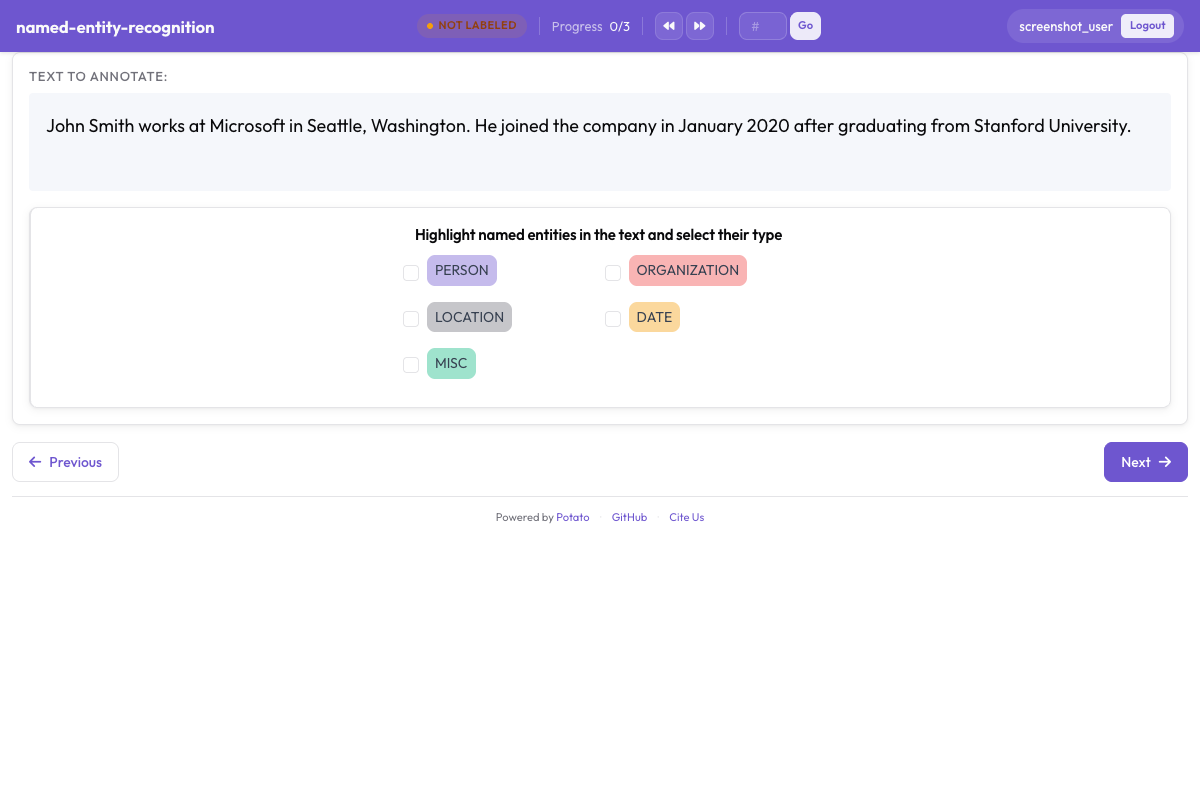 Annotation de spans avec étiquettes d'entités colorées dans Potato
Configuration de base
annotation_schemes:
  - annotation_type: span
    name: entities
    description: "Highlight named entities in the text"
    labels:
      - PERSON
      - ORGANIZATION
      - LOCATION
description est obligatoire sur chaque schéma et s'affiche au-dessus des boutons d'étiquette comme la consigne que lit l'annotateur. Elle doit donc énoncer la décision d'étiquetage plutôt que répéter le nom du schéma. Les étiquettes écrites comme de simples chaînes prennent leurs couleurs dans la palette de Potato, dans l'ordre où elles sont listées.
Options de configuration
Étiquettes d'entités
Le jeu d'étiquettes est la principale décision de conception d'une tâche de spans, car le rappel, l'accord et toutes les mesures ultérieures sont définis par rapport à lui. Gardez-le assez petit pour que les annotateurs puissent le retenir sans consulter les consignes à chaque span, ce qui revient en pratique à quatre à huit types pour la plupart des travaux de NER. Ajoutez les étiquettes au schéma ci-dessus :
labels:
  - PERSON
  - ORGANIZATION
  - LOCATION
  - DATE
  - EVENT
Couleurs
Potato attribue à chaque étiquette une couleur de la palette dans l'ordre de la liste. Il ne vaut donc la peine d'écrire les couleurs que lorsqu'une association précise compte, par exemple deux types qui apparaissent souvent dans la même phrase et ne doivent pas se confondre au premier coup d'œil. La couleur appartient à l'étiquette :
annotation_schemes:
  - annotation_type: span
    name: entities
    description: "Highlight named entities in the text"
    labels:
      - name: PERSON
        color: "#3b82f6"
      - name: ORGANIZATION
        color: "#10b981"
      - name: LOCATION
        color: "#f59e0b"
      - DATE
Les valeurs sont en hexadécimal (#3b82f6) ou en rgb(255, 0, 0). Une étiquette laissée sous forme de simple chaîne, comme DATE ci-dessus, garde la couleur suivante de la palette, si bien qu'un schéma peut nommer les couleurs des étiquettes qui en ont besoin et laisser les autres telles quelles.
Les couleurs de plusieurs schémas peuvent aussi être définies en un seul endroit, sous ui.label_colors, indexées par nom de schéma puis par étiquette :
ui:
  label_colors:
    entities:
      PERSON: "#3b82f6"
      ORGANIZATION: "#10b981"
Une table colors: écrite sur le schéma lui-même n'est pas une clé que Potato lit. Un schéma qui en porte une s'affiche avec les couleurs de la palette, comme si le bloc n'existait pas.
Raccourcis clavier
Les raccourcis valent la peine d'être activés sur toute tâche de spans comptant plus de deux étiquettes, car un annotateur qui déplace la souris jusqu'à un bouton pour chaque span travaille bien plus lentement qu'un annotateur qui garde les deux mains sur le texte. sequential_key_binding: true attribue des touches aux étiquettes dans l'ordre où elles sont listées :
- annotation_type: span
  name: entities
  description: "Highlight named entities in the text"
  labels:
    - PERSON
    - ORGANIZATION
    - LOCATION
    - DATE
  sequential_key_binding: true
Quand une tâche affiche plusieurs schémas sur la page, Potato attribue à chacun des touches issues d'un groupe distinct, en prenant d'abord la rangée des chiffres, puis la rangée supérieure de lettres, puis la rangée de repos, si bien que les raccourcis de schémas différents n'entrent jamais en conflit.
Pour associer une étiquette à une touche précise plutôt qu'à sa position dans la liste, donnez-lui un key_value. L'allocateur respecte un key_value explicite avant toute attribution automatique, et les touches mnémoniques résistent à un réordonnancement ultérieur de la liste d'étiquettes, ce que les touches positionnelles ne font pas :
- annotation_type: span
  name: entities
  description: "Highlight named entities in the text"
  labels:
    - name: PERSON
      key_value: "p"
    - name: ORGANIZATION
      key_value: "o"
    - LOCATION
  sequential_key_binding: true
Une table key_values: au niveau du schéma n'est pas lue, pas plus qu'une table écrite comme valeur de sequential_key_binding, que Potato traite uniquement comme un indicateur.
Infobulles
L'infobulle est l'endroit où placer les cas limites d'une étiquette, pour qu'un annotateur puisse vérifier ce qui compte comme ORGANIZATION sans quitter la tâche. Les infobulles sont des propriétés de chaque étiquette :
- annotation_type: span
  name: entities
  description: "Highlight named entities in the text"
  labels:
    - name: PERSON
      tooltip: "Names of people, characters, or personas"
    - name: ORGANIZATION
      tooltip: "Companies, agencies, institutions"
    - name: LOCATION
      tooltip_file: "config/tooltips/location.html"
tooltip accepte du texte brut et tooltip_file le chemin d'un fichier HTML, ce qui est préférable quand les consignes ont besoin d'exemples, de texte en gras ou d'une liste. Une table tooltips: au niveau du schéma n'est lue que par hierarchical_multiselect et n'a aucun effet sur un schéma de span.
Spans chevauchants
Autoriser le chevauchement
Les spans peuvent se chevaucher, et aucun réglage n'active ce comportement. Le chevauchement est ce qu'il faut quand un même passage porte deux étiquettes à la fois, comme « Dr. Smith », qui est à la fois une PERSON et un ROLE. Depuis la version 2.9.0, une sélection qui commence à la fin d'un span existant ou se termine au début d'un span est aussi acceptée, ce qui permet de créer des spans qui se chevauchent partiellement. Les versions antérieures refusaient cette sélection.
Désactiver le chevauchement (par défaut)
Le schéma de span n'a aucune clé qui interdit le chevauchement. Une tâche où les spans ne doivent jamais se chevaucher doit donc l'indiquer dans ses consignes d'annotation. Quand la distinction compte pour l'export plutôt que pour l'annotateur, deux schémas de span séparent les jeux d'étiquettes, puisque chaque schéma enregistre ses spans sous son propre nom :
annotation_schemes:
  - annotation_type: span
    name: entities
    description: "Label named entities"
    labels:
      - PERSON
      - ORGANIZATION

  - annotation_type: span
    name: roles
    description: "Label professional roles"
    labels:
      - ROLE
Modes de sélection de span
Potato enregistre chaque span sous forme de décalages de caractères dans le texte de l'élément, et aucune clé de configuration ne fait passer la sélection d'une granularité au mot à une granularité au caractère. Les deux modes ci-dessous décrivent ce qu'un annotateur peut faire, pas des réglages à activer.
Sélection au niveau du mot
En pratique, la plupart des travaux de NER consistent à faire glisser la souris sur des mots entiers, et le résultat est enregistré sous forme des décalages du premier et du dernier caractère sélectionnés. Rien dans la configuration n'impose les frontières de mots. Si les spans de mots entiers comptent pour vos données, inscrivez cette exigence dans les consignes et vérifiez-la sur l'export plutôt que d'attendre de l'interface qu'elle refuse un mot partiel.
Sélection au niveau du caractère
Sélectionner une partie d'un mot est toujours possible et ne demande aucune configuration, ce sur quoi reposent les tâches morphologiques et infra-token. Potato réduit les suites d'espaces et de tabulations avant l'affichage pour que les décalages qu'il enregistre correspondent à ce que mesure le navigateur, ce qui compte quand votre texte porte une indentation significative. Déclarez instance_display quand les espaces horizontaux doivent être conservés à l'identique.
Spans pré-annotés
Amorcer une tâche avec la sortie d'un modèle transforme l'étiquetage en correction, le flux le plus rapide dès lors qu'un modèle a déjà raison sur la majeure partie du corpus. Potato lit les annotations d'amorçage dans un champ de chaque élément, nommé par pre_annotation.field :
pre_annotation:
  enabled: true
  field: "predictions"
  allow_modification: true
  show_confidence: true
  highlight_low_confidence: 0.7
C'est allow_modification: true qui fait de la tâche une correction plutôt qu'une relecture, puisque sans cette option les annotateurs ne peuvent pas modifier ce que le modèle a proposé. highlight_low_confidence: 0.7 signale les éléments sur lesquels le modèle était le moins sûr, afin que l'attention se porte sur les spans les plus susceptibles d'être erronés.
Le champ contient une entrée par nom de schéma, et un schéma de span prend une liste de décalages :
{
  "id": "item_002",
  "text": "Apple announced new iPhone in California.",
  "predictions": {
    "entities": [
      {"start": 0, "end": 5, "label": "ORG", "confidence": 0.85},
      {"start": 27, "end": 37, "label": "LOC", "confidence": 0.91}
    ]
  }
}
Les pré-annotations sont un point de départ et non une annotation. Un élément que personne n'ouvre est donc exporté vide, même s'il est arrivé accompagné de prédictions.
Configurations NER courantes
NER standard (4 types)
Le jeu de quatre types suit la convention CoNLL-2003, le bon choix quand vos résultats doivent être comparables aux chiffres de NER publiés :
- annotation_type: span
  name: ner
  description: "Label named entities"
  labels:
    - PER    # Person
    - ORG    # Organization
    - LOC    # Location
    - MISC   # Miscellaneous
  sequential_key_binding: true
NER étendue (style OntoNotes)
Dix-huit types permettent des distinctions plus fines, au prix réel d'un accord plus faible, car les frontières entre NORP, ORG et GPE sont celles sur lesquelles les annotateurs divergent le plus. Utilisez le jeu étendu quand les travaux en aval ont besoin de ces distinctions, et prévoyez une formation plus longue :
- annotation_type: span
  name: ner_extended
  description: "Label named entities using the OntoNotes type set"
  labels:
    - PERSON
    - NORP        # Nationalities, religious/political groups
    - FAC         # Facilities
    - ORG
    - GPE         # Geopolitical entities
    - LOC
    - PRODUCT
    - EVENT
    - WORK_OF_ART
    - LAW
    - LANGUAGE
    - DATE
    - TIME
    - PERCENT
    - MONEY
    - QUANTITY
    - ORDINAL
    - CARDINAL
NER biomédicale
Les spans biomédicaux sont longs et souvent imbriqués. Des infobulles contenant un exemple commenté par type sont donc plus rentables ici que sur une tâche de domaine général :
- annotation_type: span
  name: bio_ner
  description: "Label biomedical entities"
  labels:
    - GENE
    - PROTEIN
    - DISEASE
    - DRUG
    - SPECIES
NER pour réseaux sociaux
Le texte des réseaux sociaux apporte des types d'entités pour lesquels les jeux conçus pour les dépêches d'agence n'ont pas de case, et CREATIVE_WORK et GROUP sont les deux qui finissent le plus souvent classés à tort comme ORG faute d'étiquette propre :
- annotation_type: span
  name: social_ner
  description: "Label named entities in social media text"
  labels:
    - PERSON
    - ORGANIZATION
    - LOCATION
    - PRODUCT
    - CREATIVE_WORK
    - GROUP
Spans avec attributs
Un second schéma à côté du schéma de span recueille un jugement sur l'élément dans son ensemble. Potato enregistre les deux séparément, si bien que la réponse radio s'applique au document et non à un span particulier :
annotation_schemes:
  - annotation_type: span
    name: entities
    description: "Highlight named entities"
    labels:
      - PERSON
      - ORGANIZATION

  - annotation_type: radio
    name: entity_type
    description: "What type of entity is this?"
    labels:
      - Named
      - Nominal
      - Pronominal
Plusieurs schémas de spans
Deux schémas de span permettent d'annoter différents aspects du même texte sans obliger les annotateurs à garder en tête un seul jeu d'étiquettes combiné. Chaque schéma a sa propre rangée de boutons, son propre groupe de touches et son propre champ dans l'export :
annotation_schemes:
  # Named entities
  - annotation_type: span
    name: entities
    description: "Label named entities"
    labels:
      - PERSON
      - ORGANIZATION
      - LOCATION

  # Sentiment expressions
  - annotation_type: span
    name: sentiment_spans
    description: "Highlight sentiment expressions"
    labels:
      - POSITIVE
      - NEGATIVE
Annotation de spans multi-champs
Nouveau en v2.1.0
L'annotation de spans peut cibler un champ de texte précis dans des données multi-champs via l'option target_field. C'est ce qu'il vous faut quand un élément contient un document source et un résumé et qu'un span appartient à l'un des deux.
Configuration
Chaque schéma nomme le champ qu'il annote, si bien que les deux jeux d'étiquettes restent rattachés au bon texte :
annotation_schemes:
  - annotation_type: span
    name: source_entities
    description: "Label entities in the source text"
    target_field: source_text
    labels:
      - PERSON
      - ORGANIZATION

  - annotation_type: span
    name: summary_entities
    description: "Label entities in the summary"
    target_field: summary
    labels:
      - PERSON
      - ORGANIZATION
Format des données multi-champs
Vos données doivent inclure les champs de texte séparés :
{
  "id": "doc1",
  "source_text": "John Smith works at Microsoft in Seattle.",
  "summary": "Smith is employed by Microsoft."
}
Format de sortie
Avec target_field, les annotations sont indexées par champ :
{
  "id": "doc1",
  "source_entities": {
    "source_text": [
      {"start": 0, "end": 10, "text": "John Smith", "label": "PERSON"},
      {"start": 20, "end": 29, "text": "Microsoft", "label": "ORGANIZATION"}
    ]
  },
  "summary_entities": {
    "summary": [
      {"start": 0, "end": 5, "text": "Smith", "label": "PERSON"},
      {"start": 22, "end": 31, "text": "Microsoft", "label": "ORGANIZATION"}
    ]
  }
}
Pour un exemple complet et fonctionnel, voir project-hub/simple_examples/simple-multi-span/ dans le dépôt Potato.
Options d'affichage
Afficher l'étiquette dans le span
Par défaut, Potato affiche l'étiquette à l'intérieur de chaque span surligné. Sur un document dense comportant beaucoup de spans courts, le texte des étiquettes encombre la phrase, et show_span_labels: false garde le texte lisible tandis que la couleur du surlignage continue d'indiquer l'étiquette :
- annotation_type: span
  name: entities
  description: "Highlight named entities in the text"
  labels:
    - PERSON
    - ORGANIZATION
  show_span_labels: false
Style souligné
Le schéma de span n'a aucune clé pour le style de surlignage, et les spans s'affichent toujours avec un fond coloré. Le soulignement et les crochets sont des options du type de coréférence, via visual_display.highlight_mode. Une tâche qui a besoin de l'un ou de l'autre doit donc utiliser les Chaînes de coréférence.
Format de sortie
Les annotations de spans sont enregistrées avec des décalages de caractères :
{
  "id": "doc1",
  "entities": [
    {
      "start": 0,
      "end": 10,
      "text": "John Smith",
      "label": "PERSON"
    },
    {
      "start": 20,
      "end": 29,
      "text": "Microsoft",
      "label": "ORGANIZATION"
    }
  ]
}
Exemple complet : tâche de NER
item_properties nomme les champs que Potato lit pour l'identifiant de l'élément et son texte, et une configuration sans cette clé ne démarre pas. Les cinq types d'entités reçoivent des touches de la rangée des chiffres via sequential_key_binding, et le schéma radio final enregistre un jugement de difficulté, utile plus tard pour expliquer où l'accord a baissé :
annotation_task_name: "Named Entity Recognition"

data_files:
  - data/documents.json

item_properties:
  id_key: id
  text_key: text

annotation_schemes:
  - annotation_type: span
    name: entities
    description: "Highlight and label all named entities"
    labels:
      - PERSON
      - ORGANIZATION
      - LOCATION
      - DATE
      - MONEY
    sequential_key_binding: true
    allow_discontinuous: false

  - annotation_type: radio
    name: difficulty
    description: "How difficult was this document to annotate?"
    labels:
      - Easy
      - Medium
      - Hard

output_annotation_dir: annotation_output
export_annotation_format: jsonl
Spans discontinus
Nouveau en v2.2.0
allow_discontinuous: true permet à un annotateur de sélectionner plusieurs passages de texte non adjacents et de les enregistrer comme un seul span, ce dont ont besoin les antécédents scindés et les constituants discontinus. La discontinuité est autre chose que le chevauchement, et la clé n'a aucun effet sur la possibilité pour deux spans de couvrir les mêmes caractères :
- annotation_type: span
  name: entities
  description: "Highlight named entities in the text"
  labels:
    - PERSON
    - ORGANIZATION
  allow_discontinuous: true
Avec l'option activée, l'annotateur maintient Ctrl sous Windows et Linux, ou Cmd sur Mac, pendant qu'il sélectionne du texte supplémentaire pour l'ajouter au span courant. La sortie contient une paire début et fin pour chaque segment.
Intégration du liage d'entités
Nouveau en v2.2.0
Les annotations de spans peuvent être liées à des bases de connaissances externes (Wikidata, UMLS ou API REST personnalisées) en ajoutant un bloc entity_linking au schéma de span. Le liage vaut l'étape supplémentaire par span quand deux entités partagent une même forme de surface et que l'étiquette seule ne permet pas de les distinguer :
- annotation_type: span
  name: entities
  description: "Highlight and link named entities"
  labels:
    - PERSON
    - ORGANIZATION
    - LOCATION
  entity_linking:
    enabled: true
    knowledge_bases:
      - name: wikidata
        type: wikidata
        language: en
    auto_search: true
    required: false
auto_search: true lance la recherche dès qu'un span est créé, ce qui économise un clic sur les tâches où la plupart des spans sont liés. required: true refuse d'enregistrer un span sans lien. Laissez donc cette option désactivée, sauf si chaque entité de vos données est censée figurer dans la base de connaissances. Quand le liage d'entités est activé, une icône de lien apparaît dans la barre de contrôle de chaque span, et un clic dessus ouvre une fenêtre de recherche. Voir la documentation Liage d'entités pour tous les détails.
Bonnes pratiques
- Écrivez les couleurs sur les étiquettes qui en ont besoin et laissez la palette gérer le reste
- Placez les cas limites dans
tooltipoutooltip_file, un par étiquette, plutôt que dans la description du schéma - Activez
sequential_key_bindingpour tout schéma de plus de deux étiquettes, et ajoutezkey_valuelà où une touche mnémonique aide - Fixez la politique de chevauchement dans les consignes, puisque le schéma n'en impose aucune
- Amorcez avec
pre_annotationpour les flux de correction, et gardezallow_modification: true - Gardez un jeu d'étiquettes réduit et répartissez les aspects sans rapport dans des schémas de span distincts
Pour aller plus loin
- Liage d'entités - Liez des spans à des bases de connaissances
- Chaînes de coréférence - Regroupez les mentions coréférentes
- Annotation d'événements - Structures d'événements n-aires avec arguments de span
- Liage de spans - Créez des relations entre spans
- Affichage des instances - Affichage de contenu multi-champs avec cibles de span
- Configuration de l'interface - Personnalisez les couleurs de spans
- Fonctionnalités de productivité - Raccourcis clavier
Pour les détails d'implémentation, voir la documentation source.