Schémas d'annotation
Définissez des schémas d'annotation en YAML avec radio, multiselect, span, likert, slider, text et 55 autres types. Configurez étiquettes, questions et champs obligatoires.
Les schémas d'annotation définissent les tâches d'étiquetage pour vos annotateurs. Potato prend en charge 76 types d'annotation qui peuvent être combinés pour créer des tâches d'annotation complexes.
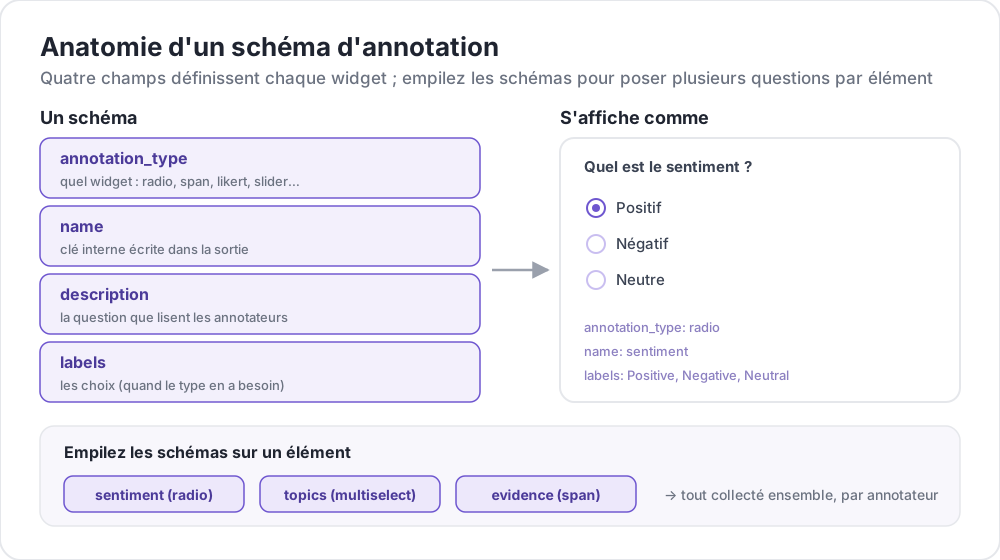 Anatomie d'un schéma d'annotation
Structure de base
Chaque schéma est défini dans le tableau annotation_schemes :
annotation_schemes:
  - annotation_type: radio
    name: sentiment
    description: "What is the sentiment?"
    labels:
      - Positive
      - Negative
      - Neutral
Champs obligatoires
Chaque schéma comporte ces trois champs. Chaque type y ajoute ses propres champs obligatoires, indiqués avec chaque type ci-dessous.
| Champ | Description |
|---|---|
annotation_type | Type d'annotation (radio, multiselect, likert, span, text, number, slider, multirate, select, pairwise, bws, soft_label, confidence, constant_sum, range_slider, semantic_differential, hierarchical_multiselect, card_sort, rubric_eval, extractive_qa, error_span, triage, coreference, span_link, et d'autres) |
name | Identifiant interne (sans espaces, utilisé dans la sortie) |
description | Instructions affichées aux annotateurs |
Types d'annotation supportés
1. Radio (choix unique)
Sélectionnez exactement une option dans une liste :
- annotation_type: radio
  name: sentiment
  description: "What is the sentiment of this text?"
  labels:
    - Positive
    - Negative
    - Neutral

  # Assigns keys 1, 2, 3... in the order the labels are listed
  sequential_key_binding: true

  # Horizontal layout instead of vertical
  horizontal: true
Les raccourcis séquentiels associent les chiffres 1 à 9 aux neuf premières étiquettes, donc réordonner la liste d'étiquettes réattribue les touches. Pour un raccourci qui résiste au réordonnancement, donnez à chaque étiquette sa propre touche (voir Raccourcis clavier).
2. Échelle de Likert
Échelles d'évaluation avec des extrémités étiquetées :
- annotation_type: likert
  name: agreement
  description: "How much do you agree with this statement?"
  size: 5  # Number of scale points
  min_label: "Strongly Disagree"
  max_label: "Strongly Agree"

  # Show the numeric value of the selected point
  displaying_score: true
size est obligatoire, tout comme les deux étiquettes d'extrémité. Cinq points laissent aux annotateurs un milieu neutre ; une taille paire les oblige à pencher d'un côté.
3. Sélection multiple (choix multiples)
Sélectionnez plusieurs options dans une liste :
- annotation_type: multiselect
  name: topics
  description: "Select all relevant topics"
  labels:
    - Politics
    - Technology
    - Sports
    - Entertainment
    - Science

  # Require at least one box before the annotator can move on
  label_requirement:
    required: true

  # Allow free text response
  has_free_response: true
has_free_response ajoute une zone de texte « other ». Il vaut la peine de l'activer tant que le jeu d'étiquettes est encore en révision, car les réponses qu'elle recueille nomment les catégories qui vous manquent.
4. Annotation de segments
Surlignez et étiquetez des segments de texte :
- annotation_type: span
  name: entities
  description: "Highlight named entities in the text"
  labels:
    - PERSON
    - ORGANIZATION
    - LOCATION
    - DATE

  # Show the label name on each highlighted span
  show_span_labels: true

  # Ctrl/Cmd+click to add non-contiguous ranges to one annotation
  allow_discontinuous: false

  # Keyboard shortcuts for labels
  sequential_key_binding: true
allow_discontinuous couvre les segments formés de plages séparées, comme les antécédents scindés, et non les segments qui se chevauchent. Laissez-le désactivé sauf si le phénomène que vous étiquetez est réellement interrompu par un intervalle, car le geste Ctrl/Cmd-clic se déclenche facilement par accident.
5. Curseur
Plage numérique continue :
- annotation_type: slider
  name: confidence
  description: "How confident are you in your answer? (0 = not at all, 100 = completely)"
  min_value: 0
  max_value: 100
  starting_value: 50
  step: 1

  # Shows min_value and max_value at the ends of the track
  show_labels: true
Les trois champs min_value, max_value et starting_value sont obligatoires. Un curseur n'accepte pas de liste labels. En ajouter une fait passer la question à une disposition en boutons radio et le curseur disparaît, donc placez toute formulation destinée aux extrémités de l'échelle dans description. La valeur de départ est la position du curseur de chaque annotateur avant qu'il n'y touche, donc un point médian évite de l'ancrer vers l'une ou l'autre extrémité.
6. Saisie de texte
Réponses textuelles libres :
- annotation_type: text
  name: explanation
  description: "Explain your reasoning"

  # Multi-line input
  rows: 4

  # Require a minimum length and show a running count
  min_chars: 20
  show_char_count: true

  # Placeholder text
  placeholder: "Enter your explanation here..."

  # Disable paste (for transcription tasks)
  allow_paste: false
allow_paste: false compte pour les tâches de transcription et de rappel libre, où une réponse collée est copiée depuis la source au lieu d'être produite par l'annotateur.
7. Saisie numérique
Entrée numérique avec contraintes :
- annotation_type: number
  name: count
  description: "How many entities are mentioned?"
  min: 0
  max: 100
  step: 1
8. Évaluation multiple (évaluation matricielle)
Évaluez plusieurs éléments sur la même échelle :
- annotation_type: multirate
  name: quality_aspects
  description: "Rate each aspect of the response"

  # Rows: the items being rated
  options:
    - Accuracy
    - Fluency
    - Relevance

  # Columns: the shared rating scale
  labels:
    - Poor
    - Fair
    - Good
    - Very Good
    - Excellent

  # Randomize row order per annotator
  option_randomization: true

  # Layout options
  arrangement: "vertical"
  display_config:
    num_columns: 2
options et labels sont tous deux obligatoires, puisqu'une matrice a besoin de lignes et de colonnes. Rendre aléatoire l'ordre des lignes répartit tout effet d'ordre entre les éléments, au lieu de le concentrer sur l'aspect qui se trouve en tête de liste.
Options communes
Raccourcis clavier
Accélérez l'annotation avec des raccourcis clavier :
# Automatic sequential binding: digits 1, 2, 3... in label order
sequential_key_binding: true
Pour un raccourci qui ne bouge pas quand la liste d'étiquettes change, passez des objets étiquette et donnez à chacun une key_value :
labels:
  - name: Positive
    key_value: "1"
  - name: Negative
    key_value: "2"
  - name: Neutral
    key_value: "3"
Info-bulles
Fournissez des indices au survol sur les étiquettes individuelles. Les info-bulles sont rattachées à l'étiquette, pas au schéma, et se configurent donc dans labels :
labels:
  - name: Positive
    tooltip: "Expresses happiness, approval, or satisfaction"
  - name: Negative
    tooltip: "Expresses sadness, anger, or disappointment"
  - name: Neutral
    tooltip: "No clear emotional content"
Pour des indications mises en forme, faites plutôt pointer tooltip_file vers un fichier HTML :
labels:
  - name: Economic
    tooltip_file: "config/tooltips/economic.html"
Couleurs des étiquettes
Couleurs personnalisées pour la distinction visuelle, définies une seule fois pour tout le projet sous ui :
ui:
  label_colors:
    entities:
      PERSON: "#3b82f6"
      LOCATION: "#10b981"
      ORGANIZATION: "#f59e0b"
Les couleurs sont indexées par nom de schéma, puis par étiquette. Une couleur peut aussi être définie sur une étiquette individuelle, à côté de son info-bulle :
labels:
  - name: positive
    color: "#22C55E"
    tooltip: "Positive sentiment"
Champs obligatoires
Rendez un schéma obligatoire avant la soumission :
- annotation_type: radio
  name: sentiment
  description: "What is the sentiment?"
  label_requirement:
    required: true
  labels:
    - Positive
    - Negative
Pour exiger une option précise plutôt qu'une réponse quelconque, nommez-la avec required_label, qui accepte une seule étiquette ou une liste.
Schémas multiples
Combinez plusieurs types d'annotation par instance :
annotation_schemes:
  # Primary classification
  - annotation_type: radio
    name: sentiment
    description: "Overall sentiment"
    labels:
      - Positive
      - Negative
      - Neutral
    label_requirement:
      required: true
    sequential_key_binding: true

  # Confidence rating
  - annotation_type: likert
    name: confidence
    description: "How confident are you?"
    size: 5
    min_label: "Guessing"
    max_label: "Certain"

  # Topic tags
  - annotation_type: multiselect
    name: topics
    description: "Select all relevant topics"
    labels:
      - Politics
      - Technology
      - Sports
      - Entertainment
    has_free_response: true

  # Notes
  - annotation_type: text
    name: notes
    description: "Any additional observations"
    rows: 4
    label_requirement:
      required: false
Seule l'étiquette de sentiment est obligatoire ici. Laisser facultatives l'évaluation de confiance et les notes limite l'ensemble obligatoire au seul champ dont l'étude dépend, de sorte que les annotateurs ne sont pas bloqués par une case qui ne pèse rien dans l'analyse.
Fonctionnalités avancées
Comparaison par paires
Comparez deux éléments. Les éléments proviennent de l'instance elle-même, dans le champ désigné par items_key :
- annotation_type: pairwise
  name: preference
  description: "Which response is better?"
  mode: binary
  items_key: "responses"   # Field holding a list of 2+ items

  # Labels for the two sides
  show_labels: true
  labels:
    - "Response A"
    - "Response B"

  # Tie option (opt-in)
  allow_tie: true
  tie_label: "No preference"
Le fichier de données fournit la paire, donc chaque ligne contient une liste d'au moins deux éléments :
{"id": "1", "responses": ["First response text", "Second response text"]}Un bouton d'égalité vaut la peine d'être ajouté quand les paires réellement équivalentes sont fréquentes, car sans lui les annotateurs tranchent les égalités au hasard et ce bruit apparaît comme du désaccord.
Classement Best-Worst
Classez les éléments en sélectionnant le meilleur et le pire d'un tuple. Les tuples sont construits par un bloc bws_config de premier niveau et non par le schéma, et un schéma bws sans ce bloc affiche une question sur une liste d'éléments vide :
bws_config:
  tuple_size: 4              # Items per tuple
  min_item_appearances: 8    # Minimum appearances per item across tuples
  seed: 42
  scoring:
    method: counting         # counting | bradley_terry | plackett_luce

annotation_schemes:
  - annotation_type: bws
    name: ranking
    description: "Sentiment Intensity"
    best_description: "Which sentence expresses the MOST positive sentiment?"
    worst_description: "Which sentence expresses the LEAST positive sentiment?"
    tuple_size: 4
    sequential_key_binding: true
Chaque ligne du fichier de données est un élément, et Potato tire des tuples de cet ensemble. Augmenter min_item_appearances resserre le score de chaque élément au prix de davantage de comparaisons.
Sélection par menu déroulant
Sélection unique économe en espace :
- annotation_type: select
  name: category
  description: "Select a category"
  labels:
    - Category A
    - Category B
    - Category C
    - Category D
    - Category E

  # Vary the option order between annotators
  randomize_order: true
Un menu déroulant masque les options jusqu'à son ouverture. Il convient donc aux longs jeux d'étiquettes, pour lesquels des boutons radio repousseraient le texte hors de l'écran. Pour les jeux courts, les boutons radio sont plus rapides, car ils demandent un clic au lieu de deux.
Référence du format de données
Entrée
Les schémas d'annotation fonctionnent avec votre format de données :
{
  "id": "doc_1",
  "text": "This is the text to annotate."
}
Sortie
Les annotations sont sauvegardées avec les noms de schémas comme clés :
{
  "id": "doc_1",
  "annotations": {
    "sentiment": "Positive",
    "confidence": 4,
    "topics": ["Technology", "Science"],
    "entities": [
      {"start": 0, "end": 4, "label": "ORGANIZATION", "text": "This"}
    ],
    "notes": "Clear positive sentiment about technology."
  }
}
Bonnes pratiques
1. Étiquettes claires
Utilisez des étiquettes non ambiguës et distinctes :
Ces étiquettes désignent des points distincts sur une même dimension :
labels:
  - Strongly Positive
  - Somewhat Positive
  - Neutral
  - Somewhat Negative
  - Strongly Negative
Celles-ci non. Deux annotateurs ne placeront pas la même frontière entre « OK », « Fine » et « Acceptable », et le désaccord qui en résulte tient au jeu d'étiquettes plutôt qu'aux données :
labels:
  - Good
  - OK
  - Fine
  - Acceptable
2. Info-bulles utiles
Ajoutez des info-bulles pour les étiquettes nuancées :
labels:
  - name: Sarcasm
    tooltip: "The text says the opposite of what it means"
  - name: Irony
    tooltip: "A mismatch between expectation and reality"
3. Raccourcis clavier
Activez les raccourcis pour les tâches à grand volume :
sequential_key_binding: true4. Ordre logique
Ordonnez les étiquettes de manière cohérente :
- Les plus courantes en premier
- Alphabétiquement
- Par intensité (faible à élevée)
5. Limiter les options
Trop de choix ralentit l'annotation :
- Radio : 2 à 7 options
- Sélection multiple : 5 à 15 options
- Likert : 5 à 7 points
6. Tester d'abord
Annotez plusieurs exemples vous-même avant le déploiement pour détecter :
- Les étiquettes ambiguës
- Les catégories manquantes
- Les instructions peu claires