Evaluating Voice and Video Agents
How to run human evaluation of voice, video, and document agents in Potato, from turn-taking timelines and live IoU to speech-error tags and table cells.
Agents that talk, watch video, and read documents fail in ways a text box cannot show, so each modality needs a review surface shaped to it. A voice agent's mistakes happen between turns, a video agent's answer is a time interval rather than a sentence, and a document agent's error is a misread table cell.
Potato adds five schemas for these agents, which this post groups into four surfaces. Voice (voice_interaction), video (temporal_grounding), and speech (speech_transcript) get one schema each, and documents use two, table_grid for cell structure and multimodal_reasoning for reasoning traces. They sit alongside Potato's existing image and audio displays, and the full reference is Multimodal-Agent Evaluation.
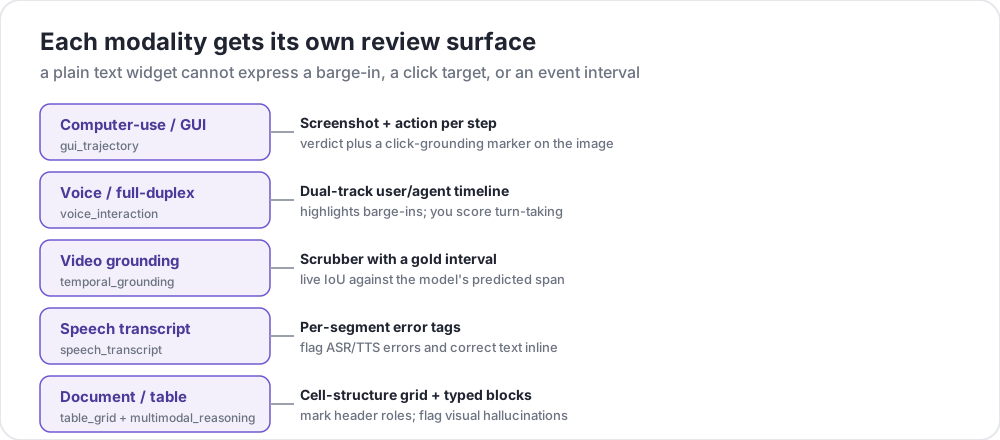 A plain text widget cannot express a barge-in, an event interval, or a table cell
Turn-taking on a dual-track voice timeline
Spoken agents break at turn boundaries, when they cut the user off, talk over them, or pause so long the user gives up. The voice_interaction schema lays the conversation out as a dual-track timeline, with a user lane and an agent lane, and highlights the overlap regions (barge-ins) where both speak at once (Full-Duplex-Bench, 2025). You classify each overlap and rate the overall turn-taking, and the audio plays inline when provided.
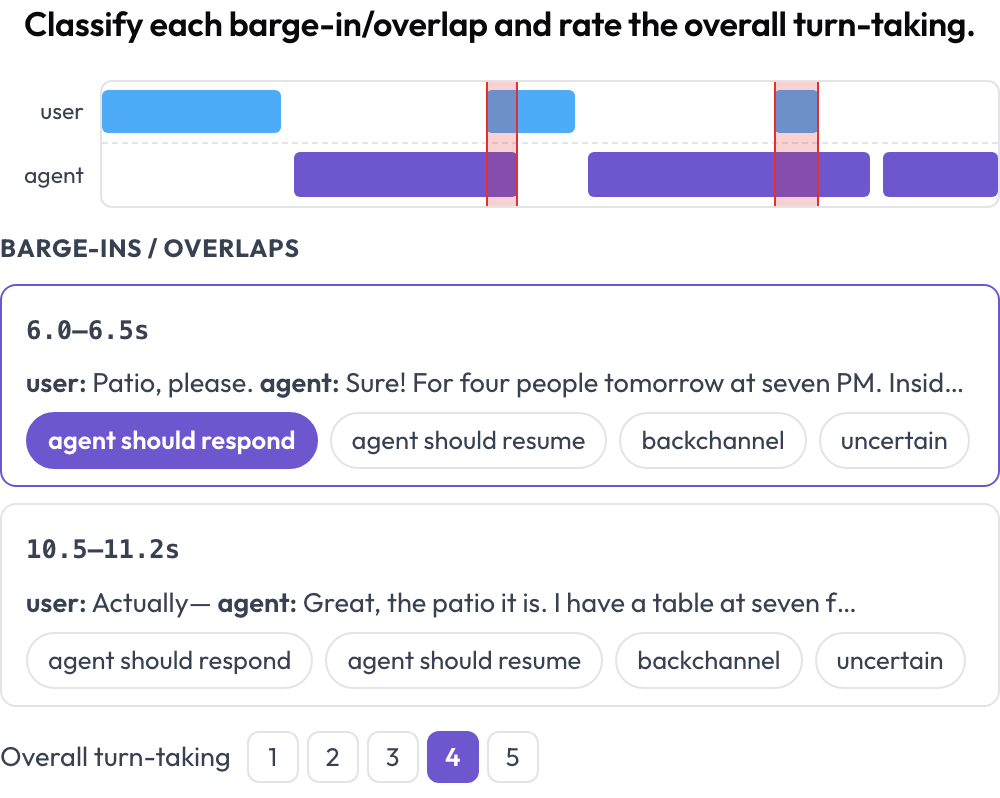 Dual-track voice timeline with barge-in detection and turn-taking scoring
annotation_schemes:
  - annotation_type: voice_interaction
    name: turn_taking
    description: "Classify each barge-in/overlap and rate the overall turn-taking."
    turns_key: turns
    speaker_key: speaker
    user_speakers: [user, human, caller]
    overlap_labels: [agent_should_respond, agent_should_resume, backchannel, uncertain]
    rating_scale: 5
Potato computes the overlaps from the turn timings at render time. A full-duplex conversation that a flat transcript would flatten into "they both said things" therefore becomes a set of concrete moments you can label.
Temporal grounding scored with live IoU
A video agent's answer to "when does the goal happen?" is an interval, so you score it as one. The temporal_grounding schema gives you a scrubber where you mark the gold [start, end] interval for each event prompt, by capturing the playhead or typing seconds. When the data carries the model's predicted interval, a live intersection over union (IoU) and a two-bar mini-timeline update as you adjust the boundaries (TimeScope, 2025).
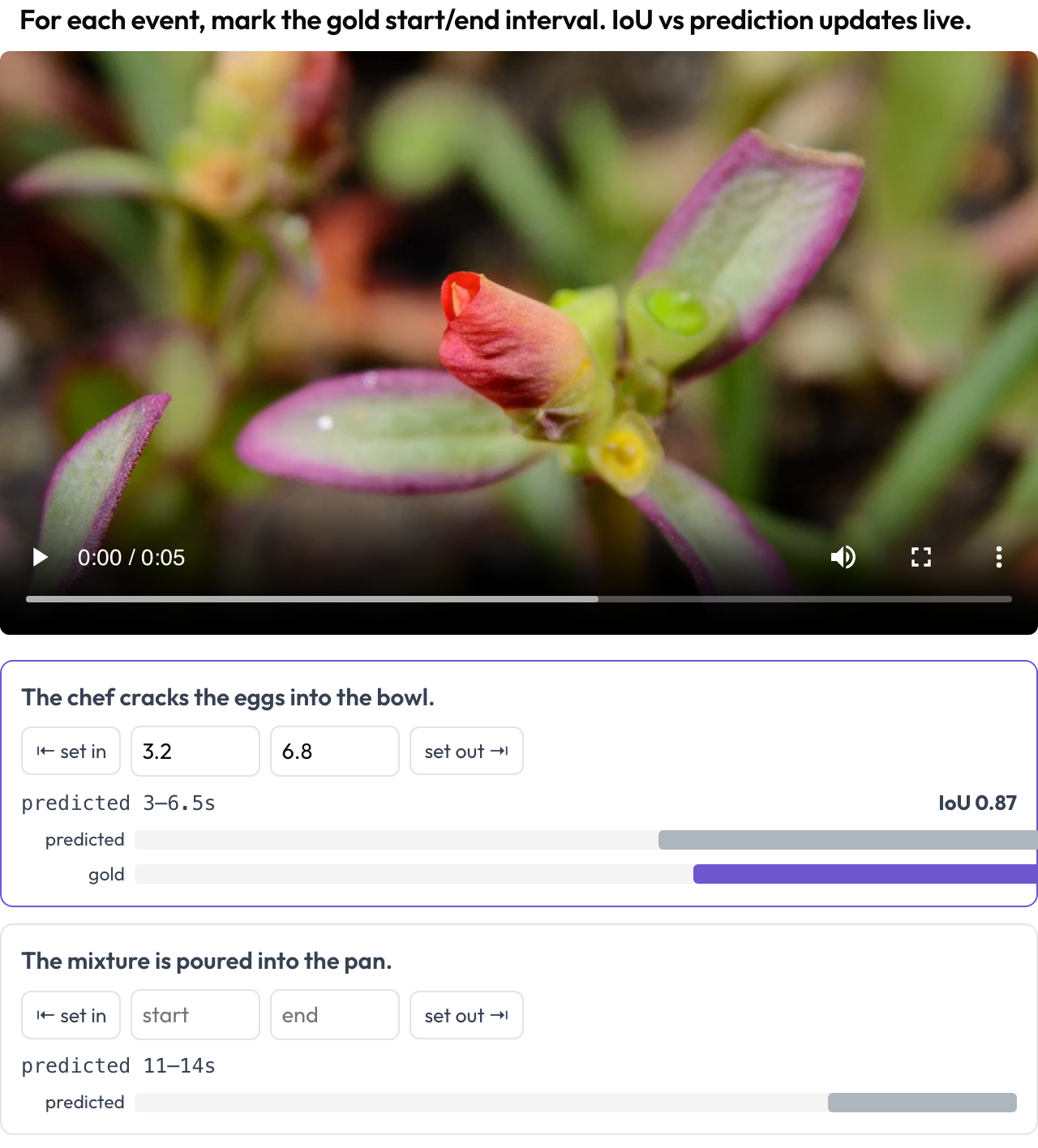 Mark gold event intervals on video with a live IoU against the model's prediction
annotation_schemes:
  - annotation_type: temporal_grounding
    name: grounding
    description: "Mark the gold start/end interval for each event. IoU vs prediction updates live."
    video_key: video
    events_key: events
The schema is built for predicted-versus-gold localization, which is a different job from general segment labeling. You are scoring how close the model's span is to the truth, and seeing the IoU move as you drag a boundary makes that distance immediate.
Speech transcripts, reasoning traces, and document tables
Three more schemas cover speech and documents:
- Speech transcripts (
speech_transcript): each time-aligned segment is a card, where you tag automatic speech recognition (ASR) and text-to-speech (TTS) errors, mispronunciations, and disfluencies and correct the text inline. The same tagging applies to non-native speech, which the Speak & Improve Corpus 2025 releases with manual transcriptions and error labels for research on ASR of L2 learner English and disfluency detection. The segment-level view complements the turn-taking timeline. - Interleaved reasoning (
multimodal_reasoning): a text-image-tool trace is rendered as typed blocks. You rate each step's coherence and flag visual hallucinations, the steps where the reasoning does not follow from the image (Multimodal RewardBench 2, 2025). - Document tables (
table_grid): you set the grid dimensions and click cells to mark their role (data, column header, row header, or empty). The grid captures structure that bounding boxes cannot.
The speech_transcript config sets four error tags and allows correction.
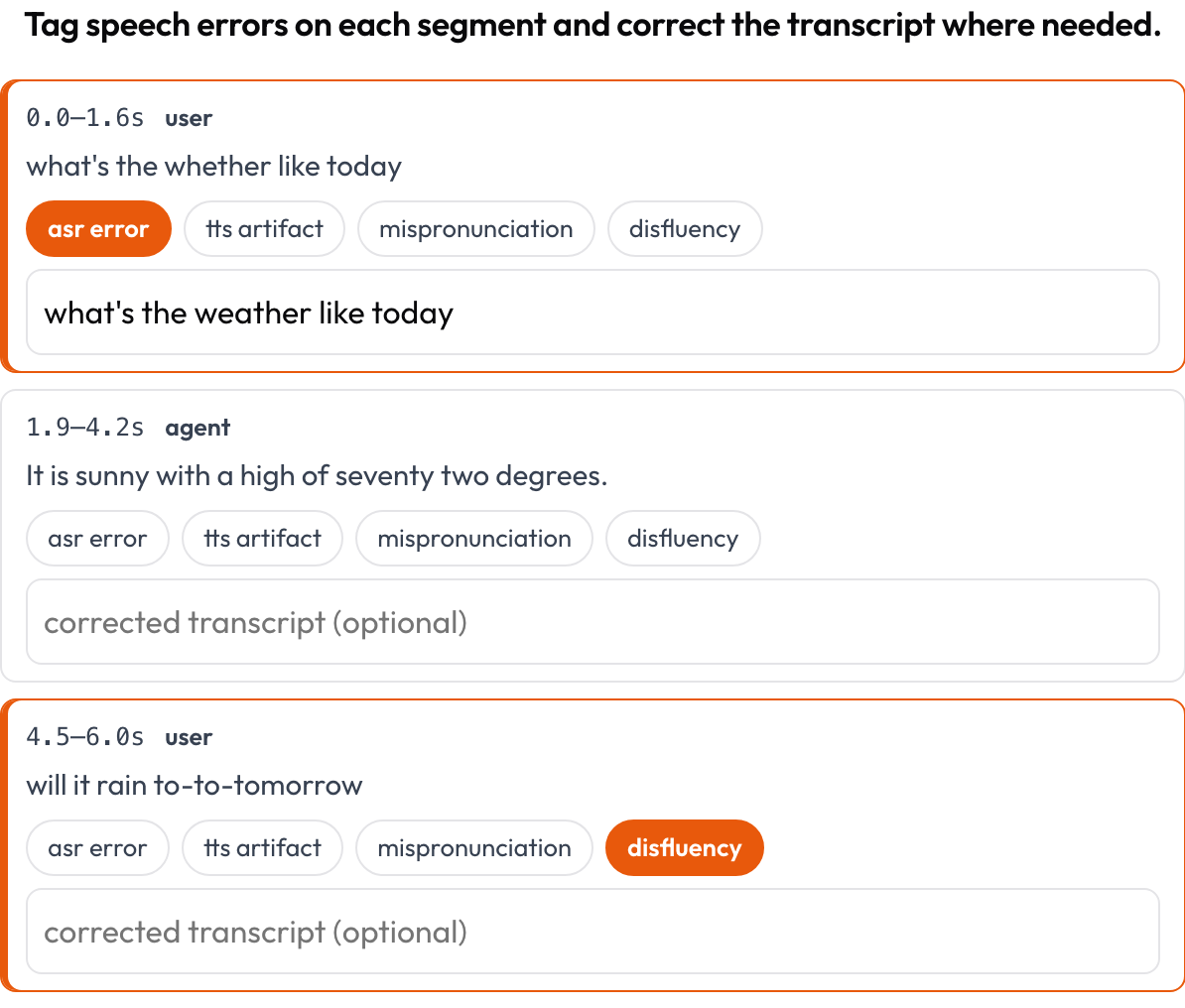 Tag ASR, TTS, and pronunciation errors per segment and correct the transcript inline
annotation_schemes:
  - annotation_type: speech_transcript
    name: speech_errors
    description: "Tag speech errors on each segment and correct the transcript where needed."
    segments_key: segments
    error_types: [asr_error, tts_artifact, mispronunciation, disfluency]
    allow_correction: true
Several of these schemas can run on the same task, so a single document-agent run can be scored for table structure and reasoning coherence at once.
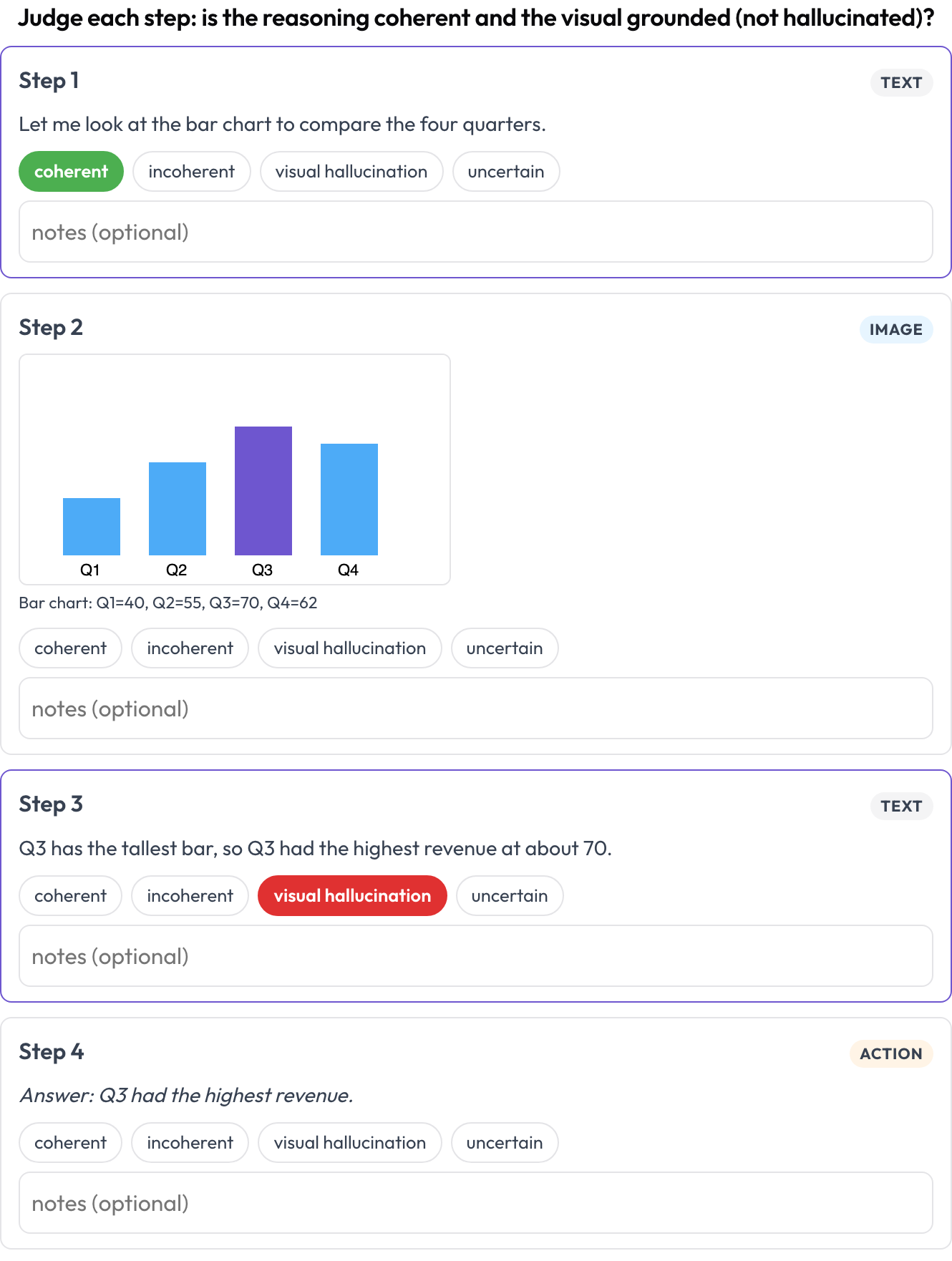 Rate each step of a text-image-tool reasoning trace for coherence and visual hallucination
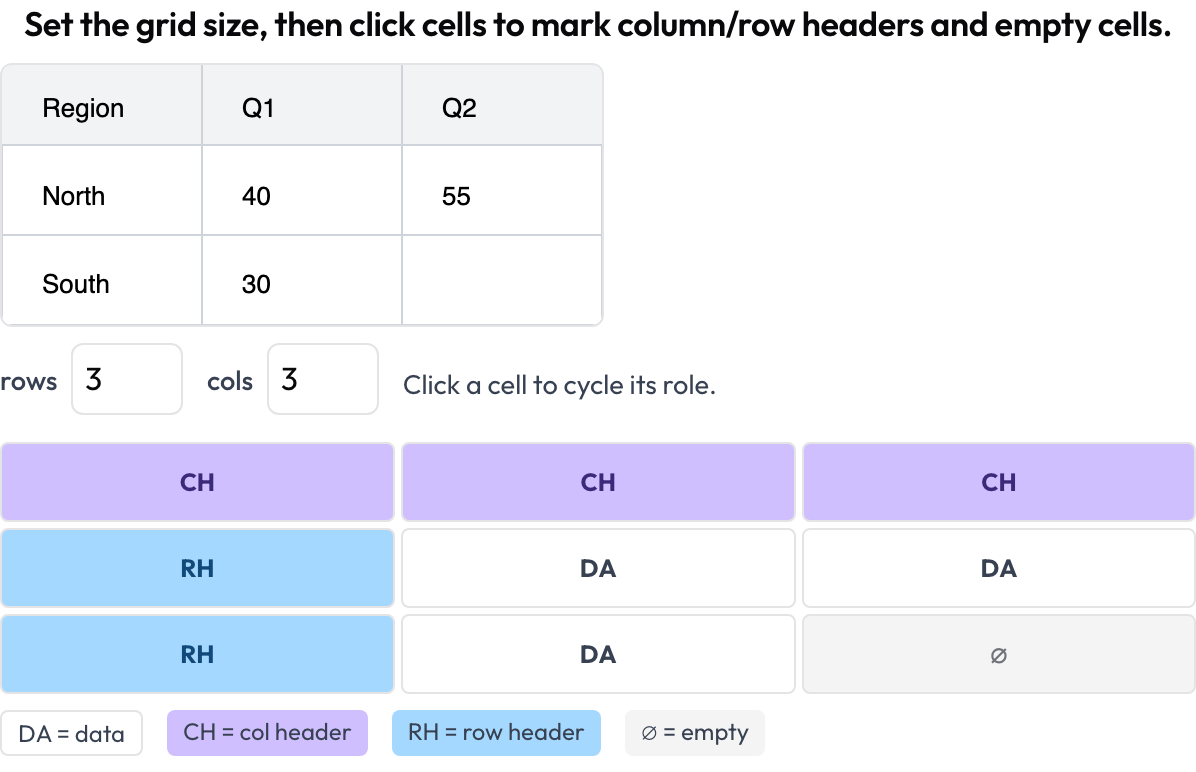 Annotate document-table cell structure with column headers, row headers, data, and empty cells
Running the example projects
Each surface ships a runnable example under examples/agent-traces/ in the Potato repository. The examples are not part of the PyPI package, so these commands clone the repository and serve the temporal-grounding example on port 8000:
git clone https://github.com/davidjurgens/potato.git
cd potato && pip install -r requirements.txt
python potato/flask_server.py start examples/agent-traces/temporal-grounding/config.yaml -p 8000
Your own data supplies turns, segments, or events with timestamps, and each surface derives its timeline from them at render time. For GUI and OS agents, the companion piece is Evaluating Computer-Use Agents.
Further reading
- Multimodal-Agent Evaluation, the full schema reference
- Evaluating Computer-Use and Multimodal Agents, the guide with a schema-selection table
- Evaluating Computer-Use Agents, Step by Step, the GUI and OS half of the multimodal surfaces
- Potato 2.6.2: A Complete Open-Source Agent-Evaluation Suite, everything in the 2.6.x line
References
Guan-Ting Lin et al. (2025). Full-Duplex-Bench: A Benchmark to Evaluate Full-duplex Spoken Dialogue Models on Turn-taking Capabilities. arXiv preprint arXiv:2503.04721. https://arxiv.org/abs/2503.04721
Xiangrui Liu et al. (2025). TimeScope: Towards Task-Oriented Temporal Grounding In Long Videos. arXiv preprint arXiv:2509.26360. https://arxiv.org/abs/2509.26360
Kate Knill et al. (2024). Speak & Improve Corpus 2025: an L2 English Speech Corpus for Language Assessment and Feedback. arXiv preprint arXiv:2412.11986. https://arxiv.org/abs/2412.11986
Yushi Hu et al. (2025). Multimodal RewardBench 2: Evaluating Omni Reward Models for Interleaved Text and Image. arXiv preprint arXiv:2512.16899. https://arxiv.org/abs/2512.16899