Evaluating Computer-Use Agents, Step by Step
Evaluate computer-use and GUI agents step by step in Potato by judging each action, checking click grounding on the screenshot, and reviewing each tool call.
Evaluating a computer-use agent means checking, at each step, whether the action was right and whether the click landed on the element it named. Task success on its own hides the click that hit the wrong button but advanced anyway, and the action that was right by luck.
A computer-use agent, also called a GUI or OS agent, sees the screen as pixels or a DOM and acts through the same controls a person has. At each step it reads a screenshot, decides on an action, and clicks. Benchmarks such as OSWorld, ScreenSpot, and AndroidWorld score task completion automatically. Automatic scoring is cheap and worth running, but it cannot tell you why a run failed or catch the lucky pass, and human step review covers both. Potato reviews these runs with a purpose-built GUI-trajectory surface and a tool-call review, both configured in YAML.
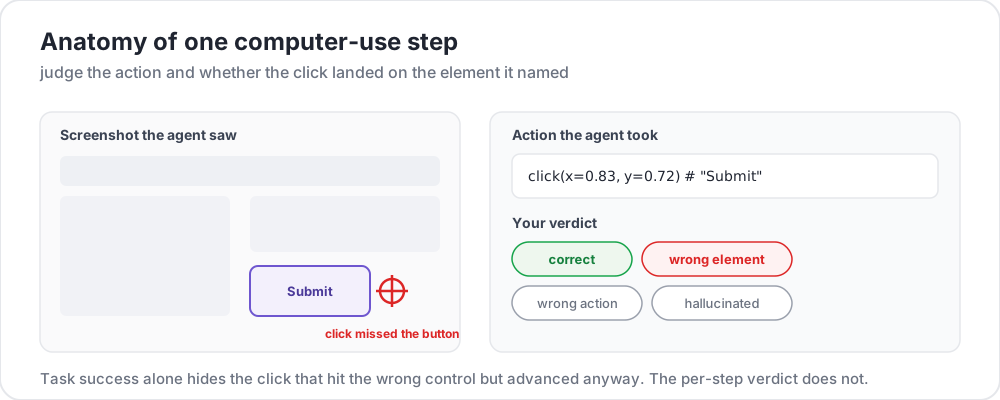 Judge the action and whether the click landed on the element it named
Step-level judgments in a GUI trajectory
Each step pairs a screenshot (what the agent saw) with an action (what it did). You judge the action, and when the step carries click coordinates, you check the grounding marker that Potato draws on the screenshot. A review covers three judgments:
- Action correctness: correct, wrong element, wrong action, or hallucinated.
- Click grounding: whether the coordinates landed on the element the action named.
- Outcome: whether the run finished the task, and the step at which it first went wrong.
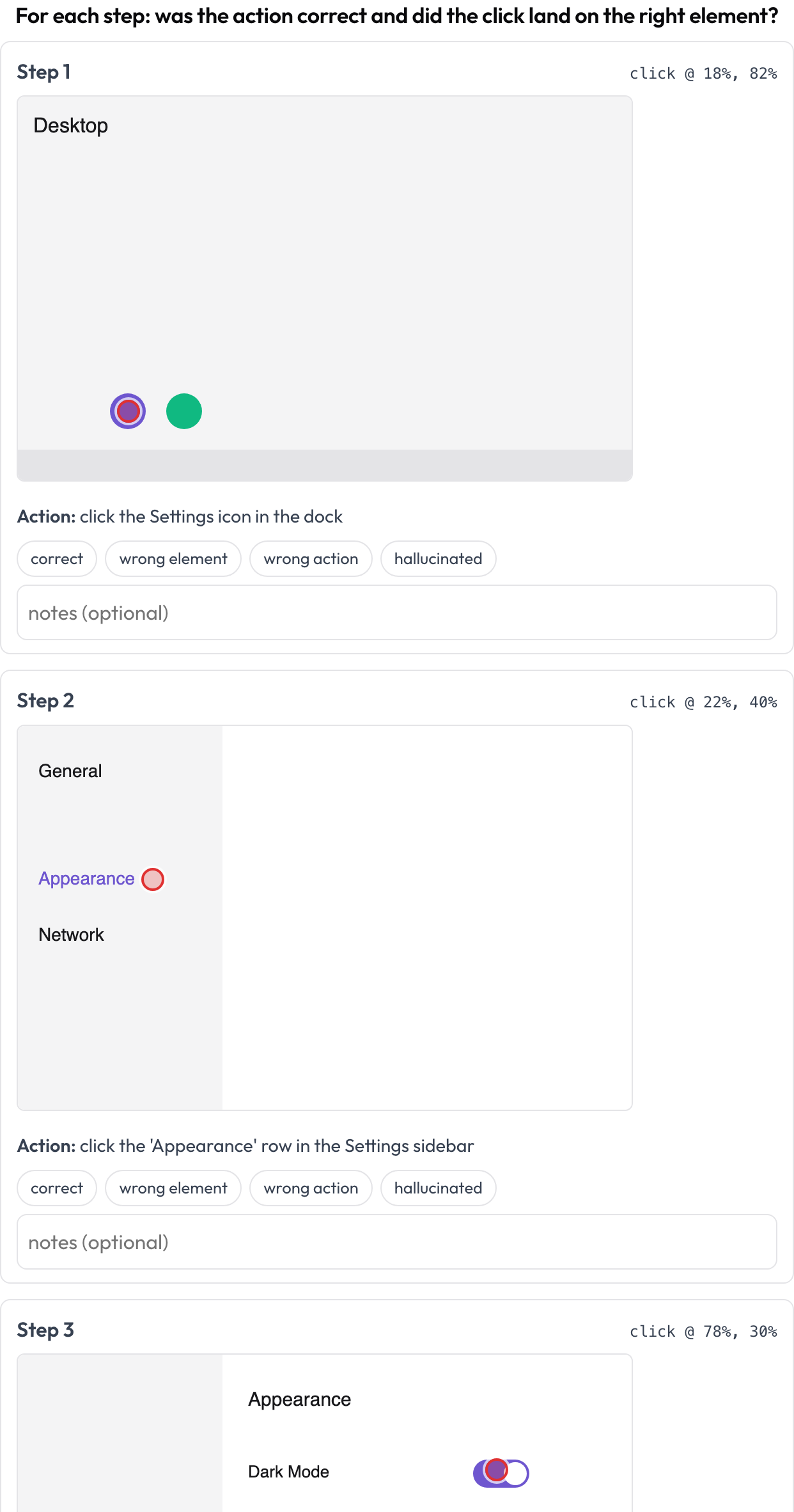 Review each step: action correctness plus click grounding on the screenshot
The scheme sets the four action verdicts:
annotation_schemes:
  - annotation_type: gui_trajectory
    name: gui_review
    description: "For each step: was the action correct and did the click land right?"
    steps_key: steps
    screenshot_key: screenshot
    action_key: action
    coord_space: normalized
    verdict_options: [correct, wrong_element, wrong_action, hallucinated]
Each step supplies screenshot, action, and optional x/y (or a nested click: {x, y}). Task-level scoring can pass a run with a grounding error in it. A model can output the right action label while clicking ten pixels off the target, and if the run still reaches the goal screen, a pass/fail on the final screen does not record the miss.
First-divergence labels for failed runs
The first wrong step matters more than the final result because you would fix or train against it. A run that fails at step 9 because step 3 misread a dialog is really a step-3 problem, and labeling it at step 9 teaches the wrong lesson. Catching the first divergence is the same idea behind process reward models, where a signal at every step localizes the error instead of collapsing the whole trajectory into one number.
Per-call review of tool calls
GUI agents also call tools and functions, which fail in their own ways when the agent picks the wrong tool for the right intent or passes malformed arguments to the right tool. The tool_call_review schema pulls each call out of the trace and gives it a card with the tool name and pretty-printed arguments, so you judge the calls one at a time as correct, wrong tool, or wrong arguments, as in BFCL v4 and MCPMark.
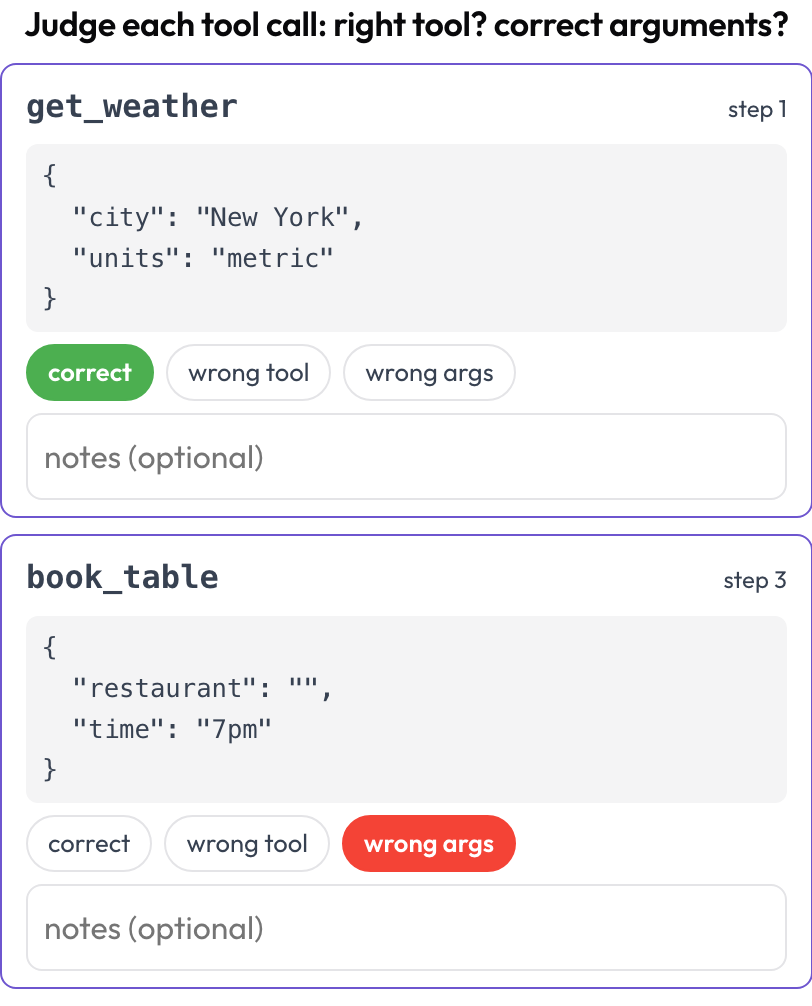 Judge every tool call: right tool and correct arguments
Leaving verdict_options unset gives those three verdicts. If call order matters for your agent, uncomment the line to add wrong_order as a fourth:
annotation_schemes:
  - annotation_type: tool_call_review
    name: tool_review
    description: "Judge each tool call: right tool? correct arguments?"
    steps_key: steps
    # verdict_options: [correct, wrong_tool, wrong_args, wrong_order]
Potato extracts tool calls at render time from each step's tool_calls or tool_call field, or from a step that names a tool or sets action_type: tool, so you can review a trajectory that mixes UI clicks and API calls on both axes in one task.
Runnable examples and your own data
Each surface ships a runnable example with sample data under examples/agent-traces/ in the Potato repository. The examples are not part of the PyPI package, so clone the repository to run one:
git clone https://github.com/davidjurgens/potato.git
cd potato && pip install -r requirements.txt
python potato/flask_server.py start examples/agent-traces/gui-trajectory/config.yaml -p 8000
The last command serves the GUI-trajectory example at http://localhost:8000.
Your own data drops in as a list of steps, each with a screenshot URL or data-URI and an action string. For broader web agents that work from rendered pages rather than raw screenshots, see Web-Agent Evaluation.
Further reading
- Multimodal-Agent Evaluation, the full schema reference for GUI, voice, video, and document agents
- Evaluating Computer-Use and Multimodal Agents, the guide with a schema-selection table
- Evaluating Voice and Video Agents, the other half of the multimodal surfaces
- Potato 2.6.2: A Complete Open-Source Agent-Evaluation Suite, the full 2.6.x line
References
- Xie, T., Zhang, D., Chen, J., et al. (2024). OSWorld: Benchmarking Multimodal Agents for Open-Ended Tasks in Real Computer Environments. Neural Information Processing Systems (NeurIPS). https://arxiv.org/abs/2404.07972
- Cheng, K., Sun, Q., Chu, Y., et al. (2024). SeeClick: Harnessing GUI Grounding for Advanced Visual GUI Agents. Proceedings of the 62nd Annual Meeting of the Association for Computational Linguistics (Volume 1: Long Papers). https://doi.org/10.18653/v1/2024.acl-long.505
- Rawles, C., Clinckemaillie, S., Chang, Y., et al. (2024). AndroidWorld: A Dynamic Benchmarking Environment for Autonomous Agents. arXiv preprint. https://arxiv.org/abs/2405.14573
- Wu, Z., Liu, X., Zhang, X., et al. (2025). MCPMark: A Benchmark for Stress-Testing Realistic and Comprehensive MCP Use. arXiv preprint. https://arxiv.org/abs/2509.24002