为目标检测绘制边界框
在 Potato 中构建目标检测任务:从三个标签的入门配置,到驾驶影像的生产配置,再导出为 COCO 或 YOLO。
本教程在 Potato 中构建一个目标检测标注任务,从三个标签的配置开始,最终得到检测器训练所用的 COCO 或 YOLO 导出结果。图像工具及其选项的完整列表,见图像标注文档。
数据文件
数据文件的每一行是一张图像。Potato 需要一个标识符,以及一个存放图像 URL 或路径的字段,item_properties 说明哪个字段是哪一个:
{"id": "img_001", "image_url": "https://example.com/street_001.jpg"}
{"id": "img_002", "image_url": "/static/images/street_002.jpg"}
相对路径会基于 media_directory 解析,所以本地图像不需要运行文件服务器。
最简配置
image_annotation 方案负责绘制界面。它需要一个名称、一段标注者当作指示来读的描述、要启用的工具,以及标签集:
annotation_task_name: "Object Detection Annotation"
task_dir: "."
output_annotation_dir: "annotation_output/"

data_files:
  - "data/images.json"

item_properties:
  id_key: id
  text_key: image_url

annotation_schemes:
  - annotation_type: image_annotation
    name: objects
    description: "Draw a box around every car, person, and bicycle"
    tools:
      - bbox
    labels:
      - name: car
        color: "#FF6B6B"
      - name: person
        color: "#4ECDC4"
      - name: bicycle
        color: "#45B7D1"
三个标签是刻意选择的起点。你每加一个标签,标注者在每个目标上就多一次判断,也多一种必须被告知如何处理的边界情况,所以先从模型真正需要的类别开始,等指南站得住脚之后再补上其余的。
启动服务器并打开任务:
potato start config.yaml -p 8000标注者做什么
标注者先选一个标签,然后围绕每个目标拖出一个矩形,调整角点直到框贴紧目标:
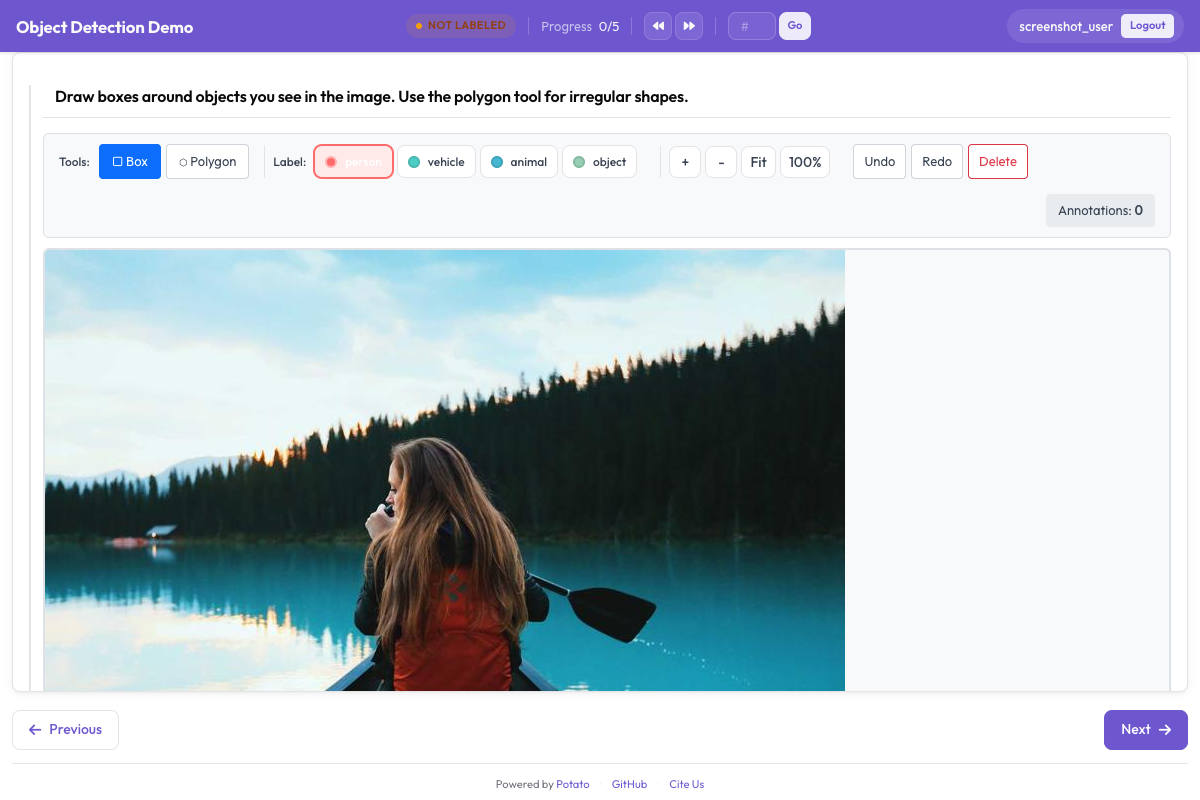 边界框工具让标注者在图像上绘制并标注矩形区域
缩放和平移默认开启,这对小的或远处的目标很重要。如果图像规格一致、多出来的控件只会碍事,可以用 zoom_enabled: false 和 pan_enabled: false 把两者都关掉。
标签快捷键
在默认的 v7 快捷键方案下,工具占用字母键,所以 r 选择框选工具,p 选择多边形,b 选择画笔。标签快捷键通过每个标签的 key_value 单独设置,数字是稳妥的选择,因为 key_value 与工具键冲突的标签会一次触发两个动作:
annotation_schemes:
  - annotation_type: image_annotation
    name: objects
    description: "Annotate all visible objects"
    tools:
      - bbox
    labels:
      - name: person
        color: "#FF6B6B"
        key_value: "1"

      - name: car
        color: "#4ECDC4"
        key_value: "2"

      - name: motorcycle
        color: "#45B7D1"
        key_value: "3"

      - name: bicycle
        color: "#96CEB4"
        key_value: "4"

      - name: traffic_light
        color: "#FFEAA7"
        key_value: "5"

      - name: stop_sign
        color: "#DDA0DD"
        key_value: "6"
颜色值得挑选,而不是照单全收。在密集的交通场景里,标注者是在扫视自己漏掉了什么,相邻类别用两种相近的颜色会让这个扫视变慢。如果你的标注者学的是 Potato 2.8 之前的按键,而你不想重新培训他们,就设置 keybinding_profile: legacy。
添加目标属性
Potato 没有针对单个框的属性块。image_annotation 的标签只会被读取
name、color 和 key_value,标签字典里的其他内容都会被丢弃,
所以嵌套的 attributes: 列表不起任何作用,画完一个框之后也不会出现任何提示。
有两种办法可以采集同样的信息。一种是把这个区分折进标签集, 让属性成为标注者所选内容的一部分:
annotation_schemes:
  - annotation_type: image_annotation
    name: objects
    description: "Draw a box around each object"
    tools:
      - bbox
    labels:
      - name: person
        color: "#FF6B6B"
      - name: person_occluded
        color: "#C44536"
另一种是用第二个方案对整张图像提问。它作用于条目而不是某个具体的框, 代价就在这里:你知道图像里有东西被遮挡,却不知道是哪个框:
  - annotation_type: multiselect
    name: image_conditions
    description: "Conditions affecting this image"
    labels:
      - Heavy occlusion
      - Truncated objects
      - Low light
属性唯一能保留下来的地方是从 VIA 导入:via_importer 会读取
每个区域的 region_attributes 并把它们折进标签。这是导入阶段的概念,
不是配置里的概念。
要求至少画一个框
一张没有框的图像含义不明,因为它可能表示标注者什么都没找到,也可能表示他们跳过了这个条目。min_annotations 会拒绝形状数量低于下限的提交,从而强制区分这两种情况,于是真正空无一物的图像就需要一个明确的否定标签来代替:
annotation_schemes:
  - annotation_type: image_annotation
    name: objects
    description: "Draw a box around every traffic participant"
    tools:
      - bbox
    labels: [...]
    min_annotations: 1
控制图像渲染多大
绘制界面跟着渲染出来的图像走,所以渲染得小的图像只会给标注者一块小画布。instance_display 设定尺寸,缩放仍然可用于处理细节:
instance_display:
  fields:
    - key: image_url
      type: image
      label: "Frame"
      display_options:
        max_width: 1200
        max_height: 800
        zoomable: true
生产配置
下面这份驾驶场景配置带有检测数据集需要的五个类别。标签保留数字快捷键,让标注者的左手一直停在数字行上;min_annotations: 1 成立,是因为这份语料里的每一帧都至少含有一个交通参与者:
annotation_task_name: "Autonomous Driving - Object Detection"
task_dir: "."
output_annotation_dir: "annotation_output/"

data_files:
  - "data/driving_frames.json"

item_properties:
  id_key: id
  text_key: frame_path

annotation_schemes:
  - annotation_type: image_annotation
    name: objects
    description: "Annotate all traffic participants and objects"
    tools:
      - bbox
    min_annotations: 1
    labels:
      - name: vehicle
        color: "#FF6B6B"
        key_value: "1"

      - name: pedestrian
        color: "#4ECDC4"
        key_value: "2"

      - name: cyclist
        color: "#45B7D1"
        key_value: "3"

      - name: traffic_sign
        color: "#FFEAA7"
        key_value: "4"

      - name: traffic_light
        color: "#DDA0DD"
        key_value: "5"
五个类别已经接近数字快捷键能舒服覆盖的上限。超过十个,标注者就会在找按键而不是看画面,到那一步,把任务拆成两个比再加一个标签更划算。
标注结果长什么样
不管是哪个工具画的,Potato 都把一张图像上的所有形状存进一个扁平的 JSON 数组。坐标相对图像归一化到 0 到 1 的范围,所以图像以后以别的尺寸提供时,标注依然正确:
[
  {
    "type": "bbox",
    "label": "vehicle",
    "color": "#FF6B6B",
    "coordinates": {"x": 0.234, "y": 0.352, "width": 0.120, "height": 0.130}
  },
  {
    "type": "bbox",
    "label": "pedestrian",
    "color": "#4ECDC4",
    "coordinates": {"x": 0.427, "y": 0.370, "width": 0.026, "height": 0.139}
  }
]
bbox 的几何信息以 {x, y, width, height} 的形式放在 coordinates 下。多边形在同一个键下放的是点的列表,而掩码改为在 rle 下放游程编码。
导出用于训练
检测器的训练代码读取 COCO 或 YOLO,两种 Potato 都能写:
python -m potato.export --config config.yaml --format coco --output ./export/
python -m potato.export --config config.yaml --format yolo --output ./export/
这两种导出的差别不止在语法上。COCO 写出单个 annotations.json,其中的框是 [x, y, width, height] 形式的像素坐标,而且它不会复制图像,所以 file_name 的值指向图像原本所在的位置。YOLO 为每张图像写一个文本文件,用归一化的中心坐标,把图像和标签分到 train/ 和 val/ 两个目录,还加上 data.yaml 和 classes.txt,这样训练过程不必另外被告知就能读到类别列表。
让框保持一致
框要贴紧目标,因为框里的每一个背景像素,都是模型学着当成前景的像素。把棘手情况(遮挡、被画面边缘切掉的目标、反射)的处理方式写下来,并在第一周一起过一批例子,那时候改指南还便宜。研究进行期间,盯着每位标注者的框数量和尺寸分布,因为突然的变化通常意味着某个人开始用不同的方式理解某条规则,而不是图像变了。
下一步
其余的图像选项见图像标注。