众包标注的质量控制
把注意力检查、金标准、标注者重叠和计时数据叠起来用,拦住低质量标注,并给出每一项对应的 Potato 配置键和它们各自报告什么。
**没有哪一种检查能抓住所有类型的坏标注,所以把四种叠起来用:注意力检查针对不读题的标注者,金标准针对读了题仍然答错的标注者,重叠针对本身有歧义的项目,计时针对快到不可能真做过的提交。**每一项都有自己的 Potato 配置键,而且各自单独报告到管理面板。
质量控制在收集之前做最便宜,在收集之后做最贵。一个在标注者第五次失败时就把他拦下的注意力检查,配置起来不花什么成本,还省下了他本会填掉的那些项目;同样的问题靠事后脚本发现,代价就是重新收集一遍。下面的控制手段按它们起作用的时间排序。
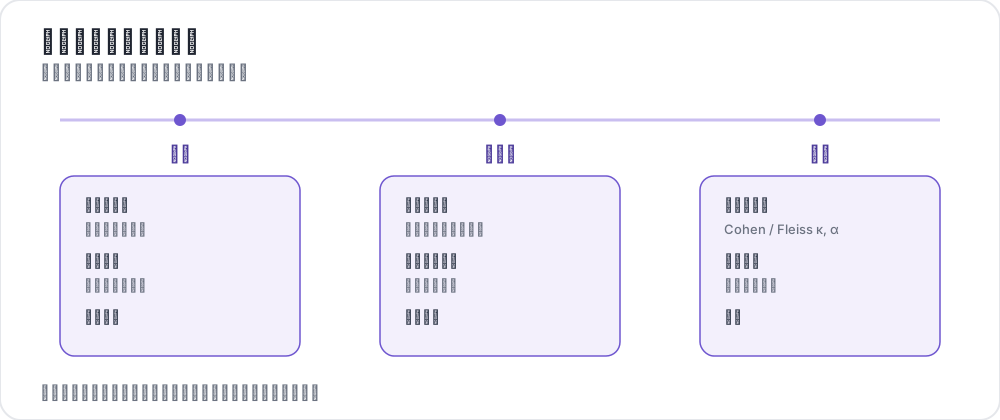 贯穿项目周期的质量控制
每种控制各能抓住什么
四种控制失效的方向不同,这正是要同时跑不止一种的理由。
| 控制手段 | 能抓住 | 抓不住 |
|---|---|---|
| 注意力检查 | 不读题就作答的标注者 | 认真却误解了指南的标注者 |
| 金标准 | 读了题但答错的标注者 | 没有唯一正确答案的项目 |
| 重叠与一致性 | 有歧义的项目和标签 | 因为共用同一来源而一致的标注者 |
| 计时与遥测 | 快到不可能真做过的提交 | 在确实容易的语料上做得快 |
一致性尤其不是万能的。当标注者复核模型预标注时,不读就接受建议会抬高而不是压低一致性,于是在这个指标上,盖章式的标注者看起来是最好的那一个。一致性抓不住盖章式标注讲了应该改为记录什么。
注意力检查
注意力检查是一些答案已知的项目,按一定节奏注入标注流,用来核实标注者是读了之后才作答的。Potato 负责注入、评分、警告标注者,并在你设定的阈值上把他拦下,所以整个环路跑在服务器上,而不是跑在事后脚本里。
频率要按你的项目花多长时间来定。每 10 个项目一次检查,足以在一个工作时段之内抓到走神的标注者,又不会把太多预算花在非数据上。min_response_time 这个下限抓的是点而不读,比它更快的作答无论内容是什么都算不通过:
attention_checks:
  enabled: true
  items_file: "data/attention_checks.json"
  frequency: 10              # one check every 10 items
  min_response_time: 3.0     # seconds; faster than this fails the check

  failure_handling:
    warn_threshold: 2
    warn_message: "Please read items carefully before answering."
    block_threshold: 5
    block_message: "You have been blocked due to too many incorrect responses."
项目文件给每个检查一个 id、标注者看到的文本,以及按方案给出的预期答案:
[
  {
    "id": "attn_001",
    "text": "Please select 'Positive' for this item to verify you are reading carefully.",
    "expected_answer": {
      "sentiment": "positive"
    }
  }
]
结果在重启后仍然保留。Potato 一边记录一边把它们写进输出目录里的 quality_control_results.json,并在启动时读回来,所以一次部署不会清掉某个标注者的失败历史,也不会把已经被拦下的人放出来。
金标准
金标准是混进标注流的专家标注项目,用来测量准确率而不是注意力。它们默认是静默的,结果进到管理面板,标注者看不到任何反馈,这样在测量质量的同时不会改变你正在测量的那个行为。当你是在做训练而不是在筛人时,再把反馈打开。
金标项目每隔 frequency 个项目注入一次,所以这个设置是在测量精度和"多少预算花在你已经有标签的项目上"之间做权衡。二十分之一,大约能在一个 500 个项目的工作班次里给出 25 个被评分的项目:
gold_standards:
  enabled: true
  items_file: "data/gold_standards.json"
  mode: mixed                # mixed injects into the stream; this is the implemented mode
  frequency: 20

  accuracy:
    min_threshold: 0.7       # annotators below this are named in the dashboard
    evaluation_count: 10     # evaluate once an annotator has seen 10 gold items

  feedback:
    show_correct_answer: false
    show_explanation: false
项目文件带有按方案给出的正确标注,以及一个可选的解释,供需要反馈的场合使用:
[
  {
    "id": "gold_001",
    "text": "The service was absolutely terrible and I will never return.",
    "gold_label": {
      "sentiment": "negative"
    },
    "explanation": "Strong negative language indicates negative sentiment.",
    "difficulty": "easy"
  }
]
要选在专家看来没有歧义的金标项目。一个你自己团队都会争论的项目,测量的是指南而不是标注者,而且它会把称职的标注者压到阈值以下。Potato 也可以在标注者对某个项目一致同意之后,通过 gold_standards.auto_promote 把它提升为金标项目,这样不必增加专家标注就能把金标池做大。
按标注者的准确率出现在 /admin/api/quality_control,它在给出总数的同时报告 configured_correct 和 configured_total。比较标注者时要引用 configured 这组数字,因为配置好的金标池对每个人都一样,而自动提升的那部分取决于每名标注者是什么时候来的。
重叠与一致性
每个项目多名标注者,是那个用来找出有歧义项目、而不是找出坏标注者的控制手段。每个项目三名是常见的默认值,因为三名既能给出用于聚合的多数结果,也能给出足够算系数的重叠。设定目标并打开报告:
num_annotators_per_item: 3

agreement_metrics:
  enabled: true
  min_overlap: 2
  refresh_interval: 60
随着标注进来,Krippendorff's alpha 会按方案出现在管理面板上。衡量标注者间一致性讲了该报告哪个系数,以及那些阈值意味着什么。
计时与遥测
Potato 记录的不只是答了什么,还有每个项目花了多长时间。每个实例都带一个 behavioral_data 对象,其中的 total_time_ms 是在那个项目上花的时间,旁边还有交互事件、标注修改历史和 AI 建议的生命周期。正是这个字段让你能把"因为语料容易而快"的标注者和"因为没在看而快"的标注者分开:
def flag_fast_annotations(export, min_seconds=2.0):
    """Instances submitted faster than a floor, from an exported annotation file."""
    flagged = []
    for instance in export:
        bd = instance.get("behavioral_data") or {}
        seconds = bd.get("total_time_ms", 0) / 1000
        if seconds < min_seconds:
            flagged.append((instance["id"], seconds))
return flagged把计时当作你自己项目内部的一个分布来读,而不是拿它去对一个固定的秒数,因为同一个阈值在难语料上抓到的是盖章式标注,在易语料上抓到的是称职。对于绘制类标注,annotation_telemetry 以更细的粒度记录同样的想法。它最强的信号是 AI 建议出现到标注者接受它之间的延迟。行为追踪和绘制遥测介绍了这些字段,以及它们支撑起来的那些标记。
四种控制齐备的一份配置
这四个键相互独立,所以一个项目可以一次采用一个。合起来是这个样子:
annotation_task_name: "Sentiment Annotation with Quality Control"
task_description: "Classify the sentiment of short texts."

data_files:
  - data/items.json

item_properties:
  id_key: id
  text_key: text

annotation_schemes:
  - annotation_type: radio
    name: sentiment
    description: "What is the sentiment of this text?"
    labels:
      - Positive
      - Negative
      - Neutral

num_annotators_per_item: 3

attention_checks:
  enabled: true
  items_file: data/attention_checks.json
  frequency: 15
  min_response_time: 3.0
  failure_handling:
    warn_threshold: 2
    block_threshold: 5

gold_standards:
  enabled: true
  items_file: data/gold_standards.json
  mode: mixed
  frequency: 25
  accuracy:
    min_threshold: 0.7
    evaluation_count: 10

agreement_metrics:
  enabled: true
  min_overlap: 2
  refresh_interval: 60

output_annotation_dir: annotation_output
阈值一开始要放宽。拦截阈值设成 5、准确率下限设成 0.7,能让你在决定什么算不合格之前先看到标注者群体的真实分布,而之后再收紧不花什么成本。第一天就把它们设死,等于凭一份还没试跑过的指南把标注者赶走。
平台层面的控制
众包平台在任何人到达你的任务之前就先筛一遍人,这和上面那些检查是两件不同的事,值得在做那些检查之外也做一做。
- 预筛选。 Prolific 能按通过率和以往完成的工作量筛选,也能按人口统计和语言筛选。
- 资格测试。 在 Potato 的培训阶段放一个简短的测试,就能在任何平台上限制谁能进入主任务。
- 付款前复核。 工作没问题时尽快通过,因为标注者抱怨最多的就是审核慢;驳回要省着用,因为它会损害一名工作者在平台上的信誉。
平台预筛选和 Potato 自己的检查是互补的。预筛选决定谁能到达任务,注意力检查和金标准测量的是他们到了之后做了什么。
开始收集之前
有两个决定在收集开始之后很难反悔,所以先把它们定下来。决定你在导出里需要哪些字段,因为事后才想做的计时分析,要求 behavioral_data 在运行过程中就已经被记录下来。再用几十个项目、开着完整的控制栈跑一次试点,因为试点正是你发现注意力检查有歧义、或者金标项目有争议的地方,代价是一个下午,而不是一整个数据集。