為目標檢測繪製邊界框
在 Potato 中構建目標檢測任務:從三個標籤的入門配置,到駕駛影像的生產配置,再匯出為 COCO 或 YOLO。
本教程在 Potato 中構建一個目標檢測標註任務,從三個標籤的配置開始,最終得到檢測器訓練所用的 COCO 或 YOLO 匯出結果。影像工具及其選項的完整列表,見影像標註文件。
資料檔案
資料檔案的每一行是一張影像。Potato 需要一個識別符號,以及一個存放影像 URL 或路徑的欄位,item_properties 說明哪個欄位是哪一個:
{"id": "img_001", "image_url": "https://example.com/street_001.jpg"}
{"id": "img_002", "image_url": "/static/images/street_002.jpg"}
相對路徑會基於 media_directory 解析,所以本地影像不需要執行檔案伺服器。
最簡配置
image_annotation 方案負責繪製介面。它需要一個名稱、一段標註者當作指示來讀的描述、要啟用的工具,以及標籤集:
annotation_task_name: "Object Detection Annotation"
task_dir: "."
output_annotation_dir: "annotation_output/"

data_files:
  - "data/images.json"

item_properties:
  id_key: id
  text_key: image_url

annotation_schemes:
  - annotation_type: image_annotation
    name: objects
    description: "Draw a box around every car, person, and bicycle"
    tools:
      - bbox
    labels:
      - name: car
        color: "#FF6B6B"
      - name: person
        color: "#4ECDC4"
      - name: bicycle
        color: "#45B7D1"
三個標籤是刻意選擇的起點。你每加一個標籤,標註者在每個目標上就多一次判斷,也多一種必須被告知如何處理的邊界情況,所以先從模型真正需要的類別開始,等指南站得住腳之後再補上其餘的。
啟動伺服器並開啟任務:
potato start config.yaml -p 8000標註者做什麼
標註者先選一個標籤,然後圍繞每個目標拖出一個矩形,調整角點直到框貼緊目標:
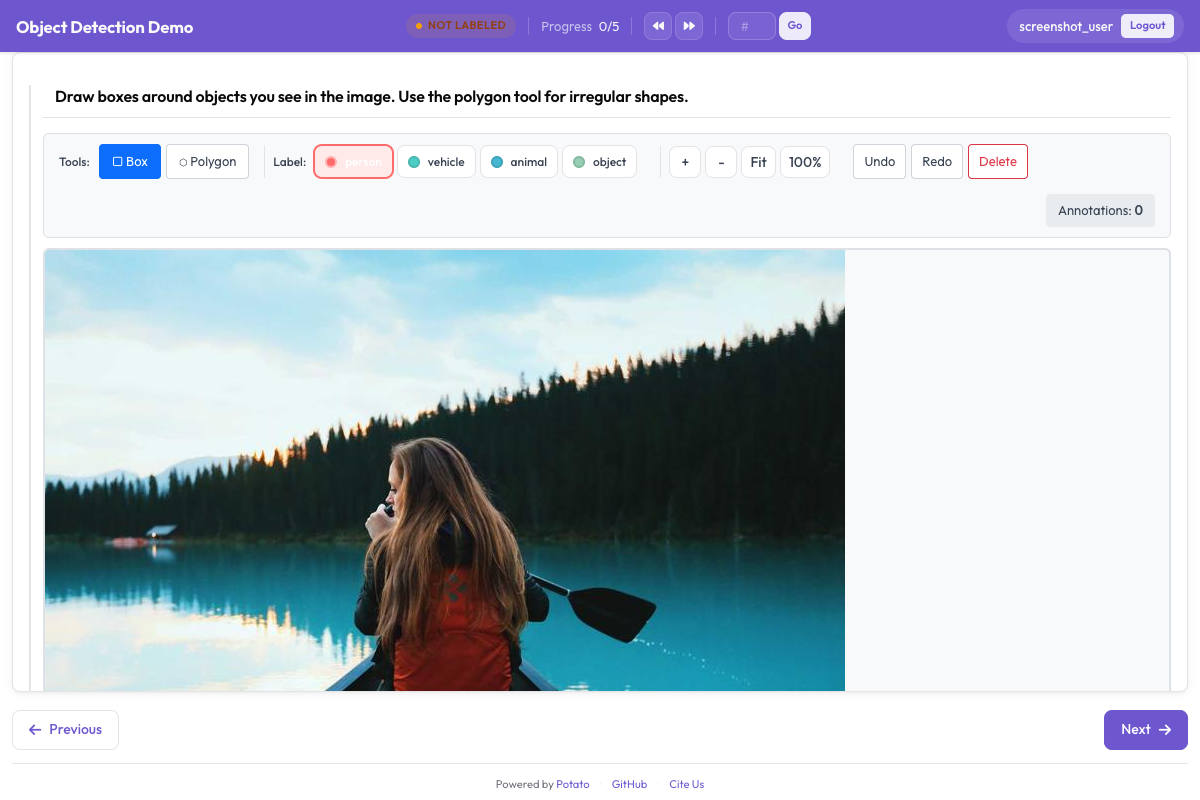 邊界框工具讓標註者在影像上繪製並標註矩形區域
縮放和平移預設開啟,這對小的或遠處的目標很重要。如果影像規格一致、多出來的控制元件只會礙事,可以用 zoom_enabled: false 和 pan_enabled: false 把兩者都關掉。
標籤快捷鍵
在預設的 v7 快捷鍵方案下,工具佔用字母鍵,所以 r 選擇框選工具,p 選擇多邊形,b 選擇畫筆。標籤快捷鍵通過每個標籤的 key_value 單獨設定,數字是穩妥的選擇,因為 key_value 與工具鍵衝突的標籤會一次觸發兩個動作:
annotation_schemes:
  - annotation_type: image_annotation
    name: objects
    description: "Annotate all visible objects"
    tools:
      - bbox
    labels:
      - name: person
        color: "#FF6B6B"
        key_value: "1"

      - name: car
        color: "#4ECDC4"
        key_value: "2"

      - name: motorcycle
        color: "#45B7D1"
        key_value: "3"

      - name: bicycle
        color: "#96CEB4"
        key_value: "4"

      - name: traffic_light
        color: "#FFEAA7"
        key_value: "5"

      - name: stop_sign
        color: "#DDA0DD"
        key_value: "6"
顏色值得挑選,而不是照單全收。在密集的交通場景裡,標註者是在掃視自己漏掉了什麼,相鄰類別用兩種相近的顏色會讓這個掃視變慢。如果你的標註者學的是 Potato 2.8 之前的按鍵,而你不想重新培訓他們,就設定 keybinding_profile: legacy。
新增目標屬性
Potato 沒有針對單個框的屬性塊。image_annotation 的標籤只會被讀取
name、color 和 key_value,標籤字典裡的其他內容都會被丟棄,
所以巢狀的 attributes: 列表不起任何作用,畫完一個框之後也不會出現任何提示。
有兩種辦法可以採集同樣的資訊。一種是把這個區分折進標籤集, 讓屬性成為標註者所選內容的一部分:
annotation_schemes:
  - annotation_type: image_annotation
    name: objects
    description: "Draw a box around each object"
    tools:
      - bbox
    labels:
      - name: person
        color: "#FF6B6B"
      - name: person_occluded
        color: "#C44536"
另一種是用第二個方案對整張影像提問。它作用於條目而不是某個具體的框, 代價就在這裡:你知道影像裡有東西被遮擋,卻不知道是哪個框:
  - annotation_type: multiselect
    name: image_conditions
    description: "Conditions affecting this image"
    labels:
      - Heavy occlusion
      - Truncated objects
      - Low light
屬性唯一能保留下來的地方是從 VIA 匯入:via_importer 會讀取
每個區域的 region_attributes 並把它們折進標籤。這是匯入階段的概念,
不是配置裡的概念。
要求至少畫一個框
一張沒有框的影像含義不明,因為它可能表示標註者什麼都沒找到,也可能表示他們跳過了這個條目。min_annotations 會拒絕形狀數量低於下限的提交,從而強制區分這兩種情況,於是真正空無一物的影像就需要一個明確的否定標籤來代替:
annotation_schemes:
  - annotation_type: image_annotation
    name: objects
    description: "Draw a box around every traffic participant"
    tools:
      - bbox
    labels: [...]
    min_annotations: 1
控制影像渲染多大
繪製介面跟著渲染出來的影像走,所以渲染得小的影像只會給標註者一塊小畫布。instance_display 設定尺寸,縮放仍然可用於處理細節:
instance_display:
  fields:
    - key: image_url
      type: image
      label: "Frame"
      display_options:
        max_width: 1200
        max_height: 800
        zoomable: true
生產配置
下面這份駕駛場景配置帶有檢測資料集需要的五個類別。標籤保留數字快捷鍵,讓標註者的左手一直停在數字行上;min_annotations: 1 成立,是因為這份語料裡的每一幀都至少含有一個交通參與者:
annotation_task_name: "Autonomous Driving - Object Detection"
task_dir: "."
output_annotation_dir: "annotation_output/"

data_files:
  - "data/driving_frames.json"

item_properties:
  id_key: id
  text_key: frame_path

annotation_schemes:
  - annotation_type: image_annotation
    name: objects
    description: "Annotate all traffic participants and objects"
    tools:
      - bbox
    min_annotations: 1
    labels:
      - name: vehicle
        color: "#FF6B6B"
        key_value: "1"

      - name: pedestrian
        color: "#4ECDC4"
        key_value: "2"

      - name: cyclist
        color: "#45B7D1"
        key_value: "3"

      - name: traffic_sign
        color: "#FFEAA7"
        key_value: "4"

      - name: traffic_light
        color: "#DDA0DD"
        key_value: "5"
五個類別已經接近數字快捷鍵能舒服覆蓋的上限。超過十個,標註者就會在找按鍵而不是看畫面,到那一步,把任務拆成兩個比再加一個標籤更划算。
標註結果長什麼樣
不管是哪個工具畫的,Potato 都把一張影像上的所有形狀存進一個扁平的 JSON 陣列。座標相對影像歸一化到 0 到 1 的範圍,所以影像以後以別的尺寸提供時,標註依然正確:
[
  {
    "type": "bbox",
    "label": "vehicle",
    "color": "#FF6B6B",
    "coordinates": {"x": 0.234, "y": 0.352, "width": 0.120, "height": 0.130}
  },
  {
    "type": "bbox",
    "label": "pedestrian",
    "color": "#4ECDC4",
    "coordinates": {"x": 0.427, "y": 0.370, "width": 0.026, "height": 0.139}
  }
]
bbox 的幾何資訊以 {x, y, width, height} 的形式放在 coordinates 下。多邊形在同一個鍵下放的是點的列表,而掩碼改為在 rle 下放遊程編碼。
匯出用於訓練
檢測器的訓練程式碼讀取 COCO 或 YOLO,兩種 Potato 都能寫:
python -m potato.export --config config.yaml --format coco --output ./export/
python -m potato.export --config config.yaml --format yolo --output ./export/
這兩種匯出的差別不止在語法上。COCO 寫出單個 annotations.json,其中的框是 [x, y, width, height] 形式的畫素座標,而且它不會複製影像,所以 file_name 的值指向影像原本所在的位置。YOLO 為每張影像寫一個文本檔案,用歸一化的中心座標,把影像和標籤分到 train/ 和 val/ 兩個目錄,還加上 data.yaml 和 classes.txt,這樣訓練過程不必另外被告知就能讀到類別列表。
讓框保持一致
框要貼緊目標,因為框裡的每一個背景畫素,都是模型學著當成前景的畫素。把棘手情況(遮擋、被畫面邊緣切掉的目標、反射)的處理方式寫下來,並在第一週一起過一批例子,那時候改指南還便宜。研究進行期間,盯著每位標註者的框數量和尺寸分佈,因為突然的變化通常意味著某個人開始用不同的方式理解某條規則,而不是影像變了。
下一步
其餘的影像選項見影像標註。