指南閱讀約需 3 分鐘
主動學習:更聰明地標註,而非更辛苦地標註
Potato 如何按分類器的不確定性重排標註佇列,以及取樣設定、冷啟動和保留多少隨機樣本的配置。
Potato Team
主動學習決定接下來標註哪些項目,而不是把這件事交給運氣,標註的精力因此花在模型最能學到東西的樣本上。下面是在 Potato 中的配置方法。
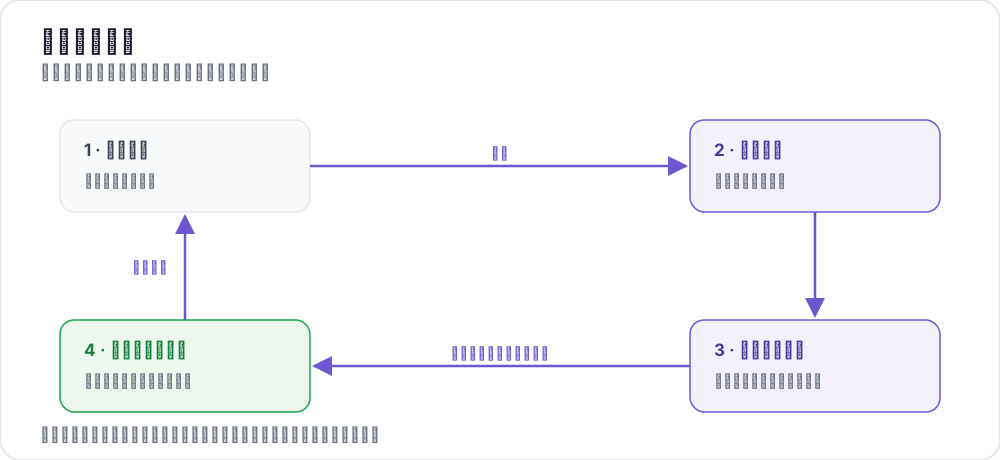 The active learning loop
什麼是主動學習?
主動學習不是隨機抽樣資料進行標註,而是:
- 在當前標註資料上訓練模型
- 識別模型不確定的項目
- 優先將這些項目交給人工標註
- 重複此過程,持續提升效率
為什麼使用主動學習?
- 降低標註成本:用更少的標註量達到相同的模型品質
- 更快迭代:更早獲得可用的模型
- 聚焦專業知識:將人工注意力集中在困難案例上
- 更好的覆蓋:確保邊緣案例得到充分代表
基本主動學習配置
yaml
annotation_task_name: "Active Learning Classification"

data_files:
  - "data/unlabeled_pool.json"

item_properties:
  id_key: id
  text_key: text

# Active learning configuration
active_learning:
  enabled: true
  classifier:
    name: "sklearn.linear_model.LogisticRegression"

  # Sampling settings
  max_instances_to_reorder: 1000  # Number of instances to reorder by uncertainty
  random_sample_percent: 0.1  # 10% random sampling to maintain diversity

annotation_schemes:
  - annotation_type: radio
    name: category
    description: "Classify the sentiment"
    labels: [Positive, Negative, Neutral]
不確定性取樣的工作原理
Potato 的主動學習使用不確定性取樣來優先處理分類器最不確定的項目。分類器對未標註實例進行預測,置信度最低的項目會被優先展示給標註者。
classifier_name 欄位使用完整模組路徑指定任何相容 scikit-learn 的分類器:
yaml
active_learning:
  enabled: true
  classifier:
    name: "sklearn.linear_model.LogisticRegression"
其他分類器選項包括:
sklearn.ensemble.RandomForestClassifiersklearn.svm.SVC(需要設定probability=True)sklearn.naive_bayes.MultinomialNB
完整配置
yaml
annotation_task_name: "Active Learning for Sentiment"

data_files:
  - "data/reviews.json"

item_properties:
  id_key: id
  text_key: text

active_learning:
  enabled: true
  classifier:
    name: "sklearn.linear_model.LogisticRegression"

  # Sampling settings
  max_instances_to_reorder: 2000  # Reorder top N by uncertainty
  random_sample_percent: 0.1  # 10% random to maintain diversity

annotation_schemes:
  - annotation_type: radio
    name: sentiment
    description: "Classify the sentiment"
    labels:
      - name: Positive
        key_value: "1"
      - name: Negative
        key_value: "2"
      - name: Neutral
        key_value: "3"
    label_requirement:
      required: true

annotation_instructions: |
  ## Sentiment Classification

  Items are prioritized by model uncertainty.
  You may see more difficult or ambiguous cases.

  Focus on accuracy over speed.
監控進度
通過 Potato 內建的日誌功能跟蹤標註進度。系統會記錄哪些實例被選中及其不確定性分數,讓你能夠監控整個主動學習過程。
最佳實踐
冷啟動
通過設定較高的 random_sample_percent 從多樣化的隨機取樣開始:
yaml
active_learning:
  enabled: true
  classifier:
    name: "sklearn.linear_model.LogisticRegression"
  random_sample_percent: 0.2  # 20% random for initial diversity
控制重排範圍
使用 max_instances_to_reorder 控制按不確定性排序的實例數量。較大的值提供更好的選擇效果,但需要更多計算:
yaml
active_learning:
  max_instances_to_reorder: 5000  # Rank top 5000 by uncertainty
維持多樣性
random_sample_percent 參數確保包含一些隨機抽樣的實例,防止模型只看到不確定的邊緣案例:
yaml
active_learning:
  random_sample_percent: 0.1  # 10% random sampling
成功建議
- 從多樣性開始:隨機初始樣本覆蓋邊緣案例
- 監控準確率:跟蹤模型效能隨時間的變化
- 不要過度最佳化:保持一定的隨機取樣以維持覆蓋範圍
- 處理標註者疲勞:困難項目容易讓人疲倦
- 儲存模型檢查點:必要時可以回滾
下一步
完整的主動學習文件請參閱 主動學習。