构建你的第一个命名实体识别标注任务
逐步搭建 Potato 中的命名实体识别任务:span 标注配置、标签颜色、重叠片段、键盘快捷键和 CoNLL 导出。
本教程在 Potato 中构建一个命名实体识别(NER)任务,包含五种实体类型、数字键快捷键、标注者指南,以及用于模型训练的 CoNLL-2003 导出。其背后的 span 配置选项,见 span 标注文档。
标注者看到的界面
任务建好后,标注者看到的是一个句子,上方是一排标签按钮。拖动鼠标选中一个短语,按数字键或点击按钮给它打上标签,再次点击已标注的片段就能修改或删除。每个片段都连同它的字符偏移量一起保存,所以同一份标注文件既能导出成 CoNLL-2003,也能用来计算片段级别的一致性。
前置条件
你需要装好 Potato、一份文本数据文件,以及够用的 YAML 基础来改配置:
pip install potato-annotation第 1 步:span 方案
片段标注用的是 Potato 的 span 类型。每个标签都要有名称,此外有几个好用的可选字段:color 在密集文本上把不同实体类型区分开,key_value 把一个键盘快捷键绑到标签上,tooltip 在鼠标悬停时显示标签的定义,标注者不用离开页面去翻编码手册。
五种类型能让标注者一次坐下就把任务学会。超过八种左右,标注者就会在每条数据上都去查指南,效率正是在这里掉下来的。sequential_key_binding 启用数字键,key_value 指定哪个数字对应哪个标签,而不是听凭列表顺序决定。创建 config.yaml:
annotation_task_name: "Named Entity Recognition"
task_dir: "."

data_files:
  - data/sentences.json

item_properties:
  id_key: id
  text_key: text

output_annotation_dir: "annotation_output/"
export_annotation_format: "jsonl"

annotation_schemes:
  - annotation_type: span
    name: entities
    description: "Highlight and label named entities in the text"
    sequential_key_binding: true
    labels:
      - name: PER
        tooltip: "Person names, including fictional characters"
        color: "#FF6B6B"
        key_value: "1"
      - name: ORG
        tooltip: "Companies, institutions, agencies"
        color: "#4ECDC4"
        key_value: "2"
      - name: LOC
        tooltip: "Places, including countries, cities, landmarks"
        color: "#45B7D1"
        key_value: "3"
      - name: DATE
        tooltip: "Dates, times, and temporal expressions"
        color: "#96CEB4"
        key_value: "4"
      - name: MISC
        tooltip: "Named entities that fit none of the above"
        color: "#FFEAA7"
        key_value: "5"

user_config:
  allow_all_users: true
第 2 步:数据文件
Potato 按行读取 JSON 对象,取用 item_properties 中指定的字段。创建 data/sentences.json:
{"id": "1", "text": "Apple Inc. announced that CEO Tim Cook will visit Paris next Tuesday."}
{"id": "2", "text": "The United Nations headquarters in New York hosted delegates from Japan."}
{"id": "3", "text": "Dr. Sarah Johnson published her research at Stanford University in March 2024."}
三个句子足够检验界面是否正常。等标签集通过了试标注,再载入真正的语料。
第 3 步:标注者随手可及的指南
NER 的分歧大多来自边界规则,而不是实体类型本身,所以决定条目最多的那几条规则应该放在标注界面上。annotation_instructions 会在每条数据顶部渲染成一个可折叠面板,默认展开,标注者熟悉任务后可以把它收起来。把下面这段加进上面的配置:
annotation_instructions: |
  ## Entity types

  - **PER** covers people, including fictional characters ("John Smith", "Dr. Johnson", "Batman")
  - **ORG** covers companies, institutions, and agencies ("Apple Inc.", "United Nations", "Stanford University")
  - **LOC** covers places, including countries, cities, and landmarks ("Paris", "New York", "Mount Everest")
  - **DATE** covers dates, times, and temporal expressions ("Tuesday", "March 2024", "next week")
  - **MISC** covers named entities that fit none of the above ("Nobel Prize", "iPhone", "COVID-19")

  ## Boundary rules

  1. Include titles (Dr., Mr.) with person names.
  2. For nested entities, annotate the largest meaningful span.
  3. Leave articles (the, a) outside the span.
这里支持 Markdown,所以可以直接把编码手册里的文字搬过来,不用改写成 HTML。这个面板只留能定下大多数条目的规则,完整的编码手册交给 annotation_codebook_url,它会在单独的标签页里打开。
片段标注界面会把标签显示为文本上方的按钮:
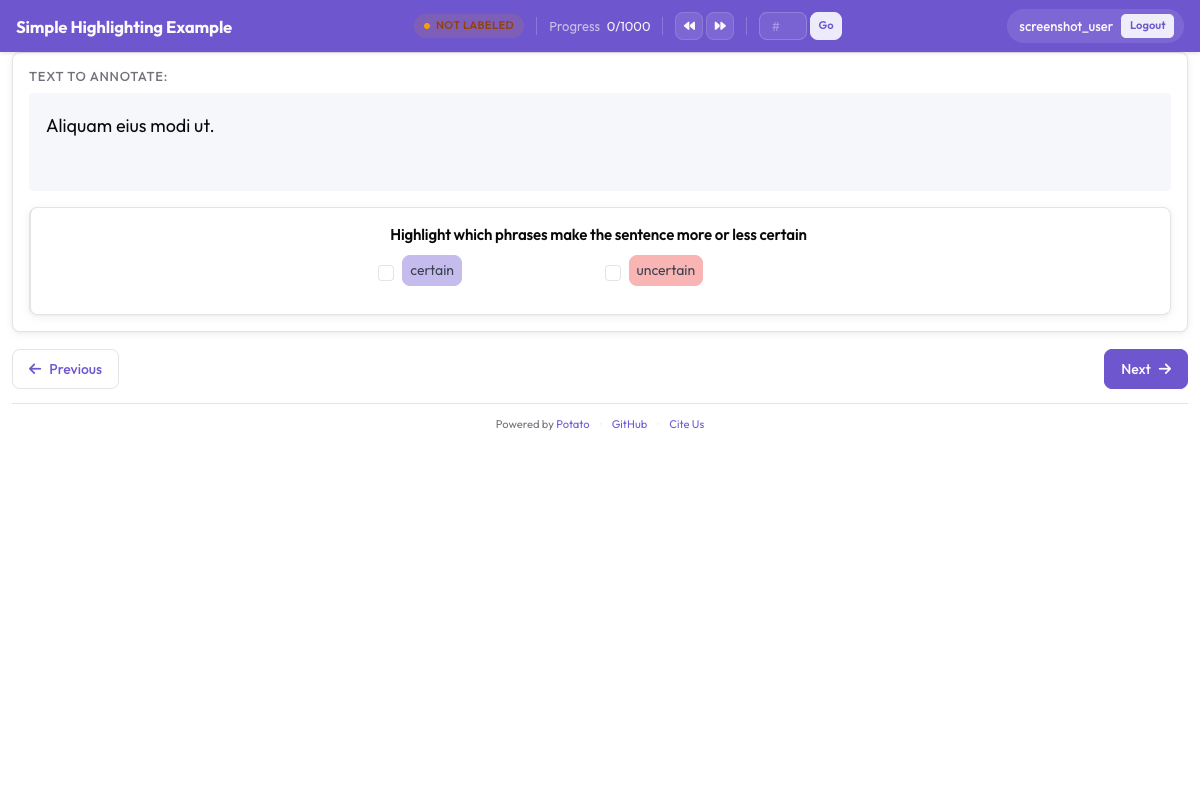 标注者高亮文本片段并指定 PER、ORG、LOC、DATE 等实体标签
第 4 步:运行任务
用第 1 步的配置启动服务器:
potato start config.yaml打开它打印出的地址并登录。标注者对每个实体走四步:
- 选中文本。 点击并拖过这个短语。
- 指定类型。 按数字键或点击标签按钮。
- 改正错误。 点击已有的片段来改标签或删掉它。
- 提交。 这个句子做完就进入下一条。
第 5 步:输出文件里有什么
每条标注完的数据会作为一个 JSON 对象写入 annotation_output/,以方案名作为键,每个片段一条记录:
{
  "id": "1",
  "text": "Apple Inc. announced that CEO Tim Cook will visit Paris next Tuesday.",
  "entities": [
    {"start": 0, "end": 10, "label": "ORG", "text": "Apple Inc."},
    {"start": 30, "end": 38, "label": "PER", "text": "Tim Cook"},
    {"start": 50, "end": 55, "label": "LOC", "text": "Paris"},
    {"start": 61, "end": 73, "label": "DATE", "text": "next Tuesday"}
  ]
}
字符偏移量是这份文件在下游有用的原因。它们不受分词方式变化的影响,所以同一批标注可以重新对齐到模型使用的任何分词器。
第 6 步:导出为 CoNLL-2003
序列标注模型读的是带标签的 token,而不是字符偏移量,所以 Potato 在导出时会转换这些片段:
python -m potato.export -c config.yaml -f conll_2003 -o ./conll_export/结果是每行一个 token 加它的标签,句子之间用空行隔开。tag_scheme 选项可以写 BIO、BIOES 或 IOB,默认是 BIO,导出之前先把它调成训练代码期望的那一种。
收紧标注指南
规则含糊,同一个片段就会被判成不同结果,所以趁试标注规模还小的时候修订规则最划算。带标注者过一遍难例要放在他们开工之前,而不是之后,边缘案例一旦有了定论就随手记进一份共享清单。标注者之间的一致性下滑,就是某条规则该收紧的信号,在 50 条数据上发现这一点,比在 5000 条上便宜得多。
下一步
- 添加训练阶段,让标注者在接触真实数据之前先上手
- 设置多标注者,这样片段标注之间可以互相比较
- 导出为 Hugging Face 格式用于模型训练
- 阅读 span 标注文档了解完整的选项列表