クラウドソーシングによるアノテーションの品質管理
アテンションチェック、ゴールドスタンダード、アノテーター間のオーバーラップ、時間データを組み合わせて低品質なアノテーションを検出する方法を、それぞれのPotato設定キーと報告内容とともに解説します。
どのチェックも単独ではあらゆる種類の不良アノテーションを検出できないため、4つを重ねて使います。読んでいないアノテーターにはアテンションチェック、読んだうえで間違えるアノテーターにはゴールドスタンダード、曖昧なアイテムにはオーバーラップ、実際に作業したとは思えないほど速く提出された作業には時間データです。 それぞれにPotatoの設定キーがあり、それぞれが管理ダッシュボードに個別に報告します。
品質管理は、データ収集の前なら最も安く、後になるほど高くつきます。5回目の失敗でアノテーターをブロックするアテンションチェックは設定の手間がかからず、そのアノテーターが埋めていたはずのアイテムを守ります。同じ問題を事後のスクリプトで見つけた場合は、収集のやり直しが必要になります。以下の管理手段は、作用するタイミングの順に並べています。
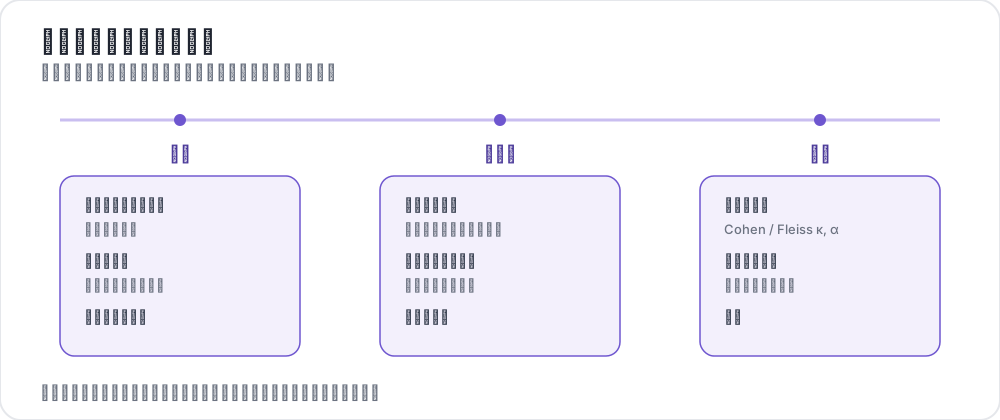 プロジェクト全体を通した品質管理
それぞれの管理手段が検出するもの
4つの管理手段はそれぞれ異なる方向に取りこぼすため、複数を併用する意味があります。
| 管理手段 | 検出するもの | 見逃すもの |
|---|---|---|
| アテンションチェック | アイテムを読んでいないアノテーター | ガイドラインを誤解している注意深いアノテーター |
| ゴールドスタンダード | 読んだうえで誤答するアノテーター | 正解が1つに定まらないアイテム |
| オーバーラップと一致度 | 曖昧なアイテムとラベル | 同じ情報源に頼っているために一致するアノテーター |
| 時間とテレメトリ | 実際に作業したとは思えないほど速く提出された作業 | 本当に易しいコーパスでの速い作業 |
特に一致度は万能ではありません。アノテーターがモデルの事前ラベルをレビューする場合、提案を読まずに受け入れると一致度は下がるどころか上がるため、確認せずに承認するアノテーターがその指標では最も優秀に見えます。代わりに何を記録すべきかは一致度では確認なしの承認を検出できないで解説しています。
アテンションチェック
アテンションチェックは答えがわかっているアイテムで、決まった間隔でアノテーションの流れに挿入され、アノテーターが回答前に読んでいるかを確かめます。Potatoはこれを挿入し、採点し、アノテーターに警告し、設定したしきい値でブロックします。そのため、この一連の流れは事後のスクリプトではなくサーバー上で完結します。
頻度は、アイテム1件にかかる時間をもとに決めます。10アイテムに1回のチェックであれば、データにならないアイテムに予算を大きく割かずに、セッション中に集中が途切れたアノテーターを見つけられます。クリックだけして読んでいない状態を検出するのは下限値min_response_timeで、これより速い回答は内容にかかわらず不合格になります。
attention_checks:
  enabled: true
  items_file: "data/attention_checks.json"
  frequency: 10              # one check every 10 items
  min_response_time: 3.0     # seconds; faster than this fails the check

  failure_handling:
    warn_threshold: 2
    warn_message: "Please read items carefully before answering."
    block_threshold: 5
    block_message: "You have been blocked due to too many incorrect responses."
アイテムファイルでは、各チェックにid、アノテーターに表示するテキスト、スキームごとの期待される回答を指定します。
[
  {
    "id": "attn_001",
    "text": "Please select 'Positive' for this item to verify you are reading carefully.",
    "expected_answer": {
      "sentiment": "positive"
    }
  }
]結果は再起動後も保持されます。Potatoは記録のたびに出力ディレクトリ内のquality_control_results.jsonへ書き込み、起動時に読み戻します。そのため、デプロイによってアノテーターの失敗履歴が消えることも、ブロックされていた人のブロックが解除されることもありません。
ゴールドスタンダード
ゴールドスタンダードは専門家がラベル付けしたアイテムで、注意力ではなく正確さを測るために流れに混ぜ込みます。デフォルトでは表に出ない設定になっており、結果は管理ダッシュボードに送られ、アノテーターにはフィードバックが表示されません。これにより、測定対象の行動を変えずに品質を測れます。選別ではなく訓練を目的とする場合は、フィードバックを有効にしてください。
ゴールドアイテムはfrequencyアイテムごとに挿入されるため、この設定は測定の精度と、すでにラベルがあるアイテムに割く予算の割合とのトレードオフになります。20件に1件なら、500アイテムの作業1回あたり約25件が採点されます。
gold_standards:
  enabled: true
  items_file: "data/gold_standards.json"
  mode: mixed                # mixed injects into the stream; this is the implemented mode
  frequency: 20

  accuracy:
    min_threshold: 0.7       # annotators below this are named in the dashboard
    evaluation_count: 10     # evaluate once an annotator has seen 10 gold items

  feedback:
    show_correct_answer: false
    show_explanation: false
アイテムファイルには、スキームごとの正しいアノテーションと、フィードバックを出す場合の任意の説明を記載します。
[
  {
    "id": "gold_001",
    "text": "The service was absolutely terrible and I will never return.",
    "gold_label": {
      "sentiment": "negative"
    },
    "explanation": "Strong negative language indicates negative sentiment.",
    "difficulty": "easy"
  }
]ゴールドアイテムには、専門家にとって曖昧さのないものを選んでください。自分たちのチーム内でも意見が分かれるアイテムは、アノテーターではなくガイドラインを測ることになり、有能なアノテーターをしきい値の下に押し下げてしまいます。Potatoはgold_standards.auto_promoteを使って、アノテーターの判断が全員一致したアイテムをゴールドに昇格させることもでき、専門家による追加のラベル付けなしにゴールドの数を増やせます。
アノテーターごとの正答率は/admin/api/quality_controlに表示され、合計値と並んでconfigured_correctとconfigured_totalが報告されます。アノテーター同士を比較するときは設定済みの数値を使ってください。設定済みのゴールドは全員に共通ですが、自動昇格したゴールドは各アノテーターが参加した時期によって変わるためです。
オーバーラップと一致度
1アイテムに複数のアノテーターを割り当てることは、不良なアノテーターではなく曖昧なアイテムを見つけるための管理手段です。1アイテムあたり3人が一般的な既定値です。3人いれば集約のための多数決が取れ、係数を計算するのに十分なオーバーラップも得られます。目標人数を設定し、レポートを有効にします。
num_annotators_per_item: 3

agreement_metrics:
  enabled: true
  min_overlap: 2
refresh_interval: 60これにより、アノテーションが集まるにつれて、Krippendorffのアルファがスキームごとに管理ダッシュボードに表示されます。どの係数を報告すべきか、しきい値が何を意味するかはアノテーター間一致度の測定で解説しています。
時間とテレメトリ
Potatoは、何を回答したかだけでなく、各アイテムにどれだけ時間がかかったかも記録します。各インスタンスにはbehavioral_dataオブジェクトがあり、そのtotal_time_msがそのアイテムに費やした時間です。これと並んで、インタラクションイベント、アノテーションの変更履歴、AI提案のライフサイクルも記録されます。このフィールドがあることで、コーパスが易しいから速いアノテーターと、見ていないから速いアノテーターを区別できます。
def flag_fast_annotations(export, min_seconds=2.0):
    """Instances submitted faster than a floor, from an exported annotation file."""
    flagged = []
    for instance in export:
        bd = instance.get("behavioral_data") or {}
        seconds = bd.get("total_time_ms", 0) / 1000
        if seconds < min_seconds:
            flagged.append((instance["id"], seconds))
return flagged時間は固定の秒数と比べるのではなく、自分のプロジェクト内の分布として読んでください。難しいコーパスで確認なしの承認を検出するしきい値は、易しいコーパスでは有能さを検出してしまうからです。描画アノテーションについては、annotation_telemetryが同じ考え方をより細かい粒度で記録します。最も強いシグナルは、AIの提案が表示されてからアノテーターがそれを受け入れるまでの時間です。フィールドの内容と、それをもとに立てられるフラグについては行動トラッキングと描画テレメトリで解説しています。
4つの管理手段をすべて含む設定
4つのキーは互いに独立しているため、プロジェクトは1つずつ導入できます。すべてを組み合わせると次のようになります。
annotation_task_name: "Sentiment Annotation with Quality Control"
task_description: "Classify the sentiment of short texts."

data_files:
  - data/items.json

item_properties:
  id_key: id
  text_key: text

annotation_schemes:
  - annotation_type: radio
    name: sentiment
    description: "What is the sentiment of this text?"
    labels:
      - Positive
      - Negative
      - Neutral

num_annotators_per_item: 3

attention_checks:
  enabled: true
  items_file: data/attention_checks.json
  frequency: 15
  min_response_time: 3.0
  failure_handling:
    warn_threshold: 2
    block_threshold: 5

gold_standards:
  enabled: true
  items_file: data/gold_standards.json
  mode: mixed
  frequency: 25
  accuracy:
    min_threshold: 0.7
    evaluation_count: 10

agreement_metrics:
  enabled: true
  min_overlap: 2
  refresh_interval: 60

output_annotation_dir: annotation_output
しきい値は緩めから始めてください。ブロックのしきい値を5、正答率の下限を0.7にしておけば、何を不合格とするかを決める前にアノテーター集団の実際の分布を確認でき、後から厳しくしてもコストはかかりません。初日から厳しく設定すると、まだパイロットで検証していないガイドラインを根拠にアノテーターを排除することになります。
プラットフォーム側の管理手段
クラウドソーシングプラットフォームは、誰かがタスクにたどり着く前に参加者を絞り込みます。これは上記のチェックとは別の役割であり、それらに加えて実施する価値があります。
- 事前スクリーニング。 Prolificは承認率と過去の完了作業に加えて、人口統計や言語でも絞り込むことができます。
- 資格テスト。 Potatoのトレーニングフェーズに短いテストを入れれば、どのプラットフォームでもメインタスクへのアクセスを制限できます。
- 支払い前のレビュー。 作業に問題がなければすぐに承認してください。承認の遅さは、アノテーターの不満として最も多いものだからです。却下はプラットフォーム上のワーカーの評価を損なうため、控えめにしてください。
プラットフォームの事前スクリーニングとPotato自身のチェックは補い合う関係にあります。事前スクリーニングは誰がタスクにたどり着くかを決め、アテンションチェックとゴールドスタンダードはたどり着いた人が何をしたかを測ります。
収集を始める前に
収集を始めてからでは覆しにくい決定が2つあるので、先に済ませておきます。1つは、エクスポートにどのフィールドが必要かを決めることです。後から計画した時間分析には、実行中にbehavioral_dataが記録されている必要があります。もう1つは、すべての管理手段を有効にした状態で数十アイテムのパイロットを実施することです。アテンションチェックが曖昧だったり、ゴールドアイテムに異論があったりすることはパイロットで判明し、その代償はデータセット1つではなく半日で済みます。
参考資料
- ゴールドスタンダードとアテンションチェック
- 品質管理機能リファレンス
- 本番タスクの前にアノテーターを慣れさせるためのトレーニングフェーズ
- 効果的なアノテーションガイドラインの書き方
- クラウドソーシングのスタディを実施する
- Potatoの品質管理ソースドキュメント