画像比較と選好タスク
2枚の画像を並べて表示し、選好スキーム、ランダムな提示順、大きな画像プール向けのランキングを備えた画像比較タスクをPotatoで構築します。
このチュートリアルでは、生成された2枚の画像を並べて表示し、5段階の選好スケール、基準ごとの追加質問、そして2枚を超えるプール向けのランキングとBest-Worst Scalingの変種を備えた画像比較タスクをPotatoで構築します。同じ構成は、RLHFの選好データ、圧縮や画像補正の比較、デザインのA/Bテストにも使えます。
比較では、アノテーターは1枚の画像をスケール上に位置づけるのではなく、2枚のうちどちらかを選びます。そのため、5段階の4が何を意味するかという基準をアノテーター全員が共有している必要がなくなります。代償として、n枚の画像のプールを完全に順序づけるにはずっと多くの判断が必要になります。最後のランキングとBest-Worst Scalingのセクションはこの問題を扱います。
データファイル
各行には、識別子、2枚の画像のパス、そしてアノテーターが判断に必要とする文脈を入れます。Potatoはフィールド名をitem_propertiesから読み取るので、名前自体は自由に決めて構いません。
{"id": "pair_001", "prompt": "A sunset over mountains", "image_a": "/media/model_a_001.png", "image_b": "/media/model_b_001.png"}
{"id": "pair_002", "prompt": "A cat on a windowsill", "image_a": "/media/model_a_002.png", "image_b": "/media/model_b_002.png"}
2枚の画像を並べて表示する
Potatoでは、コンテンツと質問を別々に設定します。instance_displayブロックはアノテーターが何を見るかを、annotation_schemesは何を問われるかを指定します。横方向のレイアウトに2つのimageフィールドを置くと画像が隣り合って表示され、zoomableを使うとアノテーターは表示サイズでは見えないアーティファクトを拡大して確認できます。
instance_display:
  layout:
    direction: horizontal
    gap: 24px
  fields:
    - key: image_a
      type: image
      label: "Image A"
      display_options:
        max_height: 512
        zoomable: true
        alt_text: "First generated image"
    - key: image_b
      type: image
      label: "Image B"
      display_options:
        max_height: 512
        zoomable: true
        alt_text: "Second generated image"
表示とスキームの両方を設定すると、アノテーターには次のように表示されます。
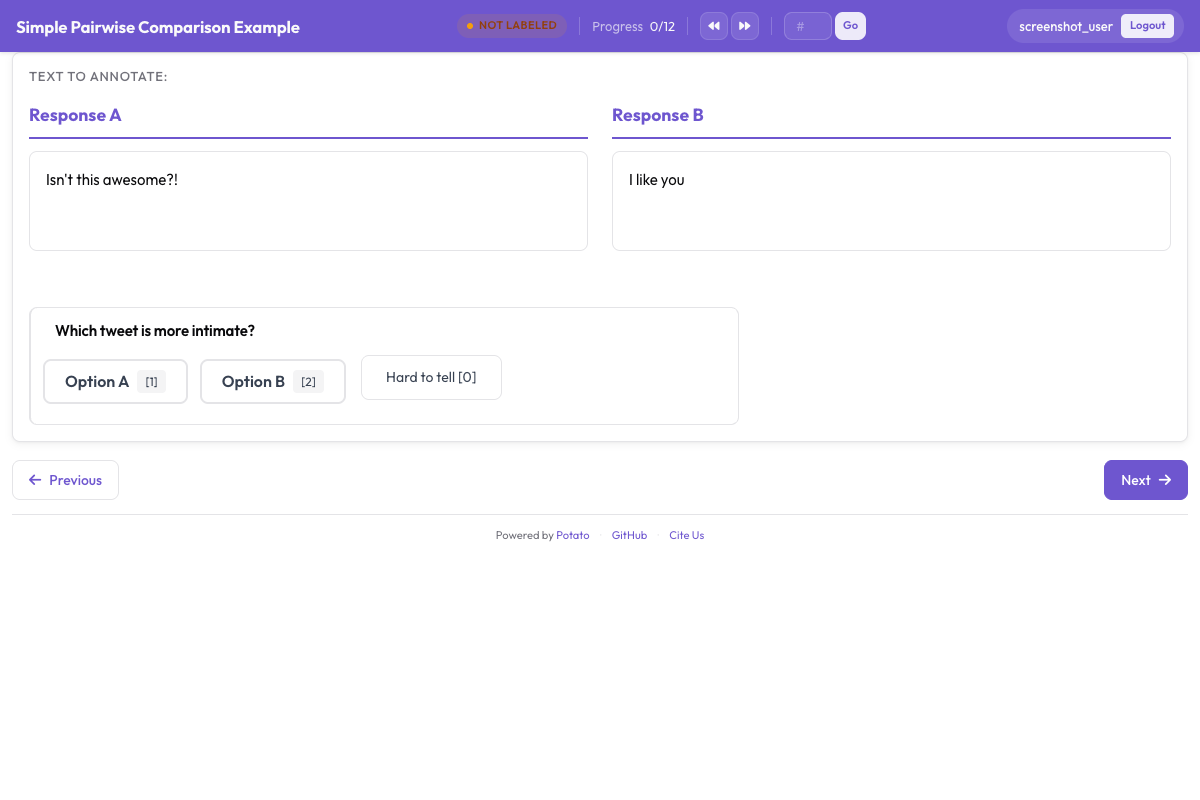 2つの候補を表示し、その下に選好の質問を置いた比較タスク
選好の質問
5段階のスケールを使うと、強い選好と弱い選好を区別できます。結果を学習に使う場合、これは重要です。アノテーターの意見が均等に割れたペアと、全員がはっきり判断したペアとでは、学習シグナルが異なるからです。sequential_key_bindingは5つの選択肢に1から5のキーを割り当てます。これが、1回の比較に4秒かかるか12秒かかるかの違いになります。
annotation_schemes:
  - annotation_type: radio
    name: preference
    description: "Which image better matches the prompt?"
    labels:
      - name: "A is clearly better"
      - name: "A is slightly better"
      - name: "About equal"
      - name: "B is slightly better"
      - name: "B is clearly better"
    sequential_key_binding: true
    label_requirement:
      required: true
このブロックを上の設定に追加してください。中央の選択肢は"No preference"ではなく"About equal"にします。この2つは異なる判断を表しており、アノテーターは"no preference"の選択肢をスキップボタンとして使ってしまうからです。
位置バイアス
アノテーターは本来よりも頻繁に左側の選択肢を選ぶため、画像がどちら側に表示されるかは変える必要があります。データファイルを作る段階でランダム化してください。ランダムに選んだ半分の行でimage_aとimage_bを入れ替え、各行がどちら向きになったかを記録し、分析の前に記録した判断を元の向きに戻します。Potatoの表示フィールドは列挙した順に描画されるため、設定ではこれを代わりに行えません。
テキストの比較は事情が異なります。pairwiseスキーマは2つの候補をアイテムデータの1つのフィールドから取り出すので、randomize_orderで順序を入れ替えることができ、Potatoは各アノテーターが実際に見た順序を記録します。シードはアノテーター、アイテム、スキームの3つを組み合わせて導出されます。そのため、ある人の先頭位置への選好は、調査全体を通じて一方の側と相関するのではなく、アイテムごとに異なる候補に振り分けられます。比較対象がテキストの場合はペアワイズ比較のドキュメントを参照してください。
特定の基準について尋ねる
全体的な選好からは、どちらの画像が勝ったかはわかりますが、その理由はわかりません。その下に2つか3つの絞り込んだ質問を加えると、意見の相違を読み解けるようになります。全体の判断で意見が割れたアノテーター同士でも、プロンプトへの忠実さでは一致し、美しさで意見が分かれていることがよくあるからです。
  - annotation_type: radio
    name: prompt_adherence
    description: "Which image better matches the prompt?"
    labels:
      - name: A
      - name: Tie
      - name: B

  - annotation_type: multiselect
    name: issues_a
    description: "Problems in Image A (select all that apply)"
    labels:
      - name: "Distorted faces or hands"
      - name: "Text rendering errors"
      - name: "Unnatural lighting"
      - name: "Missing elements from the prompt"
      - name: "Blurry or low quality"
      - name: "None"
これらのスキームを上のブロックに追加してください。基準のリストは短く保ちます。質問を1つ増やすごとに調査全体の作業量が掛け算で増え、2,000ペアに5つの基準のフォームを使えば10,000件の判断になり、そのそれぞれについて指示の中で定義が必要になります。
ビフォーアフター比較
補正、復元、編集のタスクでも同じ2枚構成を使いますが、左右はランダム化せずに名前をつけます。どちらが元画像かということ自体が質問の一部だからです。
instance_display:
  layout:
    direction: horizontal
    gap: 24px
  fields:
    - key: original
      type: image
      label: "Original"
      display_options:
        max_height: 512
        zoomable: true
    - key: enhanced
      type: image
      label: "Enhanced"
      display_options:
        max_height: 512
        zoomable: true

annotation_schemes:
  - annotation_type: radio
    name: enhancement_quality
    description: "How did the edit change the image?"
    labels:
      - name: "Clearly improved"
      - name: "Slightly improved"
      - name: "No noticeable change"
      - name: "Made worse"
    label_requirement:
      required: true

  - annotation_type: multiselect
    name: problems_introduced
    description: "Problems the edit introduced (select all that apply)"
    labels:
      - name: "Over-sharpening or halos"
      - name: "Color shift"
      - name: "Loss of detail"
      - name: "New artifacts"
      - name: "None"
編集によって生じた問題は、全体的な品質とは別に尋ねてください。被写体をシャープにする一方で周囲にハローを加える編集は、単一のスケールでは改善として読み取られますが、知る必要があるのはまさにそのハローです。
3枚以上の画像
1アイテムあたり3から8個の候補がある場合は、galleryフィールドに表示し、rankingスキーマで完全な順序を収集します。ギャラリーは1つのフィールドから画像パスのリストを受け取るので、データファイルには2つの別々のキーではなく配列を入れます。
item_properties:
  id_key: id
  text_key: prompt

instance_display:
  fields:
    - key: prompt
      type: text
      label: "Prompt"
    - key: images
      type: gallery
      display_options:
        layout: grid
        columns: 2
        thumbnail_size: 320
        zoomable: true

annotation_schemes:
  - annotation_type: ranking
    name: preference_rank
    description: "Drag the image numbers to rank them from best at the top to worst at the bottom."
    labels:
      - "Image 1"
      - "Image 2"
      - "Image 3"
      - "Image 4"
    allow_ties: false
    label_requirement:
required: truelabelsはギャラリー内の位置に名前をつけるものなので、リストには画像1枚につき1項目が必要で、すべてのアイテムで候補の数を揃える必要があります。ランキングは小さなセットに向いています。アノテーターはすべての候補を他のすべての候補と一度に比べるからです。候補が8個程度を超えると、アイテムあたりの労力は、得られる情報よりも速く増えていきます。
大きなプール
プールが大きすぎて1画面でランキングできない場合は、Best-Worst Scalingを使います。アノテーターは通常4個のアイテムの組を見て、最良と最悪だけを選びます。スコアは多数の重なり合う組にわたって計算されます。
  - annotation_type: bws
    name: quality
    description: "Select the BEST and the WORST image in this set."
    tuple_size: 4
    best_description: "Best"
worst_description: "Worst"このスキームを上の設定に追加してください。スコアリングは収集の後に、管理ダッシュボードのBWSタブかコマンドラインから実行し、出力ディレクトリにbws_scores.tsvを書き出します。
python -m potato.bws_scoring --config config.yaml --method bradley_terrycountingメソッドは追加の依存関係を必要とせず、透明性の高いベースラインになります。bradley_terryは、暗黙のペアワイズ比較にモデルを当てはめるもので、pip install choixが必要です。plackett_luceは最良と最悪の各選択を直接モデル化し、Potato本体のほかには何も必要ありません。これらすべての前に行う必要がある組の生成については、Best-Worst Scalingのドキュメントで説明しています。
指示とアテンションチェック
このタスクで「より良い」が何を意味するかを指示に書いてください。書かなければアノテーターは各自の定義を持ち込み、それが判明するのは一致度を測る段階になってからです。annotation_instructionsは、すべてのアノテーションページにそのテキストを表示します。
annotation_instructions: |
  Judge each pair on how well it matches the prompt first, then on visual
  quality, then on how appealing it looks. Zoom in before deciding: hands,
  text, and fine texture are where generation failures show up. Mark "About
  equal" only when you have looked at both and cannot separate them.
比較タスクのアテンションチェックは、勝者が明らかなペアです。専用のファイルからキューに混ぜ込むことで、データセットには含まれません。
attention_checks:
  enabled: true
  items_file: "data/attention_checks.json"
  frequency: 20
  min_response_time: 3.0
  failure_handling:
    warn_threshold: 2
block_threshold: 5両方のブロックを上の設定に追加してください。min_response_timeは、比較タスクが最もさらされやすい失敗、つまり2枚目の画像を見る時間がないほどの速さでクリックし続けるアノテーターを検出します。
完全な設定
この設定は、アイテムごとに2つのモデル出力、5段階の選好、基準に関する質問1つ、確信度の評価を備えたRLHFの選好収集を実行します。各ペアを3人のアノテーターが見るので、一致度を報告し、多数決のラベルを取るのに十分です。
annotation_task_name: "Generative Model Comparison"
task_description: "Compare two generated images against the prompt that produced them."

data_files:
  - data/model_outputs.json

item_properties:
  id_key: id
  text_key: prompt

instance_display:
  layout:
    direction: horizontal
    gap: 24px
  fields:
    - key: image_a
      type: image
      label: "Image A"
      display_options:
        max_height: 512
        zoomable: true
        alt_text: "First generated image"
    - key: image_b
      type: image
      label: "Image B"
      display_options:
        max_height: 512
        zoomable: true
        alt_text: "Second generated image"

annotation_instructions: |
  Judge each pair on prompt match first, then visual quality, then appeal.
  Zoom in before deciding. Mark "About equal" only when you cannot separate them.

annotation_schemes:
  - annotation_type: radio
    name: preference
    description: "Which image better represents the prompt?"
    labels:
      - name: "A is clearly better"
      - name: "A is slightly better"
      - name: "About equal"
      - name: "B is slightly better"
      - name: "B is clearly better"
    sequential_key_binding: true
    label_requirement:
      required: true

  - annotation_type: radio
    name: prompt_adherence
    description: "Which image matches the prompt more closely?"
    labels:
      - name: A
      - name: Tie
      - name: B

  - annotation_type: likert
    name: confidence
    description: "How confident are you in this judgment?"
    size: 5
    min_label: "Guessing"
    max_label: "Certain"

attention_checks:
  enabled: true
  items_file: "data/attention_checks.json"
  frequency: 20
  min_response_time: 3.0
  failure_handling:
    warn_threshold: 2
    block_threshold: 5

num_annotators_per_item: 3
output_annotation_dir: annotation_output/image-comparison/
export_annotation_format: jsonl
potato start config.yaml -p 8000で起動し、ブラウザでそのポートを開いてログインし、リンクを誰かに送る前にペアが想定どおりに表示されるかを確認してください。自分でもいくつかアノテーションしてみてください。設定上では明確に見えるスキームが、実際の3組目のペアで曖昧だとわかることはよくあります。
出力の内容
Potatoはアノテーターごとのファイルをoutput_annotation_dirの下に書き出し、export_annotation_formatは<output_annotation_dir>/exports/<format>/の下に定期的なエクスポートを追加します。エクスポートされた各レコードには、インスタンス、アノテーター、各スキームで選ばれたラベルが記録されます。
{"instance_id": "pair_001", "user_id": "rater_01", "labels": {"preference": {"A is slightly better": "A is slightly better"}, "confidence": {"4": "4"}}, "spans": {}, "links": {}}これをinstance_idでデータファイルと結合して、どちらの側をどのモデルが生成したかを復元し、何かを集計する前に、ファイル作成時に行った左右の入れ替えを元に戻してください。この手順をアノテーション設定の中ではなく最後に行うことで、各アノテーターが実際に何を見たかという生の記録が保たれます。
次のステップ
- Prolificで選好データを大規模に収集する
- 結果についてアノテーター間一致度を測定する
- テキストの比較についてはペアワイズ比較のドキュメントを、スキーマのリファレンスについてはPotatoのソースドキュメントを参照する