Model Training on Your Own Annotations
Train a model on your study's labels from the admin Training page, score the model on held-out items, and show the predictions to annotators as pre-labels.
New in v2.14.0
Model training fits a model on the labels your annotators have already given, scores the model on items held out from training, and can show the model's answers to annotators as pre-labels to confirm or correct. This page explains the training loop, the admin Training page, the trainers grouped by task, and the page or tutorial that covers each part in detail. The page is written for study owners and admins who run a self-hosted Potato server. The Training page and the sklearn-text trainer have been part of Potato since 2.11. Version 2.14.0 adds 37 trainers, remote training on GPU servers and SLURM clusters, held-out scores in the Runs table, and publishing to the Hugging Face Hub.
The training loop
Each round of the loop trains a model on the human labels collected so far and gives the next annotator the model's answers as a starting point. The loop runs in six steps:
- Annotate. Annotators label items as usual, and Potato resolves several annotators' labels on one item into one label, with Dawid-Skene by default or a majority vote.
- Train. A run splits the labeled items into train, val, and test sets and fits the model in a separate process. Every item keeps the same split from run to run, because the split is a seeded hash of the item ID.
- Score. The run scores the model on the held-out val and test items.
- Write back. The run's predictions go into each item's data as pre-labels for the schemes you choose. Predictions below a confidence floor and predictions on train-split items are left out.
- Correct. The next annotator sees the model's answer already filled in, and confirms or changes the answer. A reviewer can also record whether the model was right.
- Retrain. The next run trains on the new labels, and every item a reviewer corrected goes into the train split.
Turning training on
Model training is off by default, and one config key turns training on. Add this block to an existing config:
model_training:
  enabled: true
Restart the server and open /admin/training with an admin session or the admin API key. Without enabled: true, the training routes do not exist. Turning training on changes nothing annotators see, because pre-labels appear only for the schemes listed under writeback.schemas, and the list is empty by default.
The Start a run panel at the top of the Training page holds the whole setup for a run. Schema lists the study's annotation schemes, Trainer lists the trainers that fit the selected scheme's type and items, and Runs on lists the places a run can execute. The Parameters field takes JSON and starts from the chosen trainer's entry in model_training.trainer_params. The note under the field names every parameter the trainer takes. Train now starts the run. A run started while another run is in progress waits in a queue and shows in the Runs table as waiting #N, with a Cancel run button.
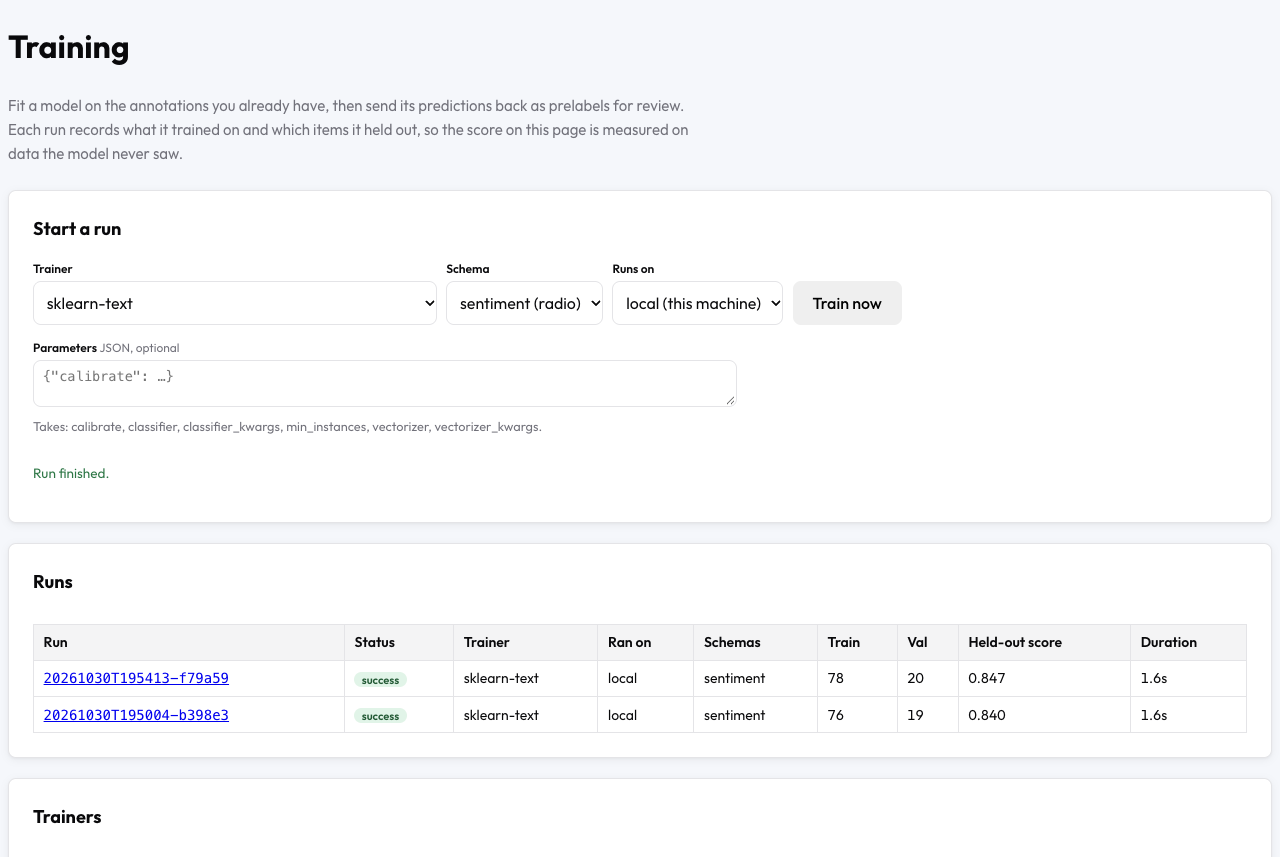 Two sklearn-text runs on a sentiment scheme, each with a score measured on reviews the model never trained on
Each run ID in the Runs table opens the run page at /admin/training/runs/<run_id>. The run page shows the run's status, trainer, backend, split sizes, held-out score, and parameters, then every metric the run recorded and the run's log. A failed run adds a What went wrong section. From the run page you can also save the run's val, test, or train items as a dataset version, and publish the model to the Hugging Face Hub. For a complete first run on a sample project with no GPU, follow Train your first model.
Trainers by task
Potato 2.14.0 has 38 trainers, each named in the Trainer menu by registry name. The table groups the trainers by the kind of annotation each trainer learns from:
| Task | Trainers | Covered in |
|---|---|---|
| Labels on text | sklearn-text, hf-text-classification, setfit | Train your first model |
| Spans, relations, conversation trees, and glosses | hf-token-classification, hf-relation, hf-conversation-tree, byt5-gloss | Trainers |
| LLMs and reward models | llm-sft, llm-dpo, reward-model, prm-reward | Fine-tuning LLMs |
| Images, slides, microscopy, maps, and page layouts | hf-image-classification, torchvision-detect, ultralytics-detect, torchvision-segment, ultralytics-segment, cellpose, sam-finetune, layoutlmv3, vlm-sft | Vision models |
| Audio | hf-audio-tagger, whisper-asr, diarization | Audio models |
| Volumes, point clouds, and video | volume-unet, external-3d, video-track | Volumes, point clouds, and video |
| Molecules, spectra, signals, and robot episodes | rdkit-property, peak-cnn, signal-cnn, episode-model | Science models |
| Decision models (Laya, Jev, OpenJev) | decision-calibrate, laya-finetune, openjev-finetune | Trainers |
| Models you already run elsewhere | label-studio-ml, hf-inference, openai-vlm-boxes, roboflow, cvat-nuclio | Bring your own model |
The five trainers in the last row fit nothing. Each of the five sends the held-out items to a model running elsewhere, and Potato scores, writes back, and reviews the answers like a trained model's. sklearn-text needs nothing beyond a plain Potato install, and pip install "potato-annotation[train]" installs what the text, image, audio, and LLM trainers need. A trainer that is not installed appears on the Training page as "not installed", with the command that installs the trainer. Trainers gives each trainer's annotation types, item types, install command, and parameters.
Where runs execute
A run executes on a backend, chosen per run in the Runs on menu or by default with model_training.backend. Potato has four kinds of backend:
localtrains on the Potato server, in a subprocess.device: autotakes CUDA first, then Apple's Metal, then the CPU.sshtrains on a GPU server that Potato reaches with key-based ssh. Potato copies the Potato source code to the server, starts the run there, and copies the model back after a successful run.slurmconnects to a cluster's login node the same way and submits the training job to a compute node withsbatch. The backend calls onlysbatch,squeue,scancel, andscontrol. A cluster withoutsrunorsaccttherefore works.agentserves a machine Potato cannot reach, such as a workstation behind NAT.potato training agenton that machine polls the server for jobs, and the model files stay on that machine.
potato training check <backend> config.yaml tests a backend before the first run, and the Check button on the Training page does the same. Configuration lists every backend key, and Training on a GPU server or cluster sets up the three remote kinds step by step.
Held-out scores
Every run scores the model on the val and test items, with a metric chosen for the scheme's annotation type. A single-label classifier gets macro-F1, a span tagger gets span F1, a box detector gets mAP at IoU 0.5, and a transcription model gets 1 minus the word error rate. The Runs table shows one headline score per run, and the run page lists every metric with the split in the metric's name, such as val_macro_f1 or test_f1. An item with a label and no prediction counts as wrong. A trainer therefore cannot raise a score by skipping hard items. When a trainer picks the best checkpoint on the val items, the headline comes from the test items, because the val score has already shaped the model. A trainer that chooses nothing on val, such as sklearn-text, takes the headline from the val items. Configuration gives the metrics for every annotation type.
Pre-labels and the model review queue
A pre-label is a model's answer filled in on the annotation page for the annotator to confirm or change. Write-back turns a run's predictions into pre-labels for the schemes listed under writeback.schemas, with no pre_annotation block needed. Add the writeback block under model_training:
model_training:
  enabled: true
  writeback:
    schemas: [sentiment]
    min_confidence: 0.6
    include_unlabeled: true
With this block, a sentiment prediction with a confidence below 0.6 is stored and not shown. include_unlabeled: true makes each run also predict on the items nobody has labeled yet. Without the setting, a run predicts only on the held-out val and test items. Items in a run's train split never get a pre-label, and write-back never changes a human label. A pre-label becomes the annotator's answer only when the annotator edits the pre-label or moves on to the next item.
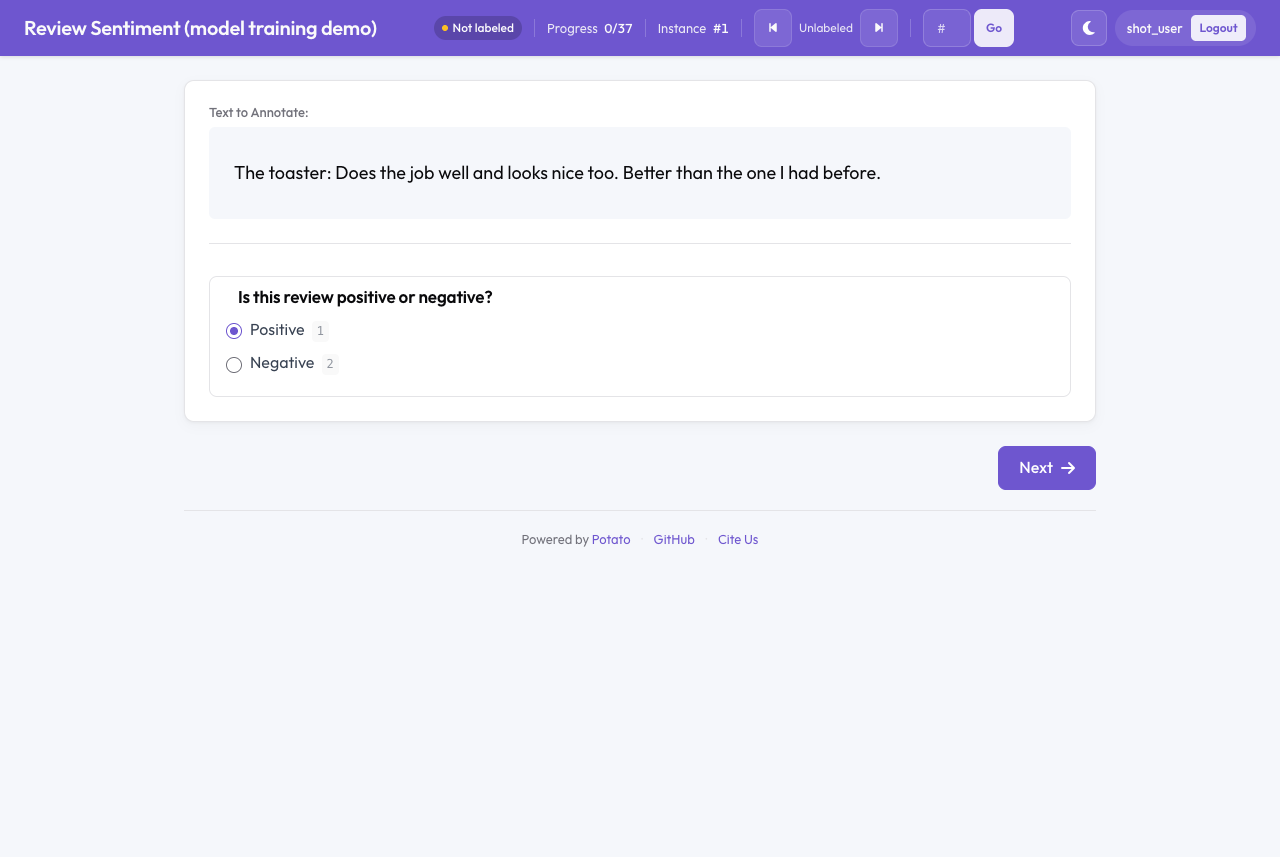 A new annotator sees the model's answer selected and confirms or changes the answer
assignment_strategy: model_review serves pre-labeled items to reviewers least-confident first. A reviewer records a verdict of accept, correct, or reject on each item. A rejected pre-label comes off the item and is not shown again. Every later run trains on an item with a correct verdict and never scores the model on that item. Pre-labels pull annotators toward the model's answer. Turn on include_unlabeled once the held-out score supports the model, and use How to Tell Review from Rubber-Stamping in Pre-Labeled Data to find annotators who accept pre-labels unread. The model in the loop walks through write-back, review, and retraining on one project.
Retraining as annotations arrive
auto_retrain starts runs automatically as annotations come in, and each new run replaces the previous run's pre-labels. Add the block under model_training:
model_training:
  enabled: true
  auto_retrain:
    enabled: true
    trainer: sklearn-text
    schemas: [sentiment]
    update_frequency: 25
    min_interval_s: 600
With these values, a run starts once 25 annotations have arrived since the last automatic run and 600 seconds have passed since the last run finished. Configuration lists every auto_retrain key and the reasons a check skips a run, and The model in the loop shows when to turn retraining on.
Publishing a model to the Hugging Face Hub
A successful run whose model is on the Potato server has a Publish to the Hugging Face Hub form on the run page. The push uploads the model's weights, config, and tokenizer files, plus a README.md model card written from the run. The model card names the trainer, base model, schemes, labels, split sizes, and held-out score. The run's predictions and any copy of the training data stay on the server.
You type the repository name twice, and the push goes ahead only when the two names match. Private is ticked by default, and the Hugging Face token comes from an environment variable on the server (HF_TOKEN by default) rather than from the page. A model left on a remote host or on an agent machine cannot be pushed from the run page. Configuration lists which files go up and the API route, and Fine-Tuning an LLM on Your Annotations runs a push from start to finish.
Model training and the labeling engine
The labeling engine uses the same trainers. With distillation turned on (features.distill), the engine fits a model with a trainer (sklearn-text by default) on the engine's human labels and on the machine labels a contract certified, then puts the model ahead of the configured cascade as a trained source. Items in the engine's cert and audit splits never go into the distillation training set. A trained source can also load a model from a training run, with the run's model directory as artifact_dir. Labeling Engine Configuration lists the distillation keys.
Model training and active learning
Potato's active learning feature fits a model on the study's labels for a narrower purpose than model training. Active learning fits a scikit-learn classifier inside the server process every update_frequency annotations and uses the classifier to reorder the queue, most uncertain items first. Annotators get the reordered queue only under assignment_strategy: active_learning. The active-learning classifier is scored on the items the classifier was fitted on, and the classifier's predictions are never shown to annotators.
Model training runs any of the 38 trainers in a separate process or on another machine, scores the model on held-out items, and shows the model's answers as pre-labels. Model training can order the queue as well. Under assignment_strategy: llm_confidence, items whose published pre-label is least confident come first. The acquisition parameter of hf-text-classification and hf-image-classification replaces that order with a margin, entropy, BALD, or core-set score. Use active learning to decide which items people label next. Use model training when you need a model scored on held-out items, pre-labels for annotators, or a model to publish.
Tutorials
Each tutorial runs one setup from install to a scored run:
- Train Your First Model from Your Annotations trains
sklearn-texton a sentiment study, with no GPU. - Train on a GPU Server, SLURM Cluster, or Machine Behind NAT sets up an ssh GPU server, a SLURM cluster, and a polling agent.
- Model-in-the-Loop Labeling with Pre-Labels and Retraining covers write-back, review, acquisition,
auto_retrain, and dataset versions. - Fine-Tuning an LLM on Your Annotations trains SFT, DPO, reward, and process reward models, with QLoRA and a Hub push.
- Train Detection and Segmentation Models on Image Annotations trains detectors and segmenters on images, slides, microscopy, and maps, plus Cellpose, SAM, LayoutLMv3, and vision-language models.
- Train Speech and Audio Models on Your Annotations trains Whisper, speaker diarization, spectrogram detectors, and audio taggers, with RTTM files.
- Train Models on Volumes, Point Clouds, and Video trains
volume-unet,external-3d, andvideo-track. - Train Models on Molecules, Spectra, Signals, and Robot Episodes trains
rdkit-property,peak-cnn,signal-cnn, andepisode-model. - Pre-Labels and Held-Out Scores from a Model You Already Run connects a model you already serve through an inference bridge or
label-studio-ml. - Differentially Private Fine-Tuning with Opacus trains a classifier with the
dpparameter and Opacus.
Further reading
- Trainers - All 38 trainers, grouped by task
- Configuration - Every
model_trainingkey, backend, route, and storage path - Active Learning - Queue reordering with a scikit-learn classifier
- LLM and Vision Pre-Annotation - Pre-labels from an LLM or a vision model instead of a trained one
- The Labeling Engine - Machine labels tested against a blind sample of human labels
- User Simulator - Simulated annotators for trying the loop before real annotators start
For implementation details, see the source documentation.