Model-in-the-Loop Labeling with Pre-Labels and Retraining
Show a trained model's answers as pre-labels, review the least confident pre-labels first, and retrain the model as annotators correct the answers.
New in v2.14.0
This tutorial runs one sentiment study through the model-in-the-loop cycle. A model trains on the first labels, the model's predictions appear to annotators as pre-labels, reviewers correct the least confident pre-labels, and the corrections feed the next run. The tutorial is for study owners who have trained a first model, as in Train your first model, and now want annotators to work alongside the model. Every step except one runs on a laptop with sklearn-text. The acquisition step trains a small transformer and takes a few minutes on a CPU.
The sentiment project
The project is Potato's model-training example, 160 synthetic product reviews with one radio scheme named sentiment. A pre-label is one label a model proposed for an item before any person labeled the item. Write-back is the step that turns a training run's predictions into pre-labels on the annotation page. By the end of the tutorial, the project trains a classifier on the first 120 labels, publishes pre-labels on the remaining reviews, serves the least confident reviews first, retrains as new labels arrive, and keeps a held-out split as a dataset version.
Pre-labels make annotation faster and also pull annotators toward the model's answer. Model-Assisted Labeling with a Model Trained on Your Labels covers when the trade is worth making, and How to Tell Review from Rubber-Stamping in Pre-Labeled Data covers annotators who accept pre-labels unread. The config below holds out a share of annotators from every pre-label from the start. The held-out answers let the study measure the pull.
Set up the project
Install Potato. sklearn-text needs nothing beyond the base package:
pip install --upgrade potato-annotationCopy examples/ai-assisted/model-training/ from the Potato repository into a new folder. The folder holds data/reviews.json, with the 160 reviews, and data/gold.json, the labels the simulator answers from. Replace the example's config.yaml with this config:
annotation_task_name: "Review Sentiment (model in the loop)"

data_files:
  - "data/reviews.json"

item_properties:
  id_key: "id"
  text_key: "text"

task_dir: "."
output_annotation_dir: "annotation_output"

require_password: false
admin_api_key: "demo-admin-key"

num_annotators_per_item: 1
assignment_strategy: llm_confidence

annotation_schemes:
  - annotation_type: "radio"
    name: "sentiment"
    description: "Is this review positive or negative?"
    labels:
      - "positive"
      - "negative"
    sequential_key_binding: true

ai_support:
  holdout:
    fraction: 0.2
    salt: "review-sentiment"

datasets:
  enabled: true

model_training:
  enabled: true
  writeback:
    schemas: ["sentiment"]
    include_unlabeled: true
    min_confidence: 0.6
Each block added to the example's config does one job:
assignment_strategy: llm_confidenceserves every item, least confident pre-label first. Items with no prediction come last, in queue order.ai_support.holdoutwithholds every form of AI assistance, pre-labels included, from 20% of annotator-item pairs. Set the holdout before annotation starts, because changingfractionorsaltmid-study reshuffles the groups.datasets.enabledlets a run's split be saved as a dataset version in the last step.writeback.schemasnames the schemes whose predictions annotators see. The list is empty by default, and turning training on changes nothing on the annotation page until the list names a scheme.include_unlabeled: truemakes each run predict on the reviews nobody has labeled yet. Without the setting, a run predicts only on the run's held-out val and test items. Those items already carry human labels.min_confidence: 0.6keeps a prediction with a confidence below 0.6 out of the annotators' view. Potato still stores the prediction with the run.
writeback.field keeps the default, predictions, the item field the pre-labels are written to. With the default, no pre_annotation block is needed. Check the config before starting the server:
potato validate config.yaml
potato start config.yaml -p 8000
Label a seed set
A model trained on your labels needs labels first. sklearn-text refuses to fit with fewer than 10 items in the training split. Label some reviews at http://localhost:8000, or let three simulated annotators label 40 reviews each from the gold file:
python -m potato.simulator --server http://localhost:8000 --users 3 \
  --strategy gold_standard --competence good=1.0 --max-annotations 40 \
  --gold-file data/gold.json --sequential --fast-mode --no-export
--competence good=1.0 gives every simulated annotator the good profile, which answers 80–90% of reviews correctly. With num_annotators_per_item: 1, the three annotators cover 120 different reviews and leave 40 unlabeled for the model.
Train and read the write-back report
Open http://localhost:8000/admin/training with the admin key, pick sklearn-text and the sentiment scheme, and click Train now. The same run starts from the command line:
curl -X POST -H "X-API-Key: demo-admin-key" -H "Content-Type: application/json" \
  http://localhost:8000/admin/training/api/runs \
  -d '{"trainer": "sklearn-text", "schemas": ["sentiment"]}'
The run takes a few seconds. Potato splits the labeled reviews into train, val, and test (70%, 15%, and 15% by default), fits the classifier on train, and scores the classifier on val and test. The status route then reports the scores and the write-back report:
curl -H "X-API-Key: demo-admin-key" http://localhost:8000/admin/training/api/statusOne run of this tutorial returned the following, trimmed to the fields that matter here:
{
  "metrics": {
    "heldout_metric": "val macro_f1",
    "heldout_score": 0.7333,
    "n_train": 76.0,
    "val_n": 20.0,
    "test_n": 24.0,
    "test_macro_f1": 0.8222
  },
  "writeback": {
    "n_read": 84,
    "n_written": 78,
    "n_skipped_low_confidence": 6,
    "n_skipped_train_split": 0,
    "n_skipped_rejected": 0,
    "n_skipped_schema_not_enabled": 0,
    "summary": "Published 78 prediction(s) as prelabels."
  }
}
The run predicted on 84 reviews, the 44 val and test reviews plus the 40 nobody had labeled. Six predictions fell under the 0.6 floor, and the other 78 became pre-labels. Your scores and counts will differ from run to run, because the simulated annotators make random mistakes and label different reviews. Each skip counter names one of the four write-back checks, which Configuration lists in order.
Write-back never changes a human label. Predictions go into item data, and annotations stay in each annotator's own state. Log in under a new username to see the result. The next review arrives with the model's answer selected:
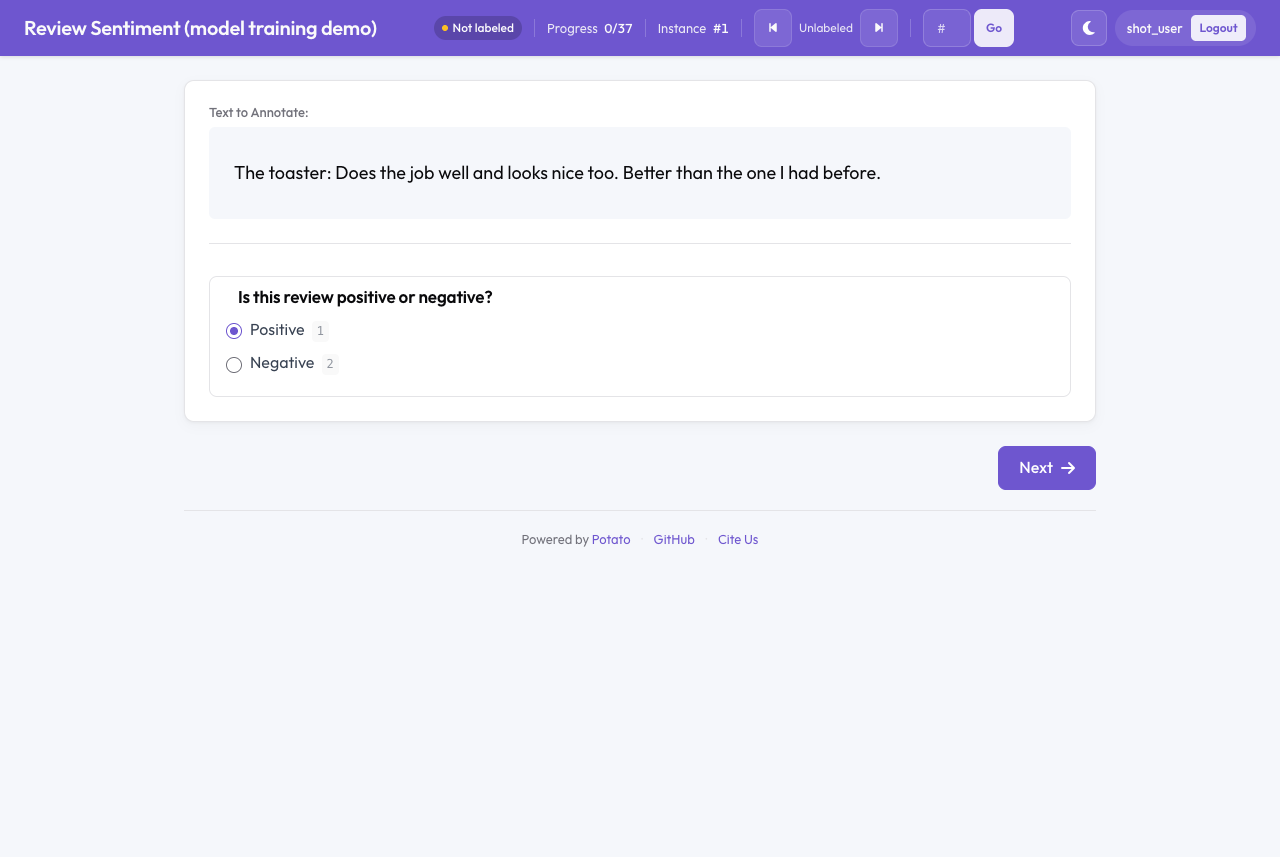 A new annotator sees the model's answer selected and confirms or changes the answer
A pre-label is not saved while the annotator only looks at the pre-label. The pre-label becomes the annotator's answer when the annotator edits the pre-label or moves on to the next review. An unanswered review therefore does not count as done, and a model's answer does not return to training as a human label.
Read the held-out score before showing pre-labels to annotators. A run's val score of 0.73 macro-F1 on 20 reviews leaves much room for wrong pre-labels. The upstream write-back reference lists the remaining skip counters and how each annotation type shows a pre-label.
Review the least confident pre-labels
Under llm_confidence, the next annotator gets the 40 unlabeled reviews ordered by the published pre-label's confidence, lowest first. A second strategy serves pre-labels for quality control rather than for labeling. assignment_strategy: model_review serves only items that carry a pre-label, least confident first, and leaves out items with no prediction. Switch to model_review for a review pass over model output, and stay on llm_confidence while every item still needs a label. The upstream model review reference explains both queues.
The model review report shows the queue and what the model left out:
curl -H "X-API-Key: demo-admin-key" http://localhost:8000/admin/model-reviewThe report from the run above, with the lists cut short:
{
  "n_items": 160,
  "n_prelabelled": 78,
  "queue": ["review_062", "review_024", "review_044", "review_122", "..."],
  "worst_first": ["review_062", "review_024", "review_044", "..."],
  "n_empty": 82,
  "empty_prediction_ids": ["review_006", "review_007", "review_008", "..."],
  "provenance": {
    "review_062": {
      "sentiment": {
        "run_id": "20261104T043431-de5686",
        "trainer": "sklearn-text",
        "heldout_metric": "val macro_f1",
        "heldout_score": 0.7333
      }
    }
  }
}
An item's rank in queue is the item's lowest prediction confidence across schemes. worst_first is the least confident 20% of the queue, never fewer than one item. empty_prediction_ids lists the items with no pre-label. In this project the 82 empty items are the 76 training reviews and the 6 predictions under the floor. Training reviews never get a pre-label.
provenance records where each pre-label came from. For every item in the queue whose pre-label a training run wrote, the entry names the run, the trainer, and the run's held-out score. A pre-label that arrived with the data file has no entry. When a pre-label looks wrong, the run id leads to the run page at /admin/training/runs/<run_id>, which shows the parameters and the split of each item.
Recording verdicts
A verdict records a reviewer's judgment of one pre-label, separately from the reviewer's annotation. "The model was right" and "a person chose this label independently" are different facts, and keeping the two apart keeps model precision measurable. Potato takes verdicts through one route, from the annotator the item is assigned to or from an admin with the API key:
curl -X POST -H "Content-Type: application/json" -H "X-API-Key: demo-admin-key" \
  -d '{"instance_id": "review_062", "verdict": "correct", "schema_name": "sentiment"}' \
  http://localhost:8000/api/model-review/verdict
accept means the model was right, correct means a person changed the answer, and reject means the model was wrong. A reject takes the pre-label off the item at once, and later runs do not publish a prediction for that item and scheme again. The reject still counts against the model's precision, as a rejected pre-label rather than a label the model missed, and sending the same verdict again changes no count. A correct verdict moves the item into the train split of every later run, as the corrections section below describes. Recording a second verdict on the same item replaces the first, and an unknown verdict is refused with HTTP 400.
Order the queue by an acquisition score
Confidence order serves first the items where the model's top answer is weakest. An acquisition function in active learning ranks unlabeled items by how much a label on each item would help the next model. hf-text-classification and hf-image-classification take an acquisition parameter that writes such a score on every prediction, and llm_confidence then serves the highest score first. The trainer needs the text-training extra:
pip install "potato-annotation[train-text]"Start a run with the parameter, from the Training page's Parameters field or from the API:
curl -X POST -H "X-API-Key: demo-admin-key" -H "Content-Type: application/json" \
  http://localhost:8000/admin/training/api/runs \
  -d '{"trainer": "hf-text-classification", "schemas": ["sentiment"],
       "params": {"acquisition": "margin"}}'
The parameter takes five values:
acquisition | Score written on each prediction |
|---|---|
least_confident | The default. No score is written, and items keep the confidence order. |
margin | 1 minus the gap between the top two probabilities. |
entropy | Entropy of the predicted distribution, scaled to 0–1. |
bald | Mutual information between the label and the model's weights, from mc_samples (default 10) forward passes with dropout on. The method is from Houlsby et al. (2011). The score is high where the model lacks data and low where an item is ambiguous whatever the data. |
coreset | Each item's distance to the nearest training item or already-chosen item over the model's embeddings. The method is from Sener and Savarese (2018). The score spreads the queue across the data, so ten near-copies of one hard item do not take the first ten places. |
A prediction from the margin run carries the score beside the confidence:
{"label": "positive", "confidence": 0.5207,
 "probabilities": {"negative": 0.4793, "positive": 0.5207},
 "acquisition": 0.9586}
Under llm_confidence, items with an acquisition score come first, then items with only a confidence, then items whose prediction has no confidence, then items with no prediction. acquisition works on single-label schemes (radio, select, likert). The order reads published pre-labels, so the scheme must be in writeback.schemas, and include_unlabeled: true must be set for unlabeled items to get a score at all. model_review ignores the score and keeps confidence order, because a review pass looks for the model's wrong answers. The upstream section on choosing what to ask next has the details.
Compare the new run's held-out score with the sklearn-text run before keeping the run's pre-labels. Potato keeps one prediction per item and scheme, and a newer run's prediction replaces an older one. Where the newer run's prediction is stored but not shown, e.g., under min_confidence, the older run's pre-label comes off the item as well, as Configuration describes. In one run of this tutorial on a CPU, three epochs of the default model (epochs: 3 in params) scored 0.52 test macro-F1 on 84 training reviews, below the sklearn-text run on the same labels, and the run published 37 pre-labels. To withdraw a run's pre-labels, delete the run's predictions:
curl -X DELETE -H "X-API-Key: demo-admin-key" \
  http://localhost:8000/admin/training/api/runs/<run_id>/predictions
Withdrawing removes the run's stored predictions and takes the run's pre-labels off the items. An earlier run's pre-labels do not come back, so train again to republish.
Retrain automatically
auto_retrain starts a run on its own as annotations arrive. Add the block to model_training once a run's held-out score supports showing pre-labels:
model_training:
  enabled: true
  writeback:
    schemas: ["sentiment"]
    include_unlabeled: true
    min_confidence: 0.6
  auto_retrain:
    enabled: true
    trainer: sklearn-text
    schemas: ["sentiment"]
    update_frequency: 25
    min_interval_s: 600
Potato checks after every annotation save. A run starts once 25 annotations have arrived since the last automatic run and 600 seconds have passed since the last run finished. Both values are the defaults, and trainer and schemas are required. params passes trainer parameters, as the Training page's Parameters field does.
Turn auto_retrain on after the first manual run rather than from the first annotation. A project with no run yet trains as soon as the project has update_frequency annotations. With update_frequency: 20 set from the start, this project's first automatic run trained on 12 reviews, scored a val macro-F1 of 1.0 on 3 reviews, and published 72 pre-labels. A held-out score on 3 reviews says almost nothing about the next 72.
When a check decides not to start a run, skip_reason in /admin/training/api/status gives the reason, such as "waiting for 3 more annotation(s)" or "waiting 299 more second(s) since the last run". Automatic runs do not join the run queue. The next annotation saved after the queue empties triggers a fresh check. The counters live in memory, and after a restart a project that has run before counts new annotations from the restart. A trainer whose license needs confirming (ultralytics-detect, ultralytics-segment, layoutlmv3) also needs accept_licence: true in the block, or every automatic run is skipped. The complete config with both blocks passes potato validate config.yaml --strict.
Corrected and pinned items in training
Two kinds of item go into the train split of every later run, whatever the item's place in the stable split. The first kind is an item with a correct verdict. Corrections come from the items the model was worst at, and in val or test the corrections would score the model on a sample of the model's own mistakes. accept and reject verdicts do not move an item. The second kind is a pinned item, which an admin sends to training by hand:
curl -X POST -H "X-API-Key: demo-admin-key" -H "Content-Type: application/json" \
  http://localhost:8000/admin/training/api/pinned \
  -d '{"instance_ids": ["review_007", "review_008"]}'
A pinned item trains once someone has labeled the item, and until then each run counts the item as waiting. With curation: {enabled: true}, the Train on these button beside a slice on the Catalog page pins everything the slice matches, such as the built-in model-found-nothing slice. DELETE /admin/training/api/pinned unpins.
A run that moved held-out items into train logs a warning with the count. After one correct verdict, the next run in this tutorial logged the following:
1 held-out item(s) moved to train (corrected: 1). Held-out scores are computed without them, so they are not directly comparable with a run that had them.The counts are in the run bundle's manifest.json, under stats.forced_train. Compare held-out scores across runs with the warning in mind, since the two runs scored different items.
Save a run's test split as a dataset
A held-out score changes as the splits change, and a fixed set of items is what makes two models comparable. The run page's Keep this split as a dataset section saves a run's val, test, or train items, with the items' agreed human labels, as a new version of a dataset. Pick the split, type a dataset name, and click Save as dataset version. The route behind the button takes the same request from the command line:
curl -X POST -H "X-API-Key: demo-admin-key" -H "Content-Type: application/json" \
  http://localhost:8000/admin/training/api/runs/<run_id>/pin-split \
  -d '{"dataset": "sentiment-test", "split": "test"}'
The response names the new version and the number of items, here 23 test reviews saved as version v0001. A version does not change after the save, so later models and LLM prompts in the datasets' experiment runner can be scored on exactly those items. Saving into a dataset that already has versions starts a new version holding that split only, so a later run's val items cannot mix with items the later run trained on. Each example's inputs leave out the pre-label field, so an evaluation cannot read the model's answer. The route returns HTTP 400 when datasets.enabled is not set.
Holding annotators out of pre-labels
The ai_support.holdout block in the config keeps 20% of annotator-item pairs free of assistance from the first annotation. For a held-out pair, the annotation page shows no pre-label, and the item data sent to the browser leaves out both the writeback.field (here predictions) and the pre_annotation.field. The draw is a salted hash per annotator and item, so a pair stays in the same group on every visit and after a restart. With several annotators per review, most reviews get some assisted and some held-out annotators. The admin dashboard's AI influence tab compares the two groups on how often answers match the model, how often answers match gold, and agreement within each group. With num_annotators_per_item: 1, each review falls in only one group, so raise the value above 1 for a study that measures the effect. Model-Assisted Labeling with a Model Trained on Your Labels explains how to read the comparison.
Further reading
- Model training explains the training loop and the Training page.
- Model training configuration lists every
writebackandauto_retrainkey with defaults. - Train your first model sets up this project and a first
sklearn-textrun. - Train Detection and Segmentation Models on Image Annotations runs the same loop with a box detector on images.
- Model-Assisted Labeling with a Model Trained on Your Labels covers when pre-labels save time and when pre-labels anchor answers.
- How to Tell Review from Rubber-Stamping in Pre-Labeled Data finds annotators who accept pre-labels unread.
- Active learning covers choosing the next item without showing a model's answer.
- The upstream model training reference gives every write-back check and route.
References
- Houlsby, N., Huszár, F., Ghahramani, Z., and Lengyel, M. (2011). Bayesian Active Learning for Classification and Preference Learning. arXiv:1112.5745. https://arxiv.org/abs/1112.5745
- Sener, O., and Savarese, S. (2018). Active Learning for Convolutional Neural Networks: A Core-Set Approach. ICLR 2018. https://arxiv.org/abs/1708.00489