Train Your First Model from Your Annotations
Run Potato's sample review study on a laptop with no GPU, label 120 reviews with the simulator, train sklearn-text, and see the model's pre-labels.
New in v2.14.0
This tutorial trains a sentiment classifier on a sample study's own labels and shows the classifier's answers to the next annotator as pre-labels. The tutorial is written for a study owner trying Potato's model training for the first time, and every step runs on a laptop with no GPU and no install beyond Potato itself. You start Potato's sample review project, have the user simulator label 120 of the project's 160 reviews, train sklearn-text from the admin Training page, read the run's held-out score, and log in as a new annotator to see the model's answers. For what each part of the loop does in general, see the model training overview.
Installing Potato and the example project
The tutorial uses sklearn-text, a trainer that turns each review into TF-IDF features and fits a logistic regression classifier. sklearn-text needs no extra install because scikit-learn is one of Potato's core dependencies. The sample project lives in Potato's GitHub repository rather than in the pip package, so install Potato and clone the repository:
pip install --upgrade potato-annotation
git clone https://github.com/davidjurgens/potato.git
cd potato
Every command below runs from the repository root. The project folder examples/ai-assisted/model-training/ holds three files:
config.yamlis the study config, with the commands of this tutorial in its comments.data/reviews.jsonholds 160 synthetic product reviews, one JSON object per line with anidand atext.data/gold.jsongives the correct label for every review. The simulator answers from this file.
The example config
The config defines one radio scheme named sentiment with the labels positive and negative, and turns model training on. The block below is the shipped file with the comments removed, and the file passes python -m potato.validate_cli --strict unchanged:
annotation_task_name: "Review Sentiment (model training demo)"

data_files:
  - "data/reviews.json"

item_properties:
  id_key: "id"
  text_key: "text"

task_dir: "."
output_annotation_dir: "annotation_output"

require_password: false
admin_api_key: "demo-admin-key"

num_annotators_per_item: 1

annotation_schemes:
  - annotation_type: "radio"
    name: "sentiment"
    description: "Is this review positive or negative?"
    labels:
      - "positive"
      - "negative"
    sequential_key_binding: true

model_training:
  enabled: true
  writeback:
    schemas: ["sentiment"]
    include_unlabeled: true
    min_confidence: 0.6
Four settings shape the tutorial:
num_annotators_per_item: 1gives every review one label. Three simulated annotators with 40 reviews each then cover 120 different reviews and leave 40 unlabeled for the model.require_password: falselets a new annotator log in with a username alone. The last step logs in that way.admin_api_key: "demo-admin-key"opens the admin pages. Replace the key on any server other people can reach.model_trainingregisters the/admin/trainingroutes. Thewritebackblock shows thesentimentscheme's predictions to annotators, and the section on write-back below explains each key.
Starting the server on port 8000
Start Potato with the example config:
potato start examples/ai-assisted/model-training/config.yaml -p 8000The server loads the 160 reviews and serves the annotation page at http://localhost:8000. If port 8000 is taken on your machine, give -p another port and use that port in every URL below.
Labeling 120 reviews with the simulator
The model needs human labels to learn from. The user simulator stands in for three annotators. Each simulated annotator answers from the gold file and gets most answers right. Run the simulator in a second terminal, from the repository root:
python -m potato.simulator --server http://localhost:8000 --users 3 \
  --strategy gold_standard --competence good=1.0 --max-annotations 40 \
  --gold-file examples/ai-assisted/model-training/data/gold.json \
  --sequential --fast-mode --no-export
--strategy gold_standard makes each simulated annotator answer from gold.json, and --competence good=1.0 gives all three annotators the simulator's good profile. A good annotator draws an accuracy between 0.80 and 0.90 and answers each review correctly with that probability. The labels therefore contain errors, as a real team's labels do. --sequential runs the three annotators one after another, --fast-mode drops the pauses between answers, and --no-export skips writing the simulator's own result files. The simulator finishes in about two seconds and ends with a summary. Check that the summary reports Total annotations: 120 before you go on. You can also label reviews by hand at http://localhost:8000. sklearn-text refuses to fit with fewer than 10 labeled items in the train split.
Opening the Training page with the admin key
The Training page needs an admin session. Open http://localhost:8000/admin, enter demo-admin-key when the page asks for the API key, and then open http://localhost:8000/admin/training.
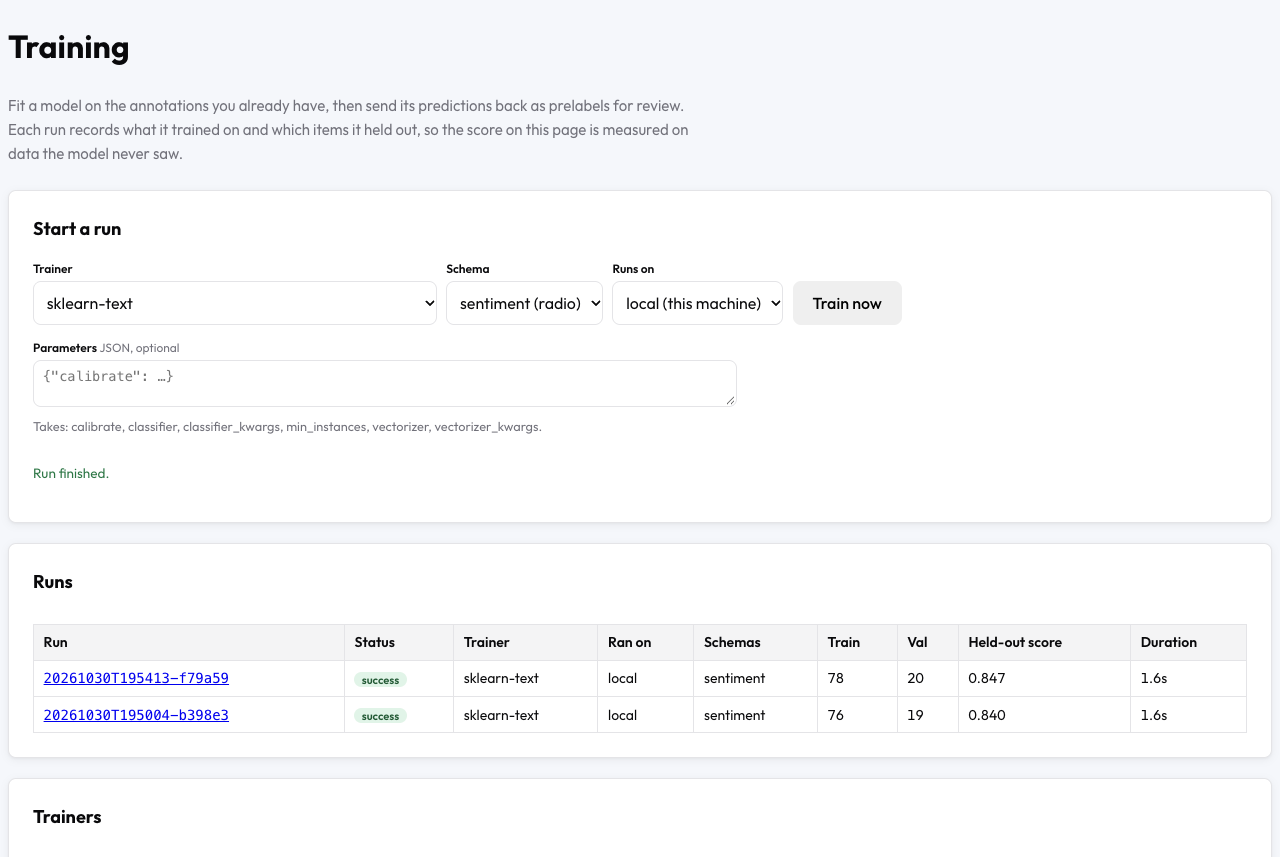 The Training page after two sklearn-text runs on the sample project
The Start a run panel at the top holds the whole setup. Schema lists the project's one scheme, sentiment (radio). Trainer lists all 38 trainers, and a trainer the project cannot run carries the reason beside its name, such as "not installed". The page selects sklearn-text whenever sklearn-text fits the scheme. Runs on shows the project's only backend, local (this machine).
Training sklearn-text
Leave Parameters empty to use the trainer's defaults, and click Train now. The run resolves the annotations to one label per review, splits the 120 labeled reviews into train, val, and test sets, and fits the model in a separate process. Our run took 1.5 seconds, and the panel showed "Run finished." when the run was done.
sklearn-text defaults to scikit-learn's TfidfVectorizer for features and LogisticRegression for the classifier. With 50 or more items in the train split, sklearn-text also calibrates the classifier's confidences. Calibration uses Platt scaling below 1,000 training items and isotonic regression from 1,000 items. The calibrated model is kept only if calibration costs no more than 0.05 training accuracy. Calibration matters here because the write-back step compares each confidence with min_confidence.
To start the same run from a script, send the admin key in the X-API-Key header:
curl -X POST -H "X-API-Key: demo-admin-key" -H "Content-Type: application/json" \
  http://localhost:8000/admin/training/api/runs \
  -d '{"trainer": "sklearn-text", "schemas": ["sentiment"]}'
The response carries the new run_id and "started": true.
The run page and the held-out score
The finished run appears in the Runs table with its train and val sizes and its Held-out score. Click the run ID to open the run page at /admin/training/runs/<run_id>. The run page lists the run's status, trainer, backend, split sizes, split seed, held-out score, and parameters, then a table of every metric and the run's log.
A run holds out 15% of the labeled items for val and 15% for test by default, and split_seed decides which items land where. The split stays the same from run to run while split_seed keeps its value, so two runs on the same labels are scored on the same items. The held-out score of an sklearn-text run is the macro-F1 on val. Macro-F1 averages the F1 score of each label, here positive and negative. The run also records accuracy and macro-F1 on test. Accuracy on the train split is recorded as train_accuracy and never used as the score. In our run, the log read:
[info] Read 76 labelled rows from the train split
[info] Applied sigmoid calibration over 5 folds
[info] Held-out val macro_f1: 0.725
Potato's own documentation reports one run on the same project, and the table puts that run beside ours:
| Potato's documentation | Our run | |
|---|---|---|
| Labeled reviews | 120 | 120 |
| Train, val, and test items | not stated | 76, 19, and 25 |
| Held-out score (val macro-F1) | 0.84 | 0.725 |
| Test macro-F1 | not stated | 0.826 |
| Pre-labels published | 80 | 73 |
Predictions below min_confidence | 4 | 11 |
Your numbers will differ from both columns, because each simulated annotator draws an accuracy at random and makes different mistakes. In our run, the simulated labels matched gold.json on 97 of the 120 reviews and on 15 of the 19 val reviews. The held-out score measures agreement with your annotators' labels rather than with any answer key, so annotator errors in val lower the score. Every one of the 73 pre-labels our run published matched gold.json. On a real study with no gold file, read a low held-out score as a reason to check the annotators' agreement before blaming the model.
Turning on write-back for the scheme
A run's predictions reach annotators only through write-back. The example config already turns write-back on for the sentiment scheme. For your own project, add this block under model_training in the config and restart the server:
model_training:
  enabled: true
  writeback:
    schemas: ["sentiment"]
    include_unlabeled: true
    min_confidence: 0.6
writeback.schemas names the schemes whose predictions annotators see. The list is empty by default, so turning training on changes nothing on the annotation page until you name a scheme. include_unlabeled: true makes each run predict on the reviews nobody has labeled as well as on the val and test reviews. Without include_unlabeled, a run predicts only on the val and test reviews, and those reviews already have a human label. min_confidence: 0.6 keeps a prediction off the annotation page when the model's confidence falls below 0.6. Potato still stores the prediction.
Write-back runs after every successful run and skips any item in the run's train split. In our run, the model predicted on 84 reviews (19 val, 25 test, and the 40 unlabeled), 11 predictions fell below 0.6, and the run published the other 73. The writeback field of GET /admin/training/api/status gives the same counts, with the summary "Published 73 prediction(s) as prelabels." Stored predictions are written back again when the server starts, so pre-labels survive a restart. To take a run's pre-labels off the items, send DELETE /admin/training/api/runs/<run_id>/predictions.
A pre-label seen by a new annotator
Open http://localhost:8000 in a private browser window and log in with a username nobody has used, such as newannotator. Each labeled review already has its one label, so the new annotator is assigned the 40 unlabeled reviews, and the progress counter in our run read 0/40. Our first review was "The toaster: Disappointed, it stopped working within a week. Much smaller than the photos suggest." with Negative already selected at a confidence of 0.68.
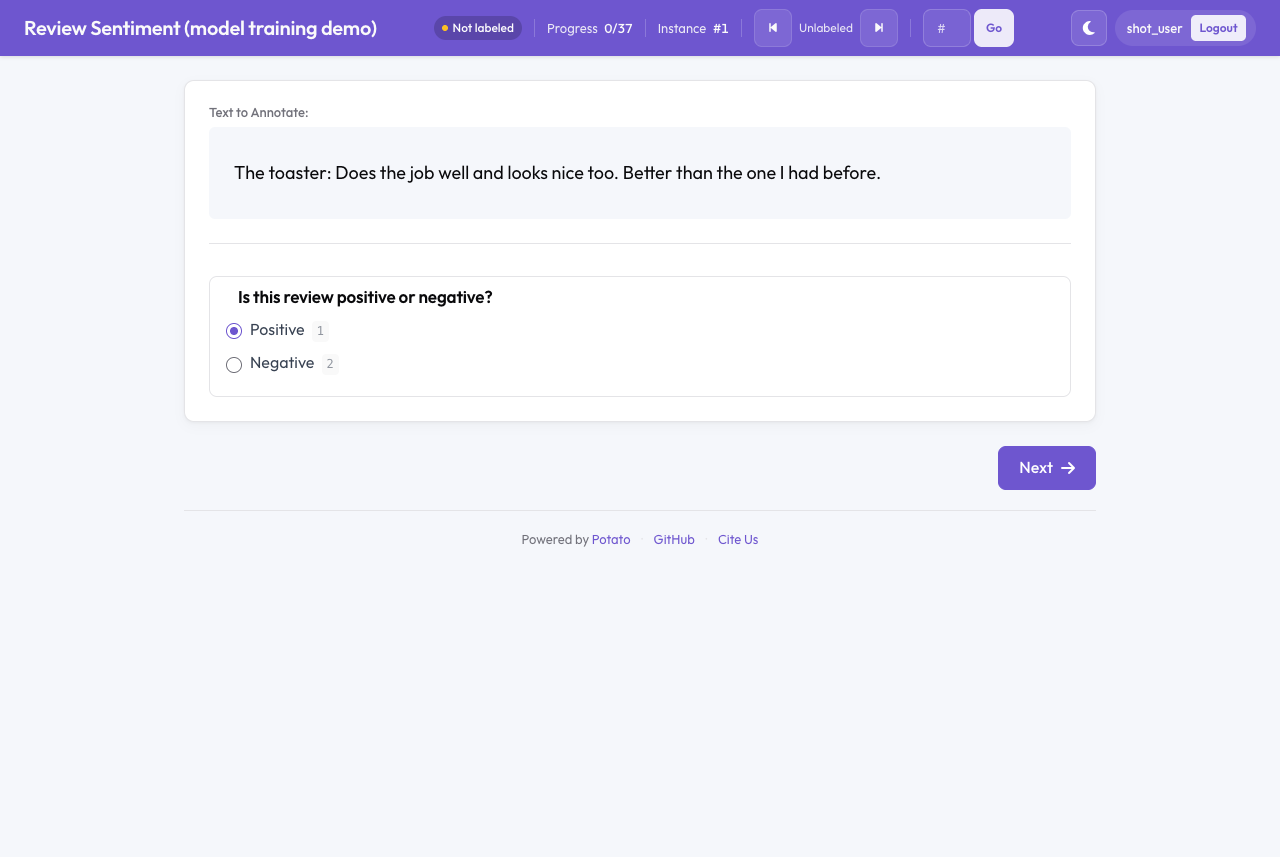 A review that opens with the model's answer selected, before the annotator has saved anything
The pre-label is not saved while the annotator only looks at the review, and the status chip reads "Not labeled" until the annotator saves an answer. The model's answer becomes the annotator's answer when the annotator changes the selection or clicks Next. In our run, the 5 unlabeled reviews whose prediction fell below min_confidence opened with nothing selected. An annotator held out from machine help with ai_support.holdout sees no pre-labels at all. Pre-labels pull annotators toward the model's answer, so turn write-back on once the held-out score is high enough to trust, and watch for annotators who accept every pre-label with the checks in detecting rubber-stamped pre-labels.
Next steps
The same project supports a few more experiments before you move to your own data:
- Change a parameter. Type
{"vectorizer_kwargs": {"ngram_range": [1, 2]}}into Parameters and train again to add word pairs to the features. Our second run with word pairs scored 0.774 val macro-F1 on the same split and published 74 pre-labels. A parameter namesklearn-textdoes not take is refused with the list of names the trainer does take. - Try a transformer.
hf-text-classification(pip install "potato-annotation[train-text]") andsetfit(pip install "potato-annotation[embeddings]") learn the same scheme, and the trainers page gives each trainer's parameters. - Close the loop. Model in the loop adds the review queue, retraining as annotations arrive with
auto_retrain, and saving a run's split as a dataset version. - Move training to a GPU. Train on a GPU server, SLURM cluster, or machine behind NAT sends the same runs to another machine.
- Train other kinds of model. The tutorials on fine-tuning LLMs, vision models, audio models, and science models follow the same steps with other trainers and schemes.
Every key used here is listed in the model training configuration reference. Start your own project's first run by copying the model_training block above into your config and naming your scheme under writeback.schemas.