Potato 2.14: Train Models on Your Own Annotations
Potato 2.14 trains models on a study's labels with 38 trainers, scores each run on held-out items, and shows the predictions to annotators as pre-labels.
Potato 2.14 trains models on a study's own annotations. A run fits one of 38 trainers on the labels annotators have given, scores the model on items held out from training, and writes the model's predictions back to items as pre-labels that annotators confirm or correct. Version 2.13.1 had one trainer, sklearn-text. The release also imports RTTM diarization files, exports corrected speaker turns, runs WhisperX for local transcription, and fixes several bugs that changed agreement figures and exports, so read the upgrade notes before you install.
pip install --upgrade potato-annotationUpgrade notes
Run potato validate config.yaml --strict on each config first. The following changes can alter what a working 2.13 study does:
assignment_strategy: llm_confidencenow orders the queue. The strategy serves the least-confident pre-label first, then items with no pre-label. Earlier releases accepted the value and assigned items at random.model_trainingis checked at validation and startup. An unknown key underwritebackorauto_retrain, a split named other thantrain,val, ortest, and awriteback.schemasentry that is not a scheme are errors that stop the server.- The Training page reports a held-out score. The score column used to show training accuracy. A score from a 2.13 run is not comparable with a 2.14 held-out score.
- Links, chains, and events appear in exports.
span_link,coreference, andevent_annotationanswers were missing from every export, and CSV and TSV now add<scheme>._linksand<scheme>._eventscolumns. - Potato no longer lists
ujsonininstall_requires. A script of your own that importsujsonfrom Potato's environment needspip install ujson.
Model training
Model training is for a study with more items than annotators will label, where a model trained on the first labels can propose the rest. The loop has three steps. First, a run resolves each item's labels to one answer and splits the items into train, val, and test. Second, the trainer fits a model on the train split in a separate process, and the run scores the model on the val and test items. Third, write-back shows the model's predictions to annotators as pre-labels, and the answers annotators save become labels for the next run.
To turn the loop on for a study with a sentiment scheme, add this block to the study's config:
model_training:
  enabled: true
  writeback:
    schemas: [sentiment]
    include_unlabeled: true
    min_confidence: 0.6
Annotators see nothing from a run until a scheme is named under writeback.schemas. include_unlabeled: true predicts on the items nobody has labeled, and min_confidence keeps predictions below 0.6 off the page. Restart the server, open /admin/training with the admin key, pick a trainer and a scheme, and click Train now.
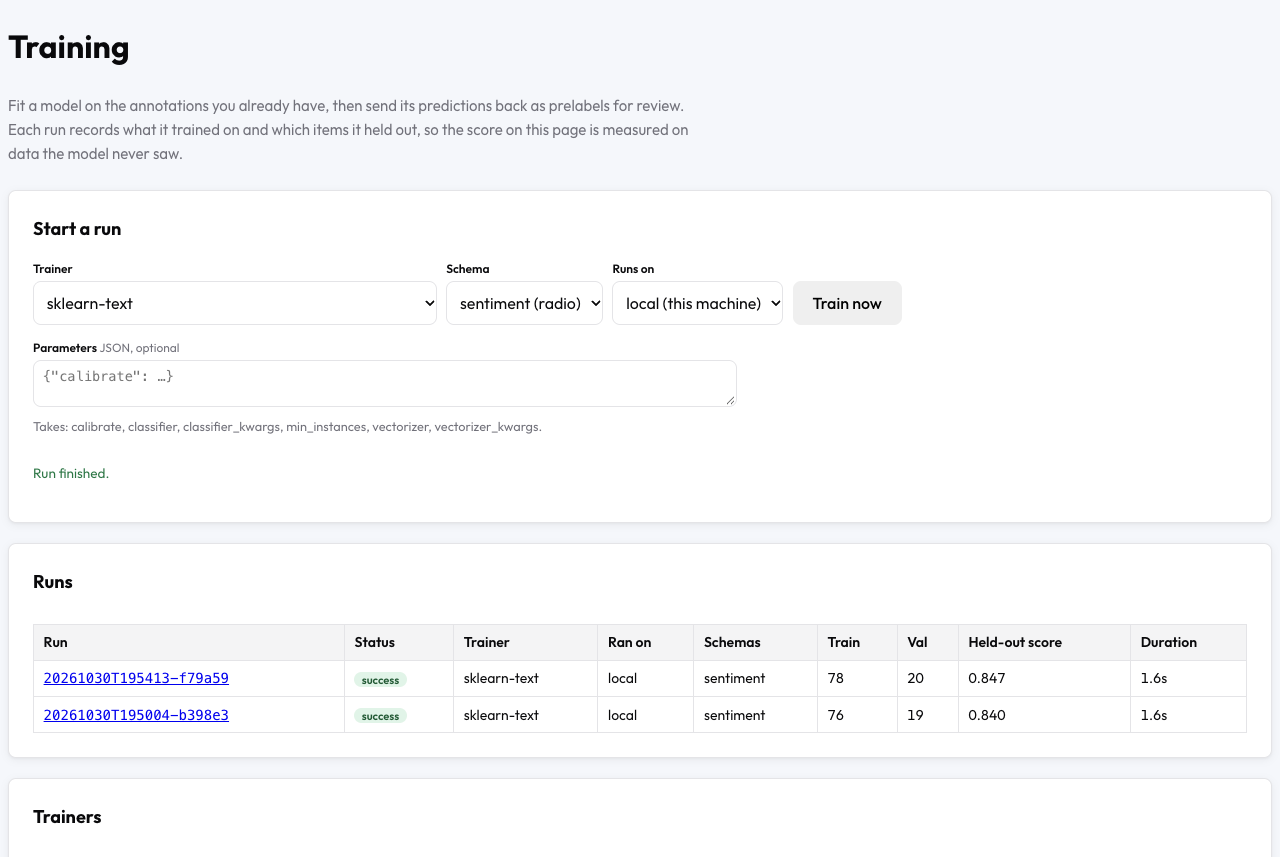
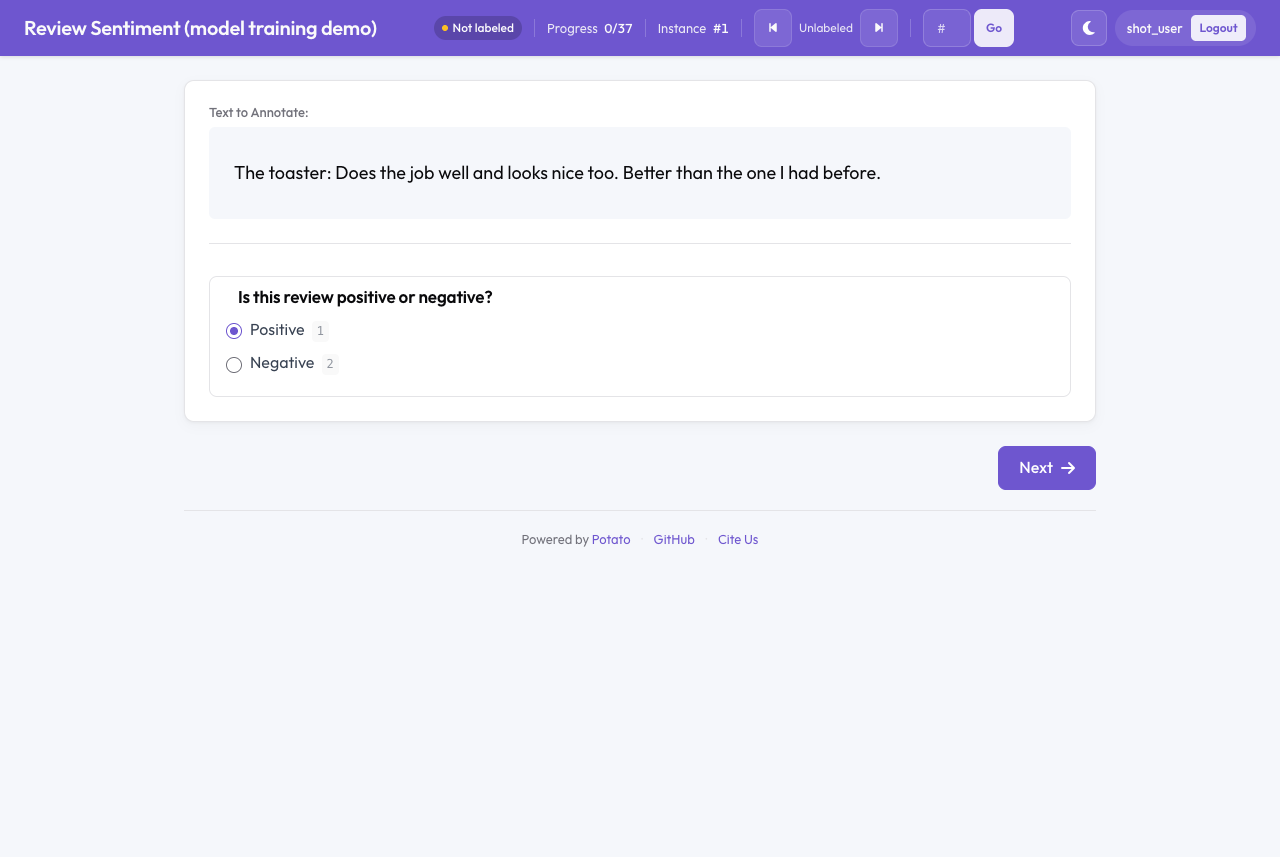
Potato's example project in examples/ai-assisted/model-training/ has 160 product reviews and runs sklearn-text, which needs no GPU and nothing beyond a plain install. The model training documentation reports one run there, on 120 labeled reviews, that scored 0.84 macro-F1 on the validation reviews and wrote 80 pre-labels. A new annotator then sees each of those reviews with the model's answer already selected:
Train Your First Model walks through the example step by step.
Trainers for each kind of annotation
The Training page offers each scheme only the trainers that fit the scheme. The trainer catalogue lists all 38 trainers with install commands, and the list below names the main groups:
- Text.
hf-text-classification,setfit, andsklearn-textclassify items.hf-token-classificationtags spans,hf-relationlinks spans into relations, events, and coreference chains, andbyt5-glosssegments and glosses words for interlinear glossing. - Images.
torchvision-detectandultralytics-detecttrain detectors, andtorchvision-segment,ultralytics-segment, andcellposetrain segmenters. Detection and segmentation runs tile whole slides and large images, and train on microscopy planes and GeoTIFF maps.volume-unetsegments 3D volumes,layoutlmv3labels page layouts, andvlm-sftfine-tunes a vision-language model on captions, grounding, and GUI steps. - Audio and video.
whisper-asrfine-tunes Whisper on corrected transcript turns,diarizationtrains a speaker model on speaker turns,hf-audio-taggertags audio segments, andvideo-tracktracks objects across frames. - LLMs and agents.
llm-sftfine-tunes on free-text answers,llm-dpoon pairwise preferences,reward-modelon pairwise, ranking, and best-worst answers, andprm-rewardon step ratings of agent traces. - Science.
rdkit-propertypredicts answers about molecules,peak-cnnpredicts peak positions on spectra,signal-cnnlabels intervals of time-series signals, andepisode-modellabels robot episodes.
The ultralytics trainers are AGPL-3.0, and the LayoutLMv3 weights are CC BY-NC-SA 4.0. A run of either asks you to accept the license first. pip install "potato-annotation[train]" installs what the text, image, audio, and LLM trainers need, and the catalogue names the separate installs.
Held-out scores and pre-labels
Every run scores its predictions on the val and test items with a metric suited to the scheme, such as macro-F1 for labels, mAP50 for boxes, word error rate for transcripts, and Dice for volumes. An item with a label and no prediction counts as wrong, and a coverage figure reports the share of items that got a prediction. Train-split items never get a pre-label, and an item a reviewer corrected always goes to the train split of later runs.
A pre-label becomes the annotator's answer only when the annotator edits the pre-label or moves on, and write-back never changes a human label. The model review queue serves pre-labels least-confident first, and the review report names the run behind each pre-label. Model in the Loop covers the review workflow.
Training on a GPU server or a cluster
A run executes on a backend. The local backend trains on the Potato server and picks CUDA, Apple's Metal, or the CPU. An ssh backend starts the run on a GPU server Potato can reach and streams progress and the model back. A slurm backend submits the run to a compute node with sbatch from the login node, and needs only sbatch, squeue, and scancel. An agent backend serves a machine Potato cannot reach, which runs potato training agent and polls for jobs. Before a run on an ssh backend, potato training check <backend> config.yaml reports the remote Python, the remote GPUs, and the missing training packages. Train on a GPU Server, SLURM Cluster, or Machine Behind NAT sets up each backend.
Choosing what to ask next
hf-text-classification and hf-image-classification take an acquisition parameter that writes a score on each prediction, by margin, entropy, BALD, or core-set distance. assignment_strategy: llm_confidence then serves the highest score first. auto_retrain starts a new run after every 25 new annotations by default, and each run rescores the unlabeled items. Active learning compares this loop with Potato's active_learning block.
Models you already have
Five trainers fit nothing and score a model running somewhere else: label-studio-ml for a Label Studio ML backend, openai-vlm-boxes for a vision-language model behind an OpenAI-compatible API, hf-inference for a Hugging Face Inference Endpoint, roboflow, and cvat-nuclio for a CVAT serverless function. The predictions of those models get the same held-out score, write-back, and review as a trained model's. Pre-Labels and Held-Out Scores from a Model You Already Run covers each bridge.
Publishing a model
A run's page pushes the model to the Hugging Face Hub with a model card that names the trainer, the base model, the schemes, the split sizes, and the held-out score. You type the repository name twice, the repository is private by default, and the token comes from an environment variable on the server. The predictions and the training data stay on the server. The same page keeps a run's split and the split's human labels as a dataset version for comparing later models on the same items.
Transcripts, import, and export
- WhisperX.
potato transcripts --transcribeuses WhisperX when WhisperX is installed, with word times from forced alignment under--asr-word-timestamps, and falls back to faster-whisper otherwise. Awhisper-asrrun writes a CTranslate2 copy of the fine-tuned model that--asr-modelloads. - RTTM import.
potato import -f rttmturns a diarization file, or a folder of diarization files, into one item per recording with the speaker turns to correct.--speaker-maprenames speakers. segmentsexport. The format writes one JSONL row per audio or video segment and an RTTM file per annotator.- CoNLL-U dependencies. HEAD and DEPREL come from a directed
span_linkscheme over the exported spans. Both columns were always_before.
Fixes that affect results
The changelog lists every fix. The fixes below could have changed numbers you reported:
- A ranking tie written as
B,D=A,Cwas read as one item namedD=A, so Kendall's tau and the Spearman footrule left both tied items out. - Slider, soft-label, and pairwise-scale pre-labels were saved as the annotator's answer when the page loaded, so an item counted as done before anyone answered. Opening a
grounding_evalitem saved the item in the same way. /admin/iaalisted coreference, span links, and events as spans with no score. The report now scores the three types by mean pairwise F1.- Merging or splitting a code in the codebook re-pointed no codings, because nothing linked saved annotations to code ids.
- Snapshot manifests froze null agreement figures, and now record kappa and percent agreement.
- Model review counted a
rejectverdict as a miss rather than against the pre-label the verdict took down, and the review report's precision came out wrong. A held-out annotator-item pair also kept the write-back field in the item data whenwriteback.fielddiffered frompre_annotation.field, and the item data for such a pair now leaves out both fields.
Installing 2.14
Upgrade, validate each config, and install the trainers you need:
pip install --upgrade potato-annotation
potato validate config.yaml --strict
pip install "potato-annotation[train]"
Model Training is the place to start, and What's New lists the rest of the release.