语音情感分类
在 Potato 中创建音频情感分类任务,配有交互式波形显示、播放速度控制、李克特量表和可配置的情感标签集。
语音情感识别(SER)出现在虚拟助手、心理健康工具和呼叫中心分析里,而这些都需要带标签的音频来训练。本教程会走一遍分类式情感、维度评分,以及包含不止一种情感的片段各自适用的标注界面。音频的底层选项请参阅音频标注文档。
情感标注方法
标注语音情感有几种常见做法。你可以使用快乐、悲伤、愤怒这样的离散类别。你可以在效价、唤醒度和支配度这类连续维度上打分。你可以让标注者一次标出多种情感并给出强度评分。或者,对于较长的片段,在不同时间戳上标注不同的情感。
分类式情感分类
基本配置
annotation_task_name: "Speech Emotion Recognition"

data_files:
  - data/utterances.json

item_properties:
  id_key: id
  text_key: transcript  # Optional transcript

instance_display:
  fields:
    - key: audio_path
      type: audio
      label: "Utterance"
      display_options:
        controls: true
        show_waveform: true
        preload: metadata

annotation_schemes:
  - annotation_type: radio
    name: emotion
    description: "What emotion is expressed in this speech?"
    labels:
      - name: Happy
        description: "Joy, excitement, amusement"
        key_value: "h"
      - name: Sad
        description: "Sorrow, disappointment, grief"
        key_value: "s"
      - name: Angry
        description: "Frustration, irritation, rage"
        key_value: "a"
      - name: Fearful
        description: "Anxiety, worry, terror"
        key_value: "f"
      - name: Surprised
        description: "Astonishment, shock"
        key_value: "u"
      - name: Disgusted
        description: "Revulsion, distaste"
        key_value: "d"
      - name: Neutral
        description: "No clear emotion"
        key_value: "n"
    label_requirement:
      required: true
Potato 会在标注标签旁渲染一个带播放控件的交互式波形:
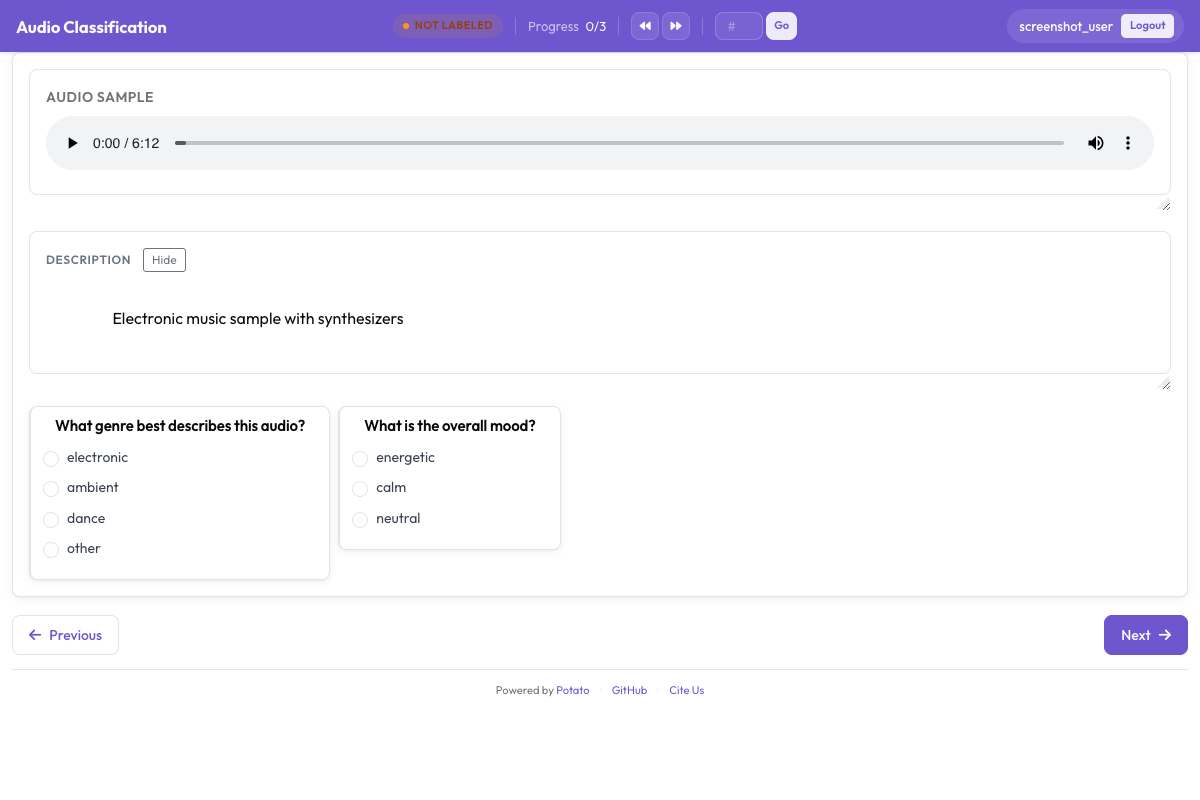 音频标注界面,显示带播放控件的交互式波形和分类式情感标签
添加强度评分
annotation_schemes:
  - annotation_type: radio
    name: emotion
    description: "What emotion does the speaker express?"
    labels: [Happy, Sad, Angry, Fearful, Surprised, Disgusted, Neutral]
    label_requirement:
      required: true

  - annotation_type: likert
    name: intensity
    description: "How intense is this emotion?"
    size: 5
    min_label: "Very weak"
    max_label: "Very strong"
维度式情感标注
VAD(效价-唤醒度-支配度)模型不会强行把片段塞进某一个类别,而是在三个连续量表上分别给它打分:
annotation_task_name: "Dimensional Emotion Rating"

annotation_schemes:
  # Valence: negative to positive
  - annotation_type: likert
    name: valence
    description: "Valence: How positive or negative?"
    size: 7
    min_label: "Very negative"
    max_label: "Very positive"

  # Arousal: calm to excited
  - annotation_type: likert
    name: arousal
    description: "Arousal: How calm or excited?"
    size: 7
    min_label: "Very calm"
    max_label: "Very excited"

  # Dominance: submissive to dominant
  - annotation_type: likert
    name: dominance
    description: "Dominance: How submissive or dominant?"
    size: 7
    min_label: "Very submissive"
    max_label: "Very dominant"
视觉量表 (SAM)
自我评估人偶(Self-Assessment Manikin)风格:
annotation_schemes:
  - annotation_type: likert
    min_label: "Very negative"
    max_label: "Very positive"
    name: valence
    description: "Select the figure that matches the emotional valence"
    size: 9
混合情感检测
对于包含多种情感的语音:
annotation_schemes:
  - annotation_type: multiselect
    name: emotions_present
    description: "Select ALL emotions you detect (can be multiple)"
    labels:
      - Happy
      - Sad
      - Angry
      - Fearful
      - Surprised
      - Disgusted
      - Contempt

  - annotation_type: radio
    name: primary_emotion
    description: "Which emotion is MOST prominent?"
    labels:
      - Happy
      - Sad
      - Angry
      - Fearful
      - Surprised
      - Disgusted
      - Contempt
      - Mixed (no dominant)
完整的情感标注
annotation_task_name: "Comprehensive Speech Emotion Annotation"

data_files:
  - data/speech_samples.json

item_properties:
  id_key: id
  text_key: transcript

instance_display:
  fields:
    - key: audio_url
      type: audio
      label: "Speech sample"
      display_options:
        controls: true
        show_waveform: true
        preload: metadata
        autoplay: false

    # Show the transcript alongside the audio
    - key: transcript
      type: text
      label: "Transcript (for reference)"

annotation_schemes:
  # Primary categorical emotion
  - annotation_type: radio
    name: primary_emotion
    description: "Primary emotion expressed"
    labels:
      - name: Happiness
        color: "#FCD34D"
        key_value: "1"
      - name: Sadness
        color: "#60A5FA"
        key_value: "2"
      - name: Anger
        color: "#F87171"
        key_value: "3"
      - name: Fear
        color: "#A78BFA"
        key_value: "4"
      - name: Surprise
        color: "#34D399"
        key_value: "5"
      - name: Disgust
        color: "#FB923C"
        key_value: "6"
      - name: Neutral
        color: "#9CA3AF"
        key_value: "7"
    label_requirement:
      required: true

  # Emotional intensity
  - annotation_type: likert
    name: intensity
    description: "Emotional intensity"
    size: 5
    min_label: "Very mild"
    max_label: "Very intense"
    label_requirement:
      required: true

  # Dimensional ratings
  - annotation_type: likert
    name: valence
    description: "Valence (negative to positive)"
    size: 7
    min_label: "Negative"
    max_label: "Positive"

  - annotation_type: likert
    name: arousal
    description: "Arousal (calm to excited)"
    size: 7
    min_label: "Calm"
    max_label: "Excited"

  # Voice quality
  - annotation_type: multiselect
    name: voice_qualities
    description: "Voice characteristics (select all that apply)"
    labels:
      - Trembling voice
      - Raised pitch
      - Lowered pitch
      - Loud/shouting
      - Soft/whisper
      - Fast speech rate
      - Slow speech rate
      - Breathy
      - Tense/strained
      - Crying
      - Laughing

  # Genuineness
  - annotation_type: radio
    name: authenticity
    description: "Does the emotion seem genuine?"
    labels:
      - Clearly genuine
      - Likely genuine
      - Uncertain
      - Likely acted/fake
      - Clearly acted/fake

  # Confidence
  - annotation_type: likert
    name: confidence
    description: "How confident are you in your annotation?"
    size: 5
    min_label: "Guessing"
    max_label: "Certain"

annotation_instructions: |
  ## Emotion Annotation Guidelines

  ### Listening Instructions
  1. Listen to the entire clip before annotating
  2. You may replay as many times as needed
  3. Focus on the VOICE, not just the words

  ### Emotion Categories
  - **Happiness**: Joy, amusement, contentment
  - **Sadness**: Sorrow, disappointment, melancholy
  - **Anger**: Frustration, irritation, rage
  - **Fear**: Anxiety, nervousness, terror
  - **Surprise**: Astonishment, startle
  - **Disgust**: Revulsion, contempt
  - **Neutral**: Calm, matter-of-fact

  ### Tips
  - Consider tone, pitch, speaking rate
  - The transcript may not match the emotion
  - When unsure between two emotions, choose the stronger one
  - Use the intensity scale for unclear cases

output_annotation_dir: annotations/
export_annotation_format: jsonl
输出格式
{
  "instance_id": "utt_001",
  "user_id": "rater_01",
  "labels": {
    "primary_emotion": {"Surprise": "true"},
    "voice_qualities": {"Raised pitch": "true", "Fast speech rate": "true"},
    "authenticity": {"Clearly genuine": "true"},
    "confidence": {"4": "true"}
  },
  "spans": {},
  "links": {}
}
片段级情感标注
对于情感会发生变化的较长音频:
annotation_schemes:
  - annotation_type: audio_annotation
    name: emotion_segments
    description: "Mark time segments with different emotions"
    labels:
      - name: Happy
        color: "#FCD34D"
      - name: Sad
        color: "#60A5FA"
      - name: Angry
        color: "#F87171"
      - name: Neutral
        color: "#9CA3AF"
质量控制
标签已知、不存在歧义的片段可以抓出那些一路乱点的标注者。这两个配置块都位于配置的顶层,而且都从文件读取条目,不是内联写死的:
attention_checks:
  enabled: true
  frequency: 20
  items_file: data/attention_checks.json
  min_response_time: 3.0

gold_standards:
  enabled: true
  items_file: data/gold_standards.json
  mode: mixed
  frequency: 20
  accuracy:
    min_threshold: 0.7
    evaluation_count: 10
一个 gold 条目就是你的普通数据条目加上一个 gold_label,所以它的渲染方式和其他条目完全一样:
[
  {
    "id": "gold_001",
    "audio_path": "/audio/gold/clearly_happy.wav",
    "gold_label": { "primary_emotion": "Happiness" },
    "explanation": "Laughter and rising pitch throughout, with no ambiguity.",
    "difficulty": "easy"
  }
]
注意力检查条目用 expected_answer 代替 gold_label。对音频任务来说,min_response_time 是最有用的那个控制项:三秒的下限能抓出那些不可能听完就给片段打标签的人。
把这两块嵌进 quality_control: 里是个常见错误,而且它不会报错。Potato 从顶层读取 attention_checks 和 gold_standards,而它从 quality_control 读取的键只有 geometry_iou_tolerance,所以嵌套写法能通过校验,却从不生效。
情感标注技巧
先完整听完片段再下判断,并且注意的是话怎么说,而不是说了什么。要记得表达规范因文化而异,在一种文化里听起来像愤怒的,在另一种文化里可能只是强调。情感标注很耗精力,所以鼓励大家适时休息,并让团队定期讨论分歧,以保持校准一致。
下一步
文档请参阅 音频标注。