自動關鍵詞高亮
在 Potato 中配置關鍵詞高亮,可以用固定的關鍵詞檔案,也可以用 LLM 關鍵詞助手,內容涵蓋按標籤配色、隨機干擾項和響應快取。
Potato 有兩種高亮關鍵詞的方式。keyword_highlights_file 在每個項目上標出一份固定的詞表,全程不涉及模型;ai_support 則會加一個 Keyword 按鈕,標註者按下它,由 LLM 標出與每個標籤相關的詞。
兩種機制的失效方式不同,所以選哪一種比怎麼配置更要緊。固定詞表是確定性的,每個項目都不產生費用,也可以寫進論文的方法部分,但無論句子說的是什麼,它標出的始終是同樣的字串。LLM 助手會讀每個項目,能標出任何詞表都抓不到的短語,代價是每次請求一次 API 呼叫,以及依賴一個可能在你不知情時發生變化的模型。
關於選項高亮和關鍵詞高亮的實現方式,見源文件。
固定的關鍵詞列表
當你需要每名標註者看到相同的高亮,並且事後能準確說清那些高亮是什麼時,就用關鍵詞檔案。把 keyword_highlights_file 指向一個 CSV 或 TSV,Potato 會給項目文本中的每一處匹配加上帶邊框的方框。
annotation_task_name: "Sentiment with keyword highlights"
task_dir: .
output_annotation_dir: annotation_output
export_annotation_format: jsonl

data_files:
  - data/reviews.json

item_properties:
  id_key: id
  text_key: text

keyword_highlights_file: data/sentiment_keywords.tsv

ui:
  label_colors:
    sentiment:
      positive: "(22, 163, 74)"
      negative: "(239, 68, 68)"

annotation_schemes:
  - annotation_type: span
    name: sentiment
    description: "Mark the phrases that carry sentiment. Highlighted keywords are suggestions, not answers."
    labels:
      - name: positive
        tooltip: "Phrases expressing a positive opinion"
      - name: negative
        tooltip: "Phrases expressing a negative opinion"

user_config:
  allow_all_users: true
顏色是按方案、按標籤設定的,而不是全域設定,因為如果高亮的顏色和標註者正要畫的跨度標籤撞色,那還不如不要高亮。
關鍵詞檔案需要一個 keyword 表頭列。label 列說明該詞屬於哪個類別,schema 列說明它與哪個標註方案相關,可選的 color 列會覆蓋該標籤的配色。
keyword,label,schema,color
excellent,positive,sentiment,(34, 197, 94)
terrible,negative,sentiment,#ef4444
excel*,positive,sentiment,
* 匹配任意一串詞字元,所以 excel* 一行就覆蓋了 excellent、excels 和 excelled。Potato 也能讀每行一個關鍵詞的純文本檔案,以及存放關鍵詞列表或 {keyword: label} 對映的 JSON、JSONL 或 YAML。
為研究而隨機化的高亮
如果你要測量高亮是否改變了標註者的行為,把每個關鍵詞都展示給每個人,就沒有可供比較的物件了。keyword_highlight_settings 會把關鍵詞抽稀,並混入誘餌。
keyword_highlights_file: data/keywords.csv

keyword_highlight_settings:
  keyword_probability: 0.5        # show half the matched keywords
  random_word_probability: 0.05   # highlight about 5% of other words
  random_word_label: "distractor"
  random_word_schema: "keyword"
keyword_probability: 0.5 是讓這個比較成立的取值,因為這樣每名標註者在同一批語料裡,會在一半的詞上看到高亮,在另一半上看不到。這個選擇按使用者、按實例快取,種子取自使用者名稱和實例 id 的雜湊,所以標註者回到某個項目時看到的還是第一次看到的樣子。哪些詞被展示過記錄在行為資料的 keyword_highlights_shown 欄位裡,分析時可以據此做條件。
LLM 關鍵詞助手
AI 關鍵詞高亮是一個按鈕,而不是後臺程序。啟用 ai_support 之後,每個標註表單上都帶有 Hint、Keyword 和 Rationale 三個按鈕,按下 Keyword 就是在問模型:這個項目裡哪些詞與每個可選標籤相關。答案以文本上的方框疊加層返回。
ai_support:
  enabled: true
  endpoint_type: openai

  ai_config:
    model: gpt-4o-mini
    api_key: ${OPENAI_API_KEY}
    temperature: 0.3
    max_tokens: 800
    include:
      all: true
max_tokens: 800 是預設值,對這個助手來說也接近下限。Keyword 和 Rationale 的提示詞會在一次回覆裡回答所有標籤,所以預算再小就會把回覆截斷,助手會渲染成空白,而且不報錯。
include.all: true 會為所有方案開啟這些助手。如果只想為特定的頁面和方案啟用,就用 special_include,它把頁面索引對映到標註 id,再對映到助手名稱的列表:
ai_support:
  enabled: true
  endpoint_type: openai
  ai_config:
    model: gpt-4o-mini
    api_key: ${OPENAI_API_KEY}
    include:
      all: false
      special_include:
        "0":
          "0": ["hint", "keyword"]
        "1":
          "1": ["hint"]
關鍵詞高亮需要有文本可以高亮,所以即使端點是視覺模型,Potato 也會在影像項目上把這個按鈕過濾掉。在文本項目上,視覺模型提供全部三個助手。
Anthropic
ai_support:
  enabled: true
  endpoint_type: anthropic

  ai_config:
    model: claude-sonnet-4-20250514
    api_key: ${ANTHROPIC_API_KEY}
    temperature: 0.3
    max_tokens: 800
    include:
      all: true
Ollama,不產生 API 賬單
ai_support:
  enabled: true
  endpoint_type: ollama

  ai_config:
    model: qwen3:0.6b
    base_url: http://localhost:11434
    temperature: 0.3
    max_tokens: 800
    include:
      all: true
當語料不能離開你的機器,或者你要高亮幾萬個項目、按項目計費會吃掉整個研究預算時,本地端點值得承受那點品質上的損失。
改為高亮可能的標籤
當問題出在選項列表太長而不是文本太長時,option_highlighting 是更合適的工具。它向模型索要最可能的幾個選項,用全不透明度加一顆星把它們標出來,其餘的調暗。所有選項仍然可以點選。
ai_support:
  enabled: true
  endpoint_type: openai
  ai_config:
    model: gpt-4o-mini
    api_key: ${OPENAI_API_KEY}
    temperature: 0.3
    max_tokens: 800

  option_highlighting:
    enabled: true
    top_k: 3
    dim_opacity: 0.4
    auto_apply: true
    schemas: null
    prefetch_count: 10
top_k: 3 適合有八到十二個標籤的方案,標出三個選項能減少閱讀量,又不至於把答案藏起來。它對 radio、multiselect、likert 和 select 有效,對跨度、自由文本和滑塊沒有影響。
快取與預取
一次 LLM 呼叫會給頁面載入多添幾秒,而等待的標註者就不會再按那個按鈕了。快取到磁碟、並在游標前方預取,能消掉大部分等待,快取還能讓你不必為標註者重新訪問的項目付兩次錢。
ai_support:
  enabled: true
  endpoint_type: openai
  ai_config:
    model: gpt-4o-mini
    api_key: ${OPENAI_API_KEY}
    max_tokens: 800
    include:
      all: true

  cache_config:
    disk_cache:
      enabled: true
      path: annotation_output/ai_cache.json

    prefetch:
      warm_up_page_count: 10
      on_next: 5
      on_prev: 2
on_next: 5 與 on_prev: 2 的對比反映的是標註者的移動方式。大多數導航是向前的,所以預算投向前方,同時在游標後方留出足夠覆蓋一次修正的量。
一份完整配置
兩種機制可以並用。關鍵詞檔案給每名標註者相同的基線高亮,而助手留在按鈕後面,供固定詞表無話可說的那些項目使用。
annotation_task_name: "Entity annotation with keyword support"
task_dir: .
output_annotation_dir: annotation_output
export_annotation_format: jsonl

data_files:
  - data/documents.json

item_properties:
  id_key: id
  text_key: text

keyword_highlights_file: data/entity_keywords.csv

annotation_schemes:
  - annotation_type: span
    name: entities
    description: "Mark people, organizations and locations."
    labels:
      - name: PERSON
        color: "#FECACA"
      - name: ORG
        color: "#BBF7D0"
      - name: LOCATION
        color: "#BFDBFE"

ai_support:
  enabled: true
  endpoint_type: openai

  ai_config:
    model: gpt-4o-mini
    api_key: ${OPENAI_API_KEY}
    temperature: 0.3
    max_tokens: 800
    include:
      all: true

  cache_config:
    disk_cache:
      enabled: true
      path: annotation_output/ai_cache.json
    prefetch:
      warm_up_page_count: 10
      on_next: 5
      on_prev: 2

user_config:
  allow_all_users: true
啟動伺服器,高亮就出現在第一個項目上:
potato start config.yaml -p 8000啟用 AI 關鍵詞高亮後,按下 Keyword 按鈕會標出標註文本里的相關術語:
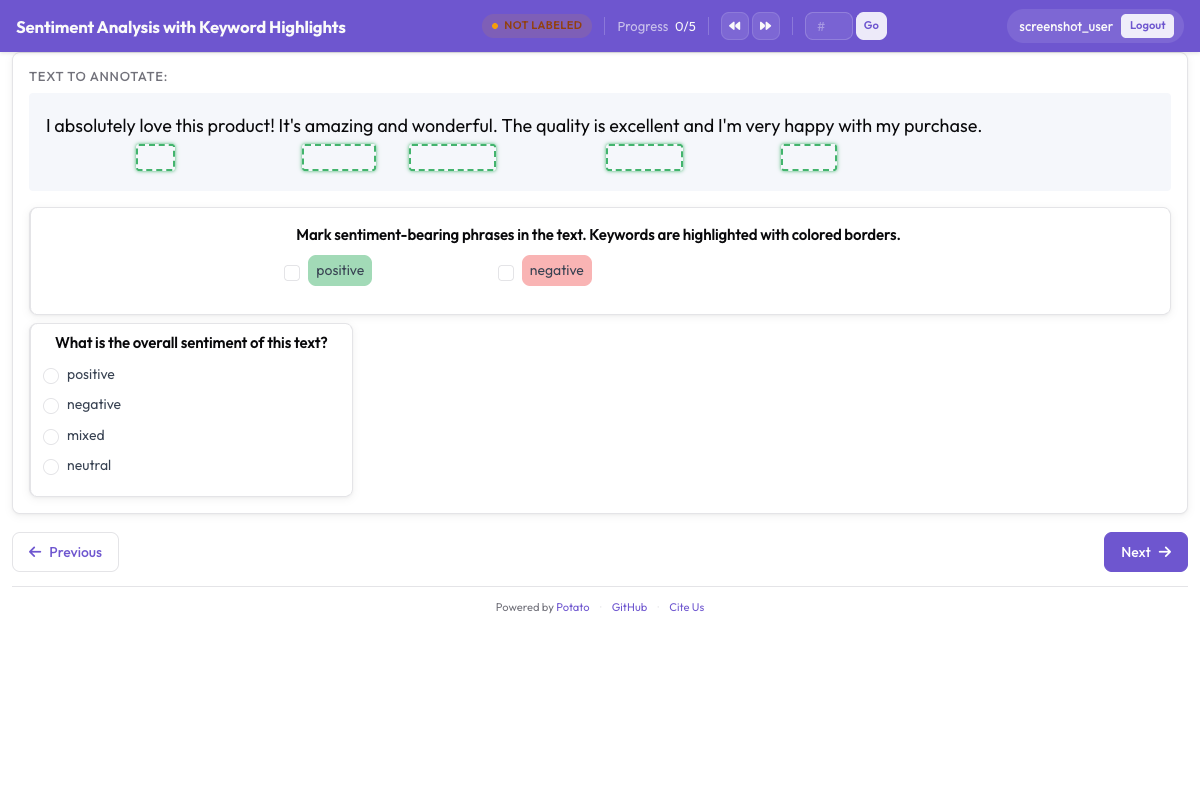 用方框疊加層標出關鍵詞和實體,引導標註者的注意力