이미지 비교 및 선호도 작업
Potato에서 두 이미지를 나란히 보여 주고, 선호도 스키마, 무작위 제시 순서, 더 큰 이미지 풀을 위한 순위 설정을 갖춘 이미지 비교 작업을 구축합니다.
이 튜토리얼은 Potato에서 생성된 두 이미지를 나란히 보여 주는 이미지 비교 작업을 구축합니다. 5점 선호도 척도, 기준별 후속 질문, 그리고 두 장이 넘는 풀을 위한 순위 매기기와 Best-Worst Scaling 변형까지 다룹니다. 같은 구성은 RLHF 선호도 데이터, 압축 및 이미지 향상 비교, 디자인 A/B 테스트에도 쓸 수 있습니다.
비교는 주석자에게 한 이미지를 척도 위에 놓게 하는 대신 두 이미지 중 하나를 고르게 하므로, 5점 중 4점이 무엇을 뜻하는지에 대한 기준을 모든 주석자가 공유할 필요가 없어집니다. 그 대가로 n장의 이미지 풀에서 완전한 순서를 얻으려면 훨씬 많은 판단이 필요하며, 끝부분의 순위 매기기와 Best-Worst Scaling 섹션이 이 문제를 다룹니다.
데이터 파일
각 행에는 식별자, 두 이미지의 경로, 그리고 주석자가 판단하는 데 필요한 맥락이 들어갑니다. Potato는 필드 이름을 item_properties에서 읽으므로 이름 자체는 원하는 대로 정하면 됩니다.
{"id": "pair_001", "prompt": "A sunset over mountains", "image_a": "/media/model_a_001.png", "image_b": "/media/model_b_001.png"}
{"id": "pair_002", "prompt": "A cat on a windowsill", "image_a": "/media/model_a_002.png", "image_b": "/media/model_b_002.png"}
두 이미지를 나란히 보여 주기
Potato에서는 콘텐츠와 질문을 따로 설정합니다. instance_display 블록은 주석자가 무엇을 보는지를, annotation_schemes는 무엇을 묻는지를 정합니다. 가로 레이아웃에 image 필드 두 개를 두면 이미지가 나란히 놓이고, zoomable을 쓰면 주석자가 표시 크기에서는 보이지 않는 결함을 확대해 살펴볼 수 있습니다.
instance_display:
  layout:
    direction: horizontal
    gap: 24px
  fields:
    - key: image_a
      type: image
      label: "Image A"
      display_options:
        max_height: 512
        zoomable: true
        alt_text: "First generated image"
    - key: image_b
      type: image
      label: "Image B"
      display_options:
        max_height: 512
        zoomable: true
        alt_text: "Second generated image"
표시와 스키마를 모두 설정하면 주석자에게는 다음과 같이 보입니다.
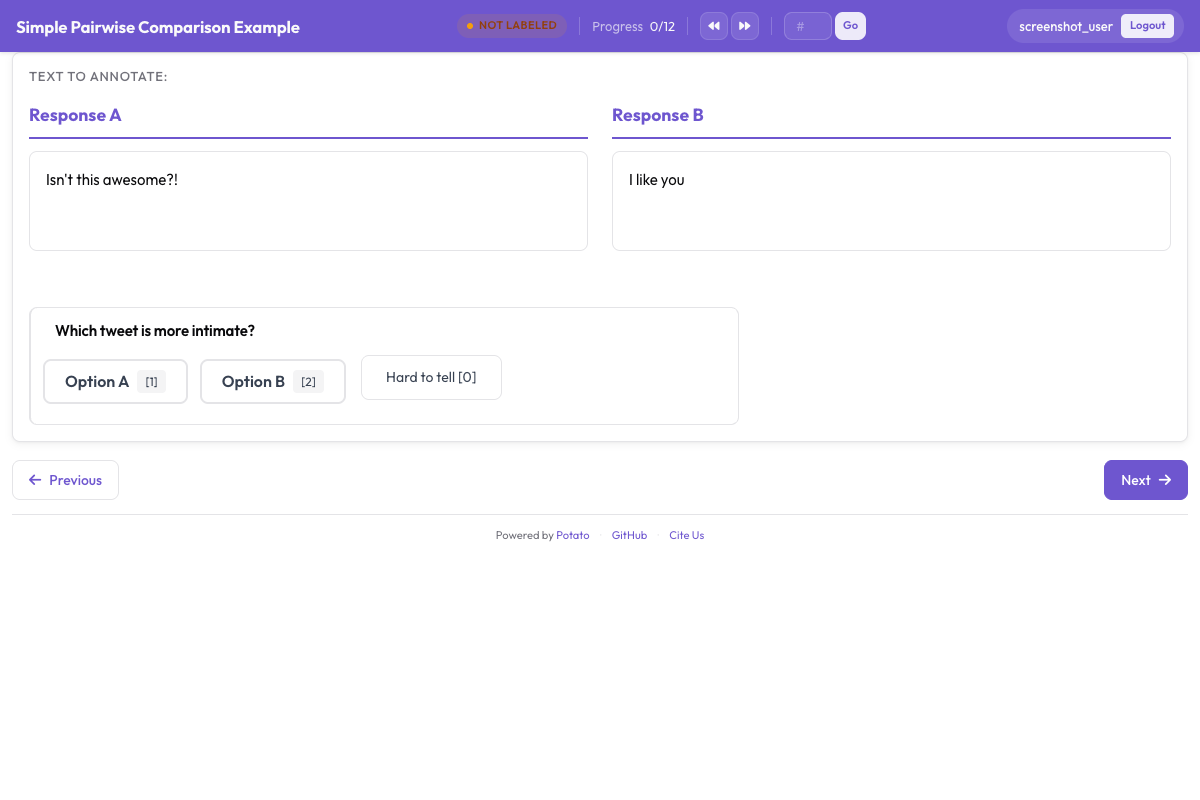 두 후보를 보여 주고 그 아래에 선호도 질문을 둔 비교 작업
선호도 질문
5점 척도는 강한 선호와 약한 선호를 구분합니다. 결과로 모델을 학습시킬 때 이 구분이 중요한데, 주석자들의 의견이 반반으로 갈린 쌍과 모두가 분명하게 판단한 쌍은 서로 다른 학습 신호를 담기 때문입니다. sequential_key_binding은 다섯 선택지에 1부터 5까지의 키를 할당하며, 이것이 비교 한 번에 4초가 걸리느냐 12초가 걸리느냐의 차이를 만듭니다.
annotation_schemes:
  - annotation_type: radio
    name: preference
    description: "Which image better matches the prompt?"
    labels:
      - name: "A is clearly better"
      - name: "A is slightly better"
      - name: "About equal"
      - name: "B is slightly better"
      - name: "B is clearly better"
    sequential_key_binding: true
    label_requirement:
      required: true
이 블록을 위 설정에 추가하십시오. 가운데 선택지는 "No preference"가 아니라 "About equal"로 하십시오. 두 표현은 서로 다른 판단을 나타내며, 주석자들은 "no preference" 선택지를 건너뛰기 버튼처럼 사용하기 때문입니다.
위치 편향
주석자는 마땅한 정도보다 왼쪽 선택지를 더 자주 고르므로, 이미지가 어느 쪽에 놓이는지를 바꿔 주어야 합니다. 데이터 파일을 만들 때 무작위로 정하십시오. 무작위로 고른 절반의 행에서 image_a와 image_b를 맞바꾸고 각 행이 어느 방향이 되었는지 기록한 다음, 분석하기 전에 기록된 판단을 원래 방향으로 되돌립니다. Potato의 표시 필드는 나열한 순서대로 렌더링되므로 설정이 이 일을 대신해 줄 수는 없습니다.
텍스트 비교는 다릅니다. pairwise 스키마는 두 후보를 아이템 데이터의 한 필드에서 가져오므로 randomize_order로 순서를 섞을 수 있고, Potato는 각 주석자가 실제로 본 순서를 기록합니다. 시드는 주석자, 아이템, 스키마를 함께 사용해 만들어지며, 그래서 한 사람의 첫 번째 위치 선호가 연구 전체에 걸쳐 한쪽 면과 상관되지 않고 아이템마다 다른 후보에 떨어집니다. 비교 대상이 텍스트라면 쌍별 비교 문서를 참고하십시오.
특정 기준에 대해 묻기
전체 선호도는 어떤 이미지가 이겼는지는 알려 주지만 이유는 알려 주지 않습니다. 그 아래에 범위를 좁힌 질문 두세 개를 추가하면 의견 불일치를 해석할 수 있게 됩니다. 전체 판단에서 갈린 주석자들도 프롬프트 충실도에서는 일치하고 미적 측면에서 갈리는 경우가 많기 때문입니다.
  - annotation_type: radio
    name: prompt_adherence
    description: "Which image better matches the prompt?"
    labels:
      - name: A
      - name: Tie
      - name: B

  - annotation_type: multiselect
    name: issues_a
    description: "Problems in Image A (select all that apply)"
    labels:
      - name: "Distorted faces or hands"
      - name: "Text rendering errors"
      - name: "Unnatural lighting"
      - name: "Missing elements from the prompt"
      - name: "Blurry or low quality"
      - name: "None"
이 스키마들을 위 블록에 추가하십시오. 기준 목록은 짧게 유지하십시오. 질문이 하나 늘 때마다 연구 전체에 걸쳐 곱해지며, 2,000쌍에 기준 다섯 개짜리 양식을 쓰면 10,000건의 판단이 되고, 각각에 대해 지침에 별도의 정의가 필요합니다.
전후 비교
향상, 복원, 편집 작업도 같은 두 이미지 구성을 쓰되, 양쪽을 무작위로 두지 않고 이름을 붙입니다. 어느 쪽이 원본인지가 질문의 일부이기 때문입니다.
instance_display:
  layout:
    direction: horizontal
    gap: 24px
  fields:
    - key: original
      type: image
      label: "Original"
      display_options:
        max_height: 512
        zoomable: true
    - key: enhanced
      type: image
      label: "Enhanced"
      display_options:
        max_height: 512
        zoomable: true

annotation_schemes:
  - annotation_type: radio
    name: enhancement_quality
    description: "How did the edit change the image?"
    labels:
      - name: "Clearly improved"
      - name: "Slightly improved"
      - name: "No noticeable change"
      - name: "Made worse"
    label_requirement:
      required: true

  - annotation_type: multiselect
    name: problems_introduced
    description: "Problems the edit introduced (select all that apply)"
    labels:
      - name: "Over-sharpening or halos"
      - name: "Color shift"
      - name: "Loss of detail"
      - name: "New artifacts"
      - name: "None"
편집이 새로 만든 문제는 전체 품질과 따로 물어보십시오. 피사체를 선명하게 하면서 그 주변에 헤일로를 더하는 편집은 단일 척도에서는 개선으로 읽히지만, 알아야 할 것은 바로 그 헤일로입니다.
두 장을 넘는 이미지
아이템당 후보가 3개에서 8개라면 gallery 필드에 보여 주고 ranking 스키마로 완전한 순서를 수집하십시오. 갤러리는 한 필드에서 이미지 경로 목록을 받으므로, 데이터 파일에는 별도의 키 두 개 대신 배열이 들어갑니다.
item_properties:
  id_key: id
  text_key: prompt

instance_display:
  fields:
    - key: prompt
      type: text
      label: "Prompt"
    - key: images
      type: gallery
      display_options:
        layout: grid
        columns: 2
        thumbnail_size: 320
        zoomable: true

annotation_schemes:
  - annotation_type: ranking
    name: preference_rank
    description: "Drag the image numbers to rank them from best at the top to worst at the bottom."
    labels:
      - "Image 1"
      - "Image 2"
      - "Image 3"
      - "Image 4"
    allow_ties: false
    label_requirement:
required: truelabels는 갤러리 안의 위치에 이름을 붙이므로, 목록에는 이미지마다 항목이 하나씩 있어야 하고 모든 아이템의 후보 수가 같아야 합니다. 순위 매기기는 작은 집합에 적합합니다. 주석자가 모든 후보를 다른 모든 후보와 한꺼번에 비교하기 때문입니다. 후보가 대략 8개를 넘으면 아이템당 노력이 돌려받는 정보보다 빠르게 늘어납니다.
더 큰 풀
풀이 너무 커서 한 화면에서 순위를 매길 수 없을 때는 Best-Worst Scaling을 씁니다. 주석자는 보통 4개로 이루어진 아이템 묶음을 보고 가장 좋은 것과 가장 나쁜 것만 고르며, 점수는 서로 겹치는 많은 묶음에 걸쳐 계산됩니다.
  - annotation_type: bws
    name: quality
    description: "Select the BEST and the WORST image in this set."
    tuple_size: 4
    best_description: "Best"
    worst_description: "Worst"
이 스키마를 위 설정에 추가하십시오. 점수 계산은 수집이 끝난 뒤 관리자 대시보드의 BWS 탭이나 명령줄에서 실행하며, 출력 디렉터리에 bws_scores.tsv를 씁니다.
python -m potato.bws_scoring --config config.yaml --method bradley_terrycounting 방법은 추가 의존성이 필요 없으며 투명한 기준선입니다. bradley_terry는 암묵적인 쌍별 비교에 모델을 적합시키며 pip install choix가 필요합니다. plackett_luce는 가장 좋은 것과 가장 나쁜 것을 고르는 각 선택을 직접 모델링하며, Potato 외에는 아무것도 필요하지 않습니다. 이 모든 것보다 먼저 이루어져야 하는 묶음 생성은 Best-Worst Scaling 문서에서 다룹니다.
지침과 주의력 검사
이 작업에서 "더 낫다"가 무엇을 뜻하는지 지침에 쓰십시오. 그러지 않으면 주석자들이 각자의 정의를 가져오고, 그 사실은 일치도를 측정하는 단계에서야 드러납니다. annotation_instructions는 모든 주석 페이지에 그 텍스트를 표시합니다.
annotation_instructions: |
  Judge each pair on how well it matches the prompt first, then on visual
  quality, then on how appealing it looks. Zoom in before deciding: hands,
  text, and fine texture are where generation failures show up. Mark "About
  equal" only when you have looked at both and cannot separate them.
비교 작업의 주의력 검사는 승자가 명백한 쌍으로, 별도 파일에서 대기열에 섞어 넣어 데이터셋에 포함되지 않게 합니다.
attention_checks:
  enabled: true
  items_file: "data/attention_checks.json"
  frequency: 20
  min_response_time: 3.0
  failure_handling:
    warn_threshold: 2
    block_threshold: 5
두 블록을 모두 위 설정에 추가하십시오. min_response_time은 비교 작업이 가장 취약한 실패 유형, 즉 두 번째 이미지를 볼 시간이 없을 만큼 빠르게 클릭해 나가는 주석자를 잡아냅니다.
전체 설정
이 설정은 아이템마다 모델 출력 두 개, 5점 선호도, 기준 질문 하나, 확신도 평가를 갖춘 RLHF 선호도 수집을 실행합니다. 각 쌍을 주석자 세 명이 보므로 일치도를 보고하고 다수결 레이블을 얻기에 충분합니다.
annotation_task_name: "Generative Model Comparison"
task_description: "Compare two generated images against the prompt that produced them."

data_files:
  - data/model_outputs.json

item_properties:
  id_key: id
  text_key: prompt

instance_display:
  layout:
    direction: horizontal
    gap: 24px
  fields:
    - key: image_a
      type: image
      label: "Image A"
      display_options:
        max_height: 512
        zoomable: true
        alt_text: "First generated image"
    - key: image_b
      type: image
      label: "Image B"
      display_options:
        max_height: 512
        zoomable: true
        alt_text: "Second generated image"

annotation_instructions: |
  Judge each pair on prompt match first, then visual quality, then appeal.
  Zoom in before deciding. Mark "About equal" only when you cannot separate them.

annotation_schemes:
  - annotation_type: radio
    name: preference
    description: "Which image better represents the prompt?"
    labels:
      - name: "A is clearly better"
      - name: "A is slightly better"
      - name: "About equal"
      - name: "B is slightly better"
      - name: "B is clearly better"
    sequential_key_binding: true
    label_requirement:
      required: true

  - annotation_type: radio
    name: prompt_adherence
    description: "Which image matches the prompt more closely?"
    labels:
      - name: A
      - name: Tie
      - name: B

  - annotation_type: likert
    name: confidence
    description: "How confident are you in this judgment?"
    size: 5
    min_label: "Guessing"
    max_label: "Certain"

attention_checks:
  enabled: true
  items_file: "data/attention_checks.json"
  frequency: 20
  min_response_time: 3.0
  failure_handling:
    warn_threshold: 2
    block_threshold: 5

num_annotators_per_item: 3
output_annotation_dir: annotation_output/image-comparison/
export_annotation_format: jsonl
potato start config.yaml -p 8000으로 시작하고, 브라우저에서 해당 포트를 열어 로그인한 뒤, 링크를 누구에게 보내기 전에 쌍이 기대한 대로 렌더링되는지 확인하십시오. 직접 몇 개 아이템에 주석을 달아 보기도 하십시오. 설정에서는 분명해 보이는 스키마가 실제 세 번째 쌍에서 모호하다고 드러나는 경우가 많습니다.
출력에 담기는 내용
Potato는 output_annotation_dir 아래에 주석자별 파일을 쓰고, export_annotation_format은 <output_annotation_dir>/exports/<format>/ 아래에 주기적인 내보내기를 추가합니다. 내보낸 각 레코드에는 인스턴스, 주석자, 스키마별로 선택된 레이블이 담깁니다.
{"instance_id": "pair_001", "user_id": "rater_01", "labels": {"preference": {"A is slightly better": "A is slightly better"}, "confidence": {"4": "4"}}, "spans": {}, "links": {}}이를 instance_id로 데이터 파일과 다시 결합해 어느 쪽을 어느 모델이 생성했는지 복원하고, 무엇이든 집계하기 전에 파일을 만들 때 적용한 좌우 교체를 되돌리십시오. 이 단계를 주석 설정 안에서가 아니라 마지막에 수행해야 각 주석자가 실제로 본 것에 대한 원본 기록이 보존됩니다.
다음 단계
- Prolific으로 선호도 데이터를 대규모로 수집하십시오
- 결과에 대해 주석자 간 일치도를 측정하십시오
- 텍스트 비교는 쌍별 비교 문서를, 스키마 레퍼런스는 Potato 소스 문서를 읽어 보십시오