지켜보고, 멈추고, 되감기: Potato의 실시간 코딩 에이전트 관찰
Ollama, Anthropic API 또는 Claude Agent SDK로 실시간 코딩 에이전트 관찰을 설정하는 튜토리얼입니다. 일시정지, 롤백, 분기, 궤적 내보내기를 다룹니다.
실시간 관찰은 무엇이 다른가
코딩 에이전트 평가는 대부분 사후에 이루어집니다. 에이전트가 실행되어 트레이스를 남기면 검토자가 나중에 그 기록을 살펴봅니다. 실시간 관찰은 순서가 반대입니다. 주석자는 에이전트가 작업하는 모습을 실시간으로 지켜보며 파일 편집, 터미널 명령, 추론 단계를 각각 일어나는 즉시 확인합니다.
이렇게 하면 할 수 있는 일이 달라집니다. 에이전트가 잘못된 길로 들어서기 시작하면 주석자는 에이전트가 거기서 시간을 허비하기 전에 개입할 수 있습니다. 에이전트가 다음으로 넘어가기 전에 일시정지하고 diff를 꼼꼼히 읽을 수도 있고, 평이한 말로 지시를 보내 방향을 바꿀 수도 있습니다. 제가 가장 유용하다고 보는 기능은 롤백입니다. 이전의 어느 체크포인트로든 되감아 에이전트가 다른 접근을 시도하게 할 수 있습니다. 이렇게 생기는 분기가 바로 선호 학습에 필요한 종류의 데이터입니다.
이것이 정적 트레이스 주석을 대체하지는 않습니다. 만들어지는 데이터의 종류가 다릅니다. 예측 가능한 비용으로 많은 양을 원한다면 정적 주석이 낫습니다. 표적화된 데이터가 필요하거나, 에이전트가 어떻게 실패하는지 이해하려 하거나, 분기형 선호 쌍을 만들려 한다면 실시간 관찰이 낫습니다.
전체 기능 레퍼런스는 소스 문서를 참고하십시오.
실시간 코딩 에이전트 인터페이스는 에이전트의 동작을 실시간으로 스트리밍하며, 에이전트가 작업하는 동안 코드 diff와 터미널 출력을 보여 줍니다.
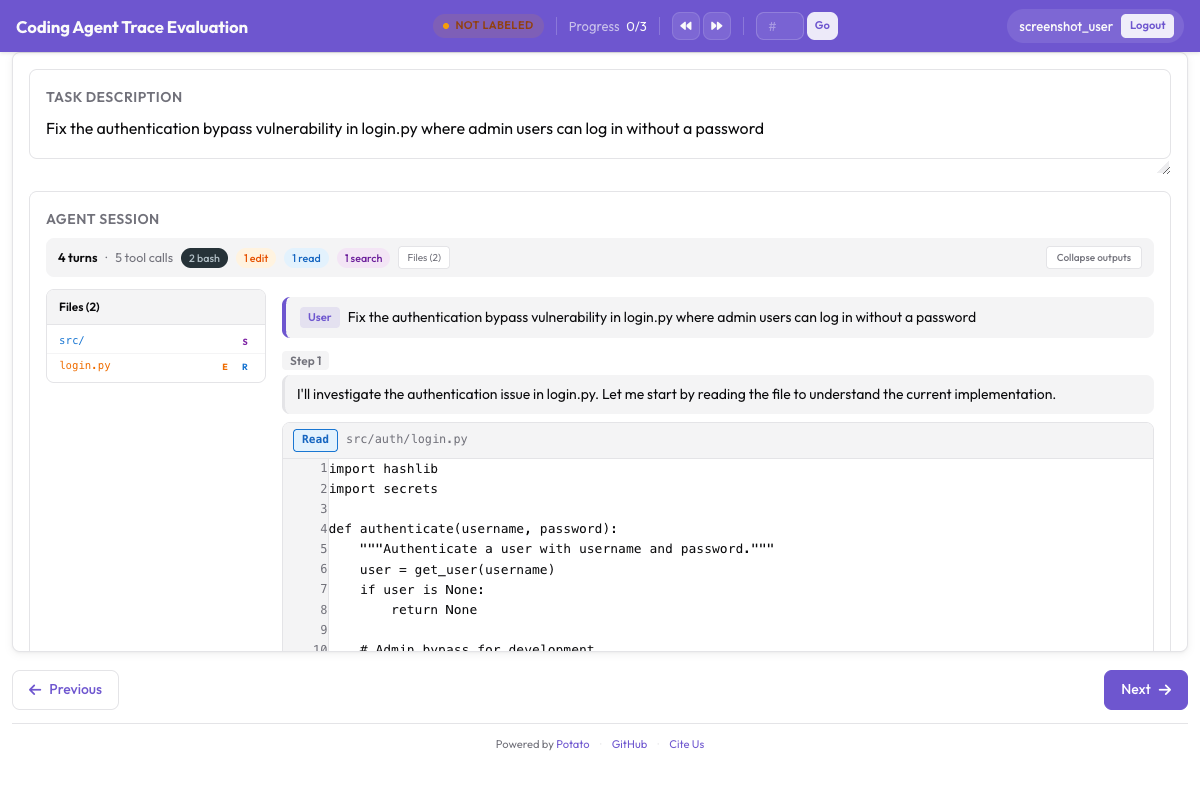 실시간 diff 렌더링과 터미널 출력을 갖춘 실시간 코딩 에이전트 관찰
세 가지 백엔드
Potato에는 실시간 관찰용 백엔드가 세 가지 있습니다. 모두 코딩 에이전트를 샌드박스에서 실행하고, 그 동작을 일어나는 대로 인터페이스에 스트리밍합니다.
Ollama (완전 로컬)
Ollama 백엔드는 API 키도 네트워크 호출도 없이 전부 사용자의 머신에서 실행됩니다. 코드베이스가 민감하거나, API 비용을 들이지 않고 실험만 해 보고 싶을 때 선택하십시오.
먼저 Ollama를 설치하고 도구 사용이 가능한 모델을 내려받습니다.
# Install Ollama
curl -fsSL https://ollama.ai/install.sh | sh

# Pull a coding-capable model
ollama pull qwen2.5-coder:32b

# Verify the model is available
ollama list
Potato가 Ollama 백엔드를 사용하도록 구성합니다.
# config.yaml
annotation_task_name: "Live Agent Observation - Ollama"
port: 8000

live_coding_agent:
  backend_type: ollama_tool_use
  ai_config:
    model: "qwen2.5-coder:32b"
    base_url: "http://localhost:11434"
    temperature: 0.2
    max_tokens: 4096
  working_dir: ./workspace       # Agent's working directory
  max_turns: 50
  sandbox_mode: container        # container (default) | bubblewrap | trusted
  sandbox_image: "python:3.11-slim"
Anthropic API (도구 사용이 가능한 Claude)
Anthropic API 백엔드는 도구 사용이 가능한 Claude 모델에 연결됩니다. 대부분의 로컬 모델보다 추론과 코드 생성이 뛰어나고, 그 대가로 API 호출 비용을 지불합니다.
# Set your API key
export ANTHROPIC_API_KEY="sk-ant-..."# config.yaml
annotation_task_name: "Live Agent Observation - Claude"
port: 8000
live_coding_agent:
backend_type: anthropic_tool_use
ai_config:
model: "claude-sonnet-4-20250514"
max_tokens: 8192
temperature: 0.1
system_prompt: >
You are a coding agent. You will be given a task description and
access to a codebase. Use the provided tools to read files, make
edits, and run commands to complete the task. Think step by step
and verify your changes by running tests.
working_dir: ./workspace
max_turns: 50
sandbox_mode: container
sandbox_image: "python:3.11-slim"Claude Agent SDK (Claude Code의 전체 기능)
Claude Agent SDK 백엔드는 세 가지 중 가장 기능이 많으며, Claude Code 도구 전체와 자율적 동작을 모두 갖추고 있습니다. claude-agent-sdk 패키지가 필요합니다.
# Install the Claude Agent SDK
pip install claude-agent-sdk# config.yaml
annotation_task_name: "Live Agent Observation - Claude Agent SDK"
port: 8000
live_coding_agent:
backend_type: claude_sdk
ai_config:
model: "claude-sonnet-4-20250514"
working_dir: ./workspace
max_turns: 50 # Maximum number of agent turns
sandbox_mode: container
sandbox_image: "node:20-slim"주석 작업 흐름
서버가 가동되면 실시간 관찰 세션은 몇 단계를 거쳐 진행됩니다.
세션 시작하기
주석자가 Potato 인터페이스를 열면 작업 설명 입력 필드가 보입니다. 에이전트가 완료해야 할 작업을 붙여 넣거나 입력합니다. 예를 들어 "새 구성 형식 때문에 실패하는 tests/test_parser.py의 테스트를 수정하라"나 "/api/users 엔드포인트에 페이지네이션 지원을 추가하라" 같은 작업입니다.
# Start the server
potato start config.yaml -p 8000
주석자가 "Start Agent"를 클릭하면 코딩 에이전트가 작업을 시작합니다. 각 동작은 CodingTraceDisplay 패널에 실시간으로 나타납니다.
에이전트의 작업 지켜보기
에이전트가 실행되는 동안 각 단계가 트레이스 뷰어에 나타납니다.
- 사고 단계는 에이전트의 추론을 보여 주는 접을 수 있는 회색 블록으로 나타납니다.
- 파일 읽기는 줄 번호와 파일 경로가 붙은 구문 강조 코드 블록으로 나타납니다.
- 파일 편집은 빨강/초록으로 강조된 unified diff로 나타납니다.
- 터미널 명령은 명령, 출력, 종료 코드를 담은 어두운 터미널 블록으로 나타납니다.
- 파일 트리는 파일이 생성, 수정, 읽힐 때마다 사이드바에서 갱신됩니다.
상단의 진행 표시기는 현재 단계 번호와 경과 시간을 보여 줍니다. 에이전트의 상태는 "Thinking...", "Editing file...", "Running command..." 등으로 표시됩니다.
일시정지와 지시 제어
에이전트가 실행되는 동안 주석자는 제어 바를 통해 개입할 수 있습니다.
Pause: 현재 단계가 끝나면 에이전트를 멈춥니다. 재개할 때까지 에이전트는 다음 단계로 넘어가지 않습니다. 에이전트가 넘어가기 전에 diff나 터미널 출력을 꼼꼼히 살펴보고 싶을 때 사용하십시오.
Send Instruction: 일시정지 중에(또는 실행 중에도) 자연어 메시지를 입력하면 에이전트의 컨텍스트에 주입됩니다. 예를 들면 "데이터베이스 스키마를 수정하지 말고 마이그레이션을 사용하라"나 "변경하기 전에 /var/log/app.log의 오류 로그를 확인하라" 같은 메시지입니다.
Resume: 일시정지 후 에이전트 실행을 이어 갑니다.
Stop: 에이전트 세션을 완전히 종료합니다. 그 시점까지의 궤적은 저장됩니다.
주석자는 트레이스 표시와 나란히 PRM 주석을 사용해 에이전트의 작업을 평가할 수 있습니다.
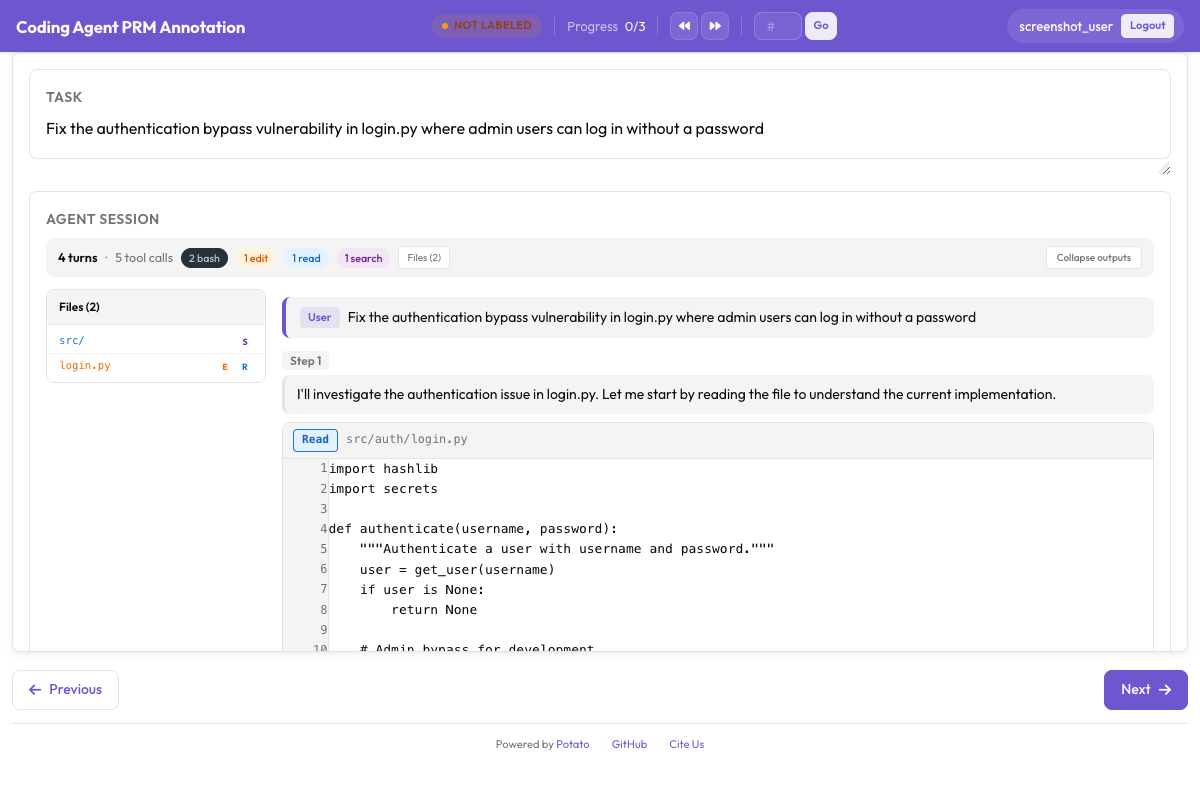 코딩 트레이스와 함께 단계 수준 정확성 라벨링을 위한 PRM 주석 인터페이스
제어 바는 실시간 코딩 에이전트 뷰어에 포함되어 있습니다. 일시정지, 재개, 지시 주입, 중지, 롤백, 브랜치 전환은 인터페이스가 실시간 에이전트 엔드포인트를 통해 실행하는 세션 동작이므로 구성에서 켤 것이 없습니다.
git 기반 체크포인트 시스템
롤백, 분기, 궤적 내보내기는 모두 체크포인트 시스템 위에서 동작합니다. 이 시스템은 에이전트가 파일을 변경할 때마다 git에 커밋합니다.
작동 방식
세션이 시작되면 Potato는 샌드박스 워크스페이스에 git 저장소를 초기화하거나, 이미 있는 저장소를 사용합니다. 파일을 편집할 때마다 구조화된 메시지로 자동 커밋합니다.
[potato-checkpoint] Step 7: Edit src/parser.py
- Modified lines 45-52
- Agent reasoning: Fix the regex pattern to handle escaped quotes
그 결과 궤적의 단계와 일대일로 대응하는 선형 커밋 이력이 만들어집니다. 각 체크포인트는 그 순간 워크스페이스의 전체 상태를 담고 있습니다.
# You can inspect checkpoints directly with git
cd workspace/
git log --oneline

# Output:
# f8a2c1d [potato-checkpoint] Step 12: Edit tests/test_parser.py
# 3b7e9f0 [potato-checkpoint] Step 10: Edit src/parser.py
# a1c4d8e [potato-checkpoint] Step 8: Edit src/parser.py
# 9e2f6b3 [potato-checkpoint] Step 5: Edit src/config.py
# 7d0a3c1 [potato-checkpoint] Step 0: Initial state
롤백
"Rollback"을 클릭하고 드롭다운에서 이전 체크포인트를 아무것이나 고릅니다. Potato는 git checkout으로 워크스페이스를 그 상태로 되돌리고 궤적 표시도 그에 맞게 되감습니다. 그런 다음 에이전트는 컨텍스트가 그 단계까지 잘린 상태로 거기서부터 다시 시작합니다.
에이전트가 잘못된 방향으로 가는 것을 보았을 때 쓰는 기능입니다. 계속 실행하며 시간을 허비하게 두는 대신, 마지막으로 괜찮았던 상태로 되감아 다시 시도하게 합니다. 더 나은 방향으로 유도하는 지시를 함께 보내도 됩니다.
분기 궤적
분기는 두 경로를 모두 남기는 롤백입니다. 되감은 뒤 에이전트가 다른 길로 가면 Potato는 이름이 붙은 git 브랜치를 만들고 두 궤적을 모두 추적합니다.
Step 0 → Step 1 → Step 2 → Step 3 → Step 4 (Branch A: original path)
                          ↘
                           Step 3' → Step 4' → Step 5' (Branch B: after rollback)
어느 체크포인트에서든 분기할 수 있으므로 궤적의 트리 전체를 쌓아 갈 수 있습니다. 이는 선호 학습에 유용합니다. 모든 브랜치 쌍이 이미 라벨이 붙은 비교이기 때문입니다. Branch A가 잘못되었다고 판단해서 되감은 것이므로, 분기 지점 이후로는 Branch B가 선호 경로가 됩니다.
분기에도 별도의 구성이 필요 없습니다. 롤백한 뒤 에이전트가 다른 경로를 택하면 Potato가 브랜치를 만들고, 세션의 나머지 동안 두 궤적을 모두 추적합니다.
내보내기 형식
실시간 세션은 상세한 궤적 데이터를 만들어 내며, 무엇을 훈련하려는지에 따라 몇 가지 형태로 내보낼 수 있습니다.
선형 궤적 내보내기
각 브랜치를 독립적인 궤적으로 내보냅니다.
python -m potato.export \
  -c config.yaml \
  -f trajectory_correction \
-o ./training_data/{
"session_id": "session_001",
"branch": "branch-A",
"task": "Fix the failing test in tests/test_parser.py",
"steps": [
{"step_idx": 0, "type": "file_read", "path": "tests/test_parser.py", "...": "..."},
{"step_idx": 1, "type": "thinking", "content": "The test expects..."},
{"step_idx": 2, "type": "file_edit", "path": "src/parser.py", "diff": "..."},
{"step_idx": 3, "type": "bash_command", "command": "pytest tests/test_parser.py"}
],
"human_interventions": [
{"after_step": 2, "type": "instruction", "content": "Use a migration instead"}
],
"rollback_from_step": null,
"outcome": "resolved"
}브랜치에서 얻는 선호 쌍
브랜치 쌍을 DPO나 RLHF용 선호 데이터로 내보냅니다.
같은 내보내기 도구가 이것도 기록합니다. 출력 디렉터리의 trajectory_dpo.jsonl에 브랜치 비교가 선호 쌍으로 담기고, trajectory_sft.jsonl과 trajectory_corrections.json도 함께 생성됩니다.
python -m potato.export \
  -c config.yaml \
  -f trajectory_correction \
-o ./training_data/{
"session_id": "session_001",
"task": "Fix the failing test in tests/test_parser.py",
"branch_point_step": 2,
"branch_point_reason": "Agent started modifying the wrong file",
"rejected_branch": "branch-A",
"rejected_steps": [
{"step_idx": 3, "type": "file_edit", "path": "src/wrong_file.py", "...": "..."},
{"step_idx": 4, "type": "bash_command", "command": "pytest", "exit_code": 1}
],
"chosen_branch": "branch-B",
"chosen_steps": [
{"step_idx": 3, "type": "file_edit", "path": "src/parser.py", "...": "..."},
{"step_idx": 4, "type": "bash_command", "command": "pytest", "exit_code": 0}
]
}실시간 관찰에서 얻는 PRM 라벨
롤백 지점은 대개 첫 오류 단계이므로 실시간 관찰을 PRM 라벨링과 함께 쓸 수 있습니다.
python -m potato.export \
  -c config.yaml \
  -f coding_eval \
  -o ./training_data/ \
  --option types=prm
여기서 롤백을 시작한 단계는 첫 오류로 라벨링되고, 새 브랜치의 단계는 사용자가 받아들였으므로 정확한 것으로 라벨링됩니다.
코드 리뷰 데이터셋
주석자의 지시와 롤백 사유를 코드 리뷰 훈련 데이터로 내보냅니다.
python -m potato.export \
  -c config.yaml \
  -f coding_eval \
  -o ./training_data/ \
  --option types=code_review
전체 빠른 시작
아무것도 없는 상태에서 Ollama 세션을 실행하기까지의 전체 순서입니다.
# 1. Install Potato with live agent support
pip install potato-annotation[live-agents]

# 2. Install and start Ollama
curl -fsSL https://ollama.ai/install.sh | sh
ollama pull qwen2.5-coder:32b

# 3. Set up a workspace with a repo to work on
mkdir -p workspace/
git clone https://github.com/example/test-project workspace/repo

# 4. Create the config file
cat > config.yaml << 'YAML'
annotation_task_name: "Live Agent Observation"
port: 8000

live_coding_agent:
  backend_type: ollama_tool_use
  ai_config:
    model: "qwen2.5-coder:32b"
    base_url: "http://localhost:11434"
    temperature: 0.2
  working_dir: ./workspace/repo
  max_turns: 50
  sandbox_mode: trusted

annotation_schemes:
  - annotation_type: radio
    name: outcome
    description: "Final outcome"
    labels:
      - name: "resolved"
        text: "Task Fully Resolved"
      - name: "partial"
        text: "Partially Resolved"
      - name: "failed"
        text: "Failed"

  - annotation_type: text
    name: notes
    description: "Session Notes"
    placeholder: "Key observations about agent behavior..."
    label_requirement:
      required: false

output_annotation_dir: "./output/"
export_annotation_format: jsonl

user_config:
  allow_all_users: false
  users:
    - "observer1"
YAML

# 5. Start Potato
potato start config.yaml -p 8000

# 6. Open http://localhost:8000 in your browser
로그인한 뒤 "/api/users POST 엔드포인트에 입력 검증을 추가하라" 같은 작업을 붙여 넣고 "Start Agent"를 클릭합니다. 에이전트가 작업하는 모습을 지켜보다가 이상해 보이면 일시정지하고, 지시를 보내 방향을 잡고, 롤백해서 다른 접근을 시도해 보십시오. 끝나면 결과를 평가하고 메모를 남깁니다.
모범 사례
명확하고 범위가 정해진 작업으로 시작하십시오. 에이전트가 5분에서 15분 정도 걸리는 작업이 가장 적당합니다. 그보다 짧으면 주석할 만한 궤적이 충분히 나오지 않고, 훨씬 길면 주석자가 지칩니다.
프로덕션에서는 샌드박스를 켜 두십시오. sandbox_mode: container가 기본값이며 에이전트가 호스트에 접근하지 못하게 합니다. bubblewrap은 더 가벼운 Linux용 대안입니다. trusted는 에이전트의 도구 호출을 머신에서 직접 실행하므로, 신뢰하는 모델로 개발하는 동안에만 쓰는 것이 합리적입니다.
롤백 사유를 기록하십시오. 구성에서 이를 강제하는 기능은 없으므로 주석자들의 규칙으로 정하십시오. 분기 지점마다 무엇이 잘못되었는지 짧은 메모를 남기는 것입니다. 이 메모는 그 자체로 유용한 훈련 신호가 되고, 선호 데이터의 품질도 높여 줍니다.
여러 백엔드를 비교하십시오. 같은 작업을 Ollama, Anthropic API, Claude Agent SDK로 실행하면 에이전트 간 선호 데이터를 얻을 수 있습니다. 구성에서 백엔드 부분만 바뀌므로 설정이 쉽습니다.
일찍, 자주 내보내십시오. 모든 것을 마지막까지 모아 두지 말고 세션마다 내보내기를 실행하십시오. 무언가 충돌해도 잃는 것이 적고, 진행하면서 데이터 품질을 계속 확인할 수 있습니다.