어노테이터 간 일치도 측정하기
Potato 어노테이션 프로젝트를 위해 Cohen의 카파, Fleiss의 카파, Krippendorff의 알파를 Python 코드 예제와 해석 지침과 함께 계산하고 해석해 보세요.
어노테이터 간 일치도(IAA)는 서로 다른 어노테이터가 같은 항목을 얼마나 일관되게 레이블링하는지를 측정합니다. 일치도가 높으면 레이블을 신뢰할 수 있습니다. 일치도가 낮으면 흔한 원인은 불명확한 지침이거나 본질적으로 주관적인 과제입니다.
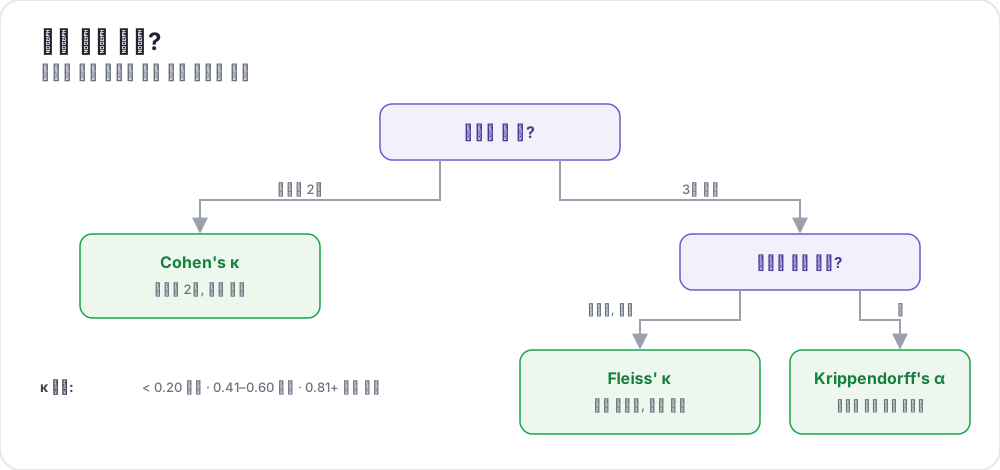 Which agreement metric to use
일치도를 측정하는 이유
그만한 값어치를 하는 몇 가지 이유가 있습니다. 낮은 일치도는 대개 다시 작성해야 할 지침을 가리키므로, 그 수치는 지침을 점검하는 역할도 겸합니다. 또한 일부 질문에는 단 하나의 정답이 없으므로, 과제가 실제로 얼마나 어려운지도 알려 줍니다. 어떤 어노테이터에게 추가 교육이 필요한지 파악할 수 있습니다. 그리고 논문을 낸다면 심사자들은 일치도 수치를 기대합니다. 끝으로, 이 지표는 여러 어노테이터를 하나의 레이블로 결합하는 방식에 정보를 제공합니다.
Potato가 이를 처음부터 끝까지 어떻게 처리하는지는 원본 문서를 참고하시기 바랍니다.
일치도 지표
Cohen의 카파 (어노테이터 2명)
범주형 데이터에서 두 어노테이터를 비교할 때:
κ = (Po - Pe) / (1 - Pe)
여기서:
- Po = 관찰된 일치도
- Pe = 우연에 의해 기대되는 일치도
해석:
| 카파 | 해석 |
|---|---|
| < 0 | 우연보다 낮음 |
| 0.01-0.20 | 미미함 |
| 0.21-0.40 | 어느 정도 |
| 0.41-0.60 | 보통 |
| 0.61-0.80 | 상당함 |
| 0.81-1.00 | 거의 완벽함 |
Fleiss의 카파 (어노테이터 3명 이상)
범주형 데이터에서 세 명 이상의 어노테이터를 비교할 때:
quality_control:
  agreement:
    metrics:
      - fleiss_kappa
Cohen의 카파와 동일한 해석 척도를 따릅니다.
Krippendorff의 알파
이것은 세 가지 중 가장 유연합니다. 어노테이터 수에 제한 없이 처리하고, 누락된 데이터를 감당하며, 명목, 순서, 구간, 비율 데이터에 두루 적용됩니다.
quality_control:
  agreement:
    metrics:
      - krippendorff_alpha
    alpha_level: nominal  # or ordinal, interval, ratio
해석:
- α ≥ 0.80: 신뢰할 수 있음
- 0.67 ≤ α < 0.80: 잠정적으로 허용 가능
- α < 0.67: 신뢰할 수 없음
Potato에서 일치도 구성하기
기본 설정
quality_control:
  agreement:
    enabled: true
    calculate_on_overlap: true

    metrics:
      - cohens_kappa
      - fleiss_kappa
      - krippendorff_alpha

    # Per annotation scheme
    per_scheme: true

    # Reporting
    report_interval: 100  # Every 100 annotations
    export_file: agreement_report.json
중첩 구성
quality_control:
  redundancy:
    # How many annotators per item
    annotations_per_item: 3

    # Minimum overlap for calculations
    min_overlap_for_agreement: 2

    # Sampling for agreement
    agreement_sample_size: 100  # Calculate on 100 items
    agreement_sample_method: random  # or stratified, all
일치도 계산하기
대시보드에서
Potato는 관리자 대시보드에 일치도 지표를 표시합니다.
quality_control:
  dashboard:
    show_agreement: true
    agreement_chart: true
    update_frequency: 60  # seconds
API를 통해
# Get current agreement metrics
curl http://localhost:8000/api/quality/agreement

# Response:
{
  "overall": {
    "fleiss_kappa": 0.72,
    "krippendorff_alpha": 0.75
  },
  "per_scheme": {
    "sentiment": {
      "fleiss_kappa": 0.78,
      "krippendorff_alpha": 0.80
    },
    "topic": {
      "fleiss_kappa": 0.65,
      "krippendorff_alpha": 0.68
    }
  },
  "sample_size": 150,
  "annotator_pairs": 10
}
CLI를 통해
# Calculate agreement from output files
potato agreement --annotations annotation_output/ --output agreement_report.json

# With specific metric
potato agreement --annotations annotation_output/ --metric krippendorff --level ordinal
다양한 어노테이션 유형에 대한 일치도
범주형 (Radio, Multiselect)
quality_control:
  agreement:
    schemes:
      sentiment:
        type: nominal
        metrics: [cohens_kappa, fleiss_kappa]

      urgency:
        type: ordinal  # Low < Medium < High
        metrics: [krippendorff_alpha]
리커트 척도
quality_control:
  agreement:
    schemes:
      quality_rating:
        type: ordinal
        metrics: [krippendorff_alpha, weighted_kappa]

        # Weighted kappa for ordinal
        weighting: linear  # or quadratic
스팬 어노테이션
스팬은 범주형 레이블보다 까다롭습니다. 두 어노테이터가 레이블에는 동의하면서도 그것이 정확히 어디에서 시작하고 끝나는지에는 이견을 보일 수 있기 때문입니다. NER에는 특별한 처리가 필요합니다.
quality_control:
  agreement:
    schemes:
      entities:
        type: span
        span_matching: overlap  # or exact, token

        # What to compare
        compare: label_and_span  # or label_only, span_only

        # Overlap threshold for "match"
        overlap_threshold: 0.5

        metrics:
          - span_f1
          - span_precision
          - span_recall
순위 매기기
quality_control:
  agreement:
    schemes:
      preference_rank:
        type: ranking
        metrics:
          - kendall_tau
          - spearman_rho
쌍대 일치도 대 전체 일치도
쌍대 (각 쌍)
quality_control:
  agreement:
    pairwise: true
    output_matrix: true  # Agreement matrix

# Output:
# annotator1 × annotator2: κ = 0.75
# annotator1 × annotator3: κ = 0.68
# annotator2 × annotator3: κ = 0.82
전체 (모든 어노테이터)
quality_control:
  agreement:
    overall: true
    metrics:
      - fleiss_kappa  # Designed for 3+ annotators
      - krippendorff_alpha
낮은 일치도 다루기
문제 영역 식별하기
quality_control:
  agreement:
    diagnostics:
      enabled: true

      # Items with most disagreement
      show_disagreed_items: true
      disagreement_threshold: 0.5

      # Labels with most confusion
      confusion_matrix: true

      # Annotators with low agreement
      per_annotator_agreement: true
낮은 일치도에 대한 조치
quality_control:
  agreement:
    alerts:
      - threshold: 0.6
        action: notify
        message: "Agreement below 0.6 - review guidelines"

      - threshold: 0.4
        action: pause
        message: "Agreement critically low - pausing task"

    # Automatic guideline reminders
    show_guidelines_on_low_agreement: true
    guideline_threshold: 0.5
전체 구성
annotation_task_name: "Agreement-Tracked Annotation"

quality_control:
  # Redundancy setup
  redundancy:
    annotations_per_item: 3
    assignment_method: random

  # Agreement calculation
  agreement:
    enabled: true

    # Metrics
    metrics:
      - fleiss_kappa
      - krippendorff_alpha

    # Per-scheme configuration
    schemes:
      sentiment:
        type: nominal
        metrics: [fleiss_kappa, cohens_kappa]

      intensity:
        type: ordinal
        metrics: [krippendorff_alpha]
        alpha_level: ordinal

      entities:
        type: span
        span_matching: overlap
        overlap_threshold: 0.5
        metrics: [span_f1]

    # Calculation settings
    calculate_on_overlap: true
    min_overlap: 2
    sample_size: all  # or number

    # Pairwise analysis
    pairwise: true
    pairwise_output: agreement_matrix.csv

    # Diagnostics
    diagnostics:
      confusion_matrix: true
      disagreed_items: true
      per_annotator: true

    # Alerts
    alerts:
      - metric: fleiss_kappa
        threshold: 0.6
        action: notify

    # Reporting
    report_file: agreement_report.json
    report_interval: 50

  # Dashboard
  dashboard:
    show_agreement: true
    charts:
      - agreement_over_time
      - per_scheme_agreement
      - annotator_comparison
출력 보고서
{
  "timestamp": "2024-10-25T15:30:00Z",
  "sample_size": 500,
  "annotators": ["ann1", "ann2", "ann3"],

  "overall_agreement": {
    "fleiss_kappa": 0.72,
    "krippendorff_alpha": 0.75
  },

  "per_scheme": {
    "sentiment": {
      "fleiss_kappa": 0.78,
      "confusion_matrix": {
        "Positive": {"Positive": 180, "Negative": 5, "Neutral": 15},
        "Negative": {"Positive": 8, "Negative": 165, "Neutral": 12},
        "Neutral": {"Positive": 12, "Negative": 10, "Neutral": 93}
      }
    }
  },

  "pairwise": {
    "ann1_ann2": 0.75,
    "ann1_ann3": 0.70,
    "ann2_ann3": 0.72
  },

  "per_annotator": {
    "ann1": {"avg_agreement": 0.73, "items_annotated": 500},
    "ann2": {"avg_agreement": 0.74, "items_annotated": 500},
    "ann3": {"avg_agreement": 0.71, "items_annotated": 500}
  },

  "most_disagreed_items": [
    {"id": "item_234", "disagreement_rate": 1.0},
    {"id": "item_567", "disagreement_rate": 0.67}
  ]
}
모범 사례
프로젝트가 끝날 때까지 기다리지 말고 일치도를 일찍 계산하시기 바랍니다. 그때가 되면 지침을 고치기에는 이미 너무 늦기 때문입니다. 데이터에 맞는 지표를 고르십시오. 명목, 순서, 또는 스팬입니다. 일치도가 낮게 나오면 어노테이터를 탓하기 전에 파고드십시오. 문제는 흔히 지침에 있기 때문입니다. 어떤 출판물에서든 그 수치를 보고하십시오. 그리고 받은 결과를 본 뒤가 아니라 시작하기 전에 허용 가능한 기준선을 정하시기 바랍니다.
어노테이터가 이견을 보일 때의 역량 추정을 더 깊이 다룬 내용은 MACE 문서를 참고하시기 바랍니다.
다음 단계
일치도에 대한 전체 문서는 사용자 관리에 있습니다.