advancedaudio
Speaker Diarization
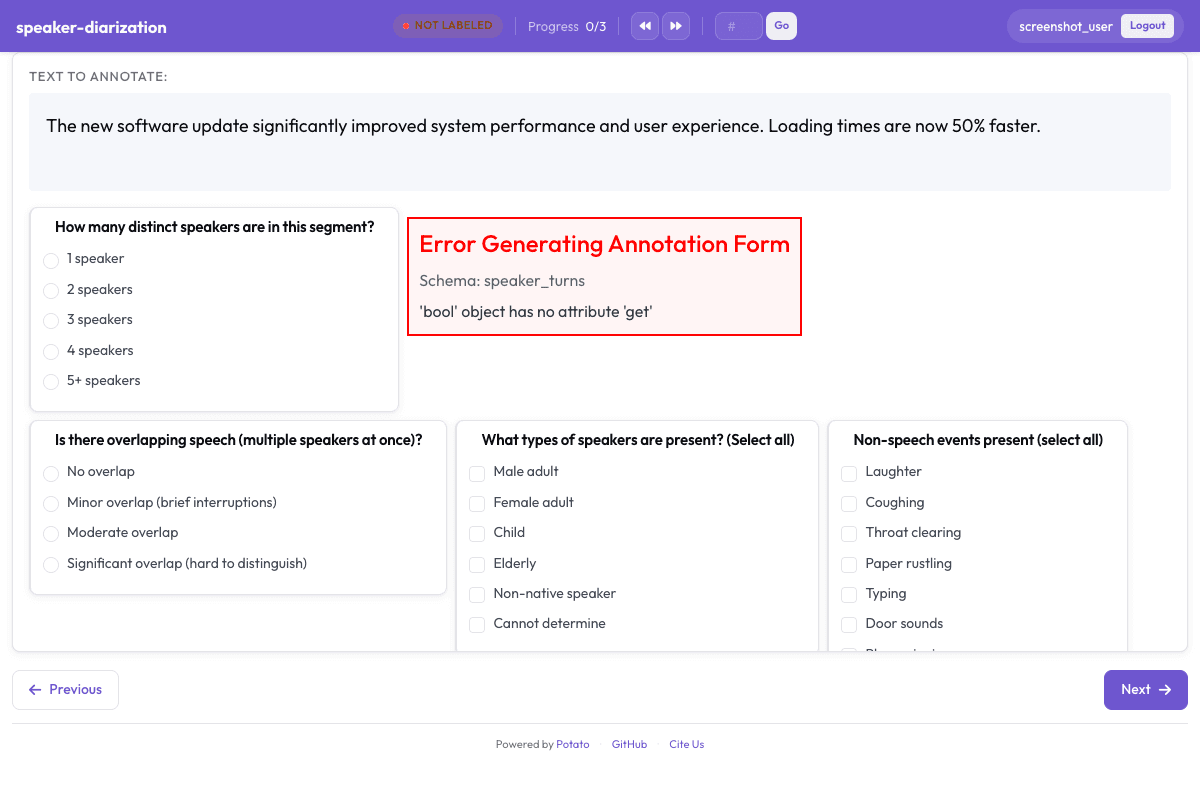
Segment and label speakers in multi-party conversations following AMI Meeting Corpus guidelines.
Configuration Fileconfig.yaml
yaml
annotation_task_name: "Speaker Diarization"
task_dir: "."

port: 8000

# Data configuration
data_files:
  - "data/meeting_segments.json"

item_properties:
  id_key: id
  text_key: text
instance_display:
  fields:
    - key: audio_url
      type: audio
      label: "Recording"
    - key: text
      type: text
      label: "Notes"

# Annotation schemes
annotation_schemes:
  # Number of speakers
  - annotation_type: radio
    name: num_speakers
    description: "How many distinct speakers are in this segment?"
    labels:
      - "1 speaker"
      - "2 speakers"
      - "3 speakers"
      - "4 speakers"
      - "5+ speakers"

  # Speaker turns (span annotation would be ideal here)
  # For now using structured fields
  - annotation_type: text
    name: speaker_turns
    description: "List speaker turns with timestamps (e.g., '0:00-0:15 Speaker A, 0:15-0:30 Speaker B')"
    multiline: true
    placeholder: "0:00-0:15 Speaker A\n0:15-0:30 Speaker B\n..."

  # Overlapping speech
  - annotation_type: radio
    name: overlap_present
    description: "Is there overlapping speech (multiple speakers at once)?"
    labels:
      - No overlap
      - Minor overlap (brief interruptions)
      - Moderate overlap
      - Significant overlap (hard to distinguish)

  # Speaker characteristics
  - annotation_type: multiselect
    name: speaker_types
    description: "What types of speakers are present? (Select all)"
    labels:
      - Male adult
      - Female adult
      - Child
      - Elderly
      - Non-native speaker
      - Cannot determine

  # Audio events
  - annotation_type: multiselect
    name: audio_events
    description: "Non-speech events present (select all)"
    labels:
      - Laughter
      - Coughing
      - Throat clearing
      - Paper rustling
      - Typing
      - Door sounds
      - Phone ringing
      - Background music
      - Extended silence
      - None

  # Recording quality
  - annotation_type: likert
    name: recording_quality
    description: "How clear is the recording for speaker identification?"
    size: 5
    min_label: "Very poor"
    max_label: "Excellent"

  # Difficulty
  - annotation_type: likert
    name: difficulty
    description: "How difficult was it to identify speaker turns?"
    size: 5
    min_label: "Very easy"
    max_label: "Very difficult"

# User settings
require_password: false

# Output
output_annotation_dir: "annotation_output/"
export_annotation_format: "jsonl"
Sample Datasample-data.json
json
[
  {
    "id": "speaker_diarization_1",
    "audio_url": "https://upload.wikimedia.org/wikipedia/commons/3/3e/Tim_Jarvis_speaking_at_the_Biodiversity_Matters_panel_discussions.ogg",
    "text": "A speaker at a panel discussion"
  },
  {
    "id": "speaker_diarization_2",
    "audio_url": "https://upload.wikimedia.org/wikipedia/commons/8/8c/Robert_Murray_Hill_AC_speaking_at_the_Biodiversity_Matters_panel_discussions.ogg",
    "text": "A speaker at a panel discussion"
  }
]

// ... and 3 more items
Get This Design
This design is available in our showcase. Copy the configuration below to get started.
Quick start:
# Create your project folder
mkdir speaker-diarization
cd speaker-diarization
# Copy config.yaml from above
potato start config.yaml
Details
Annotation Types
spanradio
Domain
AudioSpeech
Use Cases
speaker diarizationmeeting transcriptionconversation analysis
Tags
audiospeaker diarizationmeetingconversationsegmentation
Related Designs
Intent Classification
Classify user utterances into intents for chatbot and virtual assistant training.
likertmultiselect
Audio Transcription Review
Review and correct automatic speech recognition transcriptions with waveform visualization.
likertmultiselect
AgentBoard Progress Scoring
Assess multi-turn LLM agent progress by identifying achieved milestones, scoring overall progress, categorizing the agent environment, and noting partial progress observations.
multiselectlikert