Audio Transcription Review
Review and correct automatic speech recognition transcripts with waveform display.
Get This Design
This design is available in our showcase. Copy the configuration below to get started.
Quick start:
# Create your project folder
mkdir audio-transcription
cd audio-transcription
# Save config.yaml from this page into this folder
potato start config.yaml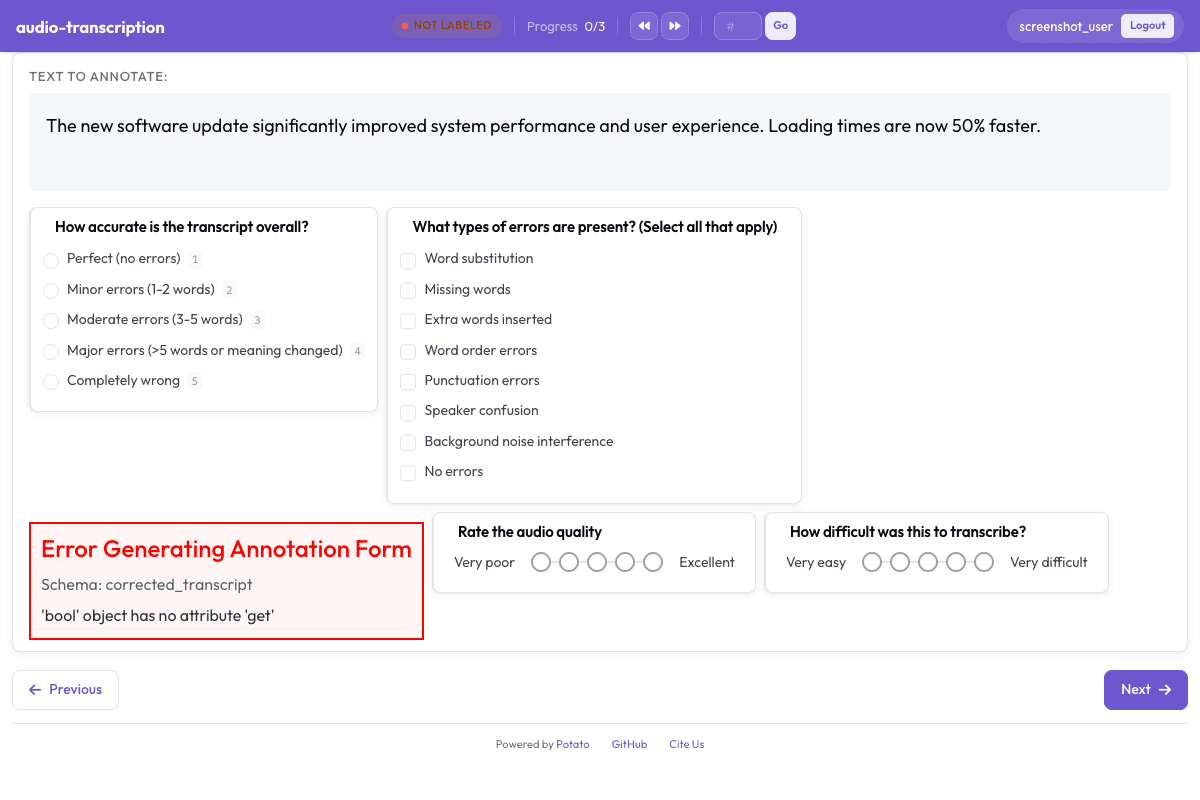
Configuration File
annotation_task_name: "Audio Transcription Review"
task_dir: "."
port: 8000

# Data configuration
data_files:
  - data/transcripts.json

item_properties:
  id_key: id
  text_key: transcript
instance_display:
  fields:
    - key: audio_url
      type: audio
      label: "Audio"
    - key: transcript
      type: text
      label: "Draft transcript"

# Annotation schemes
annotation_schemes:
  # Overall quality assessment
  - annotation_type: radio
    name: overall_accuracy
    description: "How accurate is the transcript overall?"
    labels:
      - name: "Perfect (no errors)"
        key_value: "1"
      - name: "Minor errors (1-2 words)"
        key_value: "2"
      - name: "Moderate errors (3-5 words)"
        key_value: "3"
      - name: "Major errors (>5 words or meaning changed)"
        key_value: "4"
      - name: "Completely wrong"
        key_value: "5"
    sequential_key_binding: true

  # Error types observed
  - annotation_type: multiselect
    name: error_types
    description: "What types of errors are present? (Select all that apply)"
    labels:
      - Word substitution
      - Missing words
      - Extra words inserted
      - Word order errors
      - Punctuation errors
      - Speaker confusion
      - Background noise interference
      - No errors

  # Corrected transcript
  - annotation_type: text
    name: corrected_transcript
    description: "Provide the corrected transcript (if needed)"
    multiline: true
    required: false
    placeholder: "Type the corrected version here..."

  # Audio quality rating
  - annotation_type: likert
    name: audio_quality
    description: "Rate the audio quality"
    size: 5
    min_label: "Very poor"
    max_label: "Excellent"

  # Difficulty rating
  - annotation_type: likert
    name: difficulty
    description: "How difficult was this to transcribe?"
    size: 5
    min_label: "Very easy"
    max_label: "Very difficult"

  # Additional notes
  - annotation_type: text
    name: notes
    description: "Any additional notes? (Optional)"
    multiline: true
    required: false

# User settings

# Output
output_annotation_dir: "annotation_output/"
export_annotation_format: "jsonl"
Sample Data
[
  {
    "id": "audio_transcription_1",
    "audio_url": "https://upload.wikimedia.org/wikipedia/commons/3/34/En-us-What_TV_shows_do_you_like_to_watch.ogg",
    "transcript": "What TV shows do you like to watch?"
  },
  {
    "id": "audio_transcription_2",
    "audio_url": "https://upload.wikimedia.org/wikipedia/commons/2/2e/En-us-Do_you_go_to_the_movies_often.ogg",
    "transcript": "Do you go to the movies often?"
  }
]

// ... and 3 more items
Get This Design
This design is available in our showcase. Copy the configuration below to get started.
Quick start:
# Create your project folder
mkdir audio-transcription
cd audio-transcription
# Save config.yaml from this page into this folder
potato start config.yaml
Details
Annotation Types
Domain
Use Cases
Tags
Related Designs
Speech Intelligibility Rating
Rate speech intelligibility for pathological speech following TORGO database annotation protocols.
AgentBoard Progress Scoring
Assess multi-turn LLM agent progress by identifying achieved milestones, scoring overall progress, categorizing the agent environment, and noting partial progress observations.
Clotho Audio Captioning
Audio captioning and quality assessment based on the Clotho dataset (Drossos et al., ICASSP 2020). Annotators write natural language captions for audio clips, rate caption accuracy on a Likert scale, and classify the audio environment.