より良いコーディングエージェントを訓練するためのプロセス報酬データの集め方
Potatoで、PRM訓練用のステップ単位の報酬ラベルを収集します。first-errorモードとステップごとモードを使い、エクスポートを訓練用の形に整えるスクリプトも紹介します。
プロセス報酬モデルとは
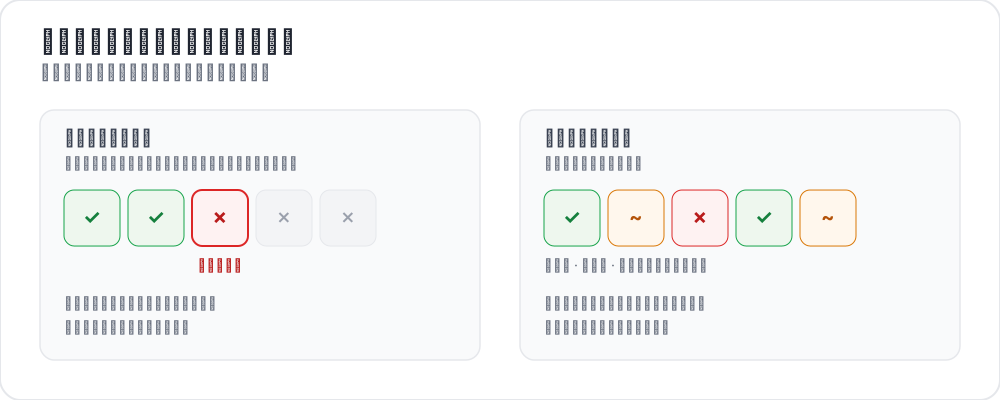 プロセス報酬をラベル付けする2つの方法
結果報酬モデルが見るのは、コーディングエージェントのトラジェクトリの末尾だけです。コードはコンパイルできたか、テストは通ったか、issueは解決したか。これに対してプロセス報酬モデルは、途中の各ステップを採点します。すべてのステップにシグナルがあれば、訓練はエージェントがどこで誤ったかを特定できます。
近年の研究はこの方向を押し進めています。AgentPRM はエージェントタスク向けにプロセス報酬を定義し直し、各行動を正しさではなく目標にどれだけ近づいたかで採点して、比較対象のベースラインより8倍以上の計算効率を報告しています。ToolRM は、自然言語出力で学習した報酬モデルはツール呼び出しをうまく判定できないことを見いだし、ツール専用の報酬モデルと、それを評価するための FC-RewardBench を作りました。対照的に、DeepSWE はテストが通るかどうかという疎な結果報酬だけでコーディングエージェントを学習させ、SWE-bench Verified で Pass@1 42.2%、テスト時スケーリングありで59%に達しています。プロセス監督が改善しようとしているのは、まさにこの結果のみの設定です。
いずれも必要とするのはステップ単位の人手アノテーションで、たいていはそこがボトルネックになります。スキーマのリファレンスはプロセス報酬のドキュメントを参照してください。
2つのアノテーションモード
first-errorモード
アノテーターはトラジェクトリを上から下へ読み、エージェントが最初に誤ったステップをクリックします。それより前のステップはすべて正しいものとして、そのステップ以降はすべて誤りとして記録されます。トレースごとに判断が1つで済むので速く、道を外れたエージェントが立て直さないというよくある状況に向いています。
annotation_schemes:
  - annotation_type: process_reward
    name: step_rewards
    description: "Click the first step where the agent makes a mistake. Steps after it are flagged automatically."
    mode: first_error
    steps_key: structured_turns
    step_text_key: content
ステップごとモード
すべてのステップに個別のラベルが付くので、first-errorでは捉えられないものを捉えられます。部分的な立て直し、無害な回り道、単体では問題ないが文脈上は誤っているステップなどです。allow_neutral を指定すると、PRM800K方式の3つ目の選択肢が加わります。
annotation_schemes:
  - annotation_type: process_reward
    name: step_rewards
    description: "Rate each step correct, neutral, or incorrect"
    mode: per_step
    steps_key: structured_turns
    step_text_key: content
    allow_neutral: true
    inline_with_trace: true
inline_with_trace は、表示内の各ステップにコントロールを付けます。長いトレースでは、別パネルにするとアノテーターが読んでいた位置を見失うので、これが効いてきます。
プロジェクトを立ち上げる
ステップ1:トレースを用意する
1行が1つのトラジェクトリです。steps_key はステップのリストを、step_text_key は各ステップ内で表示するフィールドを指定します。
{
  "id": "trace_001",
  "issue_description": "Fix the TypeError in parse_config() when the config file is empty",
  "structured_turns": [
    {"step_idx": 0, "type": "thinking", "content": "I need to find where the TypeError occurs. Let me read the file."},
    {"step_idx": 1, "type": "file_read", "content": "def parse_config(path):\n    with open(path) as f:\n        data = json.load(f)\n    return data['settings']"},
    {"step_idx": 2, "type": "thinking", "content": "When the file is empty json.load returns None, so None['settings'] raises. Add a check."},
    {"step_idx": 3, "type": "file_edit", "content": "+    if data is None:\n+        return {}"},
    {"step_idx": 4, "type": "bash_command", "content": "python -m pytest tests/test_config.py -v  ->  2 passed"}
  ]
}
別のエージェント形式からの変換は、CLIで1ステップです。
python -m potato.trace_converter \
  --input claude_code_sessions.json \
  --input-format claude_code \
  --output data/traces.jsonl
--list-formats で対応形式を一覧できます。claude_code、aider、swe_agent_trajectory、swebench、react、langchain のほか、さらに9つあります。手元のデータがどれかわからない場合は --auto-detect を使ってください。
ステップ2:設定を書く
annotation_task_name: "PRM Data Collection"
task_dir: "."

data_files:
  - "data/traces.jsonl"

item_properties:
  id_key: id
  text_key: issue_description

instance_display:
  fields:
    - key: issue_description
      type: text
      label: "Issue"

    - key: structured_turns
      type: coding_trace
      label: "Agent trajectory"
      display_options:
        diff_view: unified
        show_file_tree: true
        show_reasoning: true
        terminal_theme: dark
        collapse_long_outputs: true
        max_output_lines: 50

annotation_schemes:
  - annotation_type: process_reward
    name: step_rewards
    description: "Click the first step where the agent makes an error"
    mode: first_error
    steps_key: structured_turns
    step_text_key: content

  - annotation_type: radio
    name: outcome
    description: "Did the agent resolve the issue?"
    labels:
      - name: resolved
        text: "Fully resolved"
      - name: partial
        text: "Partially resolved"
      - name: not_resolved
        text: "Not resolved"

  - annotation_type: text
    name: error_description
    description: "If the trajectory went wrong, describe the error briefly"
    rows: 3
    placeholder: "e.g. edited the wrong file"
    label_requirement:
      required: false

num_annotators_per_item: 2

attention_checks:
  enabled: true
  items_file: "data/attention_checks.json"
  frequency: 20
  min_response_time: 20.0
  failure_handling:
    warn_threshold: 2
    block_threshold: 5

user_config:
  allow_all_users: false
  users:
    - reviewer1@example.com
    - reviewer2@example.com
    - reviewer3@example.com

output_annotation_dir: "annotation_output/"
export_annotation_format: jsonl
ラベルオブジェクトは name で識別されます。text フィールドはアノテーターが読む文言なので、文言を変えても保存される値は安定した識別子のままです。
ここで役に立つのは min_response_time: 20.0 です。diffを含む複数ステップのトラジェクトリを20秒で読める人はいないので、トレースごとの制限時間では捉えられない急ぎすぎを検出できます。
ステップ3:サーバーを起動する
potato start config.yaml -p 8000訓練用のエクスポート
coding_eval エクスポーターは訓練用の形式を直接書き出すので、データを整える作業は不要です。
python -m potato.export -c config.yaml -f coding_eval -o ./export/書き出されるのは、ステップ単位のラベルを含む prm_training_data.jsonl、アノテーションから作ったDPO形式のchosenとrejectedのトレースを含む preference_pairs.jsonl、swebench_results.jsonl、code_reviews.jsonl です。デフォルトでは4つすべてが書き出されます。絞り込むには、エクスポーターの types オプションを渡します(--option types=prm,preference)。要求した種類のデータがスタディ内に見つからなかった場合は、空のファイルを書く代わりにその旨を報告します。
アノテーションはスキーマ名の下に、steps リストとモードとして保存されます。reward は正しい場合 1、誤りの場合 -1、中立の場合 0、誰も判定しなかったステップでは null です。
{
  "step_rewards": {
    "mode": "first_error",
    "steps": [
      {"reward": 1, "source": "human", "verified": true},
      {"reward": 1, "source": "human", "verified": true},
      {"reward": -1, "source": "human", "verified": true},
      {"reward": -1, "source": "human", "verified": true}
    ]
  }
}
スクリプトが必要になるのは、エクスポーターが書き出さない形が欲しいときだけです。よくある理由は未判定のステップを自分で扱いたい場合で、誰も判定しなかったステップは 0 ではなく null になるためです。
import json
from pathlib import Path

SCHEME = "step_rewards"

examples = []
for f in Path("export/").rglob("*.jsonl"):
    with open(f) as fh:
        for line in fh:
            rec = json.loads(line)
            payload = (rec.get("labels", rec) or {}).get(SCHEME)
            if not payload:
                continue

            steps = payload.get("steps", [])
            # Drop traces with unjudged steps rather than guessing at them.
            if any(s.get("reward") is None for s in steps):
                continue

            item = items_by_id[rec["instance_id"]]      # your own data file
            examples.append({
                "trace_id": rec["instance_id"],
                "prompt": item["issue_description"],
                "steps": [
                    {"content": src["content"], "label": s["reward"]}
                    for src, s in zip(item["structured_turns"], steps)
                ],
            })

with open("prm_labels.jsonl", "w") as out:
    for ex in examples:
        out.write(json.dumps(ex) + "\n")

print(f"Wrote {len(examples)} traces")
選好ペアも同じアノテーションから作られます。2つのトレースが同じissueに取り組んでいる場合、エクスポーターはそれらをペアにし、最初の誤りがより後にあるトレース、または誤りがないトレースをchosenとして扱います。
分析
最初の誤りはどこで起きるか
import json
from pathlib import Path

SCHEME = "step_rewards"

traces = []
for f in Path("export/").rglob("*.jsonl"):
    with open(f) as fh:
        for line in fh:
            payload = (json.loads(line).get("labels", {}) or {}).get(SCHEME)
            if payload:
                traces.append(payload)

positions = []
all_correct = 0
for t in traces:
    steps = t.get("steps", [])
    first = next((i for i, s in enumerate(steps) if s.get("reward") == -1), None)
    if first is None:
        all_correct += 1
    elif len(steps) > 1:
        positions.append(first / (len(steps) - 1))

print(f"Traces annotated: {len(traces)}")
print(f"No errors: {all_correct} ({all_correct / len(traces):.1%})")
if positions:
    print(f"Average first-error position: {sum(positions) / len(positions):.2f} (0=start, 1=end)")
最初の誤りに関する一致度
2人のアノテーターが同じステップを選ぶことはまれで、完全一致で測ると実際の一致の程度を過小評価します。先に位置をビンに分けるほうが、情報量の多い比較になります。
def bin_position(steps):
    first = next((i for i, s in enumerate(steps) if s.get("reward") == -1), None)
    if first is None:
        return "all_correct"
    return "early_error" if first < len(steps) / 2 else "late_error"
num_annotators_per_item で得られる重複を使い、同じアイテムを担当したアノテーター間でこれらのビンを比較してください。
ヒント
速さを重視するならfirst-errorモードを使います。 探索を導くPRMを訓練するなら、アノテーションコストのごく一部で十分なシグナルが得られます。そもそもほとんどのエージェントは連鎖的に失敗します。
細かさが必要ならステップごとモードを使います。 部分的な立て直しや無害な回り道は、ステップごとモードでしかラベルとして存在しません。
経験のあるアノテーターから始めます。 コード、diff、ターミナル出力を読む作業です。小さなグループで始め、一致度を測り、共通の例でキャリブレーションしてから規模を広げます。
回答時間の下限を設けます。 トラジェクトリは長くなるので、下限を設けるとアノテーターがdiffを読み飛ばすのを防げます。
キャリブレーションを行います。 本番のアノテーションを始める前に、全員に同じ10〜20件のトレースをラベル付けしてもらい、意見が分かれた点を話し合います。