自動キーワードハイライト
Potatoのキーワードハイライトを、固定のキーワードファイルまたはLLMキーワードアシスタントで設定する方法。ラベルごとの色、ランダムな撹乱語、レスポンスのキャッシュも扱います。
Potatoはキーワードを2通りの方法でハイライトします。keyword_highlights_fileはモデルを使わずに固定の用語リストをすべてのアイテムでマークし、ai_supportはKeywordボタンを追加します。アノテーターがこのボタンを押すと、LLMが各ラベルに関係する語をマークします。
2つの仕組みは失敗の仕方が異なるため、設定よりもどちらを選ぶかのほうが重要です。固定リストは決定的で、アイテムごとのコストはかからず、論文の手法セクションに記載できます。ただし、周囲の文が何を言っていても同じ文字列をマークします。LLMアシスタントは各アイテムを読み、どの単語リストでも拾えなかったフレーズをマークできますが、その代わりにリクエストごとに1回のAPI呼び出しが必要で、知らないうちに変わるかもしれないモデルに依存することになります。
オプションハイライトとキーワードハイライトの実装については、ソースドキュメントを参照してください。
固定のキーワードリスト
すべてのアノテーターに同じハイライトを見せる必要があり、それが何だったかを後で正確に説明できる必要がある場合は、キーワードファイルを使います。keyword_highlights_fileにCSVまたはTSVファイルを指定すると、Potatoはアイテムのテキスト内で一致した箇所すべてを枠線付きのボックスで囲みます。
annotation_task_name: "Sentiment with keyword highlights"
task_dir: .
output_annotation_dir: annotation_output
export_annotation_format: jsonl

data_files:
  - data/reviews.json

item_properties:
  id_key: id
  text_key: text

keyword_highlights_file: data/sentiment_keywords.tsv

ui:
  label_colors:
    sentiment:
      positive: "(22, 163, 74)"
      negative: "(239, 68, 68)"

annotation_schemes:
  - annotation_type: span
    name: sentiment
    description: "Mark the phrases that carry sentiment. Highlighted keywords are suggestions, not answers."
    labels:
      - name: positive
        tooltip: "Phrases expressing a positive opinion"
      - name: negative
        tooltip: "Phrases expressing a negative opinion"

user_config:
  allow_all_users: true
色は全体ではなくスキーマごと、ラベルごとに設定します。アノテーターがこれから描こうとしているスパンラベルと同じ色のハイライトは、ハイライトがない場合よりも悪いからです。
キーワードファイルにはkeywordというヘッダー列が必要です。label列は用語が属するカテゴリを、schema列はその用語が関係するアノテーションスキームを示し、省略可能なcolor列はそのラベルのパレットを上書きします。
keyword,label,schema,color
excellent,positive,sentiment,(34, 197, 94)
terrible,negative,sentiment,#ef4444
excel*,positive,sentiment,
*は任意の単語文字の連続に一致するので、excel*の1行でexcellent、excels、excelledをカバーできます。Potatoは1行に1キーワードのプレーンなファイルも読み込めますし、キーワードのリストまたは{keyword: label}マップを含むJSON、JSONL、YAMLも読み込めます。
研究のためのランダムなハイライト
ハイライトがアノテーターの行動を変えるかどうかを測定する場合、すべてのキーワードを全員に見せると比較対象がなくなります。keyword_highlight_settingsはキーワードを間引き、おとりの語を混ぜます。
keyword_highlights_file: data/keywords.csv

keyword_highlight_settings:
  keyword_probability: 0.5        # show half the matched keywords
  random_word_probability: 0.05   # highlight about 5% of other words
  random_word_label: "distractor"
random_word_schema: "keyword"比較を成り立たせるのはkeyword_probability: 0.5という値です。これにより、同じコーパスの中で、各アノテーターは用語の半分にハイライトを見て、残りの半分にはハイライトを見ないことになります。この選択はユーザーごと、インスタンスごとにキャッシュされ、ユーザー名とインスタンスIDのハッシュをシードにしているため、アイテムに戻ってきたアノテーターは最初に見たものと同じものを見ます。どの語が表示されたかは行動データのkeyword_highlights_shownフィールドに記録されるので、分析ではそれを条件にできます。
LLMキーワードアシスタント
AIキーワードハイライトはバックグラウンド処理ではなくボタンです。ai_supportを有効にすると、各アノテーションフォームにHint、Keyword、Rationaleのボタンが表示され、Keywordを押すと、このアイテムのどの語が利用可能な各ラベルに関係するかをモデルに問い合わせます。回答はテキスト上のボックスオーバーレイとして返されます。
ai_support:
  enabled: true
  endpoint_type: openai

  ai_config:
    model: gpt-4o-mini
    api_key: ${OPENAI_API_KEY}
    temperature: 0.3
    max_tokens: 800
    include:
      all: true
max_tokens: 800はデフォルト値で、このアシスタントにとってほぼ下限です。KeywordとRationaleのプロンプトはすべてのラベルについて1つのレスポンスで回答するため、予算が小さいと返答が途中で切れ、アシスタントはエラーを出さずに空の状態で表示されます。
include.all: trueはすべてのスキームでアシスタントを有効にします。代わりに特定のページとスキームだけで有効にするには、special_includeを使います。これはページインデックスをアノテーションIDに、アノテーションIDをアシスタント名のリストに対応付けます。
ai_support:
  enabled: true
  endpoint_type: openai
  ai_config:
    model: gpt-4o-mini
    api_key: ${OPENAI_API_KEY}
    include:
      all: false
      special_include:
        "0":
          "0": ["hint", "keyword"]
        "1":
          "1": ["hint"]
キーワードハイライトにはハイライトするテキストが必要なので、エンドポイントがビジョンモデルであっても、Potatoは画像アイテムではこのボタンを除外します。テキストアイテムでは、ビジョンモデルは3つのアシスタントすべてを提供します。
Anthropic
ai_support:
  enabled: true
  endpoint_type: anthropic

  ai_config:
    model: claude-sonnet-4-20250514
    api_key: ${ANTHROPIC_API_KEY}
    temperature: 0.3
    max_tokens: 800
    include:
      all: true
Ollama(API料金なし)
ai_support:
  enabled: true
  endpoint_type: ollama

  ai_config:
    model: qwen3:0.6b
    base_url: http://localhost:11434
    temperature: 0.3
    max_tokens: 800
    include:
      all: true
コーパスをマシンの外に出せない場合や、数万件のアイテムをハイライトしていてアイテムごとのコストが研究予算の大半を占めてしまう場合は、品質が下がってもローカルエンドポイントを使う価値があります。
代わりに可能性の高いラベルをハイライトする
問題が長いテキストではなく長い選択肢リストである場合は、option_highlightingのほうが適しています。モデルに最も可能性の高い選択肢を尋ね、それらを不透明度100%で星印付きで表示し、残りを薄く表示します。どの選択肢もクリックできる状態のままです。
ai_support:
  enabled: true
  endpoint_type: openai
  ai_config:
    model: gpt-4o-mini
    api_key: ${OPENAI_API_KEY}
    temperature: 0.3
    max_tokens: 800

  option_highlighting:
    enabled: true
    top_k: 3
    dim_opacity: 0.4
    auto_apply: true
    schemas: null
    prefetch_count: 10
top_k: 3は8〜12個のラベルを持つスキームに適しています。この場合、3つのマークされた選択肢が答えを隠すことなく読む量を減らします。radio、multiselect、likert、selectで機能し、スパン、自由記述テキスト、スライダーには効果がありません。
キャッシュとプリフェッチ
LLM呼び出しはページの読み込みに数秒を加え、待たされるアノテーターはボタンを押さなくなります。ディスクへのキャッシュとカーソルより先のプリフェッチでその待ち時間の大部分がなくなり、キャッシュによって、アノテーターが再訪したアイテムに二重に料金を払うこともなくなります。
ai_support:
  enabled: true
  endpoint_type: openai
  ai_config:
    model: gpt-4o-mini
    api_key: ${OPENAI_API_KEY}
    max_tokens: 800
    include:
      all: true

  cache_config:
    disk_cache:
      enabled: true
      path: annotation_output/ai_cache.json

    prefetch:
      warm_up_page_count: 10
      on_next: 5
      on_prev: 2
on_next: 5とon_prev: 2の差は、アノテーターの移動の仕方を反映しています。移動のほとんどは前方向なので予算は前方に割り当て、カーソルの後ろには修正に対応できる分だけを残します。
完全な設定
2つの仕組みは組み合わせて使えます。キーワードファイルはすべてのアノテーターに同じ基本ハイライトを提供し、固定リストでは何も示せないアイテムのために、アシスタントはボタンの後ろで待機します。
annotation_task_name: "Entity annotation with keyword support"
task_dir: .
output_annotation_dir: annotation_output
export_annotation_format: jsonl

data_files:
  - data/documents.json

item_properties:
  id_key: id
  text_key: text

keyword_highlights_file: data/entity_keywords.csv

annotation_schemes:
  - annotation_type: span
    name: entities
    description: "Mark people, organizations and locations."
    labels:
      - name: PERSON
        color: "#FECACA"
      - name: ORG
        color: "#BBF7D0"
      - name: LOCATION
        color: "#BFDBFE"

ai_support:
  enabled: true
  endpoint_type: openai

  ai_config:
    model: gpt-4o-mini
    api_key: ${OPENAI_API_KEY}
    temperature: 0.3
    max_tokens: 800
    include:
      all: true

  cache_config:
    disk_cache:
      enabled: true
      path: annotation_output/ai_cache.json
    prefetch:
      warm_up_page_count: 10
      on_next: 5
      on_prev: 2

user_config:
  allow_all_users: true
サーバーを起動すると、最初のアイテムにハイライトが表示されます。
potato start config.yaml -p 8000AIキーワードハイライトが有効な場合、Keywordボタンを押すとアノテーションテキスト内の関連する用語がマークされます。
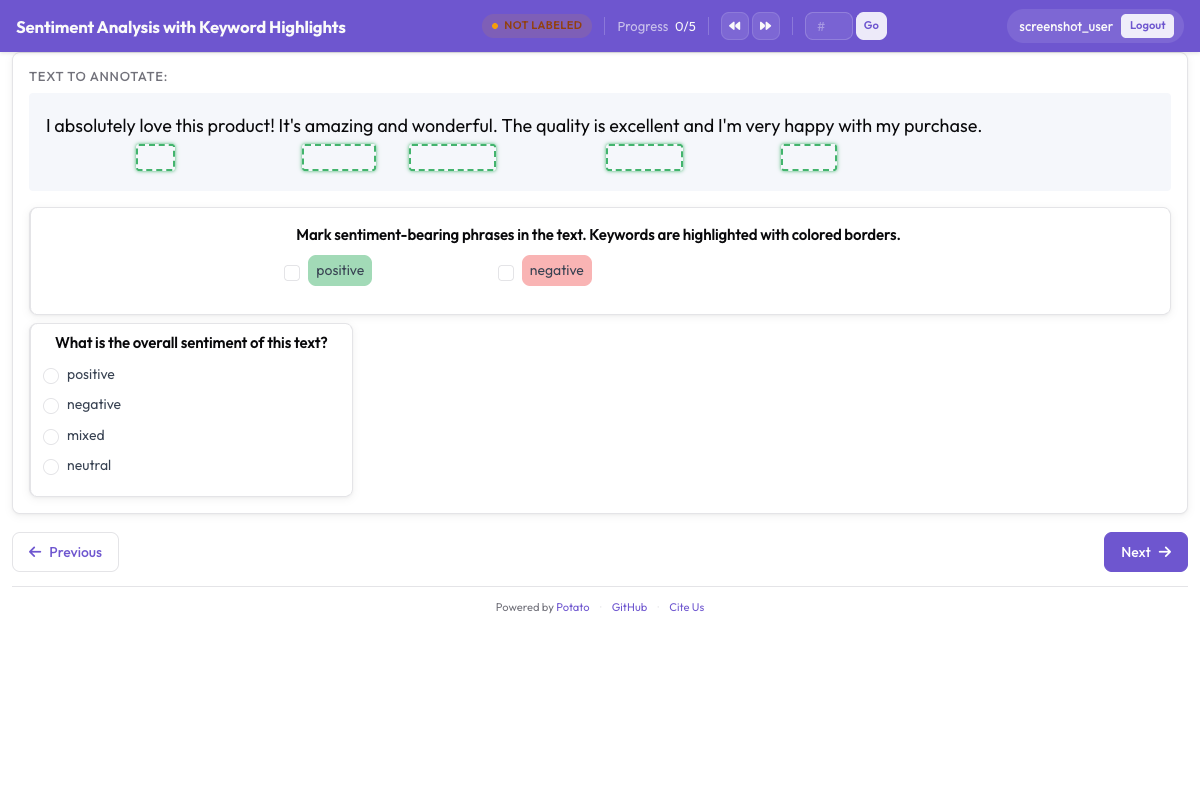 アノテーターの注意を導くため、キーワードとエンティティがボックスオーバーレイでマークされている
関連資料
- AIサポートでは、すべてのプロバイダーのエンドポイント設定を説明しています。
- オプションハイライトでは、ラベルを薄く表示する方式をより詳しく説明しています。
- スパンアノテーションでは、ハイライトと並んで使われるスキームを説明しています。
- 生産性向上機能では、キーワードファイルの形式と、アノテーターの作業速度に関するその他の設定を説明しています。