コーディングエージェントのアノテーション:Claude Code、Aider、SWE-Agentのトレースを評価する
Potatoはコーディングエージェントのトレースをdiffとターミナルブロックとして描画します。プロセス報酬とコードレビューのスキーマ、Claude Code、Aider、SWE-Agent用のコンバータを備えています。
Potatoはコーディングエージェントのセッションを直接アノテーションできるようになりました。トレースは統一diff、暗色のターミナルブロック、行番号付きのファイル読み取り、そしてエージェントが触れたすべてのファイルのツリーとして描画されます。コーディングエージェント形式のコンバータが3つ(claude_code、aider、swe_agent_trajectory)あり、Potatoが既に読める他の12のトレース形式に加わります。さらに、このデータ向けに作られたアノテーションスキーマが2つあります。ステップ単位の正しさを判定するprocess_rewardと、diffをGitHub風にレビューするcode_reviewです。
コーディングエージェントの1回の実行は、ファイルの読み取り、編集、ターミナルコマンド、推論が連なった長いトラジェクトリです。素のテキストアノテーションインターフェースはそのすべてを文字の壁に平らにしてしまいます。そのため、エージェントを評価するチームは自前のレビューUIを書くことが多く、結局ほかの誰にも使えないデータセットが残ってきました。完全なリファレンスはコーディングエージェントアノテーションのドキュメントとエージェント評価ガイドを参照してください。
研究を計画する前に確認すべき2つのこと
Claude Codeのトランスクリプトには、モデルの思考テキストが含まれていません。ファイルにはthinkingブロックとその署名が残りますが、中身は削除されています。ローカルの40セッションで6,393ブロックを計測したところ、テキストを含むものは1つもありませんでした。変換後のトレースはこの件数を報告するので、欠落は黙って消えずに目に見える形で残ります。アノテーターがステップを判断するのに推論が必要な場合は、ディスクから後で読み戻すのではなく、claude -p --output-format stream-jsonまたはAgent SDKでライブにキャプチャしてください。
トランスクリプトには、絶対パス、ブランチ名、環境の詳細、そしてセッションが読んだあらゆるソースも含まれます。データセットを共有する前に秘匿化し、セッションの持ち主から同意を得てください。
トレース表示
コーディングトレースはcoding_trace表示タイプで描画されます。これはinstance_displayの中で、アノテーターに見せたい他の要素と並べて宣言します。Potatoは何を表示するかと何を尋ねるかを分けているので、同じトレース表示がどのアノテーションスキーマとも組み合わせられます。
instance_display:
  layout:
    direction: vertical
    gap: 16px
  fields:
    - key: task_description
      type: text
      label: "Task"
    - key: structured_turns
      type: coding_trace
      label: "Agent Session"
      display_options:
        show_file_tree: true
        diff_view: unified
        collapse_long_outputs: true
        max_output_lines: 50
        terminal_theme: dark
        show_step_numbers: true
        show_reasoning: true
各ツール呼び出しはそのツールが何をしたかに応じて描画されるので、アノテーターはdiffをエスケープされたテキストではなくdiffとして読めます。
| ツール | 描画 |
|---|---|
Read | 行番号付きのコードブロック |
Edit、Replace | 赤と緑の行で示す統一diff |
Write、Create | すべて緑の新規ファイルのコードブロック |
Bash、Terminal、Shell | $プロンプト付きの暗色ターミナルブロック |
Grep、Glob、Search、Find | 検索結果のコードブロック |
| それ以外 | JSON形式の入力と出力 |
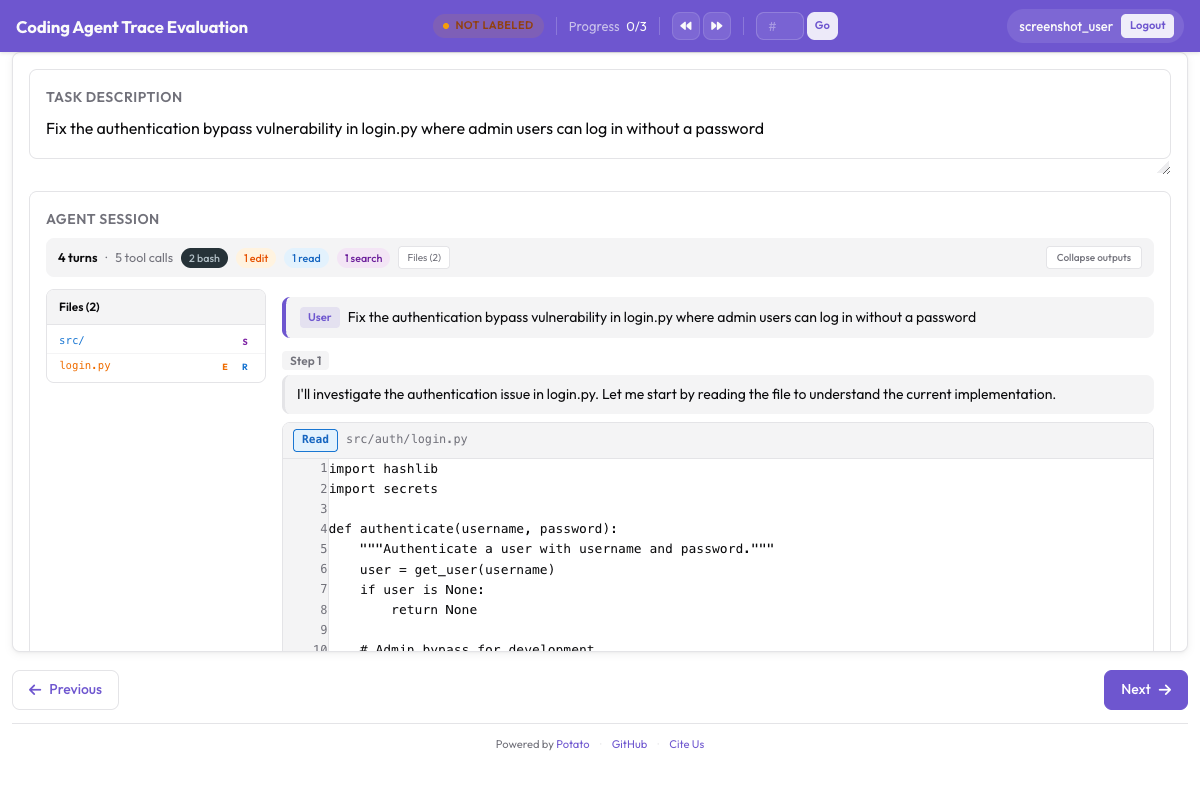 統一diff、ターミナル出力、ファイルツリーのサイドバーを備えたコーディングトレース
collapse_long_outputsとmax_output_lines: 50の組み合わせが、トレースが読めるかどうかを決める設定です。1回のpytest実行で数百行が出力されることもあり、ステップごとにそれをスクロールで飛ばさなければならないアノテーターは、やがてステップを読まなくなります。
データ形式
structured_turns形式は、表示に必要なツール呼び出しの構造を保持します。各ターンはロール、テキスト内容、ツール呼び出しのリストを持ちます。
{
  "id": "session_001",
  "task_description": "Fix the authentication bypass in login.py",
  "model": "claude-sonnet-4-20250514",
  "structured_turns": [
    {
      "role": "assistant",
      "content": "I'll investigate the auth issue.",
      "tool_calls": [
        {
          "tool": "Read",
          "input": {"file_path": "src/auth/login.py"},
          "output": "def login(user, password):\n    if user.role == 'admin':\n        return True",
          "output_type": "code",
          "language": "python"
        },
        {
          "tool": "Bash",
          "input": {"command": "pytest tests/test_auth.py -v"},
          "output": "4 passed",
          "output_type": "terminal"
        }
      ]
    }
  ]
}output_typeはcode、diff、terminal、genericのいずれかを取り、省略した場合はPotatoがツールとファイル拡張子から推定します。ツールの出力が名前から想像されるものと違う場合は、明示的に設定してください。
手元のトレースを変換する
コンバータは1つの形式を読み、Potatoが読み込むJSONLを書き出します。そのうち3つの形式がコーディングエージェント用です。
# Claude Code, or any Anthropic Messages API transcript
python -m potato.trace_converter -i traces.json -f claude_code -o data/traces.jsonl

# Aider chat history with SEARCH/REPLACE blocks
python -m potato.trace_converter -i chat.md -f aider -o data/traces.jsonl

# SWE-Agent trajectories
python -m potato.trace_converter -i trajectory.json -f swe_agent_trajectory -o data/traces.jsonl

# Mixed directory, format detected per file
python -m potato.trace_converter -i traces.json --auto-detect -o data/traces.jsonlclaude_codeコンバータは、Claude Code自身のセッショントランスクリプトと、Messages APIの生の形の両方を読めます。Claude Codeはセッションごとに1つのJSONLファイルを~/.claude/projects/<slugified-working-directory>/<session-id>.jsonlに書き出し、コンバータは1行ごとに1トレースではなく、1セッションを1つのトレースに変換します。
python -m potato.trace_converter \
  -i ~/.claude/projects/-home-me-myrepo/3c853f0f-....jsonl \
--auto-detect -o data/session.jsonlコンバータはparentUuidの連鎖をたどり、最後まで残った経路だけを保持します。巻き戻された試行は、実際に起きたかのようにアノテーションされるのではなく、除外されて件数だけが数えられます。サイドチェーンのメッセージはメインのターンから外され、sidechain_runsに入ります。スラッシュコマンドはCLIが自分自身とやり取りしているだけなので除外されます。ディスク上の形式は公開APIではなくCLIのものなので、アップグレードをまたいだ読み取りはベストエフォートと考えてください。知らないレコードタイプは無視し、ファイルがパースできなくなった場合は空のトレースを返さずにエラーを送出します。
プロセス報酬アノテーション
プロセス報酬モデルは、最終結果だけを採点するのではなく、ステップごとに功罪を割り当てます。process_rewardはその訓練に使うラベルを集めます。2つのモードで、速度と詳しさのどちらを取るかを選べます。
既定のfirst_errorモードでは、アノテーターはエージェントが最初に誤ったステップをクリックします。それより前のステップはすべて正しいとマークされ、そのステップ以降はすべて誤りとマークされます。1回のクリックでトラジェクトリ全体にラベルが付くので、量が必要なときに使うモードです。
annotation_schemes:
  - annotation_type: process_reward
    name: step_rewards
    description: "Click the first step where the agent makes a mistake."
    steps_key: structured_turns
mode: first_errorper_stepモードでは、各ステップを個別に判断します。アノテーターの時間は多くかかりますが、first_errorでは得られないシグナルが得られます。カスケードは誤りが回復不能であることを前提にしていますが、実際のエージェントは回復するからです。allow_neutralを併せて有効にすると、ラベルはPRM800Kの慣例である+1、0、-1に従い、本当に無害なステップは両極のどちらかに押し込まれず、中立として記録されます。
  - annotation_type: process_reward
    name: step_rewards
    description: "Label each step as correct, neutral, or incorrect."
    steps_key: structured_turns
    step_text_key: content
    mode: per_step
allow_neutral: trueどちらかのスキーマを上の設定に追加してください。allow_neutralが有効なとき、マークされていないステップはnullのままなので、エクスポートでは意図的な中立判断と、アノテーターが到達しなかったステップとが区別されます。allow_neutralはper_stepにのみ適用され、中立判断の入る余地がないfirst_errorでは強制的に無効になります。
コードレビューアノテーション
code_reviewスキーマは、プルリクエストのレビューをエージェントの出力に持ち込みます。アノテーターはdiffの行をクリックしてカテゴリ付きのコメントを付け、各ファイルを評価し、判定を下します。
  - annotation_type: code_review
    name: review
    description: "Review the agent's code changes."
    comment_categories: [bug, style, suggestion, security]
    verdict_options: [approve, request_changes, comment_only]
file_rating_dimensions: [correctness, quality]このスキーマを上の設定に追加してください。ファイル評価の各観点は1から5で採点されます。既定値は一般的なレビュー作業には妥当なので、独自の分類体系こそが研究の要点である場合に上書きしてください。たとえばセキュリティレビューでは、bugとsecurityを、指示の中でそれぞれ別の定義を持つ別カテゴリにする必要があります。
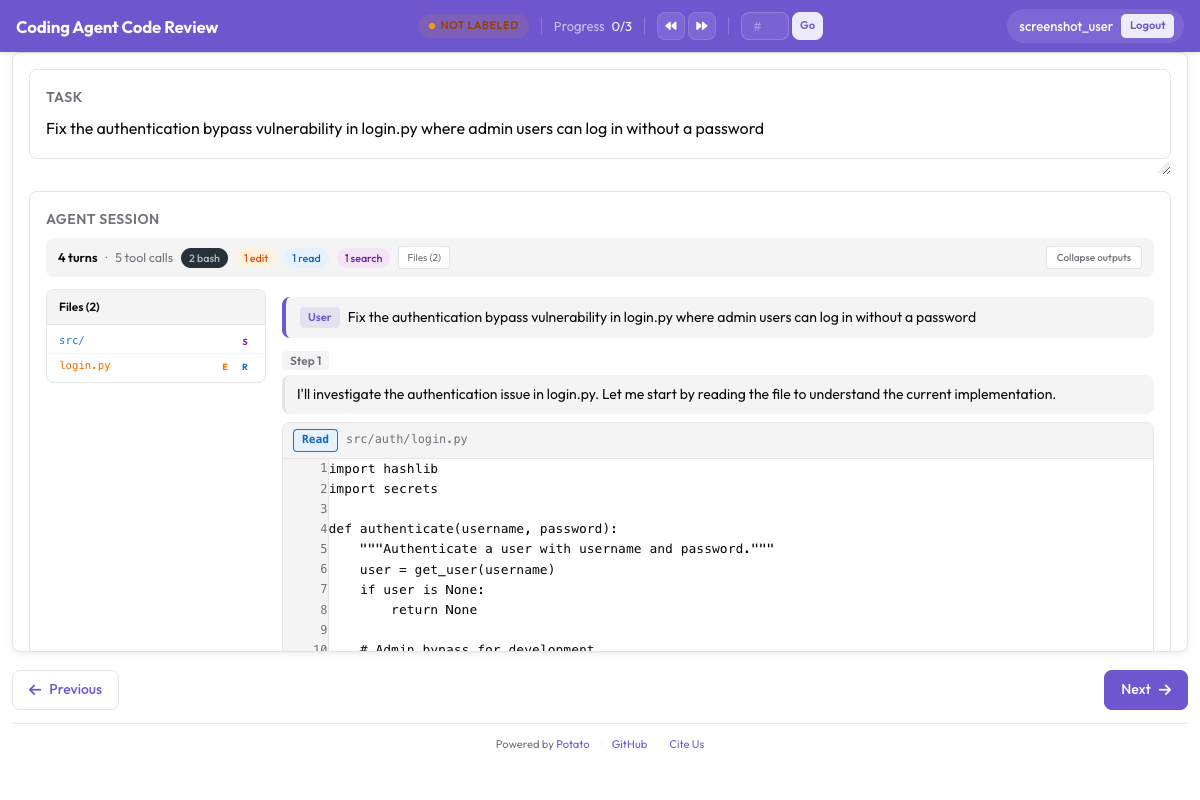 diffへのインラインコメント、ファイルごとの評価、全体の判定
コードレビューのチュートリアルでは、コメントカテゴリがアノテーターの気づくことをどう左右するかも含めて、レビュー研究の全体を順に説明しています。規模を広げる前に、少数のトレースでその研究を試してください。設定の上では完全に見えたカテゴリリストも、最初の20件のレビューのあとにはたいてい1項目増えるからです。
完全な設定
この設定はトレースを描画し、タスク単位の判定、first-errorのプロセス報酬、コードレビューを収集します。一致度を測定できるよう、各トレースに3人のアノテーターを割り当てます。
annotation_task_name: "Coding Agent Trace Evaluation"
task_description: "Judge whether the agent completed the task and review its changes."

data_files:
  - data/traces.jsonl

item_properties:
  id_key: id
  text_key: task_description

port: 8000
output_annotation_dir: annotation_output/coding-agent-eval/
export_annotation_format: jsonl

instance_display:
  layout:
    direction: vertical
    gap: 16px
  fields:
    - key: task_description
      type: text
      label: "Task"
    - key: structured_turns
      type: coding_trace
      label: "Agent Session"
      display_options:
        show_file_tree: true
        diff_view: unified
        collapse_long_outputs: true
        max_output_lines: 50
        terminal_theme: dark
        show_step_numbers: true

annotation_schemes:
  - annotation_type: radio
    name: task_success
    description: "Did the agent complete the task?"
    labels:
      - name: success
        tooltip: "Completed correctly with no issues"
      - name: partial
        tooltip: "Completed with minor issues"
      - name: failure
        tooltip: "Not completed, or completed incorrectly"
    sequential_key_binding: true

  - annotation_type: process_reward
    name: step_rewards
    description: "Click the first step where the agent makes a mistake."
    steps_key: structured_turns
    mode: first_error

  - annotation_type: code_review
    name: review
    description: "Review the agent's code changes."
    comment_categories: [bug, style, suggestion, security]
    verdict_options: [approve, request_changes, comment_only]
    file_rating_dimensions: [correctness, quality]

  - annotation_type: text
    name: notes
    description: "Anything else worth recording about this trace"
    placeholder: "Optional"

num_annotators_per_item: 3

user_config:
  allow_all_users: false
  users:
    - annotator1
    - annotator2
Potatoをインストールし、トレースを変換して、サーバーを起動します。
pip install potato-annotation
python -m potato.trace_converter -i ./my_traces.json --auto-detect -o data/traces.jsonl
potato start config.yaml -p 8000リポジトリには、このプロジェクトの動作するバージョンがexamples/agent-traces/coding-agent-evaluation/に含まれており、自分のデータを変換する前に表示を確認するにはこれが近道です。その設定を起動し、アノテーターと同じようにトレースを1つ読めば、ラベル付けを予定しているステップの粒度が表示される粒度と一致するかどうかが数分でわかります。
訓練用のエクスポート
アノテーションはコーディング評価用のエクスポーターから出力され、出力タイプごとに1つのファイルが書き出されます。
python -m potato.export -c config.yaml -f coding_eval -o exports/ \
--option types=prm,preference,swebench,code_review| タイプ | ファイル | 用途 |
|---|---|---|
prm | prm_training_data.jsonl | プロセス報酬モデルの訓練 |
preference | preference_pairs.jsonl | ペアワイズアノテーションからのDPOまたはRLHF |
swebench | swebench_results.jsonl | SWE-bench互換の評価 |
code_review | code_reviews.jsonl | 構造化されたレビューデータ |
preferenceタイプはペアワイズアノテーションを元に作られるため、プロセス報酬だけを集める研究では残りの3つが出力されます。スキーマを設計する前に4つのうちどれが必要かを決めてください。後からペアワイズ比較を加えると、すべてのトレースを相手のトレースと比べて2回目のアノテーションをすることになるからです。
エージェントの作業を見守る
記録済みのトレースは全体像の半分です。live_coding_agentはアノテーションページの中でエージェントを実行し、アノテーターはその作業を見守り、介入し、巻き戻し、別の指示で再実行できます。バックエンドはOllama、Anthropic、Claude SDKのいずれかで、サンドボックス化された作業ディレクトリで動きます。バックエンドとサンドボックスのモードについてはライブコーディングエージェントのドキュメントを参照してください。
コーディングエージェントを評価していて、この構成では対応できない問題にぶつかった場合は、GitHubリポジトリにissueを立ててください。新しいコンバータはおおむねpotato/trace_converter/converters/内の1ファイルで済むので、Potatoがまだ読めない形式は障害ではなく、貢献の機会です。