如何为训练更好的编程智能体收集过程奖励数据
在 Potato 中收集用于 PRM 训练的逐步骤奖励标注:首个错误模式与逐步骤模式,以及把导出结果整理成训练格式的脚本。
什么是过程奖励模型
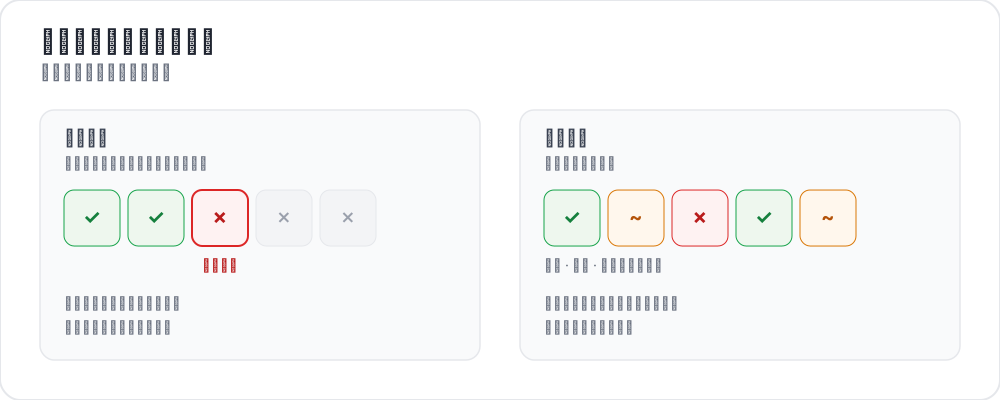 标注过程奖励的两种方式
结果奖励模型只看编程智能体轨迹的结尾:代码编译通过了吗,测试跑过了吗,问题解决了吗?过程奖励模型则给中间的每一步打分。有了每一步的信号,训练就能精确定位智能体是在哪里走偏的。
近期的研究一直在这个方向上推进。AgentPRM 为智能体任务重新定义了过程奖励,按每个动作朝目标推进了多少来打分,而不是按它是否正确来打分,并报告其计算效率比所对比的基线高出 8 倍以上。ToolRM 发现,在自然语言输出上训练出来的奖励模型判断工具调用的能力很差,于是构建了面向工具的奖励模型,以及用来评测它们的 FC-RewardBench。作为对照,DeepSWE 只用一个稀疏的结果奖励(测试是否通过)来训练编程智能体,在 SWE-bench Verified 上达到 42.2% 的 Pass@1,配合测试时扩展达到 59%。这正是过程监督想要改进的那种纯结果式设置。
这些做法都需要步骤级的人工标注,而这通常就是瓶颈。数据结构参考见过程奖励文档。
两种标注模式
首个错误模式
标注者从上到下读完整条轨迹,点击智能体第一次出错的那一步。之前的每一步都记为正确,那一步以及之后的全部记为错误。它很快,因为每条轨迹只有一个决定,而且适合常见的那种情况:智能体一旦跑偏就再也回不来。
annotation_schemes:
  - annotation_type: process_reward
    name: step_rewards
    description: "Click the first step where the agent makes a mistake. Steps after it are flagged automatically."
    mode: first_error
    steps_key: structured_turns
    step_text_key: content
逐步骤模式
每一步都有自己的标签,这能捕捉到首个错误模式捕捉不到的东西:部分纠正、无害的绕路,或者单看没问题、放在上下文里却是错的那种步骤。allow_neutral 会加上 PRM800K 风格的第三个选项。
annotation_schemes:
  - annotation_type: process_reward
    name: step_rewards
    description: "Rate each step correct, neutral, or incorrect"
    mode: per_step
    steps_key: structured_turns
    step_text_key: content
    allow_neutral: true
    inline_with_trace: true
inline_with_trace 把控件挂到显示区里的每一步上,这在长轨迹上很重要,因为单独的面板会让标注者找不到自己看到哪儿了。
搭建项目
第一步:准备轨迹数据
每一行是一条轨迹。steps_key 指向步骤列表,step_text_key 指向每个步骤里要显示的字段:
{
  "id": "trace_001",
  "issue_description": "Fix the TypeError in parse_config() when the config file is empty",
  "structured_turns": [
    {"step_idx": 0, "type": "thinking", "content": "I need to find where the TypeError occurs. Let me read the file."},
    {"step_idx": 1, "type": "file_read", "content": "def parse_config(path):\n    with open(path) as f:\n        data = json.load(f)\n    return data['settings']"},
    {"step_idx": 2, "type": "thinking", "content": "When the file is empty json.load returns None, so None['settings'] raises. Add a check."},
    {"step_idx": 3, "type": "file_edit", "content": "+    if data is None:\n+        return {}"},
    {"step_idx": 4, "type": "bash_command", "content": "python -m pytest tests/test_config.py -v  ->  2 passed"}
  ]
}
从别的智能体格式转换过来是一个命令行步骤:
python -m potato.trace_converter \
  --input claude_code_sessions.json \
  --input-format claude_code \
  --output data/traces.jsonl
--list-formats 会打印它支持的格式,其中包括 claude_code、aider、swe_agent_trajectory、swebench、react、langchain,另外还有九种。如果你不确定手上的是哪一种,就用 --auto-detect。
第二步:写配置
annotation_task_name: "PRM Data Collection"
task_dir: "."

data_files:
  - "data/traces.jsonl"

item_properties:
  id_key: id
  text_key: issue_description

instance_display:
  fields:
    - key: issue_description
      type: text
      label: "Issue"

    - key: structured_turns
      type: coding_trace
      label: "Agent trajectory"
      display_options:
        diff_view: unified
        show_file_tree: true
        show_reasoning: true
        terminal_theme: dark
        collapse_long_outputs: true
        max_output_lines: 50

annotation_schemes:
  - annotation_type: process_reward
    name: step_rewards
    description: "Click the first step where the agent makes an error"
    mode: first_error
    steps_key: structured_turns
    step_text_key: content

  - annotation_type: radio
    name: outcome
    description: "Did the agent resolve the issue?"
    labels:
      - name: resolved
        text: "Fully resolved"
      - name: partial
        text: "Partially resolved"
      - name: not_resolved
        text: "Not resolved"

  - annotation_type: text
    name: error_description
    description: "If the trajectory went wrong, describe the error briefly"
    rows: 3
    placeholder: "e.g. edited the wrong file"
    label_requirement:
      required: false

num_annotators_per_item: 2

attention_checks:
  enabled: true
  items_file: "data/attention_checks.json"
  frequency: 20
  min_response_time: 20.0
  failure_handling:
    warn_threshold: 2
    block_threshold: 5

user_config:
  allow_all_users: false
  users:
    - reviewer1@example.com
    - reviewer2@example.com
    - reviewer3@example.com

output_annotation_dir: "annotation_output/"
export_annotation_format: jsonl
标签对象以 name 为键。text 字段是标注者读到的内容,所以存下来的值是一个稳定的标识符,而措辞随时可以改。
min_response_time: 20.0 是这里真正有用的控制项。没有人能在二十秒里读完一条带 diff 的多步骤轨迹,所以它能抓到按整条轨迹计时抓不到的抢答。
第三步:启动服务器
potato start config.yaml -p 8000导出用于训练
coding_eval 导出器直接写出训练格式,整理工作它替你做了:
python -m potato.export -c config.yaml -f coding_eval -o ./export/它会写出带步骤级标签的 prm_training_data.jsonl、由标注构造出的 DPO 风格 chosen/rejected 轨迹 preference_pairs.jsonl,swebench_results.jsonl,以及 code_reviews.jsonl。四个文件默认都会写。要缩小范围,就传导出器的 types 选项:--option types=prm,preference。如果某个请求的类型在这项研究里没有数据,它会报告出来,而不是写一个空文件。
标注以 steps 列表加上模式的形式,存在标注方案的名称之下。reward 为 1 表示正确,-1 表示错误,0 表示中性,null 表示这一步没有人判断过:
{
  "step_rewards": {
    "mode": "first_error",
    "steps": [
      {"reward": 1, "source": "human", "verified": true},
      {"reward": 1, "source": "human", "verified": true},
      {"reward": -1, "source": "human", "verified": true},
      {"reward": -1, "source": "human", "verified": true}
    ]
  }
}
只有当你需要导出器写不出的格式时,才动手写脚本。最常见的理由是自己处理未被判断的步骤,因为没人判断过的步骤是 null 而不是 0:
import json
from pathlib import Path

SCHEME = "step_rewards"

examples = []
for f in Path("export/").rglob("*.jsonl"):
    with open(f) as fh:
        for line in fh:
            rec = json.loads(line)
            payload = (rec.get("labels", rec) or {}).get(SCHEME)
            if not payload:
                continue

            steps = payload.get("steps", [])
            # Drop traces with unjudged steps rather than guessing at them.
            if any(s.get("reward") is None for s in steps):
                continue

            item = items_by_id[rec["instance_id"]]      # your own data file
            examples.append({
                "trace_id": rec["instance_id"],
                "prompt": item["issue_description"],
                "steps": [
                    {"content": src["content"], "label": s["reward"]}
                    for src, s in zip(item["structured_turns"], steps)
                ],
            })

with open("prm_labels.jsonl", "w") as out:
    for ex in examples:
        out.write(json.dumps(ex) + "\n")

print(f"Wrote {len(examples)} traces")
偏好对来自同一批标注。当两条轨迹处理的是同一个问题时,导出器会把它们配成一对,并把首个错误出现得更晚、或者根本没有错误的那一条当作 chosen。
分析
首个错误落在哪里
import json
from pathlib import Path

SCHEME = "step_rewards"

traces = []
for f in Path("export/").rglob("*.jsonl"):
    with open(f) as fh:
        for line in fh:
            payload = (json.loads(line).get("labels", {}) or {}).get(SCHEME)
            if payload:
                traces.append(payload)

positions = []
all_correct = 0
for t in traces:
    steps = t.get("steps", [])
    first = next((i for i, s in enumerate(steps) if s.get("reward") == -1), None)
    if first is None:
        all_correct += 1
    elif len(steps) > 1:
        positions.append(first / (len(steps) - 1))

print(f"Traces annotated: {len(traces)}")
print(f"No errors: {all_correct} ({all_correct / len(traces):.1%})")
if positions:
    print(f"Average first-error position: {sum(positions) / len(positions):.2f} (0=start, 1=end)")
关于首个错误的一致性
两位标注者很少会选中同一步,用精确一致来衡量会低估他们实际的一致程度。先把位置分箱再比较,信息量更大:
def bin_position(steps):
    first = next((i for i, s in enumerate(steps) if s.get("reward") == -1), None)
    if first is None:
        return "all_correct"
    return "early_error" if first < len(steps) / 2 else "late_error"
在标注了同一批数据项的标注者之间比较这些分箱,用的就是 num_annotators_per_item 给你的重叠量。
一些建议
追求速度就用首个错误模式。 如果是训练一个 PRM 来引导搜索,它用几分之一的标注成本就能给出足够的信号,而且大多数智能体的失败本来就是连锁式的。
需要细节时用逐步骤模式。 部分纠正和无害的绕路只有在逐步骤模式下才存在对应的标签。
从有经验的标注者开始。 这项工作要读代码、读 diff、读终端输出。先从一小组人开始,测一致性,用共享的样例做校准,然后再扩大规模。
设一个响应时间下限。 轨迹会越来越长,下限能让标注者不至于一路快进略过 diff。
做一轮校准。 让所有人标注同样的十到二十条轨迹,把分歧讨论清楚,再开始正式标注。