自动关键词高亮
在 Potato 中配置关键词高亮,可以用固定的关键词文件,也可以用 LLM 关键词助手,内容涵盖按标签配色、随机干扰项和响应缓存。
Potato 有两种高亮关键词的方式。keyword_highlights_file 在每个项目上标出一份固定的词表,全程不涉及模型;ai_support 则会加一个 Keyword 按钮,标注者按下它,由 LLM 标出与每个标签相关的词。
两种机制的失效方式不同,所以选哪一种比怎么配置更要紧。固定词表是确定性的,每个项目都不产生费用,也可以写进论文的方法部分,但无论句子说的是什么,它标出的始终是同样的字符串。LLM 助手会读每个项目,能标出任何词表都抓不到的短语,代价是每次请求一次 API 调用,以及依赖一个可能在你不知情时发生变化的模型。
关于选项高亮和关键词高亮的实现方式,见源文档。
固定的关键词列表
当你需要每名标注者看到相同的高亮,并且事后能准确说清那些高亮是什么时,就用关键词文件。把 keyword_highlights_file 指向一个 CSV 或 TSV,Potato 会给项目文本中的每一处匹配加上带边框的方框。
annotation_task_name: "Sentiment with keyword highlights"
task_dir: .
output_annotation_dir: annotation_output
export_annotation_format: jsonl

data_files:
  - data/reviews.json

item_properties:
  id_key: id
  text_key: text

keyword_highlights_file: data/sentiment_keywords.tsv

ui:
  label_colors:
    sentiment:
      positive: "(22, 163, 74)"
      negative: "(239, 68, 68)"

annotation_schemes:
  - annotation_type: span
    name: sentiment
    description: "Mark the phrases that carry sentiment. Highlighted keywords are suggestions, not answers."
    labels:
      - name: positive
        tooltip: "Phrases expressing a positive opinion"
      - name: negative
        tooltip: "Phrases expressing a negative opinion"

user_config:
  allow_all_users: true
颜色是按方案、按标签设置的,而不是全局设置,因为如果高亮的颜色和标注者正要画的跨度标签撞色,那还不如不要高亮。
关键词文件需要一个 keyword 表头列。label 列说明该词属于哪个类别,schema 列说明它与哪个标注方案相关,可选的 color 列会覆盖该标签的配色。
keyword,label,schema,color
excellent,positive,sentiment,(34, 197, 94)
terrible,negative,sentiment,#ef4444
excel*,positive,sentiment,
* 匹配任意一串词字符,所以 excel* 一行就覆盖了 excellent、excels 和 excelled。Potato 也能读每行一个关键词的纯文本文件,以及存放关键词列表或 {keyword: label} 映射的 JSON、JSONL 或 YAML。
为研究而随机化的高亮
如果你要测量高亮是否改变了标注者的行为,把每个关键词都展示给每个人,就没有可供比较的对象了。keyword_highlight_settings 会把关键词抽稀,并混入诱饵。
keyword_highlights_file: data/keywords.csv

keyword_highlight_settings:
  keyword_probability: 0.5        # show half the matched keywords
  random_word_probability: 0.05   # highlight about 5% of other words
  random_word_label: "distractor"
  random_word_schema: "keyword"
keyword_probability: 0.5 是让这个比较成立的取值,因为这样每名标注者在同一批语料里,会在一半的词上看到高亮,在另一半上看不到。这个选择按用户、按实例缓存,种子取自用户名和实例 id 的哈希,所以标注者回到某个项目时看到的还是第一次看到的样子。哪些词被展示过记录在行为数据的 keyword_highlights_shown 字段里,分析时可以据此做条件。
LLM 关键词助手
AI 关键词高亮是一个按钮,而不是后台进程。启用 ai_support 之后,每个标注表单上都带有 Hint、Keyword 和 Rationale 三个按钮,按下 Keyword 就是在问模型:这个项目里哪些词与每个可选标签相关。答案以文本上的方框叠加层返回。
ai_support:
  enabled: true
  endpoint_type: openai

  ai_config:
    model: gpt-4o-mini
    api_key: ${OPENAI_API_KEY}
    temperature: 0.3
    max_tokens: 800
    include:
      all: true
max_tokens: 800 是默认值,对这个助手来说也接近下限。Keyword 和 Rationale 的提示词会在一次回复里回答所有标签,所以预算再小就会把回复截断,助手会渲染成空白,而且不报错。
include.all: true 会为所有方案打开这些助手。如果只想为特定的页面和方案启用,就用 special_include,它把页面索引映射到标注 id,再映射到助手名称的列表:
ai_support:
  enabled: true
  endpoint_type: openai
  ai_config:
    model: gpt-4o-mini
    api_key: ${OPENAI_API_KEY}
    include:
      all: false
      special_include:
        "0":
          "0": ["hint", "keyword"]
        "1":
          "1": ["hint"]
关键词高亮需要有文本可以高亮,所以即使端点是视觉模型,Potato 也会在图像项目上把这个按钮过滤掉。在文本项目上,视觉模型提供全部三个助手。
Anthropic
ai_support:
  enabled: true
  endpoint_type: anthropic

  ai_config:
    model: claude-sonnet-4-20250514
    api_key: ${ANTHROPIC_API_KEY}
    temperature: 0.3
    max_tokens: 800
    include:
      all: true
Ollama,不产生 API 账单
ai_support:
  enabled: true
  endpoint_type: ollama

  ai_config:
    model: qwen3:0.6b
    base_url: http://localhost:11434
    temperature: 0.3
    max_tokens: 800
    include:
      all: true
当语料不能离开你的机器,或者你要高亮几万个项目、按项目计费会吃掉整个研究预算时,本地端点值得承受那点质量上的损失。
改为高亮可能的标签
当问题出在选项列表太长而不是文本太长时,option_highlighting 是更合适的工具。它向模型索要最可能的几个选项,用全不透明度加一颗星把它们标出来,其余的调暗。所有选项仍然可以点击。
ai_support:
  enabled: true
  endpoint_type: openai
  ai_config:
    model: gpt-4o-mini
    api_key: ${OPENAI_API_KEY}
    temperature: 0.3
    max_tokens: 800

  option_highlighting:
    enabled: true
    top_k: 3
    dim_opacity: 0.4
    auto_apply: true
    schemas: null
    prefetch_count: 10
top_k: 3 适合有八到十二个标签的方案,标出三个选项能减少阅读量,又不至于把答案藏起来。它对 radio、multiselect、likert 和 select 有效,对跨度、自由文本和滑块没有影响。
缓存与预取
一次 LLM 调用会给页面加载多添几秒,而等待的标注者就不会再按那个按钮了。缓存到磁盘、并在光标前方预取,能消掉大部分等待,缓存还能让你不必为标注者重新访问的项目付两次钱。
ai_support:
  enabled: true
  endpoint_type: openai
  ai_config:
    model: gpt-4o-mini
    api_key: ${OPENAI_API_KEY}
    max_tokens: 800
    include:
      all: true

  cache_config:
    disk_cache:
      enabled: true
      path: annotation_output/ai_cache.json

    prefetch:
      warm_up_page_count: 10
      on_next: 5
      on_prev: 2
on_next: 5 与 on_prev: 2 的对比反映的是标注者的移动方式。大多数导航是向前的,所以预算投向前方,同时在光标后方留出足够覆盖一次修正的量。
一份完整配置
两种机制可以并用。关键词文件给每名标注者相同的基线高亮,而助手留在按钮后面,供固定词表无话可说的那些项目使用。
annotation_task_name: "Entity annotation with keyword support"
task_dir: .
output_annotation_dir: annotation_output
export_annotation_format: jsonl

data_files:
  - data/documents.json

item_properties:
  id_key: id
  text_key: text

keyword_highlights_file: data/entity_keywords.csv

annotation_schemes:
  - annotation_type: span
    name: entities
    description: "Mark people, organizations and locations."
    labels:
      - name: PERSON
        color: "#FECACA"
      - name: ORG
        color: "#BBF7D0"
      - name: LOCATION
        color: "#BFDBFE"

ai_support:
  enabled: true
  endpoint_type: openai

  ai_config:
    model: gpt-4o-mini
    api_key: ${OPENAI_API_KEY}
    temperature: 0.3
    max_tokens: 800
    include:
      all: true

  cache_config:
    disk_cache:
      enabled: true
      path: annotation_output/ai_cache.json
    prefetch:
      warm_up_page_count: 10
      on_next: 5
      on_prev: 2

user_config:
  allow_all_users: true
启动服务器,高亮就出现在第一个项目上:
potato start config.yaml -p 8000启用 AI 关键词高亮后,按下 Keyword 按钮会标出标注文本里的相关术语:
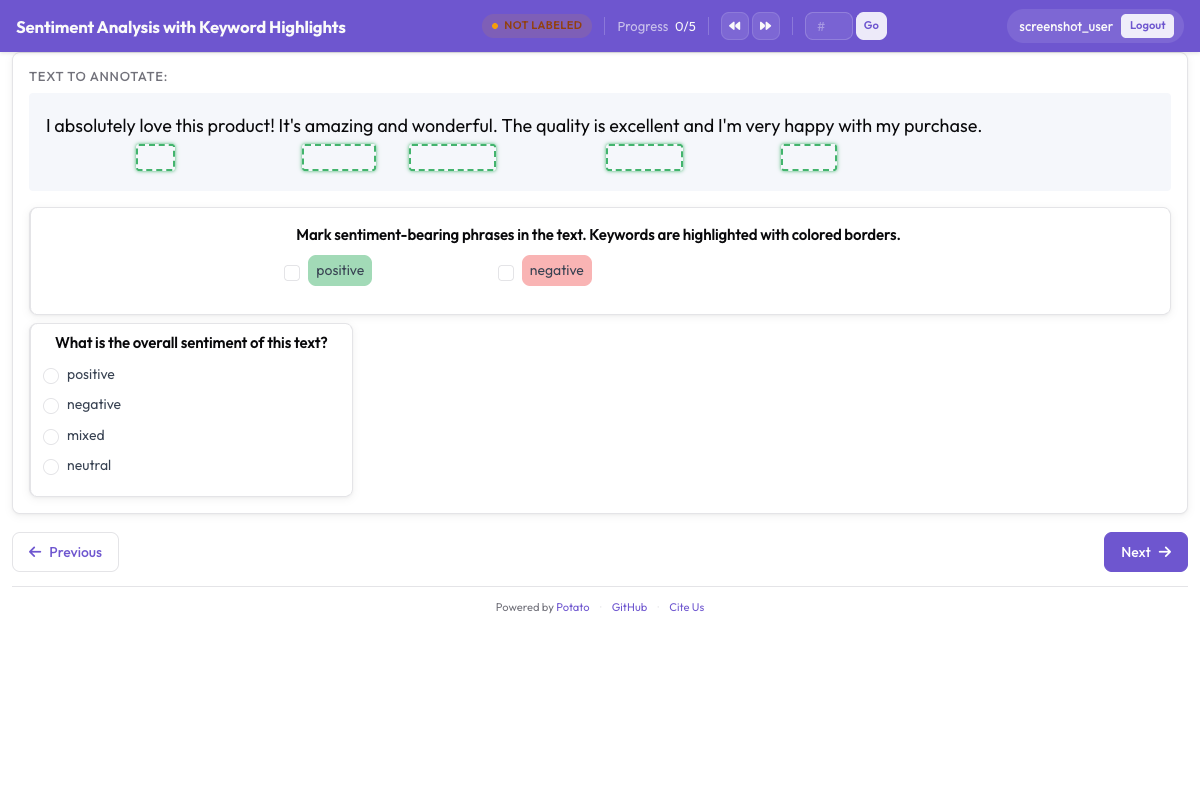 用方框叠加层标出关键词和实体,引导标注者的注意力