编码智能体标注:评测 Claude Code、Aider 与 SWE-Agent 轨迹
Potato 把编码智能体轨迹渲染成差异视图和终端块,提供过程奖励与代码审查两种标注方案,以及 Claude Code、Aider、SWE-Agent 的轨迹转换器。
Potato 现在可以直接标注编码智能体的会话。一条轨迹会渲染成统一差异、深色终端块、带行号的文件读取内容,以及智能体改动过的所有文件构成的文件树;编码智能体格式有三个转换器(claude_code、aider 和 swe_agent_trajectory),此外 Potato 原本就能读取另外十二种轨迹格式;还有两个专为这类数据设计的标注方案:process_reward 用于步骤级的对错判断,code_review 用于以 GitHub 的方式审查这些差异。
一次编码智能体的运行是一条很长的轨迹,由文件读取、编辑、终端命令和推理串成。纯文本的标注界面会把这些全部压平成一堵字符墙,所以做智能体评测的团队往往自己写一套审查界面,最后得到别人用不了的数据集。完整参考见编码智能体标注文档和智能体评测指南。
规划研究前要先确认的两件事
Claude Code 的会话记录里没有模型的思考文本。文件保留了 thinking 块和它的签名,但丢弃了内容;在 40 个本地会话中统计到 6,393 个这样的块,没有一个带文本。转换后的轨迹会报出这个数量,让缺失可见而不是悄悄发生。如果标注者需要看到推理过程才能判断各个步骤,就用 claude -p --output-format stream-json 或者 Agent SDK 实时抓取,不要事后从磁盘读回。
会话记录里还带着绝对路径、分支名、环境信息,以及会话读取过的任何源码。分享数据集之前先做脱敏,并且要取得会话所有者的同意。
轨迹显示
编码轨迹通过 coding_trace 显示类型渲染,在 instance_display 中与标注者该看到的其他内容一起声明。Potato 把"显示什么"和"问什么"分开,所以同一个轨迹显示可以配合任何标注方案使用:
instance_display:
  layout:
    direction: vertical
    gap: 16px
  fields:
    - key: task_description
      type: text
      label: "Task"
    - key: structured_turns
      type: coding_trace
      label: "Agent Session"
      display_options:
        show_file_tree: true
        diff_view: unified
        collapse_long_outputs: true
        max_output_lines: 50
        terminal_theme: dark
        show_step_numbers: true
        show_reasoning: true
每个工具调用都按它实际做的事来渲染,这样标注者看到的差异就是差异,而不是转义过的文本:
| 工具 | 渲染方式 |
|---|---|
Read | 带行号的代码块 |
Edit、Replace | 红绿双色的统一差异 |
Write、Create | 新文件代码块,整段为绿色 |
Bash、Terminal、Shell | 带 $ 提示符的深色终端块 |
Grep、Glob、Search、Find | 搜索结果代码块 |
| 其他工具 | JSON 格式的输入与输出 |
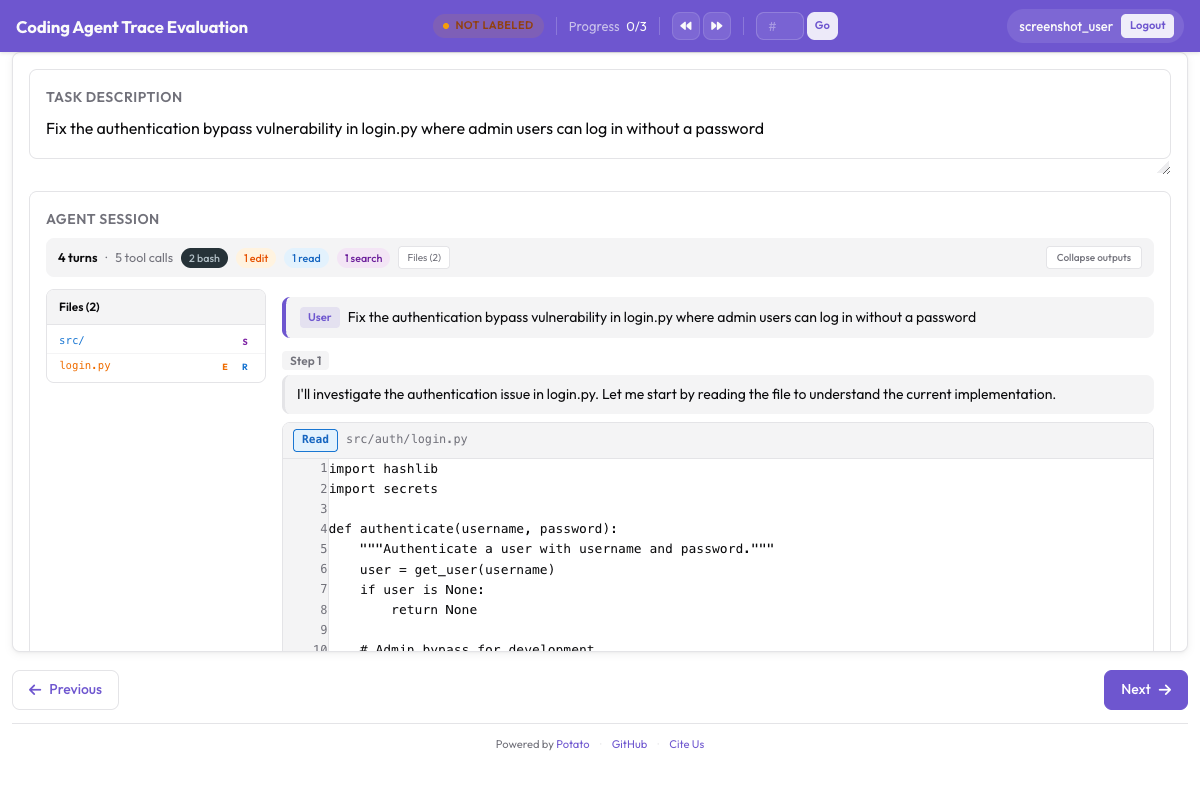 带有统一差异、终端输出和文件树侧边栏的编码轨迹
collapse_long_outputs 配合 max_output_lines: 50,决定了一条轨迹读不读得下去。一次 pytest 运行就可能打印几百行,而每一步都要滚过这些内容的标注者会干脆不看步骤了。
数据格式
structured_turns 格式保留了显示所需的工具调用结构。每一轮带有角色、文本内容和一组工具调用:
{
  "id": "session_001",
  "task_description": "Fix the authentication bypass in login.py",
  "model": "claude-sonnet-4-20250514",
  "structured_turns": [
    {
      "role": "assistant",
      "content": "I'll investigate the auth issue.",
      "tool_calls": [
        {
          "tool": "Read",
          "input": {"file_path": "src/auth/login.py"},
          "output": "def login(user, password):\n    if user.role == 'admin':\n        return True",
          "output_type": "code",
          "language": "python"
        },
        {
          "tool": "Bash",
          "input": {"command": "pytest tests/test_auth.py -v"},
          "output": "4 passed",
          "output_type": "terminal"
        }
      ]
    }
  ]
}
output_type 可取 code、diff、terminal 或 generic;不填时 Potato 会根据工具和文件扩展名推断。当某个工具的输出和它的名字不相符时,就显式写出来。
转换你手上已有的轨迹
转换器读入一种格式,写出 Potato 加载的 JSONL。其中三种格式属于编码智能体:
# Claude Code, or any Anthropic Messages API transcript
python -m potato.trace_converter -i traces.json -f claude_code -o data/traces.jsonl

# Aider chat history with SEARCH/REPLACE blocks
python -m potato.trace_converter -i chat.md -f aider -o data/traces.jsonl

# SWE-Agent trajectories
python -m potato.trace_converter -i trajectory.json -f swe_agent_trajectory -o data/traces.jsonl

# Mixed directory, format detected per file
python -m potato.trace_converter -i traces.json --auto-detect -o data/traces.jsonl
claude_code 转换器既能读 Claude Code 自己的会话记录,也能读原始的 Messages API 结构。Claude Code 会为每个会话在 ~/.claude/projects/<slugified-working-directory>/<session-id>.jsonl 下写一个 JSONL 文件,转换器把一个会话变成一条轨迹,而不是一行一条:
python -m potato.trace_converter \
  -i ~/.claude/projects/-home-me-myrepo/3c853f0f-....jsonl \
  --auto-detect -o data/session.jsonl
它会沿着 parentUuid 链走,只保留最终存活的那条路径,因此被回退掉的尝试会被丢弃并计数,而不是当作真发生过来标注。侧链消息进入 sidechain_runs,不混在主轮次里。斜杠命令会被丢弃,因为那是 CLI 在和自己说话。磁盘上的这套结构属于 CLI 而不是公开 API,所以跨版本升级时要把这个读取器当成尽力而为的实现。它会忽略自己不认识的记录类型;当某个文件解析不下去时,它会抛错而不是交回一条空轨迹。
过程奖励标注
过程奖励模型逐步分配功过,而不是只给最终结果打分,process_reward 收集的就是训练它所需的标签。两种模式在速度和精细度之间做不同的取舍。
在默认的 first_error 模式下,标注者点击智能体第一次出错的那一步。它之前的每一步都标为正确,这一步及其之后的所有步骤都标为错误。一次点击就标完整条轨迹,所以需要产量的时候用这个模式。
annotation_schemes:
  - annotation_type: process_reward
    name: step_rewards
    description: "Click the first step where the agent makes a mistake."
    steps_key: structured_turns
    mode: first_error
在 per_step 模式下,每一步各自独立评判。这会花掉更多标注时间,但能产出 first_error 给不了的信号,因为级联式标注假定错误不可挽回,而真实的智能体是会自我纠正的。再打开 allow_neutral,标签就遵循 PRM800K 的 +1、0、-1 约定,真正无害的步骤记为中性,而不是被迫归到某一极:
  - annotation_type: process_reward
    name: step_rewards
    description: "Label each step as correct, neutral, or incorrect."
    steps_key: structured_turns
    step_text_key: content
    mode: per_step
    allow_neutral: true
把这两种方案中的任意一个加到上面的配置里。开启 allow_neutral 后,未标记的步骤保持为 null,因此导出结果能区分"标注者判定为中性"和"标注者根本没看到这一步"。allow_neutral 只对 per_step 生效,在 first_error 下会被强制关闭,因为那里没有中性判断的位置。
代码审查标注
code_review 方案把拉取请求式的评审带到智能体的产出上。标注者点击差异中的某一行来附上带分类的评论,给每个文件打分,并给出结论:
  - annotation_type: code_review
    name: review
    description: "Review the agent's code changes."
    comment_categories: [bug, style, suggestion, security]
    verdict_options: [approve, request_changes, comment_only]
    file_rating_dimensions: [correctness, quality]
把这个方案加到上面的配置里。文件评分维度各按 1 到 5 打分。默认值对一般的审查工作是合适的,所以只有当你的分类体系本身就是研究重点时才去覆盖它,比如在一次安全审查中,bug 和 security 需要成为两个独立的类别,并在指南中分别定义。
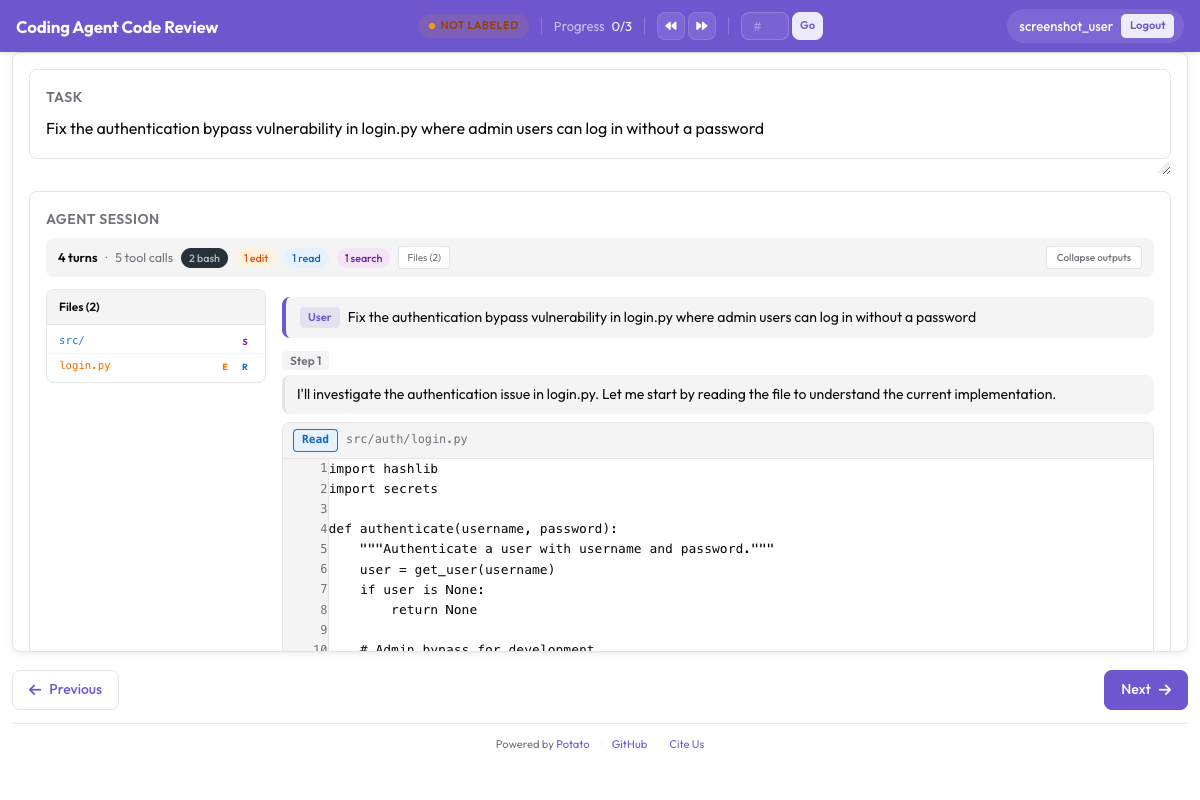 行内差异评论、逐文件评分和总体结论
代码审查教程完整走了一遍审查研究,包括评论类别如何影响标注者注意到什么。在放大规模之前,先拿少量轨迹跑一遍这个研究,因为一份在配置里看着很完整的类别清单,通常在头二十次审查之后还会再多出一项。
一份完整的配置
这份配置渲染轨迹,收集任务级结论、首错模式的过程奖励和一次代码审查,每条轨迹分配三名标注者,以便测量一致性:
annotation_task_name: "Coding Agent Trace Evaluation"
task_description: "Judge whether the agent completed the task and review its changes."

data_files:
  - data/traces.jsonl

item_properties:
  id_key: id
  text_key: task_description

port: 8000
output_annotation_dir: annotation_output/coding-agent-eval/
export_annotation_format: jsonl

instance_display:
  layout:
    direction: vertical
    gap: 16px
  fields:
    - key: task_description
      type: text
      label: "Task"
    - key: structured_turns
      type: coding_trace
      label: "Agent Session"
      display_options:
        show_file_tree: true
        diff_view: unified
        collapse_long_outputs: true
        max_output_lines: 50
        terminal_theme: dark
        show_step_numbers: true

annotation_schemes:
  - annotation_type: radio
    name: task_success
    description: "Did the agent complete the task?"
    labels:
      - name: success
        tooltip: "Completed correctly with no issues"
      - name: partial
        tooltip: "Completed with minor issues"
      - name: failure
        tooltip: "Not completed, or completed incorrectly"
    sequential_key_binding: true

  - annotation_type: process_reward
    name: step_rewards
    description: "Click the first step where the agent makes a mistake."
    steps_key: structured_turns
    mode: first_error

  - annotation_type: code_review
    name: review
    description: "Review the agent's code changes."
    comment_categories: [bug, style, suggestion, security]
    verdict_options: [approve, request_changes, comment_only]
    file_rating_dimensions: [correctness, quality]

  - annotation_type: text
    name: notes
    description: "Anything else worth recording about this trace"
    placeholder: "Optional"

num_annotators_per_item: 3

user_config:
  allow_all_users: false
  users:
    - annotator1
    - annotator2
安装 Potato、转换你的轨迹,然后启动服务:
pip install potato-annotation
python -m potato.trace_converter -i ./my_traces.json --auto-detect -o data/traces.jsonl
potato start config.yaml -p 8000
仓库在 examples/agent-traces/coding-agent-evaluation/ 下附带了这个项目的可运行版本,在你转换自己的数据之前,这是看到显示效果最快的办法。启动那份配置,像标注者那样读一条轨迹,几分钟之内你就能知道你打算标注的步骤粒度是不是显示所呈现的粒度。
为训练导出
标注通过编码评测导出器输出,每种输出类型写一个文件:
python -m potato.export -c config.yaml -f coding_eval -o exports/ \
--option types=prm,preference,swebench,code_review| 类型 | 文件 | 用途 |
|---|---|---|
prm | prm_training_data.jsonl | 训练过程奖励模型 |
preference | preference_pairs.jsonl | DPO 或 RLHF,来自成对标注 |
swebench | swebench_results.jsonl | 与 SWE-bench 兼容的评测 |
code_review | code_reviews.jsonl | 结构化的审查数据 |
preference 类型需要有成对标注才能生成,所以只收集过程奖励的研究会产出另外三种。在设计标注方案之前就决定这四种里你要哪几种,因为事后再补一次成对比较,意味着每条轨迹都要对着一个搭档再标一遍。
看着智能体干活
录制下来的轨迹只是故事的一半。live_coding_agent 会在标注页面里跑一个智能体,标注者可以看着它工作、中途介入、回滚,并换一套指令重放,后端可以是 Ollama、Anthropic 或 Claude SDK,运行在一个沙箱化的工作目录中。实时编码智能体文档介绍了各个后端和沙箱模式。
如果你的团队在评测编码智能体,遇到了这套方案覆盖不到的情况,欢迎到 GitHub 仓库提 issue。新写一个转换器大致就是 potato/trace_converter/converters/ 下的一个文件,所以 Potato 还读不了的格式是一次贡献的机会,而不是一堵墙。