Esquemas de Anotación
Define esquemas de anotación en YAML con radio, multiselect, span, likert, slider, text y 55 tipos más. Configura etiquetas, preguntas y campos obligatorios.
Los esquemas de anotación definen las tareas de etiquetado para tus anotadores. Potato soporta 76 tipos de anotación que se pueden combinar para crear tareas de anotación complejas.
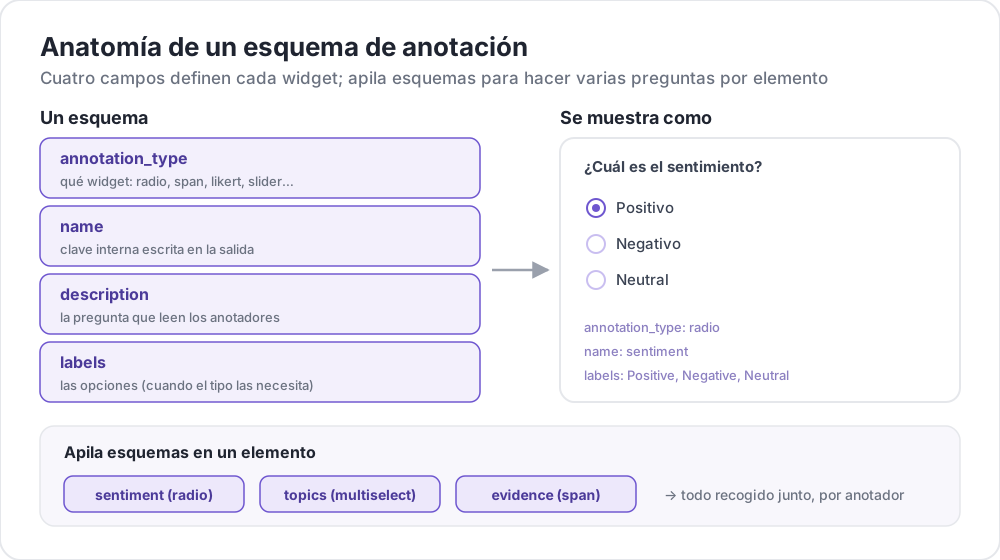 Anatomía de un esquema de anotación
Estructura Básica
Cada esquema se define en el array annotation_schemes:
annotation_schemes:
  - annotation_type: radio
    name: sentiment
    description: "What is the sentiment?"
    labels:
      - Positive
      - Negative
      - Neutral
Campos Requeridos
Todo esquema lleva estos tres campos. Cada tipo añade sus propios campos obligatorios, que se indican junto a cada tipo más abajo.
| Campo | Descripción |
|---|---|
annotation_type | Tipo de anotación (radio, multiselect, likert, span, text, number, slider, multirate, select, pairwise, bws, soft_label, confidence, constant_sum, range_slider, semantic_differential, hierarchical_multiselect, card_sort, rubric_eval, extractive_qa, error_span, triage, coreference, span_link, y más) |
name | Identificador interno (sin espacios, usado en la salida) |
description | Instrucciones mostradas a los anotadores |
Tipos de Anotación Soportados
1. Radio (Opción Única)
Selecciona exactamente una opción de una lista:
- annotation_type: radio
  name: sentiment
  description: "What is the sentiment of this text?"
  labels:
    - Positive
    - Negative
    - Neutral

  # Assigns keys 1, 2, 3... in the order the labels are listed
  sequential_key_binding: true

  # Horizontal layout instead of vertical
  horizontal: true
Las asignaciones secuenciales asocian los dígitos 1-9 a las nueve primeras etiquetas, así que reordenar la lista de etiquetas reasigna las teclas. Para una asignación que se mantenga al reordenar, da a cada etiqueta su propia tecla (consulta Atajos de Teclado).
2. Escala Likert
Escalas de calificación con etiquetas en los extremos:
- annotation_type: likert
  name: agreement
  description: "How much do you agree with this statement?"
  size: 5  # Number of scale points
  min_label: "Strongly Disagree"
  max_label: "Strongly Agree"

  # Show the numeric value of the selected point
  displaying_score: true
size es obligatorio, junto con las dos etiquetas de los extremos. Cinco puntos dan a los anotadores un punto medio neutral; un tamaño par los obliga a inclinarse hacia un lado.
3. Multiselect (Opción Múltiple)
Selecciona múltiples opciones de una lista:
- annotation_type: multiselect
  name: topics
  description: "Select all relevant topics"
  labels:
    - Politics
    - Technology
    - Sports
    - Entertainment
    - Science

  # Require at least one box before the annotator can move on
  label_requirement:
    required: true

  # Allow free text response
  has_free_response: true
has_free_response añade un cuadro de texto "other". Conviene activarlo mientras el conjunto de etiquetas todavía se está revisando, porque las entradas que recoge nombran las categorías que te faltan.
4. Anotación de Segmentos
Resalta y etiqueta segmentos de texto:
- annotation_type: span
  name: entities
  description: "Highlight named entities in the text"
  labels:
    - PERSON
    - ORGANIZATION
    - LOCATION
    - DATE

  # Show the label name on each highlighted span
  show_span_labels: true

  # Ctrl/Cmd+click to add non-contiguous ranges to one annotation
  allow_discontinuous: false

  # Keyboard shortcuts for labels
  sequential_key_binding: true
allow_discontinuous cubre segmentos formados por rangos separados, como los antecedentes divididos, no segmentos que se solapan entre sí. Déjalo desactivado salvo que el fenómeno que etiquetas realmente se interrumpa con un hueco, ya que el gesto de Ctrl/Cmd-clic es fácil de activar por accidente.
5. Deslizador
Rango numérico continuo:
- annotation_type: slider
  name: confidence
  description: "How confident are you in your answer? (0 = not at all, 100 = completely)"
  min_value: 0
  max_value: 100
  starting_value: 50
  step: 1

  # Shows min_value and max_value at the ends of the track
  show_labels: true
Los tres campos min_value, max_value y starting_value son obligatorios. Un deslizador no admite una lista labels. Si añades una, la pregunta pasa a mostrarse con botones de radio y el deslizador desaparece, así que pon cualquier texto para los extremos de la escala en description. El valor inicial es donde se sitúa el control de cada anotador antes de que lo toque, así que un punto medio evita anclarlo hacia cualquiera de los extremos.
6. Entrada de Texto
Respuestas de texto libre:
- annotation_type: text
  name: explanation
  description: "Explain your reasoning"

  # Multi-line input
  rows: 4

  # Require a minimum length and show a running count
  min_chars: 20
  show_char_count: true

  # Placeholder text
  placeholder: "Enter your explanation here..."

  # Disable paste (for transcription tasks)
  allow_paste: false
allow_paste: false importa en tareas de transcripción y de recuerdo libre, donde una respuesta pegada se copia de la fuente en lugar de ser producida por el anotador.
7. Entrada Numérica
Entrada numérica con restricciones:
- annotation_type: number
  name: count
  description: "How many entities are mentioned?"
  min: 0
  max: 100
  step: 1
8. Multirate (Calificación Matricial)
Califica múltiples elementos en la misma escala:
- annotation_type: multirate
  name: quality_aspects
  description: "Rate each aspect of the response"

  # Rows: the items being rated
  options:
    - Accuracy
    - Fluency
    - Relevance

  # Columns: the shared rating scale
  labels:
    - Poor
    - Fair
    - Good
    - Very Good
    - Excellent

  # Randomize row order per annotator
  option_randomization: true

  # Layout options
  arrangement: "vertical"
  display_config:
    num_columns: 2
Tanto options como labels son obligatorios, ya que una matriz necesita filas y columnas. Aleatorizar el orden de las filas reparte cualquier efecto de orden entre los elementos, en lugar de concentrarlo en el aspecto que aparezca primero en la lista.
Opciones Comunes
Atajos de Teclado
Acelera la anotación con asignaciones de teclado:
# Automatic sequential binding: digits 1, 2, 3... in label order
sequential_key_binding: true
Para una asignación que no cambie cuando cambia la lista de etiquetas, pasa objetos de etiqueta y da a cada uno un key_value:
labels:
  - name: Positive
    key_value: "1"
  - name: Negative
    key_value: "2"
  - name: Neutral
    key_value: "3"
Tooltips
Proporciona pistas al pasar el cursor sobre etiquetas individuales. Los tooltips se asocian a la etiqueta, no al esquema, así que se configuran dentro de labels:
labels:
  - name: Positive
    tooltip: "Expresses happiness, approval, or satisfaction"
  - name: Negative
    tooltip: "Expresses sadness, anger, or disappointment"
  - name: Neutral
    tooltip: "No clear emotional content"
Para indicaciones con formato, apunta tooltip_file a un archivo HTML:
labels:
  - name: Economic
    tooltip_file: "config/tooltips/economic.html"
Colores de Etiquetas
Colores personalizados para distinción visual, definidos una sola vez para todo el proyecto bajo ui:
ui:
  label_colors:
    entities:
      PERSON: "#3b82f6"
      LOCATION: "#10b981"
      ORGANIZATION: "#f59e0b"
Los colores se indexan por nombre de esquema y luego por etiqueta. También se puede fijar un color en una etiqueta individual, junto a su tooltip:
labels:
  - name: positive
    color: "#22C55E"
    tooltip: "Positive sentiment"
Campos Requeridos
Haz que un esquema sea obligatorio antes del envío:
- annotation_type: radio
  name: sentiment
  description: "What is the sentiment?"
  label_requirement:
    required: true
  labels:
    - Positive
    - Negative
Para exigir una opción concreta en lugar de cualquier respuesta, nómbrala con required_label, que acepta una sola etiqueta o una lista.
Múltiples Esquemas
Combina múltiples tipos de anotación por instancia:
annotation_schemes:
  # Primary classification
  - annotation_type: radio
    name: sentiment
    description: "Overall sentiment"
    labels:
      - Positive
      - Negative
      - Neutral
    label_requirement:
      required: true
    sequential_key_binding: true

  # Confidence rating
  - annotation_type: likert
    name: confidence
    description: "How confident are you?"
    size: 5
    min_label: "Guessing"
    max_label: "Certain"

  # Topic tags
  - annotation_type: multiselect
    name: topics
    description: "Select all relevant topics"
    labels:
      - Politics
      - Technology
      - Sports
      - Entertainment
    has_free_response: true

  # Notes
  - annotation_type: text
    name: notes
    description: "Any additional observations"
    rows: 4
    label_requirement:
      required: false
Aquí solo la etiqueta de sentimiento es obligatoria. Dejar opcionales la calificación de confianza y las notas limita el conjunto obligatorio al único campo del que depende el estudio, de modo que los anotadores no quedan bloqueados por un cuadro que no tiene peso en el análisis.
Funcionalidades Avanzadas
Comparación por Pares
Compara dos elementos. Los elementos vienen de la propia instancia, en el campo que indica items_key:
- annotation_type: pairwise
  name: preference
  description: "Which response is better?"
  mode: binary
  items_key: "responses"   # Field holding a list of 2+ items

  # Labels for the two sides
  show_labels: true
  labels:
    - "Response A"
    - "Response B"

  # Tie option (opt-in)
  allow_tie: true
  tie_label: "No preference"
El archivo de datos proporciona el par, así que cada línea lleva una lista de al menos dos elementos:
{"id": "1", "responses": ["First response text", "Second response text"]}Vale la pena añadir un botón de empate cuando los pares realmente equivalentes son frecuentes, porque sin él los anotadores deshacen los empates de forma arbitraria y ese ruido aparece como desacuerdo.
Escalamiento Mejor-Peor
Clasifica elementos seleccionando el mejor y el peor de una tupla. Las tuplas las construye un bloque bws_config de nivel superior y no el esquema, y un esquema bws sin ese bloque muestra una pregunta sobre una lista de elementos vacía:
bws_config:
  tuple_size: 4              # Items per tuple
  min_item_appearances: 8    # Minimum appearances per item across tuples
  seed: 42
  scoring:
    method: counting         # counting | bradley_terry | plackett_luce

annotation_schemes:
  - annotation_type: bws
    name: ranking
    description: "Sentiment Intensity"
    best_description: "Which sentence expresses the MOST positive sentiment?"
    worst_description: "Which sentence expresses the LEAST positive sentiment?"
    tuple_size: 4
    sequential_key_binding: true
Cada fila del archivo de datos es un elemento, y Potato extrae tuplas de ese conjunto. Aumentar min_item_appearances precisa la puntuación de cada elemento a costa de más comparaciones.
Selección Desplegable
Selección única eficiente en espacio:
- annotation_type: select
  name: category
  description: "Select a category"
  labels:
    - Category A
    - Category B
    - Category C
    - Category D
    - Category E

  # Vary the option order between annotators
  randomize_order: true
Un desplegable oculta las opciones hasta que se abre, así que conviene para conjuntos largos de etiquetas en los que los botones de radio empujarían el texto fuera de la pantalla. Para conjuntos cortos, los botones de radio son más rápidos porque requieren un clic en lugar de dos.
Referencia de Formato de Datos
Entrada
Los esquemas de anotación funcionan con tu formato de datos:
{
  "id": "doc_1",
  "text": "This is the text to annotate."
}
Salida
Las anotaciones se guardan con los nombres de los esquemas como claves:
{
  "id": "doc_1",
  "annotations": {
    "sentiment": "Positive",
    "confidence": 4,
    "topics": ["Technology", "Science"],
    "entities": [
      {"start": 0, "end": 4, "label": "ORGANIZATION", "text": "This"}
    ],
    "notes": "Clear positive sentiment about technology."
  }
}
Mejores Prácticas
1. Etiquetas Claras
Usa etiquetas inequívocas y distintas:
Estas etiquetas nombran puntos distintos de una misma dimensión:
labels:
  - Strongly Positive
  - Somewhat Positive
  - Neutral
  - Somewhat Negative
  - Strongly Negative
Estas no. Dos anotadores no trazarán la misma frontera entre "OK", "Fine" y "Acceptable", y el desacuerdo resultante se debe al conjunto de etiquetas y no a los datos:
labels:
  - Good
  - OK
  - Fine
  - Acceptable
2. Tooltips Útiles
Añade tooltips para etiquetas con matices:
labels:
  - name: Sarcasm
    tooltip: "The text says the opposite of what it means"
  - name: Irony
    tooltip: "A mismatch between expectation and reality"
3. Atajos de Teclado
Habilita atajos para tareas de alto volumen:
sequential_key_binding: true4. Orden Lógico
Ordena las etiquetas de forma consistente:
- Las más comunes primero
- Alfabéticamente
- Por intensidad (de menor a mayor)
5. Limitar Opciones
Demasiadas opciones ralentizan la anotación:
- Radio: 2-7 opciones
- Multiselect: 5-15 opciones
- Likert: 5-7 puntos
6. Probar Primero
Anota varios ejemplos tú mismo antes del despliegue para detectar:
- Etiquetas ambiguas
- Categorías faltantes
- Instrucciones poco claras