Anotación de Segmentos
Resalta y etiqueta segmentos de texto en Potato para reconocimiento de entidades nombradas, con colores por etiqueta, atajos de teclado, tooltips y segmentos discontinuos.
La anotación de segmentos permite a los anotadores seleccionar y etiquetar porciones de texto, y es la forma en que se construyen en Potato las tareas de reconocimiento de entidades nombradas (NER), etiquetado de partes del discurso y resaltado de texto. Una etiqueta se escribe como una cadena simple o como un objeto que lleva su propio color, key_value y tooltip. Potato lee esos tres como propiedades de cada etiqueta, así que un mapa colors, key_values o tooltips a nivel de esquema no tiene ningún efecto en un esquema de segmentos.
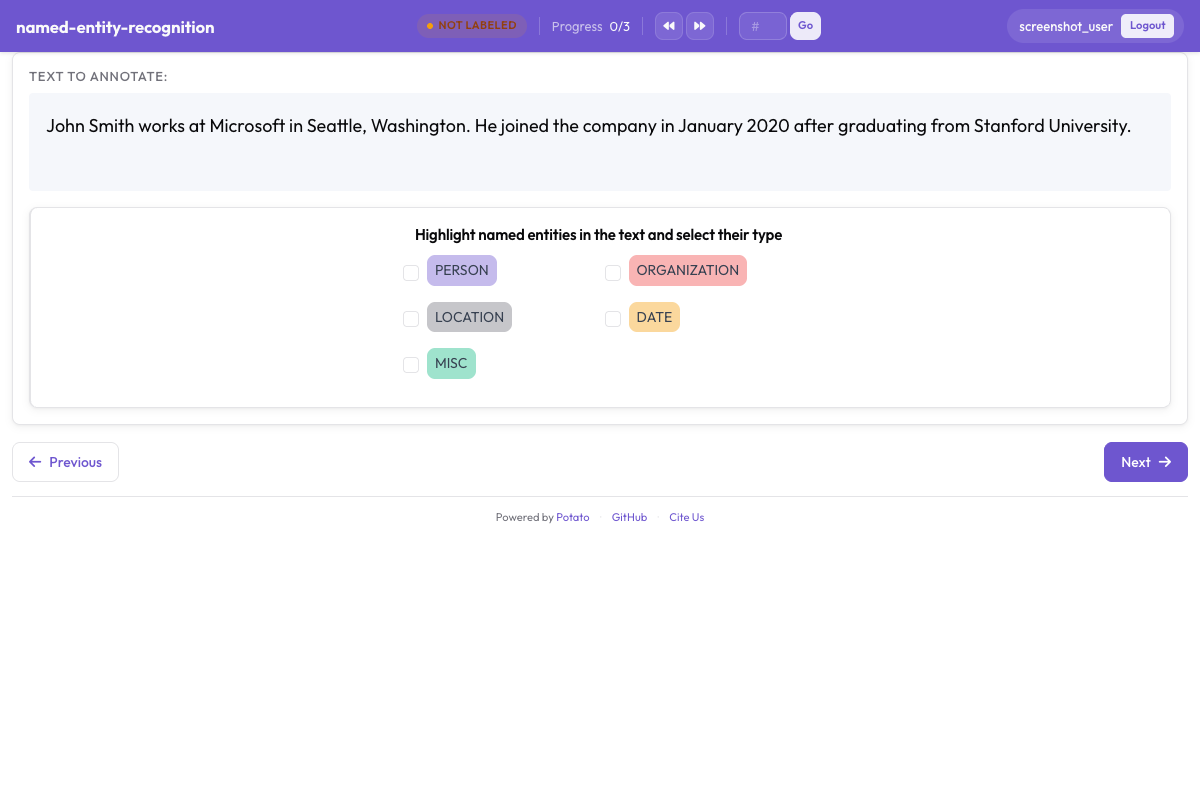 Anotación de segmentos con etiquetas de entidad codificadas por color en Potato
Configuración Básica
annotation_schemes:
  - annotation_type: span
    name: entities
    description: "Highlight named entities in the text"
    labels:
      - PERSON
      - ORGANIZATION
      - LOCATION
description es obligatorio en todo esquema y se muestra encima de los botones de etiqueta como la instrucción que lee el anotador, por lo que debe enunciar la decisión de etiquetado en lugar de repetir el nombre del esquema. Las etiquetas escritas como cadenas simples toman sus colores de la paleta de Potato en el orden en que aparecen.
Opciones de Configuración
Etiquetas de Entidad
El conjunto de etiquetas es la principal decisión de diseño en una tarea de segmentos, porque el recall, el acuerdo y todas las mediciones posteriores se definen en función de él. Mantenlo lo bastante pequeño para que los anotadores puedan recordarlo sin consultar las directrices en cada segmento, lo que en la práctica significa entre cuatro y ocho tipos para la mayoría del trabajo de NER. Añade las etiquetas al esquema anterior:
labels:
  - PERSON
  - ORGANIZATION
  - LOCATION
  - DATE
  - EVENT
Colores
Potato asigna a cada etiqueta un color de la paleta según el orden de la lista, así que solo vale la pena escribir los colores cuando importa una combinación concreta, por ejemplo dos tipos que aparecen a menudo en la misma oración y no deberían confundirse a simple vista. El color pertenece a la etiqueta:
annotation_schemes:
  - annotation_type: span
    name: entities
    description: "Highlight named entities in the text"
    labels:
      - name: PERSON
        color: "#3b82f6"
      - name: ORGANIZATION
        color: "#10b981"
      - name: LOCATION
        color: "#f59e0b"
      - DATE
Los valores son hex (#3b82f6) o rgb(255, 0, 0). Una etiqueta que se deja como cadena simple, como DATE en el ejemplo, conserva el siguiente color de la paleta, de modo que un esquema puede nombrar colores para las etiquetas que los necesitan y dejar el resto como está.
Los colores de varios esquemas también pueden definirse en un solo lugar, bajo ui.label_colors, indexados por nombre de esquema y luego por etiqueta:
ui:
  label_colors:
    entities:
      PERSON: "#3b82f6"
      ORGANIZATION: "#10b981"
Un mapa colors: escrito en el propio esquema no es una clave que Potato lea. Un esquema que lo incluya se muestra con los colores de la paleta, como si el bloque no existiera.
Atajos de Teclado
Vale la pena activar los atajos en cualquier tarea de segmentos con más de dos etiquetas, porque un anotador que mueve el ratón hasta un botón para cada segmento trabaja a una fracción de la velocidad de uno que mantiene ambas manos sobre el texto. Con sequential_key_binding: true las etiquetas reciben teclas en el orden en que aparecen en la lista:
- annotation_type: span
  name: entities
  description: "Highlight named entities in the text"
  labels:
    - PERSON
    - ORGANIZATION
    - LOCATION
    - DATE
  sequential_key_binding: true
Cuando una tarea tiene varios esquemas en la página, Potato asigna a cada uno teclas de un grupo distinto, tomando primero la fila de números, después la fila superior de letras y luego la fila central, de modo que los atajos de esquemas diferentes nunca coinciden.
Para fijar una etiqueta a una tecla concreta en lugar de a su posición en la lista, dale a la etiqueta un key_value. El asignador respeta un key_value explícito antes de asignar nada automáticamente, y las teclas mnemotécnicas sobreviven a una reordenación posterior de la lista de etiquetas, cosa que no ocurre con las posicionales:
- annotation_type: span
  name: entities
  description: "Highlight named entities in the text"
  labels:
    - name: PERSON
      key_value: "p"
    - name: ORGANIZATION
      key_value: "o"
    - LOCATION
  sequential_key_binding: true
Un mapa key_values: a nivel de esquema no se lee, como tampoco se lee un mapa escrito como valor de sequential_key_binding, que Potato trata solo como un indicador.
Tooltips
El tooltip es el lugar para los casos límite de una etiqueta, de modo que un anotador pueda comprobar qué cuenta como ORGANIZATION sin salir de la tarea. Los tooltips son propiedades de cada etiqueta:
- annotation_type: span
  name: entities
  description: "Highlight named entities in the text"
  labels:
    - name: PERSON
      tooltip: "Names of people, characters, or personas"
    - name: ORGANIZATION
      tooltip: "Companies, agencies, institutions"
    - name: LOCATION
      tooltip_file: "config/tooltips/location.html"
tooltip acepta texto simple y tooltip_file acepta la ruta a un archivo HTML, que es la mejor opción cuando la guía necesita ejemplos, texto en negrita o una lista. Un mapa tooltips: a nivel de esquema solo lo lee hierarchical_multiselect y no hace nada en un esquema de segmentos.
Segmentos Superpuestos
Permitir Superposición
Los segmentos pueden superponerse y ninguna opción activa ese comportamiento. La superposición es lo que se necesita cuando un mismo tramo de texto lleva dos etiquetas a la vez, como en "Dr. Smith", que es a la vez PERSON y ROLE. Desde la versión 2.9.0 también se acepta una selección que empieza al final de un segmento existente o termina al comienzo de uno, por lo que se pueden crear segmentos que se superponen parcialmente. Las versiones anteriores rechazaban esa selección.
Deshabilitar Superposición (Predeterminado)
El esquema de segmentos no tiene ninguna clave que prohíba la superposición, así que una tarea en la que los segmentos nunca deben superponerse tiene que indicarlo en sus directrices de anotación. Cuando la distinción importa para la exportación y no para el anotador, dos esquemas de segmentos mantienen separados los conjuntos de etiquetas, ya que cada esquema guarda sus segmentos bajo su propio nombre:
annotation_schemes:
  - annotation_type: span
    name: entities
    description: "Label named entities"
    labels:
      - PERSON
      - ORGANIZATION

  - annotation_type: span
    name: roles
    description: "Label professional roles"
    labels:
      - ROLE
Modos de Selección de Segmentos
Potato guarda cada segmento como desplazamientos de caracteres dentro del texto del elemento, y ninguna clave de configuración cambia la selección entre granularidad de palabra y de carácter. Los dos modos siguientes describen lo que un anotador puede hacer, no opciones que se activan.
Selección a Nivel de Palabra
Arrastrar sobre palabras completas es como se ve en la práctica la mayor parte del trabajo de NER, y el resultado se guarda como los desplazamientos del primer y del último carácter seleccionados. Nada en la configuración impone límites de palabra, así que si los segmentos de palabras completas importan para tus datos, pon ese requisito en las directrices y compruébalo en la exportación en lugar de esperar que la interfaz rechace una palabra parcial.
Selección a Nivel de Carácter
Seleccionar parte de una palabra es posible en todo momento y no requiere configuración, y de ello dependen las tareas morfológicas y de subtokens. Potato colapsa las secuencias de espacios y tabulaciones antes de mostrar el texto para que los desplazamientos que guarda coincidan con lo que mide el navegador, y eso importa cuando tu texto lleva una sangría con significado. Declara instance_display cuando el espacio en blanco horizontal tenga que conservarse exactamente.
Segmentos Pre-Anotados
Iniciar una tarea con la salida de un modelo convierte el etiquetado en corrección, que es el flujo de trabajo más rápido siempre que un modelo ya acierta en la mayor parte del corpus. Potato lee las anotaciones iniciales de un campo de cada elemento, cuyo nombre indica pre_annotation.field:
pre_annotation:
  enabled: true
  field: "predictions"
  allow_modification: true
  show_confidence: true
  highlight_low_confidence: 0.7
allow_modification: true es lo que convierte la tarea en una corrección y no en una revisión, ya que sin esa opción los anotadores no pueden cambiar lo que propuso el modelo. highlight_low_confidence: 0.7 marca los elementos sobre los que el modelo tenía menos seguridad, para que la atención vaya a los segmentos con más probabilidad de estar mal.
El campo contiene una entrada por nombre de esquema, y un esquema de segmentos recibe una lista de desplazamientos:
{
  "id": "item_002",
  "text": "Apple announced new iPhone in California.",
  "predictions": {
    "entities": [
      {"start": 0, "end": 5, "label": "ORG", "confidence": 0.85},
      {"start": 27, "end": 37, "label": "LOC", "confidence": 0.91}
    ]
  }
}
Las pre-anotaciones son un punto de partida y no una anotación, así que un elemento que nadie abre se exporta vacío aunque haya llegado con predicciones adjuntas.
Configuraciones NER Comunes
NER Estándar (4 Tipos)
El conjunto de cuatro tipos sigue la convención de CoNLL-2003, que es la opción adecuada cuando tus resultados tienen que ser comparables con cifras de NER publicadas:
- annotation_type: span
  name: ner
  description: "Label named entities"
  labels:
    - PER    # Person
    - ORG    # Organization
    - LOC    # Location
    - MISC   # Miscellaneous
  sequential_key_binding: true
NER Extendido (Estilo OntoNotes)
Dieciocho tipos permiten distinciones más finas a un coste real en acuerdo, ya que las fronteras entre NORP, ORG y GPE son donde más discrepan los anotadores. Usa el conjunto extendido cuando el trabajo posterior necesite esas distinciones, y prevé una formación más larga:
- annotation_type: span
  name: ner_extended
  description: "Label named entities using the OntoNotes type set"
  labels:
    - PERSON
    - NORP        # Nationalities, religious/political groups
    - FAC         # Facilities
    - ORG
    - GPE         # Geopolitical entities
    - LOC
    - PRODUCT
    - EVENT
    - WORK_OF_ART
    - LAW
    - LANGUAGE
    - DATE
    - TIME
    - PERCENT
    - MONEY
    - QUANTITY
    - ORDINAL
    - CARDINAL
NER Biomédico
Los segmentos biomédicos son largos y a menudo anidados, así que aquí los tooltips con un ejemplo resuelto por tipo compensan el esfuerzo más que en una tarea de dominio general:
- annotation_type: span
  name: bio_ner
  description: "Label biomedical entities"
  labels:
    - GENE
    - PROTEIN
    - DISEASE
    - DRUG
    - SPECIES
NER de Redes Sociales
El texto de redes sociales trae tipos de entidad para los que los conjuntos de noticias no tienen hueco, y CREATIVE_WORK y GROUP son los dos que con más frecuencia acaban mal clasificados como ORG si no tienen su propia etiqueta:
- annotation_type: span
  name: social_ner
  description: "Label named entities in social media text"
  labels:
    - PERSON
    - ORGANIZATION
    - LOCATION
    - PRODUCT
    - CREATIVE_WORK
    - GROUP
Segmentos con Atributos
Un segundo esquema junto al esquema de segmentos recoge un juicio sobre el elemento en su conjunto. Potato guarda ambos por separado, así que la respuesta radio se aplica al documento y no a un segmento concreto:
annotation_schemes:
  - annotation_type: span
    name: entities
    description: "Highlight named entities"
    labels:
      - PERSON
      - ORGANIZATION

  - annotation_type: radio
    name: entity_type
    description: "What type of entity is this?"
    labels:
      - Named
      - Nominal
      - Pronominal
Múltiples Esquemas de Segmentos
Dos esquemas de segmentos son la forma de anotar aspectos distintos del mismo texto sin obligar a los anotadores a tener en mente un único conjunto de etiquetas combinado. Cada esquema tiene su propia fila de botones, su propio grupo de teclas y su propio campo en la exportación:
annotation_schemes:
  # Named entities
  - annotation_type: span
    name: entities
    description: "Label named entities"
    labels:
      - PERSON
      - ORGANIZATION
      - LOCATION

  # Sentiment expressions
  - annotation_type: span
    name: sentiment_spans
    description: "Highlight sentiment expressions"
    labels:
      - POSITIVE
      - NEGATIVE
Anotación de Segmentos Multi-Campo
Nuevo en v2.1.0
La anotación de segmentos puede dirigirse a un campo de texto específico en datos multi-campo mediante la opción target_field, que es lo que necesitas cuando un elemento contiene un documento fuente y un resumen y un segmento pertenece a uno de ellos.
Configuración
Cada esquema nombra el campo que anota, de modo que los dos conjuntos de etiquetas quedan ligados al texto correcto:
annotation_schemes:
  - annotation_type: span
    name: source_entities
    description: "Label entities in the source text"
    target_field: source_text
    labels:
      - PERSON
      - ORGANIZATION

  - annotation_type: span
    name: summary_entities
    description: "Label entities in the summary"
    target_field: summary
    labels:
      - PERSON
      - ORGANIZATION
Formato de Datos Multi-Campo
Tus datos deben incluir los campos de texto separados:
{
  "id": "doc1",
  "source_text": "John Smith works at Microsoft in Seattle.",
  "summary": "Smith is employed by Microsoft."
}
Formato de Salida
Cuando se usa target_field, las anotaciones se indexan por campo:
{
  "id": "doc1",
  "source_entities": {
    "source_text": [
      {"start": 0, "end": 10, "text": "John Smith", "label": "PERSON"},
      {"start": 20, "end": 29, "text": "Microsoft", "label": "ORGANIZATION"}
    ]
  },
  "summary_entities": {
    "summary": [
      {"start": 0, "end": 5, "text": "Smith", "label": "PERSON"},
      {"start": 22, "end": 31, "text": "Microsoft", "label": "ORGANIZATION"}
    ]
  }
}
Para un ejemplo funcional completo, consulta project-hub/simple_examples/simple-multi-span/ en el repositorio de Potato.
Opciones de Visualización
Mostrar Etiqueta en el Segmento
Potato muestra por defecto la etiqueta dentro de cada segmento resaltado. En un documento denso con muchos segmentos cortos, el texto de la etiqueta satura la oración, y show_span_labels: false mantiene el texto legible mientras el color del resaltado sigue indicando la etiqueta:
- annotation_type: span
  name: entities
  description: "Highlight named entities in the text"
  labels:
    - PERSON
    - ORGANIZATION
  show_span_labels: false
Estilo Subrayado
El esquema de segmentos no tiene ninguna clave para el estilo de resaltado, y los segmentos siempre se muestran con un fondo de color. El subrayado y los corchetes son opciones del tipo de correferencia, mediante visual_display.highlight_mode, así que una tarea que necesite cualquiera de los dos debe usar Cadenas de Correferencia.
Formato de Salida
Las anotaciones de segmentos se guardan con desplazamientos de caracteres:
{
  "id": "doc1",
  "entities": [
    {
      "start": 0,
      "end": 10,
      "text": "John Smith",
      "label": "PERSON"
    },
    {
      "start": 20,
      "end": 29,
      "text": "Microsoft",
      "label": "ORGANIZATION"
    }
  ]
}
Ejemplo Completo: Tarea NER
item_properties nombra los campos que Potato lee para el id del elemento y su texto, y una configuración sin esa clave no arranca. Los cinco tipos de entidad reciben teclas de la fila de números mediante sequential_key_binding, y el esquema radio del final registra un juicio de dificultad que resulta útil más adelante para explicar dónde bajó el acuerdo:
annotation_task_name: "Named Entity Recognition"

data_files:
  - data/documents.json

item_properties:
  id_key: id
  text_key: text

annotation_schemes:
  - annotation_type: span
    name: entities
    description: "Highlight and label all named entities"
    labels:
      - PERSON
      - ORGANIZATION
      - LOCATION
      - DATE
      - MONEY
    sequential_key_binding: true
    allow_discontinuous: false

  - annotation_type: radio
    name: difficulty
    description: "How difficult was this document to annotate?"
    labels:
      - Easy
      - Medium
      - Hard

output_annotation_dir: annotation_output
export_annotation_format: jsonl
Segmentos Discontinuos
Nuevo en v2.2.0
allow_discontinuous: true permite a un anotador seleccionar varios tramos de texto no adyacentes y registrarlos como un solo segmento, que es lo que necesitan los antecedentes divididos y los constituyentes discontinuos. La discontinuidad es algo distinto de la superposición, y la clave no influye en si dos segmentos pueden cubrir los mismos caracteres:
- annotation_type: span
  name: entities
  description: "Highlight named entities in the text"
  labels:
    - PERSON
    - ORGANIZATION
  allow_discontinuous: true
Con la opción activada, el anotador mantiene pulsada Ctrl en Windows y Linux, o Cmd en un Mac, mientras selecciona más texto para añadirlo al segmento actual. La salida incluye un par de inicio y fin para cada tramo.
Integración de Vinculación de Entidades
Nuevo en v2.2.0
Las anotaciones de segmentos pueden vincularse a bases de conocimiento externas (Wikidata, UMLS o APIs REST personalizadas) añadiendo un bloque entity_linking al esquema de segmentos. La vinculación compensa el paso adicional por segmento cuando dos entidades comparten la misma forma superficial y la etiqueta por sí sola no puede distinguirlas:
- annotation_type: span
  name: entities
  description: "Highlight and link named entities"
  labels:
    - PERSON
    - ORGANIZATION
    - LOCATION
  entity_linking:
    enabled: true
    knowledge_bases:
      - name: wikidata
        type: wikidata
        language: en
    auto_search: true
    required: false
auto_search: true lanza la búsqueda en cuanto se crea un segmento, lo que ahorra un clic en tareas donde la mayoría de los segmentos se vinculan. required: true impide guardar un segmento sin vínculo, así que déjalo desactivado salvo que se espere que todas las entidades de tus datos estén en la base de conocimiento. Cuando la vinculación de entidades está activada, aparece un icono de enlace en la barra de control de cada segmento, y al hacer clic se abre un modal de búsqueda. Consulta la documentación de Vinculación de Entidades para ver todos los detalles.
Mejores Prácticas
- Escribe colores en las etiquetas que los necesitan y deja que la paleta se encargue del resto
- Pon los casos límite en
tooltipotooltip_file, uno por etiqueta, en lugar de en la descripción del esquema - Activa
sequential_key_bindingen cualquier esquema con más de dos etiquetas, y añadekey_valuedonde una tecla mnemotécnica ayude - Decide la política de superposición en las directrices, ya que el esquema no impone ninguna
- Inicia con
pre_annotationen flujos de corrección, y manténallow_modification: true - Mantén pequeño el conjunto de etiquetas y separa los aspectos no relacionados en esquemas de segmentos distintos
Lectura Adicional
- Vinculación de Entidades - Vincular segmentos a bases de conocimiento
- Cadenas de Correferencia - Agrupar menciones correferentes
- Anotación de Eventos - Estructuras de eventos N-arios con argumentos de segmentos
- Vinculación de Segmentos - Crear relaciones entre segmentos
- Visualización de Instancias - Visualización de contenido multi-campo con objetivos de segmentos
- Configuración de UI - Personalizar colores de segmentos
- Funcionalidades de Productividad - Atajos de teclado
Para detalles de implementación, consulta la documentación fuente.