Event Annotation
N-ary event annotation with trigger spans and typed argument roles. Annotate events like ATTACK, HIRE, and TRAVEL with constrained entity arguments and hub-spoke arc visualization.
Get This Design
This design is available in our showcase. Copy the configuration below to get started.
Quick start:
# Create your project folder
mkdir event-annotation
cd event-annotation
# Save config.yaml from this page into this folder
potato start config.yaml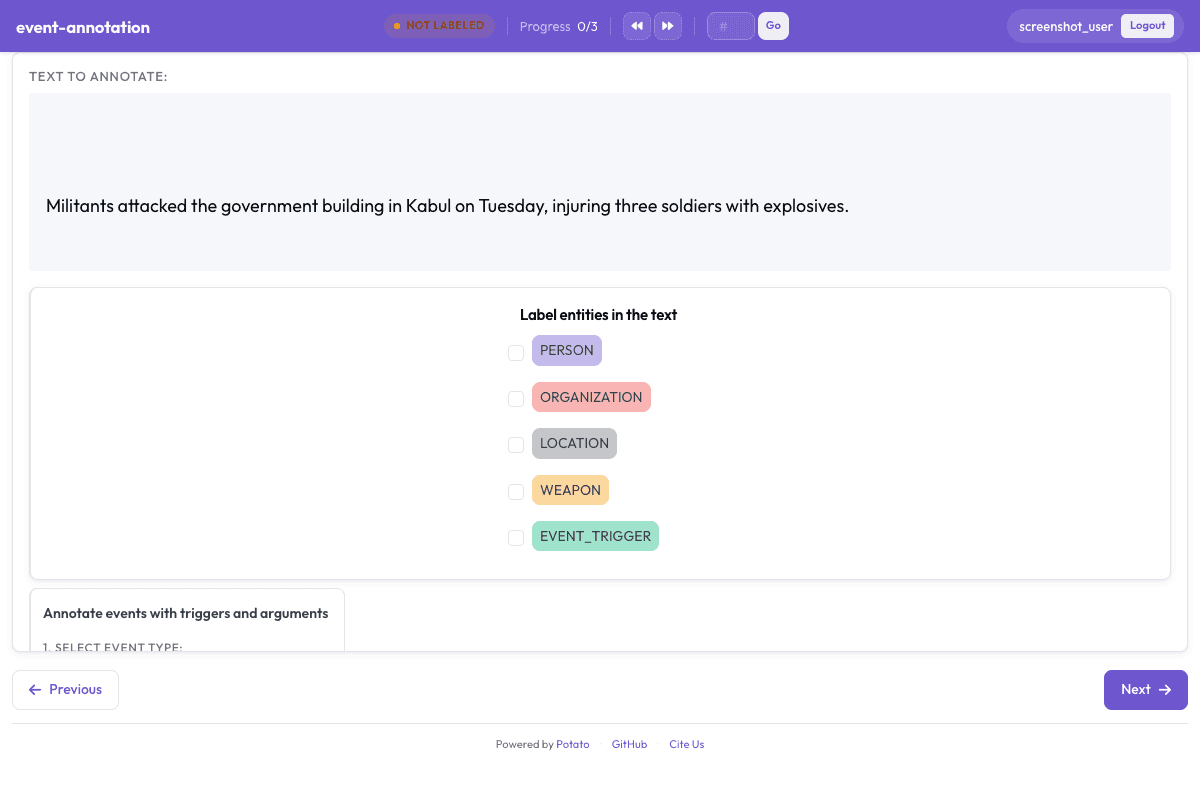
Configuration File
# Event Annotation Configuration
# Demonstrates N-ary event annotation with triggers and typed arguments

annotation_task_name: "Event Annotation Example"
task_dir: .
output_annotation_dir: annotation_output
export_annotation_format: jsonl

# Data files
data_files:
  - data.json

# Item properties
item_properties:
  id_key: id
  text_key: text
instance_display:
  fields:
    - key: text
      type: text
      label: "Text"

# Annotation schemes
annotation_schemes:
  # First define the entity span schema
  - annotation_type: span
    name: entities
    description: "Label entities in the text"
    sequential_key_binding: true
    labels:
      - name: PERSON
        color: "#3b82f6"
      - name: ORGANIZATION
        color: "#10b981"
      - name: LOCATION
        color: "#f59e0b"
      - name: WEAPON
        color: "#ef4444"
      - name: EVENT_TRIGGER
        color: "#8b5cf6"
        tooltip: "Words that trigger/indicate events"

  # Event annotation that builds on the span schema
  - annotation_type: event_annotation
    name: events
    description: "Annotate events with triggers and arguments"
    span_schema: entities
    event_types:
      - type: "ATTACK"
        color: "#dc2626"
        trigger_labels: ["EVENT_TRIGGER"]
        arguments:
          - role: "attacker"
            entity_types: ["PERSON", "ORGANIZATION"]
            required: true
          - role: "target"
            entity_types: ["PERSON", "ORGANIZATION", "LOCATION"]
            required: true
          - role: "weapon"
            entity_types: ["WEAPON"]
            required: false
          - role: "location"
            entity_types: ["LOCATION"]
            required: false

      - type: "HIRE"
        color: "#2563eb"
        trigger_labels: ["EVENT_TRIGGER"]
        arguments:
          - role: "employer"
            entity_types: ["ORGANIZATION"]
            required: true
          - role: "employee"
            entity_types: ["PERSON"]
            required: true
          - role: "position"
            required: false

      - type: "TRAVEL"
        color: "#16a34a"
        trigger_labels: ["EVENT_TRIGGER"]
        arguments:
          - role: "traveler"
            entity_types: ["PERSON"]
            required: true
          - role: "origin"
            entity_types: ["LOCATION"]
            required: false
          - role: "destination"
            entity_types: ["LOCATION"]
            required: true

    visual_display:
      enabled: true
      arc_position: above
      show_labels: true

# User access
require_password: false
Sample Data
[
  {
    "id": "event_1",
    "text": "Militants attacked the government building in Kabul on Tuesday, injuring three soldiers with explosives."
  },
  {
    "id": "event_2",
    "text": "Google hired John Smith as their new Chief Technology Officer in Mountain View last month."
  }
]

// ... and 1 more items
Get This Design
This design is available in our showcase. Copy the configuration below to get started.
Quick start:
# Create your project folder
mkdir event-annotation
cd event-annotation
# Save config.yaml from this page into this folder
potato start config.yaml
Details
Annotation Types
Domain
Use Cases
Tags
Related Designs
BioNLP 2011 - Gene Regulation Event Extraction
Biomedical event extraction for gene regulation, based on the BioNLP 2011 Shared Task (Kim et al., ACL Workshop 2011). Annotators identify biological entities and mark regulatory events such as gene expression, transcription, and protein catabolism in scientific abstracts.
Complex Named Entity Recognition (MultiCoNER)
Recognize complex and emerging named entities. Based on SemEval 2022/2023 MultiCoNER. Identify creative works, products, groups, and other challenging entity types.
CrossRE: Cross-Domain Relation Extraction
Cross-domain relation extraction across 6 domains (news, politics, science, music, literature, AI). Annotators identify entities and label 17 relation types between entity pairs, enabling study of domain transfer in relation extraction.