Basi della Configurazione
Impara i fondamenti dei file di configurazione di Potato.
Potato utilizza file di configurazione YAML per definire le attività di annotazione. Questa guida illustra le opzioni di configurazione essenziali.
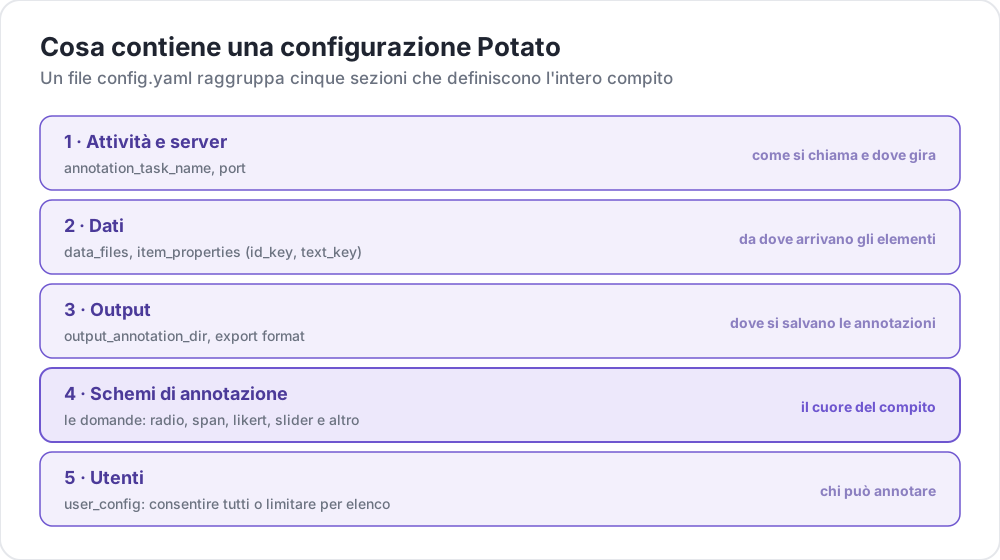 Cosa contiene una configurazione Potato
Struttura del File di Configurazione
Una configurazione base di Potato è composta dalle seguenti sezioni principali:
yaml
# Task settings
annotation_task_name: "My Annotation Task"
port: 8000

# Data configuration
data_files:
  - data.json

item_properties:
  id_key: id
  text_key: text

# Output settings
output_annotation_dir: "annotation_output/"
export_annotation_format: "jsonl"

# Annotation schemes
annotation_schemes:
  - annotation_type: radio
    name: my_annotation
    description: "Pick the label that fits this item"
    labels:
      - Label 1
      - Label 2

# User settings
user_config:
  allow_all_users: true
Impostazioni Essenziali
Configurazione del Task e del Server
yaml
annotation_task_name: "My Task"  # Display name for your task
port: 8000                       # Port to run the server on
Configurazione dei Dati
yaml
data_files:
  - data.json           # Path to your data file(s)
  - more_data.json      # You can specify multiple files

item_properties:
  id_key: id            # Field containing unique ID
  text_key: text        # Field containing text to annotate
Formati di dati supportati:
- JSON (
.json) - JSON Lines (
.jsonl) - CSV (
.csv) - TSV (
.tsv)
Configurazione dell'Output
yaml
output_annotation_dir: "annotation_output/"   # Directory for annotation files
export_annotation_format: "jsonl"             # Formats: jsonl, csv, tsv, parquet, and the other registered exporters
Schemi di Annotazione
Definisci uno o più schemi di annotazione:
yaml
annotation_schemes:
  - annotation_type: radio      # Type of annotation
    name: sentiment             # Internal name
    description: "Select the sentiment"  # Instructions
    labels:                     # Options for annotators
      - Positive
      - Negative
      - Neutral
Tipi di Annotazione Disponibili
| Tipo | Descrizione |
|---|---|
radio | Selezione a scelta singola |
multiselect | Selezione a scelta multipla |
likert | Valutazione su scala |
text | Testo libero |
number | Input numerico |
span | Evidenziazione di porzioni di testo |
slider | Selezione su intervallo continuo |
multirate | Valutazione di elementi multipli |
Configurazione Utenti
Consenti tutti gli utenti
yaml
user_config:
  allow_all_users: true
Limita a utenti specifici
yaml
user_config:
  allow_all_users: false
  users:
    - user1@example.com
    - user2@example.com
Directory del Task
L'impostazione task_dir definisce la directory radice per i percorsi relativi:
yaml
task_dir: ./my-task/
data_files:
  - data/input.json    # Resolves to ./my-task/data/input.json
Esempio Completo
Ecco una configurazione completa per un'attività di analisi del sentiment:
yaml
# config.yaml
annotation_task_name: "Sentiment Analysis"
port: 8000
task_dir: ./

# Data
data_files:
  - data/tweets.json

item_properties:
  id_key: id
  text_key: text

# Output
output_annotation_dir: "annotation_output/"
export_annotation_format: "jsonl"

# Annotation
annotation_schemes:
  - annotation_type: radio
    name: sentiment
    description: "What is the sentiment expressed in this tweet?"
    labels:
      - name: Positive
        key_value: "1"
      - name: Negative
        key_value: "2"
      - name: Neutral
        key_value: "3"
    sequential_key_binding: true

# Users
user_config:
  allow_all_users: true

# Assignment
per_annotator_quota:
  default: 100
num_annotators_per_item: 2
Passi Successivi
- Esplora i Formati di Dati in dettaglio
- Scopri gli Schemi di Annotazione
- Personalizza l'interfaccia con la Configurazione UI
- Usa il Preview CLI per validare la tua configurazione