Schemi di Annotazione
Definisci schemi di annotazione in YAML con radio, multiselect, span, likert, slider, text e altri 55 tipi. Configura etichette, domande e campi obbligatori.
Gli schemi di annotazione definiscono le attività di etichettatura per i tuoi annotatori. Potato supporta 76 tipi di annotazione, combinabili per creare attività di annotazione complesse.
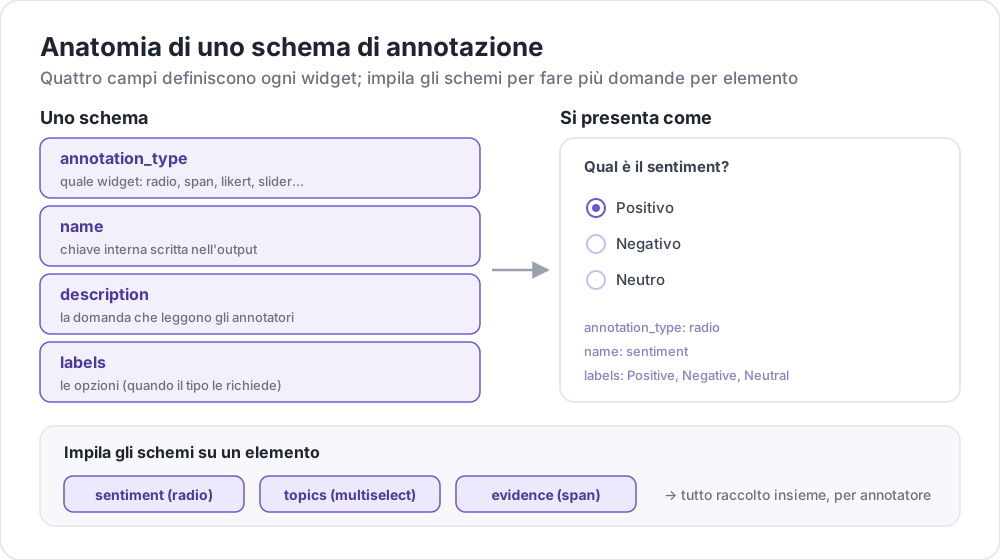 Anatomia di uno schema di annotazione
Struttura Base
Ogni schema è definito nell'array annotation_schemes:
annotation_schemes:
  - annotation_type: radio
    name: sentiment
    description: "What is the sentiment?"
    labels:
      - Positive
      - Negative
      - Neutral
Campi Obbligatori
Ogni schema contiene questi tre campi. I singoli tipi aggiungono i propri campi obbligatori, elencati più avanti per ciascun tipo.
| Campo | Descrizione |
|---|---|
annotation_type | Tipo di annotazione (radio, multiselect, likert, span, text, number, slider, multirate, select, pairwise, bws, soft_label, confidence, constant_sum, range_slider, semantic_differential, hierarchical_multiselect, card_sort, rubric_eval, extractive_qa, error_span, triage, coreference, span_link e altri) |
name | Identificatore interno (senza spazi, usato nell'output) |
description | Istruzioni mostrate agli annotatori |
Tipi di Annotazione Supportati
1. Radio (Scelta Singola)
Seleziona esattamente un'opzione da un elenco:
- annotation_type: radio
  name: sentiment
  description: "What is the sentiment of this text?"
  labels:
    - Positive
    - Negative
    - Neutral

  # Assigns keys 1, 2, 3... in the order the labels are listed
  sequential_key_binding: true

  # Horizontal layout instead of vertical
  horizontal: true
Le associazioni sequenziali assegnano le cifre 1-9 alle prime nove etichette, quindi riordinare l'elenco delle etichette riassegna anche i tasti. Per un'associazione che resti valida dopo un riordino, assegna a ogni etichetta un tasto proprio (vedi Scorciatoie da Tastiera).
2. Scala Likert
Scale di valutazione con estremi etichettati:
- annotation_type: likert
  name: agreement
  description: "How much do you agree with this statement?"
  size: 5  # Number of scale points
  min_label: "Strongly Disagree"
  max_label: "Strongly Agree"

  # Show the numeric value of the selected point
  displaying_score: true
size è obbligatorio insieme a entrambe le etichette degli estremi. Cinque punti offrono agli annotatori un punto centrale neutro; un numero pari impone una direzione.
3. Multiselect (Scelta Multipla)
Seleziona più opzioni da un elenco:
- annotation_type: multiselect
  name: topics
  description: "Select all relevant topics"
  labels:
    - Politics
    - Technology
    - Sports
    - Entertainment
    - Science

  # Require at least one box before the annotator can move on
  label_requirement:
    required: true

  # Allow free text response
  has_free_response: true
has_free_response aggiunge una casella di testo "altro". Conviene attivarla finché l'insieme di etichette è ancora in revisione, perché le voci raccolte indicano le categorie che mancano.
4. Annotazione di Span
Evidenzia ed etichetta segmenti di testo:
- annotation_type: span
  name: entities
  description: "Highlight named entities in the text"
  labels:
    - PERSON
    - ORGANIZATION
    - LOCATION
    - DATE

  # Show the label name on each highlighted span
  show_span_labels: true

  # Ctrl/Cmd+click to add non-contiguous ranges to one annotation
  allow_discontinuous: false

  # Keyboard shortcuts for labels
  sequential_key_binding: true
allow_discontinuous copre gli span composti da intervalli separati, come gli antecedenti divisi, non gli span che si sovrappongono tra loro. Lasciala disattivata a meno che il fenomeno che stai etichettando non si interrompa davvero attraverso uno spazio, perché il gesto Ctrl/Cmd-clic è facile da attivare per sbaglio.
5. Slider
Intervallo numerico continuo:
- annotation_type: slider
  name: confidence
  description: "How confident are you in your answer? (0 = not at all, 100 = completely)"
  min_value: 0
  max_value: 100
  starting_value: 50
  step: 1

  # Shows min_value and max_value at the ends of the track
show_labels: truemin_value, max_value e starting_value sono tutti e tre obbligatori. Uno slider non accetta una lista labels. Aggiungerne una fa passare la domanda a un layout a pulsanti radio e lo slider scompare, quindi inserisci qualsiasi testo per gli estremi della scala in description. Il valore iniziale è la posizione in cui si trova il cursore di ogni annotatore prima che lo tocchi, quindi un punto centrale evita di ancorarli verso uno dei due estremi.
6. Input Testuale
Risposte di testo libero:
- annotation_type: text
  name: explanation
  description: "Explain your reasoning"

  # Multi-line input
  rows: 4

  # Require a minimum length and show a running count
  min_chars: 20
  show_char_count: true

  # Placeholder text
  placeholder: "Enter your explanation here..."

  # Disable paste (for transcription tasks)
  allow_paste: false
allow_paste: false è importante nelle attività di trascrizione e di richiamo libero, dove una risposta incollata è copiata dalla fonte invece di essere prodotta dall'annotatore.
7. Input Numerico
Input numerico con vincoli:
- annotation_type: number
  name: count
  description: "How many entities are mentioned?"
  min: 0
  max: 100
  step: 1
8. Multirate (Valutazione a Matrice)
Valuta più elementi sulla stessa scala:
- annotation_type: multirate
  name: quality_aspects
  description: "Rate each aspect of the response"

  # Rows: the items being rated
  options:
    - Accuracy
    - Fluency
    - Relevance

  # Columns: the shared rating scale
  labels:
    - Poor
    - Fair
    - Good
    - Very Good
    - Excellent

  # Randomize row order per annotator
  option_randomization: true

  # Layout options
  arrangement: "vertical"
  display_config:
    num_columns: 2
Sia options sia labels sono obbligatori, perché una matrice ha bisogno di righe e colonne. Rendere casuale l'ordine delle righe distribuisce l'eventuale effetto dell'ordine su tutti gli elementi, invece di concentrarlo sull'aspetto che compare per primo nell'elenco.
Opzioni Comuni
Scorciatoie da Tastiera
Velocizza l'annotazione con associazioni di tasti:
# Automatic sequential binding: digits 1, 2, 3... in label order
sequential_key_binding: true
Per un'associazione che non si sposti quando cambia l'elenco delle etichette, passa oggetti etichetta e assegna a ciascuno un key_value:
labels:
  - name: Positive
    key_value: "1"
  - name: Negative
    key_value: "2"
  - name: Neutral
    key_value: "3"
Tooltip
Fornisci suggerimenti al passaggio del mouse sulle singole etichette. I tooltip appartengono all'etichetta, non allo schema, quindi si configurano dentro labels:
labels:
  - name: Positive
    tooltip: "Expresses happiness, approval, or satisfaction"
  - name: Negative
    tooltip: "Expresses sadness, anger, or disappointment"
  - name: Neutral
    tooltip: "No clear emotional content"
Per indicazioni formattate, punta invece tooltip_file a un file HTML:
labels:
  - name: Economic
    tooltip_file: "config/tooltips/economic.html"
Colori delle Etichette
Colori personalizzati per la distinzione visiva, definiti una sola volta per l'intero progetto sotto ui:
ui:
  label_colors:
    entities:
      PERSON: "#3b82f6"
      LOCATION: "#10b981"
      ORGANIZATION: "#f59e0b"
I colori sono indicizzati per nome dello schema e poi per etichetta. Un colore si può anche impostare su una singola etichetta, accanto al suo tooltip:
labels:
  - name: positive
    color: "#22C55E"
    tooltip: "Positive sentiment"
Campi Obbligatori
Rendi uno schema obbligatorio prima dell'invio:
- annotation_type: radio
  name: sentiment
  description: "What is the sentiment?"
  label_requirement:
    required: true
  labels:
    - Positive
    - Negative
Per richiedere un'opzione precisa invece di una risposta qualsiasi, indicala con required_label, che accetta una singola etichetta o un elenco.
Schemi Multipli
Combina più tipi di annotazione per istanza:
annotation_schemes:
  # Primary classification
  - annotation_type: radio
    name: sentiment
    description: "Overall sentiment"
    labels:
      - Positive
      - Negative
      - Neutral
    label_requirement:
      required: true
    sequential_key_binding: true

  # Confidence rating
  - annotation_type: likert
    name: confidence
    description: "How confident are you?"
    size: 5
    min_label: "Guessing"
    max_label: "Certain"

  # Topic tags
  - annotation_type: multiselect
    name: topics
    description: "Select all relevant topics"
    labels:
      - Politics
      - Technology
      - Sports
      - Entertainment
    has_free_response: true

  # Notes
  - annotation_type: text
    name: notes
    description: "Any additional observations"
    rows: 4
    label_requirement:
      required: false
Qui è obbligatoria solo l'etichetta di sentiment. Lasciare facoltativi la valutazione di confidenza e le note limita l'insieme obbligatorio all'unico campo da cui dipende lo studio, così gli annotatori non vengono bloccati da una casella che non ha peso nell'analisi.
Funzionalità Avanzate
Confronto a Coppie
Confronta due elementi. Gli elementi provengono dall'istanza stessa e sono indicati da items_key:
- annotation_type: pairwise
  name: preference
  description: "Which response is better?"
  mode: binary
  items_key: "responses"   # Field holding a list of 2+ items

  # Labels for the two sides
  show_labels: true
  labels:
    - "Response A"
    - "Response B"

  # Tie option (opt-in)
  allow_tie: true
  tie_label: "No preference"
Il file di dati fornisce la coppia, quindi ogni riga contiene un elenco di almeno due elementi:
{"id": "1", "responses": ["First response text", "Second response text"]}Un pulsante di parità conviene quando le coppie davvero equivalenti sono frequenti, perché senza di esso gli annotatori risolvono le parità in modo arbitrario e il rumore si manifesta come disaccordo.
Best-Worst Scaling
Ordina gli elementi scegliendo il migliore e il peggiore di una tupla. Le tuple sono costruite da un blocco bws_config di primo livello e non dallo schema, e uno schema bws senza di esso mostra una domanda su un elenco di elementi vuoto:
bws_config:
  tuple_size: 4              # Items per tuple
  min_item_appearances: 8    # Minimum appearances per item across tuples
  seed: 42
  scoring:
    method: counting         # counting | bradley_terry | plackett_luce

annotation_schemes:
  - annotation_type: bws
    name: ranking
    description: "Sentiment Intensity"
    best_description: "Which sentence expresses the MOST positive sentiment?"
    worst_description: "Which sentence expresses the LEAST positive sentiment?"
    tuple_size: 4
    sequential_key_binding: true
Ogni riga del file di dati è un elemento, e Potato estrae le tuple da questo insieme. Aumentare min_item_appearances rende più preciso il punteggio di ogni elemento, al costo di più confronti.
Selezione a Tendina
Selezione singola che occupa poco spazio:
- annotation_type: select
  name: category
  description: "Select a category"
  labels:
    - Category A
    - Category B
    - Category C
    - Category D
    - Category E

  # Vary the option order between annotators
  randomize_order: true
Un menu a tendina nasconde le opzioni finché non viene aperto, quindi è adatto a insiemi di etichette lunghi, dove i pulsanti radio spingerebbero il testo fuori dallo schermo. Per insiemi brevi i pulsanti radio sono più veloci, perché richiedono un clic invece di due.
Riferimento al Formato dei Dati
Input
Gli schemi di annotazione funzionano con il tuo formato di dati:
{
  "id": "doc_1",
  "text": "This is the text to annotate."
}
Output
Le annotazioni vengono salvate con i nomi degli schemi come chiavi:
{
  "id": "doc_1",
  "annotations": {
    "sentiment": "Positive",
    "confidence": 4,
    "topics": ["Technology", "Science"],
    "entities": [
      {"start": 0, "end": 4, "label": "ORGANIZATION", "text": "This"}
    ],
    "notes": "Clear positive sentiment about technology."
  }
}
Buone Pratiche
1. Etichette Chiare
Usa etichette univoche e distinte:
Queste etichette indicano punti distinti su un'unica dimensione:
labels:
  - Strongly Positive
  - Somewhat Positive
  - Neutral
  - Somewhat Negative
  - Strongly Negative
Queste no. Due annotatori non tracceranno lo stesso confine tra "OK", "Fine" e "Acceptable", e il disaccordo che ne deriva riguarda l'insieme di etichette, non i dati:
labels:
  - Good
  - OK
  - Fine
  - Acceptable
2. Tooltip Utili
Aggiungi tooltip per le etichette più sfumate:
labels:
  - name: Sarcasm
    tooltip: "The text says the opposite of what it means"
  - name: Irony
    tooltip: "A mismatch between expectation and reality"
3. Scorciatoie da Tastiera
Attiva le scorciatoie per le attività ad alto volume:
sequential_key_binding: true4. Ordine Logico
Ordina le etichette in modo coerente:
- Le più comuni per prime
- In ordine alfabetico
- Per intensità (dalla più bassa alla più alta)
5. Limita le Opzioni
Troppe scelte rallentano l'annotazione:
- Radio: 2-7 opzioni
- Multiselect: 5-15 opzioni
- Likert: 5-7 punti
6. Testa Prima
Annota tu stesso alcuni esempi prima della messa in produzione per individuare:
- Etichette ambigue
- Categorie mancanti
- Istruzioni poco chiare