LLM Response Preference
Compare AI-generated responses to collect preference data for RLHF training.
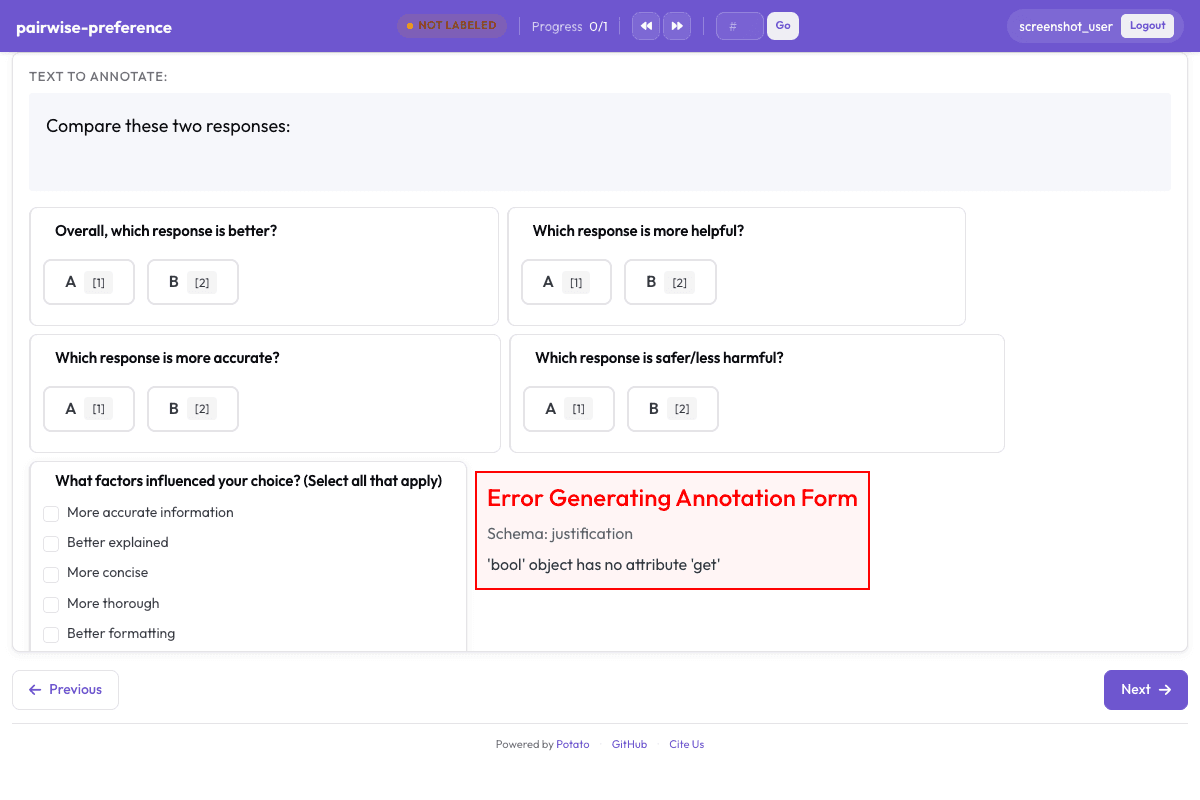
Configuration Fileconfig.yaml
annotation_task_name: "LLM Response Preference Collection"
task_dir: "."

port: 8000

# Data configuration
data_files:
  - "data/response_pairs.json"

item_properties:
  id_key: id
  text_key: text
instance_display:
  fields:
    - key: text
      type: text
      label: "Responses"

# Annotation schemes
annotation_schemes:
  # Main preference rating. Five points on one axis is pairwise's scale mode;
  # the end and centre captions come from scale.labels.
  - annotation_type: pairwise
    name: overall_preference
    description: "Overall, which response is better?"
    mode: scale
    labels: ["A", "B"]
    scale:
      min: -2
      max: 2
      step: 1
      default: 0
      labels:
        min: "A is much better"
        max: "B is much better"
        center: "About equal"
    sequential_key_binding: true

  # Individual aspect ratings. A three-way choice is the default binary mode
  # plus an explicit tie.
  - annotation_type: pairwise
    name: helpfulness
    description: "Which response is more helpful?"
    labels: ["A", "B"]
    allow_tie: true
    tie_label: "Equal"

  - annotation_type: pairwise
    name: accuracy
    description: "Which response is more accurate?"
    labels: ["A", "B"]
    allow_tie: true
    tie_label: "Equal"

  - annotation_type: pairwise
    name: safety
    description: "Which response is safer/less harmful?"
    labels: ["A", "B"]
    allow_tie: true
    tie_label: "Equal"

  # Reasons for preference
  - annotation_type: multiselect
    name: preference_reasons
    description: "What factors influenced your choice? (Select all that apply)"
    labels:
      - More accurate information
      - Better explained
      - More concise
      - More thorough
      - Better formatting
      - More appropriate tone
      - Safer/less harmful

  # Free-text justification
  - annotation_type: text
    name: justification
    description: "Briefly explain your preference"
    multiline: true
    required: false
    placeholder: "Why did you prefer one response over the other?"

# User settings
require_password: false

# Output
output_annotation_dir: "annotation_output/"
export_annotation_format: "jsonl"
Sample Datasample-data.json
[
  {
    "id": "pairwise_preference_1",
    "text": "Explain why the sky appears blue."
  },
  {
    "id": "pairwise_preference_2",
    "text": "Summarise the causes of the 1929 financial crash."
  }
]

// ... and 3 more items
Try it live — no install
Boot the real Potato server in your browser (WebAssembly) and annotate with this exact config. Nothing leaves your machine.
▶ Run live in your browserGet This Design
This design is available in our showcase. Copy the configuration below to get started.
Quick start:
# Create your project folder
mkdir pairwise-preference
cd pairwise-preference
# Copy config.yaml from above
potato start config.yaml
Details
Annotation Types
Domain
Use Cases
Tags
Related Designs
DPO Preference Data Collection
Pairwise preference annotation for Direct Preference Optimization, based on Rafailov et al., NeurIPS 2023. Annotators compare two model responses to a prompt, select a preference, rate alignment dimensions, and provide reasoning.
Pairwise Preference with Rationale
Compare two AI responses and select the better one while providing a written justification. Used for reward model training with interpretable preference signals.
SWE-Bench+ Patch Screening
Screen and compare model-generated patches against gold patches for SWE-Bench+ instances. Annotators evaluate correctness, identify specific issues, and compare model vs. gold solutions side-by-side.